Pasirinkite kalbą

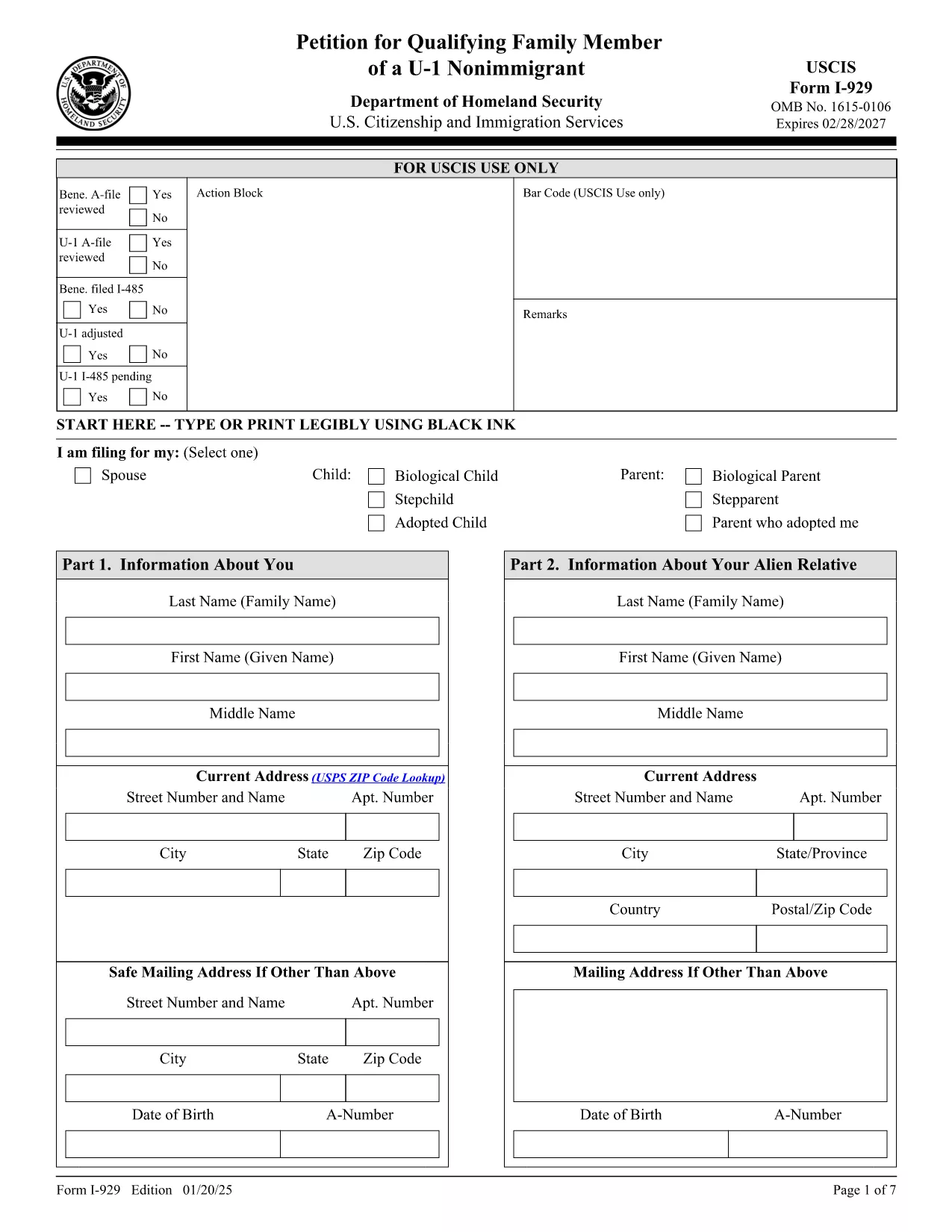
I‑929 Petition for Qualifying Family Member (U‑1 Nonimmigrant) – Fillable PDF

  1. Šalis JAV
  2. Kalba Anglų
  3. skyrius JAV pilietybės ir imigracijos tarnybos
I‑929 Petition for Qualifying Family Member (U‑1 Nonimmigrant) – Fillable PDF

The Form I‑929, “Petition for Qualifying Family Member of a U‑1 Nonimmigrant,” is used by lawful permanent residents or applicants filing Form I‑485 to request immigration benefits for a family member who never held U‑nonimmigrant status.

What Is Form I‑929?

This USCIS form allows you to demonstrate the qualifying relationship, provide evidence of extreme hardship, and request discretionary relief for your relative. It is part of the broader U‑visa family‑based immigration process.

How to Complete the Fillable I‑929 Online

Instead of downloading the static PDF and editing it in a separate editor, simply click the “Fill out this form” button on our page. The Formize PDF Filler app will load the official I‑929 document, letting you fill every field directly in your browser.

Common Mistakes to Avoid

  • Leaving any required field blank – USCIS rejects incomplete petitions.
  • Submitting unsigned forms – the electronic signature feature in Formize ensures a valid signature.
  • Using an outdated edition – always verify the edition date at the bottom of the PDF (01/20/25).
  • Uploading non‑English documents without certified translations.

Where to Submit Your I‑929

After completing the form, you can either:

  1. Download the completed PDF, print it, and mail it to USCIS ATTN: I‑929, 3 Intake Way, Minneapolis, MN 55438‑1455.
  2. Submit electronically if USCIS offers an online filing option for this form.

Download the Official PDF

For reference or offline use, you can download the official, fillable PDF directly from USCIS:

Download Form I‑929 (PDF, 1.08 MB)

Need help? Review the USCIS instructions or contact an immigration attorney for personalized guidance.

DUK
  • Who can file Form I‑929?

    U‑1 visa holders, lawful permanent residents, or applicants filing Form I‑485 can petition for a qualifying family member who never held U status.

  • Is there a filing fee for I‑929?

    The I‑929 itself does not have a separate fee; the filing fee is covered by the underlying I‑485 or other related petitions.

  • Can I submit the I‑929 electronically?

    USCIS currently accepts the form by mail. However, you can complete it online with Formize and then print and mail the signed PDF.

  • What evidence must I include?

    Proof of your lawful status, relationship to the beneficiary, evidence of extreme hardship, and any required translations of foreign‑language documents.

  • How long does USCIS take to process the petition?

    Processing times vary; typically it follows the I‑485 adjudication timeline, which can range from several months to over a year.

  • What if I make a mistake on the form?

    You can correct errors before signing. If you already mailed a flawed form, submit a corrected I‑929 with a cover letter explaining the changes.

  • Do I need to include original documents?

    Only submit originals if USCIS specifically requests them. Otherwise, provide clear photocopies with certified English translations.

  • Is the Formize filler secure?

    Yes, Formize uses SSL encryption and does not store any personal data after the session ends.

KAIP

Kaip nemokamai užpildyti I-929 form internete, atlikdami 5 paprastus veiksmus:

  1. 1
    Click “Fill out this form”
    Press the button on the page to launch the Formize PDF Filler with the official I‑929 document.
  2. 2
    Wait for the filler to load
    The app loads the fillable fields automatically; this usually takes a few seconds.
  3. 3
    Enter your information
    Complete each required field, upload supporting documents, and answer the eligibility questions.
  4. 4
    Review and sign
    Use the built‑in e‑signature tool to sign the form, then double‑check for any missing data.
  5. 5
    Download or submit
    Save the finished PDF to your device or follow USCIS instructions to mail the petition.
Formuokite PDF užpildymo programą
APIE

I-929 form šabloną

Naudodami tradicinį PDF dokumento peržiūros ir pildymo funkcijų rinkinį, žiniatinklio programos pranašumus ir interaktyvų išdėstymą, galite užbaigti I-929 form per kelias minutes.

FUNKCIJOS

PDF užpildas

Lengviausias būdas užpildyti I-929 form internete

  • Greitai užpildykite I-929 form
    Ieškote būdo greitai užpildyti I-929 form internete? Naudodami internetinį nemokamą PDF formų užpildą sužinosite, kaip redaguoti ir užpildyti šį pdf dokumentą greičiau nei per minutę.
  • Lengva naudoti internetinį PDF redaktorių
    Atsibodo spausdinti PDF failus, kad galėtumėte juos redaguoti prieš nuskaitydami iš naujo ir siųsdami atgal? Redaguoti PDF dokumentus internete nemokamai. Norėdami sutaupyti laiko ir popieriaus, naudokite mūsų internetinį pdf redaktorių.
  • Puikūs įrankiai, visos platformos
    Svarstote, kaip užpildyti I-929 form „Mac“ kompiuteryje, o gal kaip nemokamai naudoti PDF užpildą? Mūsų internetiniai PDF įrankiai veikia visose platformose.
  • Saugi failų saugykla
    Užbaigti „I-929 form“ failai saugomi saugioje duomenų bazėje, kurią valdo „Amazon Cloud“ priegloba. Galite bet kada ištrinti failus iš mūsų sistemos. Bet kokiu atveju šie failai automatiškai ištrinami po 24 valandų.
  • Kalbėkitės su I-929 form
    Kalbėkite su „I-929 form“ naudodami Chatize, kuri yra nemokama PDF skaitymo priemonė. Užduokite klausimų ir gaukite atsakymus iš „I-929 form“. Tiesiog spustelėkite aukščiau esantį mygtuką Kalbėtis su dokumentu.

Ištrinti užpildymo seansą

Ištrinti pasirinktą pildymo seansą? Tokiu atveju jūsų pažanga pildant formą bus prarasta.

Ištrinti redagavimo sesiją

Ištrinti pasirinktą redagavimo sesiją? Tokiu atveju jūsų pažanga kuriant ir redaguojant formą bus prarasta.