Pasirinkite kalbą

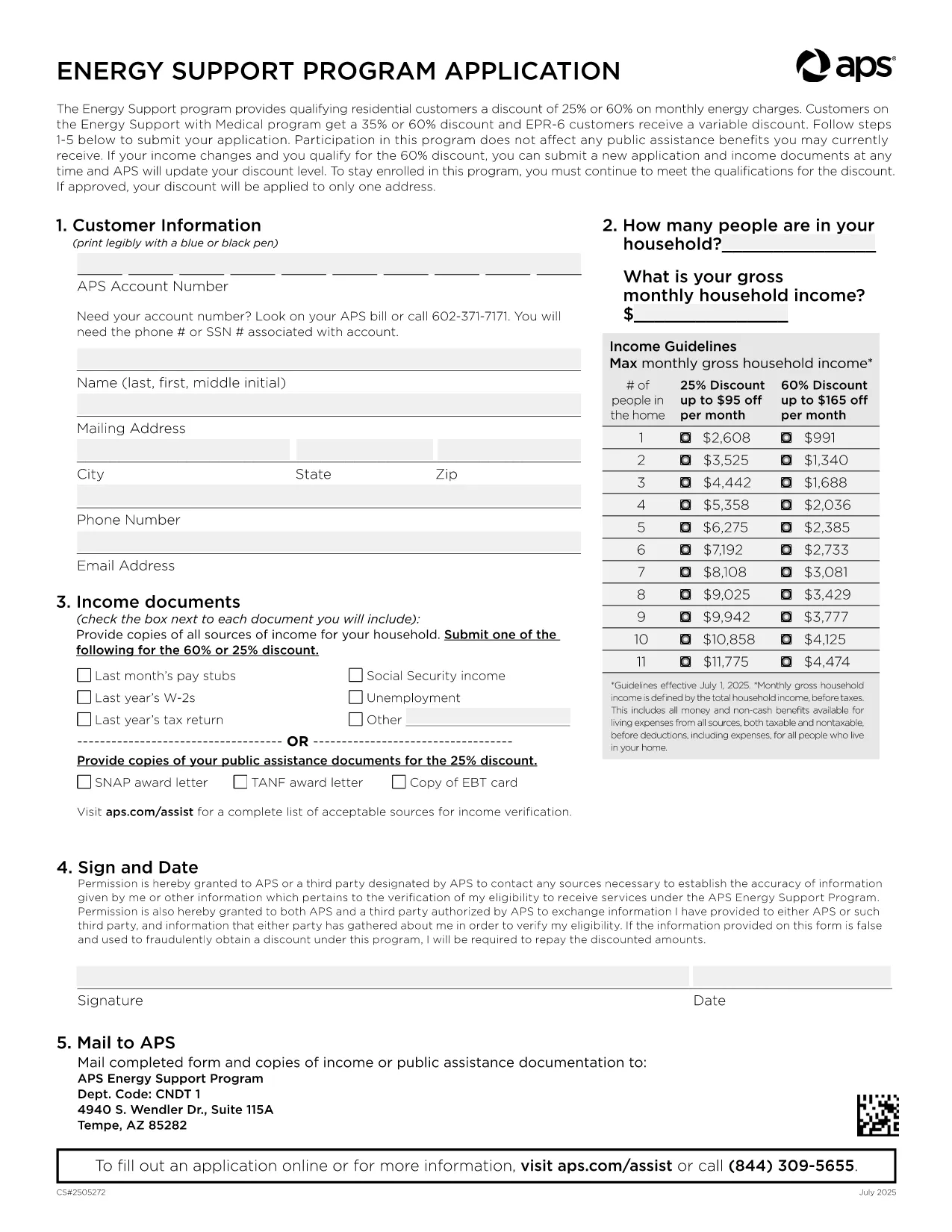
APS Energy Support Program Application Form (Fillable PDF)

  1. Kalba Anglų
  2. Šalis JAV
  3. skyrius Utility
  4. Veikla Energy Assistance
APS Energy Support Program Application Form (Fillable PDF)

Arizona Public Service (APS) offers the Energy Support Program to help qualifying households lower their monthly electric bill. The official Application Form APS is now available as a fillable PDF that you can complete directly on this page.

Why Choose the APS Energy Support Application?

The APS Energy Support Program provides a discount of up to 60% on your electricity charges. Using the online fillable PDF saves you time, eliminates printing errors, and speeds up processing—your application can be submitted in minutes.

How to Fill the APS Application Form Online

Simply click the "Fill out this form" button below. The Formize PDF Filler will load, allowing you to type, select, and sign directly in your browser. No additional software is required.

Common Mistakes to Avoid

  • Leaving required fields blank – the filler highlights missing information.
  • Submitting incomplete income documents – attach clear scans or photos of each document.
  • Forgetting the signature – the digital signature field must be completed before submission.

Eligibility & Required Documents

To qualify, you must meet the household income guidelines and provide proof for every adult in the home. Acceptable documents include recent pay stubs, tax returns, Social Security statements, SNAP benefits letters, or other listed income sources.

Submit Your Completed Form

After filling the form, click Submit. Your application will be securely sent to APS for processing. You’ll receive a confirmation email with a reference number and next‑step instructions.

Need help? Review the FAQs below or contact APS Customer Care at (602) 371‑7171.

DUK
  • What is the APS Energy Support Program?

    It is a discount program offered by Arizona Public Service that reduces eligible households' electric bills by up to 60% based on income.

  • Do I need to print the form?

    No. The fillable PDF can be completed entirely online using the Formize PDF Filler, then submitted electronically.

  • Which documents are required?

    Proof of income for every adult (pay stubs, tax returns, Social Security statements, SNAP letters, etc.) and a valid signature from the account holder.

  • How long does processing take?

    APS typically processes online applications within 10‑15 business days. You will receive an email notification of the decision.

  • Can I edit the form after submitting?

    Once submitted, the form cannot be edited. If you need to make changes, contact APS Customer Care to request a new application.

  • Is my information secure?

    Yes. Formize uses SSL encryption to protect all data entered in the PDF filler. APS also follows strict privacy standards.

  • How often do I need to reapply?

    Eligibility must be recertified every 24 months. APS will mail a re‑certification form before your current enrollment expires.

  • What if I have trouble with the online filler?

    Refresh the page, ensure your browser is up‑to‑date, and try again. If the issue persists, you can download the PDF (link below) and complete it manually.

KAIP

Kaip nemokamai užpildyti APS application form internete, atlikdami 5 paprastus veiksmus:

  1. 1
    Open the Fillable Form
    Click the "Fill out this form" button on the page. The Formize PDF Filler loads instantly in your browser.
  2. 2
    Enter Your Information
    Type directly into each field, select options from dropdowns, and upload required documents using the attachment icons.
  3. 3
    Add Your Digital Signature
    Use the signature field to draw or type your name. The filler validates the signature before allowing submission.
  4. 4
    Review and Submit
    Check all entered data, ensure every required document is attached, then click the Submit button to send your application to APS.
  5. 5
    Save a Copy
    After submission, download a PDF copy for your records by clicking the "Download Completed Form" link.
Formuokite PDF užpildymo programą
APIE

APS application form šabloną

Naudodami tradicinį PDF dokumento peržiūros ir pildymo funkcijų rinkinį, žiniatinklio programos pranašumus ir interaktyvų išdėstymą, galite užbaigti APS application form per kelias minutes.

FUNKCIJOS

PDF užpildas

Lengviausias būdas užpildyti APS application form internete

  • Greitai užpildykite APS application form
    Ieškote būdo greitai užpildyti APS application form internete? Naudodami internetinį nemokamą PDF formų užpildą sužinosite, kaip redaguoti ir užpildyti šį pdf dokumentą greičiau nei per minutę.
  • Lengva naudoti internetinį PDF redaktorių
    Atsibodo spausdinti PDF failus, kad galėtumėte juos redaguoti prieš nuskaitydami iš naujo ir siųsdami atgal? Redaguoti PDF dokumentus internete nemokamai. Norėdami sutaupyti laiko ir popieriaus, naudokite mūsų internetinį pdf redaktorių.
  • Puikūs įrankiai, visos platformos
    Svarstote, kaip užpildyti APS application form „Mac“ kompiuteryje, o gal kaip nemokamai naudoti PDF užpildą? Mūsų internetiniai PDF įrankiai veikia visose platformose.
  • Saugi failų saugykla
    Užbaigti „APS application form“ failai saugomi saugioje duomenų bazėje, kurią valdo „Amazon Cloud“ priegloba. Galite bet kada ištrinti failus iš mūsų sistemos. Bet kokiu atveju šie failai automatiškai ištrinami po 24 valandų.
  • Kalbėkitės su APS application form
    Kalbėkite su „APS application form“ naudodami Chatize, kuri yra nemokama PDF skaitymo priemonė. Užduokite klausimų ir gaukite atsakymus iš „APS application form“. Tiesiog spustelėkite aukščiau esantį mygtuką Kalbėtis su dokumentu.

Ištrinti užpildymo seansą

Ištrinti pasirinktą pildymo seansą? Tokiu atveju jūsų pažanga pildant formą bus prarasta.

Ištrinti redagavimo sesiją

Ištrinti pasirinktą redagavimo sesiją? Tokiu atveju jūsų pažanga kuriant ir redaguojant formą bus prarasta.