
Pasirinkite kalbą

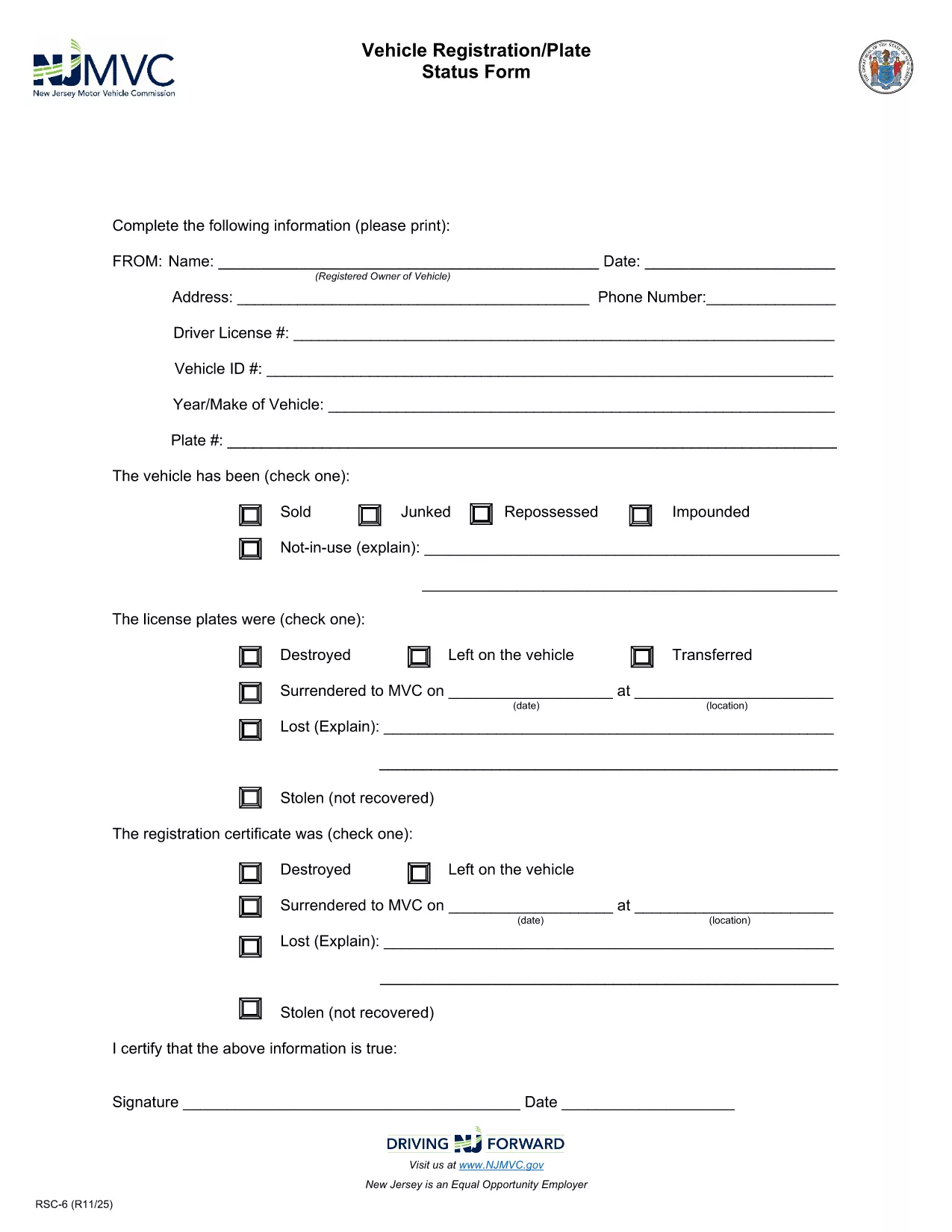
RSC-6 Vehicle Registration/Plate Status Form (Fillable PDF)

  1. Kalba Anglų
  2. Šalis JAV
  3. Veikla Transporto priemonės registracija
  4. valstybė Naujasis Džersis
RSC-6 Vehicle Registration/Plate Status Form (Fillable PDF)

The RSC-6 is the official New Jersey Motor Vehicle Commission (NJ MVC) form used to request the current registration or plate status of a vehicle. Whether you are a dealer, a private buyer, or need verification for legal purposes, this fillable PDF lets you obtain the information quickly and accurately.

Our page provides a direct, secure link to the latest RSC-6 form and an integrated Formize PDF Filler that works in any browser—no Adobe Acrobat required. Simply click “Fill out this form,” let the app load, and start typing.

What Is the RSC-6 Form?

The RSC-6, sometimes called the “Vehicle Registration/Plate Status Form,” is a request for the NJ MVC to confirm a vehicle’s registration standing, plate condition, and any liens or holds. The form is commonly used by:

  • Dealerships during vehicle transfers
  • Law enforcement or courts for verification
  • Owners who need proof of registration for insurance or resale

When and Why You Need RSC-6

You’ll need the RSC-6 whenever you must prove that a vehicle’s registration is active, check for outstanding tolls, or verify that the plates are correctly assigned. Submitting an accurate form helps avoid delays in title transfers or legal disputes.

How to Complete the RSC-6 Online

Follow these simple steps:

  1. Click the “Fill out this form” button on this page.
  2. The Formize PDF Filler loads the fillable RSC-6 PDF directly in your browser.
  3. Enter the required details: vehicle VIN, license plate number, owner information, and purpose of request.
  4. Review the completed form for any errors.
  5. Submit electronically or download and print for hand‑delivery to the NJ MVC.

Common Mistakes to Avoid

Even small errors can cause the NJ MVC to reject your request. Double‑check the following:

  • VIN and plate numbers are entered exactly as they appear on the vehicle.
  • All required fields are filled; the form will not accept blank mandatory sections.
  • Signature fields are completed with a legible electronic signature or printed signature after download.

Where to Submit the Completed Form

After filling out the RSC-6, you can:

  • Mail it to the address listed on the form.
  • Deliver it in person to any NJ MVC office.
  • Upload a scanned copy through the NJ MVC online portal if you have an account.

Need more help? The NJ MVC website provides additional guidance, but the fillable PDF and our step‑by‑step instructions cover most user needs.

DUK
  • What is the purpose of the RSC-6 form?

    The RSC-6 requests the New Jersey Motor Vehicle Commission to confirm a vehicle’s registration and plate status, often needed for sales, legal matters, or insurance.

  • Can I fill out the RSC-6 on a mobile device?

    Yes. The Formize PDF Filler works on all modern browsers, including mobile Safari and Chrome, allowing you to complete the form on phones or tablets.

  • Do I need Adobe Acrobat to use the fillable PDF?

    No. The form is fully fillable within the Formize web app—no additional software is required.

  • How long does it take for the NJ MVC to process my request?

    Processing times vary, but most requests are handled within 5‑7 business days after the NJ MVC receives the completed RSC-6.

  • What should I do if I make a mistake after submitting?

    Contact the NJ MVC directly to request a correction or submit a new RSC-6 with the correct information.

  • Is there a fee to submit the RSC-6 form?

    The RSC-6 itself does not have a filing fee, but the NJ MVC may charge fees for related services such as title transfers or duplicate plates.

  • Can I save a partially completed RSC-6 to finish later?

    Yes. The Formize app lets you save your progress locally in the browser and return later to complete the form.

KAIP

Kaip nemokamai užpildyti RSC-6 form internete, atlikdami 3 paprastus veiksmus:

  1. 1
    Open the Fillable Form
    Click the “Fill out this form” button on this page. The Formize PDF Filler app will open the RSC-6 PDF directly in your browser.
  2. 2
    Enter Your Information
    Type the required data into each field—VIN, license plate, owner details, and reason for the request. The form saves your entries automatically.
  3. 3
    Submit or Download
    When you’re done, choose to submit the completed form electronically (if supported) or download it, print, and mail it to the NJ MVC.
Formuokite PDF užpildymo programą
APIE

Transporto priemonių registracijos formos

Jei turite arba nuomojatės motorinę transporto priemonę, priekabą ar valtį, turite laikytis tam tikrų įsipareigojimų, kad jūsų transporto priemonė būtų teisėtai registruota ir saugi.

RSC-6 form yra viena iš transporto priemonių registracijos formų, kurios yra dokumentai, naudojami motorinei transporto priemonei įregistruoti atitinkamoje valstijos ar provincijos institucijoje. Šios formos paprastai reikalingos, kai asmuo perka naują ar naudotą transporto priemonę arba kai su transporto priemone persikelia į naują valstiją ar provinciją.

Tikslūs reikalavimai ir formos, reikalingos transporto priemonės registracijai, gali skirtis priklausomai nuo vietos, tačiau paprastai procesas apima informacijos apie transporto priemonę, savininką ir bet kokius transporto priemonės arešto pateikimą.

Kai bus pateiktos registracijos formos ir mokesčiai, valstybės ar provincijos institucija transporto priemonės savininkui išduos registracijos liudijimą arba valstybinį numerį. Ši registracija leidžia teisėtai eksploatuoti transporto priemonę viešuosiuose keliuose ir greitkeliuose.

FUNKCIJOS

PDF užpildas

Lengviausias būdas užpildyti RSC-6 form internete

  • Greitai užpildykite RSC-6 form
    Ieškote būdo greitai užpildyti RSC-6 form internete? Naudodami internetinį nemokamą PDF formų užpildą sužinosite, kaip redaguoti ir užpildyti šį pdf dokumentą greičiau nei per minutę.
  • Lengva naudoti internetinį PDF redaktorių
    Atsibodo spausdinti PDF failus, kad galėtumėte juos redaguoti prieš nuskaitydami iš naujo ir siųsdami atgal? Redaguoti PDF dokumentus internete nemokamai. Norėdami sutaupyti laiko ir popieriaus, naudokite mūsų internetinį pdf redaktorių.
  • Puikūs įrankiai, visos platformos
    Svarstote, kaip užpildyti RSC-6 form „Mac“ kompiuteryje, o gal kaip nemokamai naudoti PDF užpildą? Mūsų internetiniai PDF įrankiai veikia visose platformose.
  • Saugi failų saugykla
    Užbaigti „RSC-6 form“ failai saugomi saugioje duomenų bazėje, kurią valdo „Amazon Cloud“ priegloba. Galite bet kada ištrinti failus iš mūsų sistemos. Bet kokiu atveju šie failai automatiškai ištrinami po 24 valandų.
  • Kalbėkitės su RSC-6 form
    Kalbėkite su „RSC-6 form“ naudodami Chatize, kuri yra nemokama PDF skaitymo priemonė. Užduokite klausimų ir gaukite atsakymus iš „RSC-6 form“. Tiesiog spustelėkite aukščiau esantį mygtuką Kalbėtis su dokumentu.

Ištrinti užpildymo seansą

Ištrinti pasirinktą pildymo seansą? Tokiu atveju jūsų pažanga pildant formą bus prarasta.

Ištrinti redagavimo sesiją

Ištrinti pasirinktą redagavimo sesiją? Tokiu atveju jūsų pažanga kuriant ir redaguojant formą bus prarasta.