
Pasirinkite kalbą

SP-121 New Jersey Vehicle Registration Form – Fillable PDF

  1. Kalba Anglų
  2. Šalis JAV
  3. Veikla Transporto priemonės registracija
  4. valstybė Naujasis Džersis
SP-121 New Jersey Vehicle Registration Form – Fillable PDF

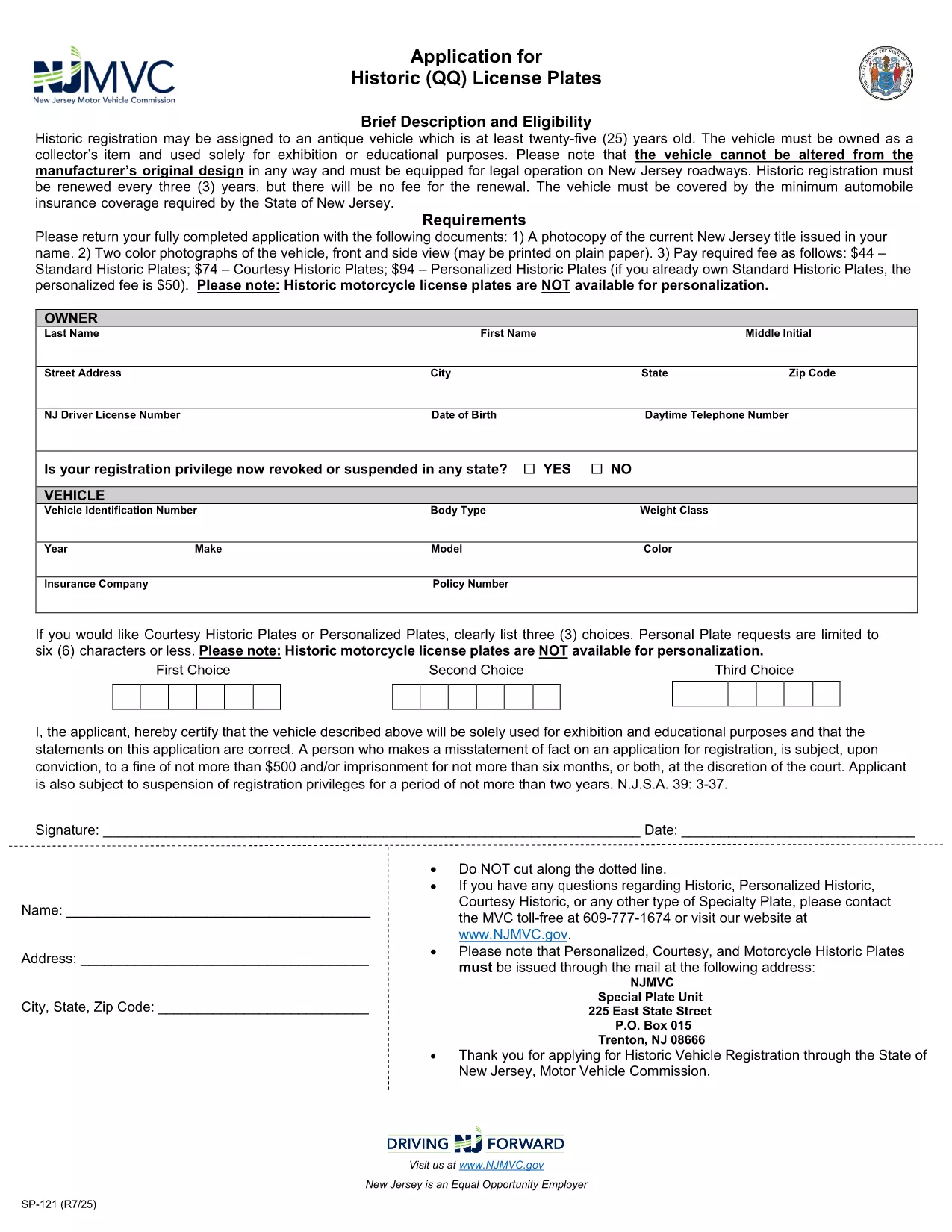
The SP-121 is the official New Jersey Motor Vehicle Commission (NJ MVC) application used to register a vehicle, request historic license plates, or update ownership information. This fillable PDF version lets you complete the form directly in your browser, eliminating the need to print, scan, or mail paperwork.

What Is Form SP-121?

Form SP-121 collects essential vehicle details (make, model, year, VIN) and owner information (name, address, contact). It is required for:

  • Standard vehicle registration
  • Historic (QQ) license plate applications
  • Title transfers and ownership changes

How to Fill Out Form SP-121 Online

Our Fill out this form button launches the Formize PDF Filler app. Follow these simple steps:

  1. Click the "Fill out this form" button above.
  2. Wait a few seconds while the fillable PDF loads in the Formize viewer.
  3. Enter the required information in each field. The form automatically validates dates and VIN format.
  4. When finished, click Save to download a completed copy or Print to submit in person.

Required Documents and Common Mistakes

Before you start, gather these documents to avoid delays:

  • Current NJ vehicle title (photocopy)
  • Two color photos of the vehicle (front and side)
  • Proof of insurance meeting NJ minimum coverage
  • Identification (driver's license or state ID)

Common mistakes to avoid:

  • Leaving the VIN field blank or entering an incorrect number.
  • Using the wrong vehicle year format (e.g., "202" instead of "2023").
  • Omitting the required photographs for historic plate requests.
  • Failing to sign the form electronically before saving.

Submit Your Completed Form

After saving the filled PDF, you can:

  • Mail it with the supporting documents to your local NJ MVC office.
  • Deliver it in person at a Motor Vehicle Commission location.
  • Use the NJ MVC online portal if you prefer electronic submission (check the portal for eligibility).

Using the fillable PDF saves time, reduces errors, and speeds up processing.

DUK
  • Is the SP-121 form available as a fillable PDF?

    Yes. Formize provides a fully interactive fillable version of the official NJ SP-121 PDF.

  • Do I need to print the form after filling it online?

    You can download the completed PDF and print it for submission, or you may submit the electronic file if the NJ MVC portal accepts it.

  • What fees are associated with historic license plates on SP-121?

    Standard historic plates cost $44, courtesy historic plates $74, and personalized historic plates $94 (fees are subject to change).

  • Can I sign the SP-121 form electronically?

    Yes. The Formize PDF Filler includes an e‑signature field that complies with NJ MVC requirements.

  • What should I do if I make a mistake after saving?

    Open the saved PDF again in Formize, correct the error, and re‑save the file before submitting.

  • Which documents must accompany the SP-121 submission?

    A photocopy of the current NJ title, two color vehicle photos, proof of insurance, and a valid ID.

  • How long does the NJ MVC take to process a completed SP-121?

    Processing typically takes 7‑10 business days once all required documents are received.

KAIP

Kaip nemokamai užpildyti SP-121 internete, atlikdami 4 paprastus veiksmus:

  1. 1
    Click the Fill Out Button
    Press the "Fill out this form" button on the page to launch the Formize PDF Filler.
  2. 2
    Wait for the Form to Load
    The fillable SP-121 PDF will appear in the viewer within a few seconds.
  3. 3
    Complete All Required Fields
    Enter vehicle and owner information, upload required photos, and sign electronically.
  4. 4
    Save or Print Your Completed Form
    Download the finished PDF or print it to submit with your supporting documents.
Formuokite PDF užpildymo programą
APIE

Transporto priemonių registracijos formos

SP-121 yra viena iš transporto priemonių registracijos formų, kurios yra dokumentai, naudojami motorinei transporto priemonei įregistruoti atitinkamoje vyriausybinėje institucijoje, paprastai Motorinių transporto priemonių departamente (DMV) arba lygiavertėje agentūroje. Šios formos reikalingos, kai asmuo perka naują ar naudotą transporto priemonę, perduoda transporto priemonės nuosavybės teisę arba su transporto priemone persikelia į naują jurisdikciją.

Konkrečios transporto priemonės registracijos formos gali skirtis priklausomai nuo jurisdikcijos, tačiau paprastai joms reikia šios informacijos:

Informacija apie transporto priemonę: tai apima išsamią informaciją apie transporto priemonę, pvz., markę, modelį, metus, transporto priemonės identifikavimo numerį (VIN) ir odometro rodmenis.

Savininko informacija: formoje reikės informacijos apie transporto priemonės savininką, įskaitant jo vardą, pavardę, adresą, kontaktinę informaciją ir vairuotojo pažymėjimo numerį.

Nuosavybės teisę patvirtinantis dokumentas: atsižvelgiant į aplinkybes, gali prireikti nuosavybės teisę patvirtinančio dokumento, pvz., nuosavybės pažymėjimo, pardavimo sąskaitos arba gamintojo kilmės sertifikato (naujoms transporto priemonėms).

Draudimo informacija: paprastai reikalingas galiojančio transporto priemonės draudimo įrodymas. Tai gali apimti draudimo poliso numerio, draudimo datų ir draudimo bendrovės duomenų pateikimą.

Mokesčių mokėjimas: transporto priemonės registracija apima įvairių mokesčių, tokių kaip registracijos mokesčiai, mokesčiai ir galbūt kiti tai jurisdikcijai būdingi mokesčiai, mokėjimą.

Be šių pagrindinių reikalavimų, kai kurios jurisdikcijos gali turėti papildomų formų arba dokumentų reikalavimų. Pavyzdžiui, kai kuriose srityse gali prireikti išmetamųjų teršalų bandymų rezultatų, saugos patikrinimų arba gyvenamosios vietos įrodymo.

Užpildžius ir pateikus transporto priemonės registracijos formas, valdžios institucija išduos registracijos liudijimą, valstybinius numerius ir registracijos lipdukus. Šiuose dokumentuose nurodyta, kad transporto priemonė yra teisėtai registruota ir leidžiama važiuoti viešaisiais keliais.

Svarbu pažymėti, kad transporto priemonių registracijos reikalavimai gali labai skirtis priklausomai nuo jurisdikcijos. Todėl dėl konkrečių formų ir procedūrų, taikomų jūsų vietovėje, rekomenduojama pasikonsultuoti su vietine DMV arba lygiaverte agentūra.

FUNKCIJOS

PDF užpildas

Lengviausias būdas užpildyti SP-121 internete

  • Greitai užpildykite SP-121
    Ieškote būdo greitai užpildyti SP-121 internete? Naudodami internetinį nemokamą PDF formų užpildą sužinosite, kaip redaguoti ir užpildyti šį pdf dokumentą greičiau nei per minutę.
  • Lengva naudoti internetinį PDF redaktorių
    Atsibodo spausdinti PDF failus, kad galėtumėte juos redaguoti prieš nuskaitydami iš naujo ir siųsdami atgal? Redaguoti PDF dokumentus internete nemokamai. Norėdami sutaupyti laiko ir popieriaus, naudokite mūsų internetinį pdf redaktorių.
  • Puikūs įrankiai, visos platformos
    Svarstote, kaip užpildyti SP-121 „Mac“ kompiuteryje, o gal kaip nemokamai naudoti PDF užpildą? Mūsų internetiniai PDF įrankiai veikia visose platformose.
  • Saugi failų saugykla
    Užbaigti „SP-121“ failai saugomi saugioje duomenų bazėje, kurią valdo „Amazon Cloud“ priegloba. Galite bet kada ištrinti failus iš mūsų sistemos. Bet kokiu atveju šie failai automatiškai ištrinami po 24 valandų.
  • Kalbėkitės su SP-121
    Kalbėkite su „SP-121“ naudodami Chatize, kuri yra nemokama PDF skaitymo priemonė. Užduokite klausimų ir gaukite atsakymus iš „SP-121“. Tiesiog spustelėkite aukščiau esantį mygtuką Kalbėtis su dokumentu.

Ištrinti užpildymo seansą

Ištrinti pasirinktą pildymo seansą? Tokiu atveju jūsų pažanga pildant formą bus prarasta.

Ištrinti redagavimo sesiją

Ištrinti pasirinktą redagavimo sesiją? Tokiu atveju jūsų pažanga kuriant ir redaguojant formą bus prarasta.