
Pasirinkite kalbą

MVR-618 Fillable PDF – North Carolina Weight Declaration Form

  1. Kalba Anglų
  2. Šalis JAV
  3. Veikla Transporto priemonės registracija
  4. valstybė Šiaurės Karolina
MVR-618 Fillable PDF – North Carolina Weight Declaration Form

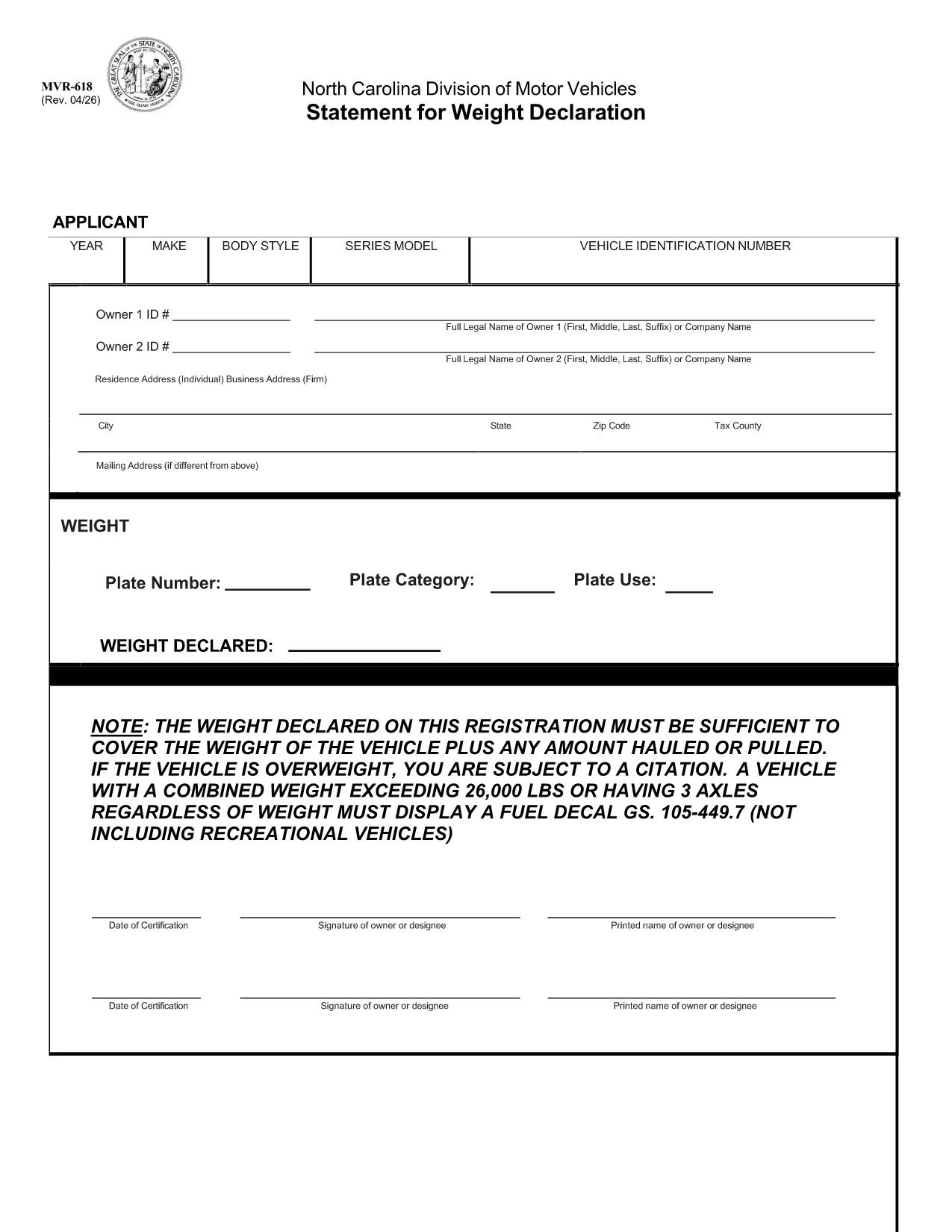
The MVR-618 is the North Carolina Division of Motor Vehicles (NCDMV) “Statement for Weight Declaration.” It is required whenever you register a vehicle that carries a load, pulls a trailer, or exceeds certain weight thresholds. The form ensures the declared weight covers the vehicle plus any hauled or pulled cargo, helping you stay compliant and avoid citations.

What is Form MVR-618?

Form MVR-618 captures the total weight of your vehicle and any additional load. North Carolina law mandates that the declared weight must be sufficient for the vehicle’s own weight plus any cargo. Vehicles over 26,000 lbs or with three axles must display a fuel decal (GS 105‑449.7). The form is part of the standard vehicle registration packet and is used by the Department of Motor Vehicles to verify compliance.

How to Fill Out MVR-618 Online

Instead of printing, printing, and scanning, you can complete the form instantly in your browser using Formize’s Fillable PDF tool. Follow the quick steps below:

  • Click the “Fill out this form” button on this page.
  • The Formize PDF Filler loads – no download required.
  • Enter the requested information (vehicle weight, cargo weight, axle count, etc.).
  • Review the data, then click **Submit** to generate a completed PDF.
  • Save or print the finished document for your records.

Common Mistakes & Tips

Even a small error can lead to a citation. Keep these tips in mind:

  • Double‑check the total weight. Add vehicle weight and cargo weight accurately.
  • Include all axles. Remember that three‑axle vehicles need a fuel decal regardless of weight.
  • Use pounds (lbs) only. The form does not accept kilograms.
  • Signature required. The online filler adds a digital signature field – sign before saving.
  • Keep a copy. Store the completed PDF in your vehicle records folder.

Download & Save the PDF

If you prefer a hard copy, the original fillable PDF is available for download below. The file is the official NCDOT version, fully compatible with Formize.

Download MVR-618 (Official PDF)

Whether you use the online filler or the printable PDF, Formize makes completing MVR-618 fast, accurate, and hassle‑free.

DUK
  • Do I need to print the MVR-618 after filling it online?

    Printing is optional. You can keep the digital PDF for your records, but many DMV offices still require a printed copy. Use the “Print” button in the Formize filler if you need one.

  • What happens if my declared weight is too low?

    If the declared weight does not cover the vehicle plus any load, the DMV may issue a citation and you could be required to re‑register with a corrected weight declaration.

  • Can I edit the form after I’ve downloaded it?

    Once you download the completed PDF, it is locked for editing. If you need to make changes, return to the online filler, adjust the fields, and download a new version.

  • Is the Formize filler secure?

    Yes. Formize uses SSL encryption for data transmission, and the completed PDF is stored only in your browser session unless you choose to download it.

  • Do I need a fuel decal if my vehicle is under 26,000 lbs but has three axles?

    Yes. North Carolina law requires a fuel decal for any vehicle with three axles, regardless of total weight.

  • What if I lose the completed MVR-618?

    You can re‑fill the form online at any time using the same vehicle information. Keep a digital copy saved on your computer or cloud storage for easy access.

KAIP

Kaip nemokamai užpildyti MVR-618 internete, atlikdami 4 paprastus veiksmus:

  1. 1
    Open the Fillable Form
    Click the “Fill out this form” button on this page. The Formize PDF Filler loads directly in your browser – no software download needed.
  2. 2
    Enter Required Information
    Fill in the vehicle’s gross weight, cargo weight, axle count, and any other fields shown. All entries are saved automatically.
  3. 3
    Review and Sign
    Check the completed values for accuracy, then use the digital signature field to sign the form.
  4. 4
    Save or Print
    Click “Download” to save the completed PDF to your device, or select “Print” to obtain a hard copy for your records.
Formuokite PDF užpildymo programą
APIE

Transporto priemonių registracijos formos

MVR-618 yra viena iš DMV formų, dar vadinamų Motorinių transporto priemonių departamento formomis, kurios yra dokumentai, naudojami atliekant įvairias operacijas ir procesus, susijusius su motorinėmis transporto priemonėmis. DMV yra vyriausybinė agentūra, atsakinga už vairuotojų pažymėjimų išdavimą, transporto priemonių registraciją ir motorinių transporto priemonių įstatymų vykdymą. Konkrečios galimos DMV formos gali skirtis priklausomai nuo jurisdikcijos, tačiau čia pateikiami keli įprasti pavyzdžiai:

Vairuotojo pažymėjimo formos: šios formos naudojamos norint gauti vairuotojo pažymėjimą arba prašyti pakeisti ar atnaujinti. Paprastai jie reikalauja asmeninės informacijos, tapatybės įrodymo ir gali apimti medicininės informacijos arba vairavimo istorijos skyrius.

Transporto priemonių registracijos formos: šios formos naudojamos motorinei transporto priemonei registruoti DMV. Jie reikalauja informacijos apie transporto priemonę, nuosavybės duomenis ir draudimo įrodymą.

Nuosavybės teisės perdavimo formos: perkant arba parduodant transporto priemonę, šios formos naudojamos nuosavybės teisei perduoti iš vienos šalies kitai. Jiems reikalinga informacija apie pirkėją, pardavėją, transporto priemonės duomenis ir gali būti pirkimo-pardavimo vekselis.

Transporto priemonės atleidimo nuo atsakomybės formos: parduodant arba perduodant transporto priemonės nuosavybės teisę, šiose formose pranešama DMV, kad pardavėjas nebėra atsakingas už transporto priemonę. Tai padeda apsaugoti pardavėją nuo atsakomybės už nelaimingus atsitikimus ar incidentus, susijusius su transporto priemone po pardavimo.

Valstybės numerio ir registracijos atnaujinimo formos: šios formos naudojamos norint atnaujinti transporto priemonės registraciją arba prašyti naujų valstybinių numerių. Paprastai jie reikalauja informacijos apie registruotą savininką, dabartinę registracijos informaciją ir taikomų mokesčių sumokėjimą.

Vairavimo įrašų užklausos formos: šios formos leidžia asmenims DMV pateikti užklausą dėl savo vairavimo įrašų, kuriuose pateikiama informacija apie vairavimo pažeidimus, pažymėjimo būseną ir kitą svarbią informaciją.

Specialios arba suasmenintos valstybinio numerio formos: šios formos naudojamos norint gauti suasmenintus arba specialius valstybinio numerio ženklus, kurie leidžia asmenims tinkinti savo valstybinio numerio ženklą naudodami tam tikrus simbolius ar piešinius.

Tai tik keli pavyzdžiai iš daugelio formų, kurios gali būti pasiekiamos per DMV. Konkrečios formos ir reikalavimai gali skirtis priklausomai nuo jurisdikcijos, todėl svarbu apsilankyti vietinėje DMV svetainėje arba apsilankyti DMV biure, kad gautumėte tinkamas formas pagal jūsų poreikius.

FUNKCIJOS

PDF užpildas

Lengviausias būdas užpildyti MVR-618 internete

  • Greitai užpildykite MVR-618
    Ieškote būdo greitai užpildyti MVR-618 internete? Naudodami internetinį nemokamą PDF formų užpildą sužinosite, kaip redaguoti ir užpildyti šį pdf dokumentą greičiau nei per minutę.
  • Lengva naudoti internetinį PDF redaktorių
    Atsibodo spausdinti PDF failus, kad galėtumėte juos redaguoti prieš nuskaitydami iš naujo ir siųsdami atgal? Redaguoti PDF dokumentus internete nemokamai. Norėdami sutaupyti laiko ir popieriaus, naudokite mūsų internetinį pdf redaktorių.
  • Puikūs įrankiai, visos platformos
    Svarstote, kaip užpildyti MVR-618 „Mac“ kompiuteryje, o gal kaip nemokamai naudoti PDF užpildą? Mūsų internetiniai PDF įrankiai veikia visose platformose.
  • Saugi failų saugykla
    Užbaigti „MVR-618“ failai saugomi saugioje duomenų bazėje, kurią valdo „Amazon Cloud“ priegloba. Galite bet kada ištrinti failus iš mūsų sistemos. Bet kokiu atveju šie failai automatiškai ištrinami po 24 valandų.
  • Kalbėkitės su MVR-618
    Kalbėkite su „MVR-618“ naudodami Chatize, kuri yra nemokama PDF skaitymo priemonė. Užduokite klausimų ir gaukite atsakymus iš „MVR-618“. Tiesiog spustelėkite aukščiau esantį mygtuką Kalbėtis su dokumentu.

Ištrinti užpildymo seansą

Ištrinti pasirinktą pildymo seansą? Tokiu atveju jūsų pažanga pildant formą bus prarasta.

Ištrinti redagavimo sesiją

Ištrinti pasirinktą redagavimo sesiją? Tokiu atveju jūsų pažanga kuriant ir redaguojant formą bus prarasta.