
Pasirinkite kalbą

Pennsylvania MV‑38L Fillable Form – Duplicate Title & Lien Requests

  1. Kalba Anglų
  2. Šalis JAV
  3. Veikla Transporto priemonės registracija
  4. valstybė Pensilvanija
Pennsylvania MV‑38L Fillable Form – Duplicate Title & Lien Requests

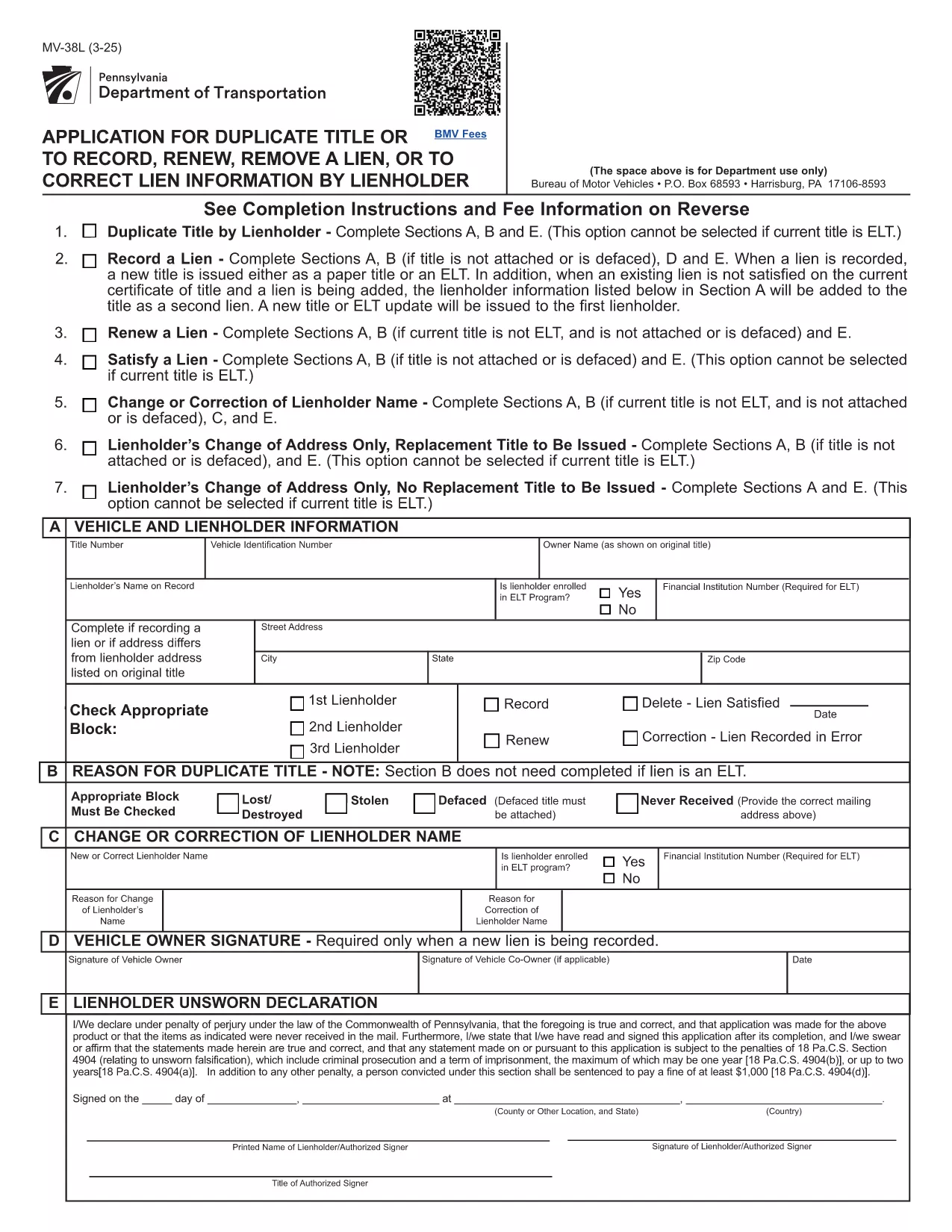
The MV‑38L is Pennsylvania's official application for a duplicate vehicle title, title renewal, lien removal, or title correction. Historically you had to print a paper copy, fill it out by hand, and mail it to PennDOT. With Formize you can now complete the entire form online, save a printed copy for your records, and submit it the way PennDOT requires.

What Is the MV‑38L Form?

MV‑38L is a fillable PDF issued by the Pennsylvania Department of Transportation (PennDOT). It replaces a lost, stolen, or damaged title and can also be used to:

  • Record a new lienholder or remove an existing lien.
  • Renew an expired title.
  • Correct errors on the original title.

When to Use MV‑38L

Typical scenarios include:

  • Your original title was misplaced or destroyed.
  • You have paid off a loan and need the lien released.
  • You are transferring ownership and the buyer needs a clean title.
  • You need to update the vehicle’s information (e.g., name change).

How to Complete the Form Online

Instead of downloading, printing, and scanning, follow these simple steps:

  1. Click the "Fill out this form" button on this page.
  2. The Formize PDF Filler app loads the MV‑38L PDF directly in your browser.
  3. Enter the required information in each field. All fields are editable and auto‑saved.
  4. When finished, click Save & Download to get a completed PDF you can print or email to PennDOT.

The online filler also validates required fields, helping you avoid common errors before submission.

Common Mistakes to Avoid

  • Incorrect VIN: Double‑check the Vehicle Identification Number; a single digit error can delay processing.
  • Missing Notarization: If Block #5 or #6 is checked, PennDOT requires a notarized signature and a fee receipt.
  • Wrong Fee Amount: Fees change annually. Verify the current amount on the PennDOT website before paying.
  • Omitting Lienholder Info: When removing a lien, provide the lender’s name, address, and account number.

Fees, Notarization, and Submission Details

Depending on the option you select, PennDOT may charge a fee (e.g., $22.50 for lien removal) and require notarization. After completing the form, you can either:

  • Print and mail the PDF to the address listed on the form, or
  • Submit electronically if your local PennDOT office accepts e‑filing.

Keep a copy of the completed PDF for your records – it serves as proof of application.

DUK
  • What is the purpose of the MV‑38L form?

    MV‑38L is used to request a duplicate vehicle title, renew an existing title, remove or record a lien, or correct errors on a Pennsylvania title.

  • Do I need a notary for every MV‑38L submission?

    Notary is required only if you check Block #5 (lien removal) or Block #6 (title correction). Otherwise, a signature alone is sufficient.

  • How much does it cost to get a duplicate title?

    The fee varies; as of the latest update it is $22.50 for lien‑related requests. Check the PennDOT website for the current fee schedule.

  • Can I submit the completed MV‑38L online?

    Many PennDOT offices accept electronic submissions, but some still require a mailed paper copy. Review the instructions on the form for your local office.

  • What information is required for the VIN?

    Enter the 17‑character Vehicle Identification Number exactly as it appears on the registration or insurance card. A single typo can delay processing.

  • Is the Formize filler free to use?

    Yes, Formize provides a free, secure PDF filler for the MV‑38L form. No software download is needed.

  • What should I do if I lose the completed PDF after filling it?

    The Formize app automatically saves a copy to your browser’s download folder. You can also email the PDF to yourself before printing.

  • Do I need to attach any supporting documents?

    If you are removing a lien, attach a lien release letter from the lender. For title corrections, include any relevant proof (e.g., court order).

KAIP

Kaip nemokamai užpildyti MV-38L internete, atlikdami 5 paprastus veiksmus:

  1. 1
    Open the Fillable Form
    Click the "Fill out this form" button on the page. The Formize PDF Filler will open the MV‑38L PDF directly in your browser.
  2. 2
    Enter Your Information
    Complete each editable field—vehicle details, owner information, and lien data. The app highlights required fields.
  3. 3
    Add Notarization (if required)
    If you checked Block #5 or #6, print the completed form, have it notarized, and scan it back into the PDF.
  4. 4
    Save and Download
    When all fields are filled, click "Save & Download" to get a finished PDF you can print or email to PennDOT.
  5. 5
    Submit to PennDOT
    Mail the printed PDF with the appropriate fee, or follow any electronic submission instructions provided on the form.
Formuokite PDF užpildymo programą
APIE

Transporto priemonių registracijos formos

MV-38L yra viena iš transporto priemonių registracijos formų, kurios yra dokumentai, naudojami motorinei transporto priemonei įregistruoti atitinkamoje vyriausybinėje institucijoje, paprastai Motorinių transporto priemonių departamente (DMV) arba lygiavertėje agentūroje. Šios formos reikalingos, kai asmuo perka naują ar naudotą transporto priemonę, perduoda transporto priemonės nuosavybės teisę arba su transporto priemone persikelia į naują jurisdikciją.

Konkrečios transporto priemonės registracijos formos gali skirtis priklausomai nuo jurisdikcijos, tačiau paprastai joms reikia šios informacijos:

Informacija apie transporto priemonę: tai apima išsamią informaciją apie transporto priemonę, pvz., markę, modelį, metus, transporto priemonės identifikavimo numerį (VIN) ir odometro rodmenis.

Savininko informacija: formoje reikės informacijos apie transporto priemonės savininką, įskaitant jo vardą, pavardę, adresą, kontaktinę informaciją ir vairuotojo pažymėjimo numerį.

Nuosavybės teisę patvirtinantis dokumentas: atsižvelgiant į aplinkybes, gali prireikti nuosavybės teisę patvirtinančio dokumento, pvz., nuosavybės pažymėjimo, pardavimo sąskaitos arba gamintojo kilmės sertifikato (naujoms transporto priemonėms).

Draudimo informacija: paprastai reikalingas galiojančio transporto priemonės draudimo įrodymas. Tai gali apimti draudimo poliso numerio, draudimo datų ir draudimo bendrovės duomenų pateikimą.

Mokesčių mokėjimas: transporto priemonės registracija apima įvairių mokesčių, tokių kaip registracijos mokesčiai, mokesčiai ir galbūt kiti tai jurisdikcijai būdingi mokesčiai, mokėjimą.

Be šių pagrindinių reikalavimų, kai kurios jurisdikcijos gali turėti papildomų formų arba dokumentų reikalavimų. Pavyzdžiui, kai kuriose srityse gali prireikti išmetamųjų teršalų bandymų rezultatų, saugos patikrinimų arba gyvenamosios vietos įrodymo.

Užpildžius ir pateikus transporto priemonės registracijos formas, valdžios institucija išduos registracijos liudijimą, valstybinius numerius ir registracijos lipdukus. Šiuose dokumentuose nurodyta, kad transporto priemonė yra teisėtai registruota ir leidžiama važiuoti viešaisiais keliais.

Svarbu pažymėti, kad transporto priemonių registracijos reikalavimai gali labai skirtis priklausomai nuo jurisdikcijos. Todėl dėl konkrečių formų ir procedūrų, taikomų jūsų vietovėje, rekomenduojama pasikonsultuoti su vietine DMV arba lygiaverte agentūra.

FUNKCIJOS

PDF užpildas

Lengviausias būdas užpildyti MV-38L internete

  • Greitai užpildykite MV-38L
    Ieškote būdo greitai užpildyti MV-38L internete? Naudodami internetinį nemokamą PDF formų užpildą sužinosite, kaip redaguoti ir užpildyti šį pdf dokumentą greičiau nei per minutę.
  • Lengva naudoti internetinį PDF redaktorių
    Atsibodo spausdinti PDF failus, kad galėtumėte juos redaguoti prieš nuskaitydami iš naujo ir siųsdami atgal? Redaguoti PDF dokumentus internete nemokamai. Norėdami sutaupyti laiko ir popieriaus, naudokite mūsų internetinį pdf redaktorių.
  • Puikūs įrankiai, visos platformos
    Svarstote, kaip užpildyti MV-38L „Mac“ kompiuteryje, o gal kaip nemokamai naudoti PDF užpildą? Mūsų internetiniai PDF įrankiai veikia visose platformose.
  • Saugi failų saugykla
    Užbaigti „MV-38L“ failai saugomi saugioje duomenų bazėje, kurią valdo „Amazon Cloud“ priegloba. Galite bet kada ištrinti failus iš mūsų sistemos. Bet kokiu atveju šie failai automatiškai ištrinami po 24 valandų.
  • Kalbėkitės su MV-38L
    Kalbėkite su „MV-38L“ naudodami Chatize, kuri yra nemokama PDF skaitymo priemonė. Užduokite klausimų ir gaukite atsakymus iš „MV-38L“. Tiesiog spustelėkite aukščiau esantį mygtuką Kalbėtis su dokumentu.

Ištrinti užpildymo seansą

Ištrinti pasirinktą pildymo seansą? Tokiu atveju jūsų pažanga pildant formą bus prarasta.

Ištrinti redagavimo sesiją

Ištrinti pasirinktą redagavimo sesiją? Tokiu atveju jūsų pažanga kuriant ir redaguojant formą bus prarasta.