
Pasirinkite kalbą

Virginia DSD 5A Temporary Transport Certificate (Fillable PDF)

  1. Kalba Anglų
  2. Šalis JAV
  3. Veikla Transporto priemonės registracija
  4. valstybė Virdžinija
Virginia DSD 5A Temporary Transport Certificate (Fillable PDF)

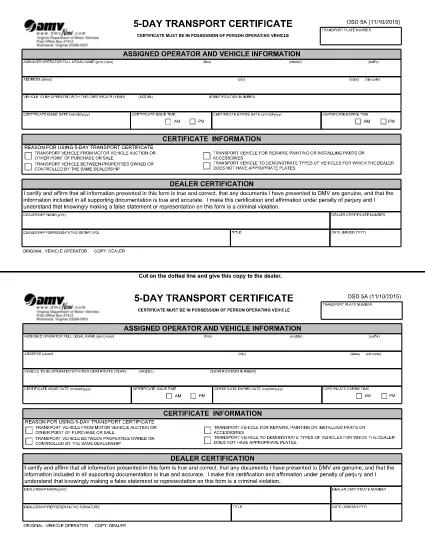
The DSD 5A is the Virginia Department of Motor Vehicles (DMV) form used by motor vehicle dealers to obtain a 5‑day temporary transport certificate. This certificate allows a dealer to move a vehicle legally while a permanent plate is being processed.

What Is the DSD 5A Form?

DSD 5A, also called the Temporary Transport Certificate, is a short‑term permit that must be carried in the vehicle at all times during transport. It is required for dealer‑to‑dealer transfers, test drives, and moving inventory between locations.

How to Complete the DSD 5A Online

Instead of printing, printing, and hand‑filling the PDF, simply click the “Fill out this form” button on this page. The Formize PDF Filler app will load the fillable version of the DSD 5A, letting you type directly into each field.

  • Step 1: Click the “Fill out this form” button.
  • Step 2: Wait a few seconds while the Formize PDF Filler loads.
  • Step 3: Enter the required information (dealer details, vehicle VIN, transport plate number, dates, etc.).
  • Step 4: Review for accuracy, then click “Save & Download” to get a completed PDF copy.

Common Mistakes & Tips

Avoid these frequent errors to ensure your DSD 5A is accepted:

  • Incorrect VIN or plate number – double‑check the numbers before submitting.
  • Leaving the “Date of Issue” or “Expiration Date” blank – the form must show a valid 5‑day window.
  • Not signing the form – the dealer’s authorized signature is mandatory.
  • Using an outdated PDF version – always use the latest PDF linked on this page.

Where to Submit the Completed Form

After filling out and downloading the completed DSD 5A, attach it to the vehicle and keep it in the driver’s seat. No additional filing with the DMV is required for the temporary certificate, but retain a copy for your records.

For any questions, contact the Virginia DMV Dealer Services Division at (804) 367‑0446.

DUK
  • What is the purpose of the DSD 5A form?

    The DSD 5A issues a temporary transport certificate that allows dealers to move a vehicle legally for up to five days while a permanent plate is being processed.

  • Can I use the DSD 5A for personal vehicle transfers?

    No. The DSD 5A is intended for licensed motor vehicle dealers only. Personal owners must use the appropriate Virginia DMV temporary tag application.

  • Do I need to submit the completed DSD 5A to the DMV?

    No filing is required. The completed certificate must be kept in the vehicle during transport and a copy retained for dealer records.

  • How long is the temporary transport certificate valid?

    The certificate is valid for exactly five consecutive days from the date of issue, as indicated on the form.

  • What should I do if I make a mistake after printing the form?

    Correct the error on the fillable PDF before downloading/printing, or fill out a new form. Hand‑written corrections are not accepted.

KAIP

Kaip nemokamai užpildyti DSD 5A internete, atlikdami 4 paprastus veiksmus:

  1. 1
    Open the Fillable Form
    Click the “Fill out this form” button on the page. The Formize PDF Filler will open the DSD 5A in a secure browser window.
  2. 2
    Enter Required Information
    Type the dealer’s name, address, VIN, transport plate number, and dates directly into the highlighted fields.
  3. 3
    Review and Sign
    Check all entries for accuracy, add the authorized dealer signature, and confirm the dates are within a 5‑day period.
  4. 4
    Save or Download
    Click “Save & Download” to store a completed PDF on your device or print it for a physical copy.
Formuokite PDF užpildymo programą
APIE

Transporto priemonių registracijos formos

Jei turite arba nuomojatės motorinę transporto priemonę, priekabą ar valtį, turite laikytis tam tikrų įsipareigojimų, kad jūsų transporto priemonė būtų teisėtai registruota ir saugi.

DSD 5A yra viena iš transporto priemonių registracijos formų, kurios yra dokumentai, naudojami motorinei transporto priemonei įregistruoti atitinkamoje valstijos ar provincijos institucijoje. Šios formos paprastai reikalingos, kai asmuo perka naują ar naudotą transporto priemonę arba kai su transporto priemone persikelia į naują valstiją ar provinciją.

Tikslūs reikalavimai ir formos, reikalingos transporto priemonės registracijai, gali skirtis priklausomai nuo vietos, tačiau paprastai procesas apima informacijos apie transporto priemonę, savininką ir bet kokius transporto priemonės arešto pateikimą.

Kai bus pateiktos registracijos formos ir mokesčiai, valstybės ar provincijos institucija transporto priemonės savininkui išduos registracijos liudijimą arba valstybinį numerį. Ši registracija leidžia teisėtai eksploatuoti transporto priemonę viešuosiuose keliuose ir greitkeliuose.

FUNKCIJOS

PDF užpildas

Lengviausias būdas užpildyti DSD 5A internete

  • Greitai užpildykite DSD 5A
    Ieškote būdo greitai užpildyti DSD 5A internete? Naudodami internetinį nemokamą PDF formų užpildą sužinosite, kaip redaguoti ir užpildyti šį pdf dokumentą greičiau nei per minutę.
  • Lengva naudoti internetinį PDF redaktorių
    Atsibodo spausdinti PDF failus, kad galėtumėte juos redaguoti prieš nuskaitydami iš naujo ir siųsdami atgal? Redaguoti PDF dokumentus internete nemokamai. Norėdami sutaupyti laiko ir popieriaus, naudokite mūsų internetinį pdf redaktorių.
  • Puikūs įrankiai, visos platformos
    Svarstote, kaip užpildyti DSD 5A „Mac“ kompiuteryje, o gal kaip nemokamai naudoti PDF užpildą? Mūsų internetiniai PDF įrankiai veikia visose platformose.
  • Saugi failų saugykla
    Užbaigti „DSD 5A“ failai saugomi saugioje duomenų bazėje, kurią valdo „Amazon Cloud“ priegloba. Galite bet kada ištrinti failus iš mūsų sistemos. Bet kokiu atveju šie failai automatiškai ištrinami po 24 valandų.
  • Kalbėkitės su DSD 5A
    Kalbėkite su „DSD 5A“ naudodami Chatize, kuri yra nemokama PDF skaitymo priemonė. Užduokite klausimų ir gaukite atsakymus iš „DSD 5A“. Tiesiog spustelėkite aukščiau esantį mygtuką Kalbėtis su dokumentu.

Ištrinti užpildymo seansą

Ištrinti pasirinktą pildymo seansą? Tokiu atveju jūsų pažanga pildant formą bus prarasta.

Ištrinti redagavimo sesiją

Ištrinti pasirinktą redagavimo sesiją? Tokiu atveju jūsų pažanga kuriant ir redaguojant formą bus prarasta.