
Pasirinkite kalbą

MVDB‑9 Dealer Plate Application (Virginia) – Fillable PDF

  1. Kalba Anglų
  2. Šalis JAV
  3. Veikla Transporto priemonės registracija
  4. valstybė Virdžinija
MVDB‑9 Dealer Plate Application (Virginia) – Fillable PDF

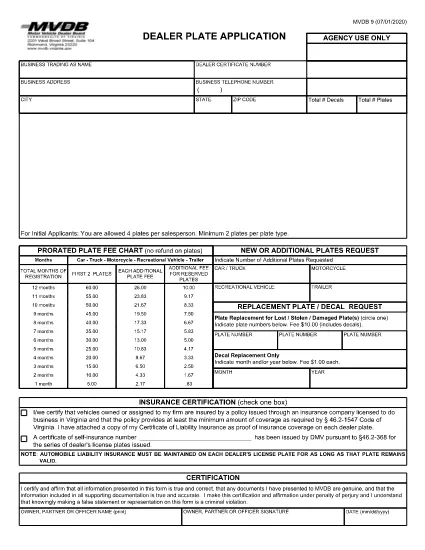
The MVDB‑9 is the official Dealer Plate Application used by the Virginia Motor Vehicle Dealer Board (MVDB). A dealer plate allows a licensed car dealer to legally move inventory on public roads while the vehicle is not yet titled to a customer.

Whether you are applying for your first dealer plates or renewing an existing set, the form must be completed accurately and submitted with the required bond and fee. Our fillable PDF lets you complete every field online, eliminates the need for a printer, and reduces the chance of errors.

What Is the MVDB‑9 Form?

The MVDB‑9 collects essential information about your dealership, including:

  • Dealer name, address, and contact details
  • Number and type of plates requested
  • Bond information (Form MVDB‑2)
  • Signature of the dealer or authorized representative

How to Complete the MVDB‑9 Online

Follow the simple steps below to fill out the form directly in your browser using Formize’s PDF Filler app.

Common Mistakes to Avoid

Even small errors can delay your application. Watch out for:

  • Leaving required fields blank
  • Using an outdated bond amount
  • Incorrect dealer plate quantity (the MVDB limits plates per salesperson)
  • Mismatched signatures and printed names

Where to Submit Your Completed Form

After you have saved the completed PDF, mail or deliver it to the Virginia Motor Vehicle Dealer Board at the address listed on the form, along with the required bond and payment. For the latest submission address, refer to the MVDB website.

DUK
  • Who needs to fill out the MVDB‑9 form?

    Any Virginia‑licensed motor vehicle dealer who wants to obtain or renew dealer plates must complete the MVDB‑9.

  • Can I submit the MVDB‑9 electronically?

    The MVDB currently requires a printed copy with a wet signature. You can fill it out online, print, sign, and mail it.

  • How many dealer plates can I request on one MVDB‑9?

    The form allows up to four plates per salesperson and a minimum of two plates per plate type. Check the MVDB guidelines for specific limits.

  • What bond amount is required with the MVDB‑9?

    A $50,000 dealer bond (Form MVDB‑2) is required for most dealer license types. Verify the exact amount for your license class on the MVDB website.

  • How long does it take for the MVDB to process my application?

    Processing typically takes 10‑14 business days after the MVDB receives a complete application and payment.

  • What should I do if I make a mistake on the form?

    If you notice an error after submission, contact the MVDB immediately. In most cases you will need to submit a corrected MVDB‑9 with a cover letter explaining the change.

  • Is there a fee for the dealer plates?

    Yes. Fees vary by plate type and quantity. The current fee schedule is listed on the MVDB website and on the MVDB‑9 form.

KAIP

Kaip nemokamai užpildyti MVDB-9 internete, atlikdami 5 paprastus veiksmus:

  1. 1
    Click the Fill‑Out Button
    On this page, click the "Fill out this form" button. The Formize PDF Filler app will open in a new tab.
  2. 2
    Wait for the Filler to Load
    The app loads the MVDB‑9 PDF automatically. This may take a few seconds depending on your connection.
  3. 3
    Complete All Required Fields
    Enter your dealership information, select the number of plates, and upload your bond details. Use the built‑in check‑boxes and dropdown menus for accuracy.
  4. 4
    Review, Sign, and Save
    Check every field for errors, add your electronic signature, then click "Save" to download the completed PDF to your computer.
  5. 5
    Submit to the MVDB
    Print (if required) and mail the PDF together with the bond and payment to the Virginia Motor Vehicle Dealer Board.
Formuokite PDF užpildymo programą
APIE

Transporto priemonių registracijos formos

MVDB-9 yra viena iš transporto priemonių registracijos formų, kurios yra dokumentai, naudojami motorinei transporto priemonei įregistruoti atitinkamoje vyriausybinėje institucijoje, paprastai Motorinių transporto priemonių departamente (DMV) arba lygiavertėje agentūroje. Šios formos reikalingos, kai asmuo perka naują ar naudotą transporto priemonę, perduoda transporto priemonės nuosavybės teisę arba su transporto priemone persikelia į naują jurisdikciją.

Konkrečios transporto priemonės registracijos formos gali skirtis priklausomai nuo jurisdikcijos, tačiau paprastai joms reikia šios informacijos:

Informacija apie transporto priemonę: tai apima išsamią informaciją apie transporto priemonę, pvz., markę, modelį, metus, transporto priemonės identifikavimo numerį (VIN) ir odometro rodmenis.

Savininko informacija: formoje reikės informacijos apie transporto priemonės savininką, įskaitant jo vardą, pavardę, adresą, kontaktinę informaciją ir vairuotojo pažymėjimo numerį.

Nuosavybės teisę patvirtinantis dokumentas: atsižvelgiant į aplinkybes, gali prireikti nuosavybės teisę patvirtinančio dokumento, pvz., nuosavybės pažymėjimo, pardavimo sąskaitos arba gamintojo kilmės sertifikato (naujoms transporto priemonėms).

Draudimo informacija: paprastai reikalingas galiojančio transporto priemonės draudimo įrodymas. Tai gali apimti draudimo poliso numerio, draudimo datų ir draudimo bendrovės duomenų pateikimą.

Mokesčių mokėjimas: transporto priemonės registracija apima įvairių mokesčių, tokių kaip registracijos mokesčiai, mokesčiai ir galbūt kiti tai jurisdikcijai būdingi mokesčiai, mokėjimą.

Be šių pagrindinių reikalavimų, kai kurios jurisdikcijos gali turėti papildomų formų arba dokumentų reikalavimų. Pavyzdžiui, kai kuriose srityse gali prireikti išmetamųjų teršalų bandymų rezultatų, saugos patikrinimų arba gyvenamosios vietos įrodymo.

Užpildžius ir pateikus transporto priemonės registracijos formas, valdžios institucija išduos registracijos liudijimą, valstybinius numerius ir registracijos lipdukus. Šiuose dokumentuose nurodyta, kad transporto priemonė yra teisėtai registruota ir leidžiama važiuoti viešaisiais keliais.

Svarbu pažymėti, kad transporto priemonių registracijos reikalavimai gali labai skirtis priklausomai nuo jurisdikcijos. Todėl dėl konkrečių formų ir procedūrų, taikomų jūsų vietovėje, rekomenduojama pasikonsultuoti su vietine DMV arba lygiaverte agentūra.

FUNKCIJOS

PDF užpildas

Lengviausias būdas užpildyti MVDB-9 internete

  • Greitai užpildykite MVDB-9
    Ieškote būdo greitai užpildyti MVDB-9 internete? Naudodami internetinį nemokamą PDF formų užpildą sužinosite, kaip redaguoti ir užpildyti šį pdf dokumentą greičiau nei per minutę.
  • Lengva naudoti internetinį PDF redaktorių
    Atsibodo spausdinti PDF failus, kad galėtumėte juos redaguoti prieš nuskaitydami iš naujo ir siųsdami atgal? Redaguoti PDF dokumentus internete nemokamai. Norėdami sutaupyti laiko ir popieriaus, naudokite mūsų internetinį pdf redaktorių.
  • Puikūs įrankiai, visos platformos
    Svarstote, kaip užpildyti MVDB-9 „Mac“ kompiuteryje, o gal kaip nemokamai naudoti PDF užpildą? Mūsų internetiniai PDF įrankiai veikia visose platformose.
  • Saugi failų saugykla
    Užbaigti „MVDB-9“ failai saugomi saugioje duomenų bazėje, kurią valdo „Amazon Cloud“ priegloba. Galite bet kada ištrinti failus iš mūsų sistemos. Bet kokiu atveju šie failai automatiškai ištrinami po 24 valandų.
  • Kalbėkitės su MVDB-9
    Kalbėkite su „MVDB-9“ naudodami Chatize, kuri yra nemokama PDF skaitymo priemonė. Užduokite klausimų ir gaukite atsakymus iš „MVDB-9“. Tiesiog spustelėkite aukščiau esantį mygtuką Kalbėtis su dokumentu.

Ištrinti užpildymo seansą

Ištrinti pasirinktą pildymo seansą? Tokiu atveju jūsų pažanga pildant formą bus prarasta.

Ištrinti redagavimo sesiją

Ištrinti pasirinktą redagavimo sesiją? Tokiu atveju jūsų pažanga kuriant ir redaguojant formą bus prarasta.