
Pasirinkite kalbą

Wisconsin MV2849 Title Branding Notification – Free Fillable PDF

  1. Kalba Anglų
  2. Šalis JAV
  3. Veikla Transporto priemonės registracija
  4. valstybė Viskonsinas
Wisconsin MV2849 Title Branding Notification – Free Fillable PDF

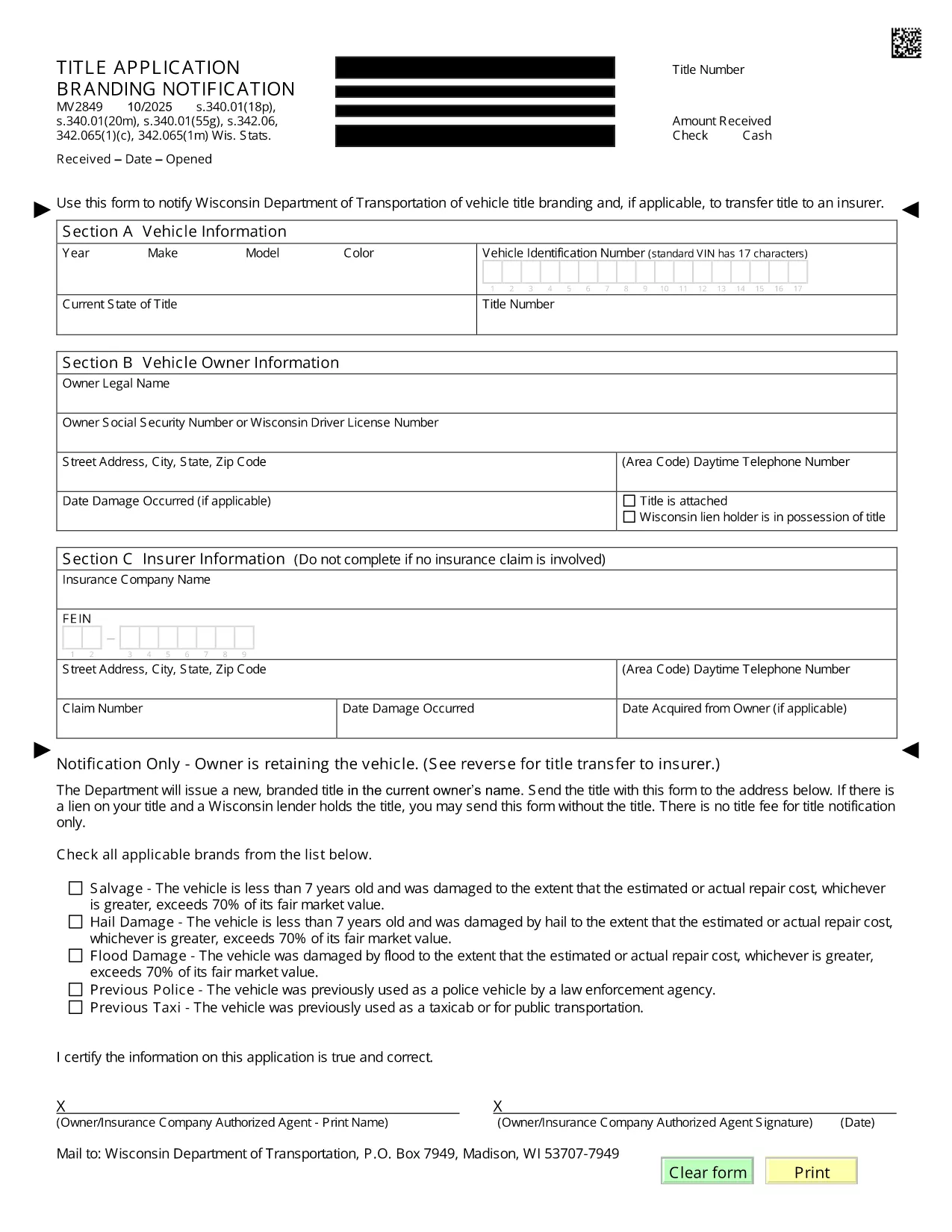
The MV2849 is the Wisconsin Department of Transportation’s official form for notifying the state of a vehicle title branding change and, when required, transferring the title to an insurer. This fillable PDF is now available directly on Formize, so you can complete it without printing or scanning.

What is Form MV2849?

Form MV2849 – Title Branding Notification – is used to record any branding (e.g., salvage, rebuilt, junk) that appears on a vehicle’s title. The form also serves as a request to transfer the title to an insurance company when the vehicle is declared a total loss.

When and Who Should Use MV2849

  • Dealers who receive a branded title from a previous owner.
  • Insurance adjusters processing a total‑loss claim.
  • Vehicle owners who need to update the branding status on their title.

How to Complete the MV2849 Online

Follow the simple steps below – no PDF editor needed:

  1. Click the "Fill out this form" button on this page.
  2. Wait for the Formize PDF Filler app to load (a few seconds).
  3. Enter the required information in each field. The form auto‑saves as you type.
  4. Review the completed form for accuracy.
  5. Submit directly to WisDOT or download a copy for your records.

Common Mistakes to Avoid

  • Leaving the VIN blank: The Vehicle Identification Number is mandatory.
  • Incorrect branding code: Use the exact code listed on the existing title.
  • Missing insurer information: Provide the insurer’s name and policy number when transferring the title.

Where to Submit the Completed Form

After filling out the MV2849, you can:

  • Mail the printed form to the Wisconsin Department of Transportation, Vehicle Titling Division.
  • Deliver it in person at any WisDOT DMV office.
  • Attach the PDF to an email if your insurer accepts electronic submissions.

Need help? Contact WisDOT’s Vehicle Titling hotline at 1‑800‑534‑6386.

DUK
  • Do I need to print the MV2849 after filling it online?

    No. You can submit the completed PDF electronically to your insurer or print it only if WisDOT requires a hard copy.

  • Is the Formize filler secure?

    Yes. All data is processed in your browser and never stored on our servers unless you choose to save a copy.

  • Can I edit the form after I submit it?

    Once submitted to WisDOT, the form cannot be edited. Make sure all information is correct before clicking Submit.

  • What is the branding code and where do I find it?

    The branding code appears on your current title (e.g., "S" for salvage, "R" for rebuilt). Enter the exact code in the designated field.

  • Do I need a signature on the PDF?

    A digital signature is accepted. Use the signature field in the Formize filler, then print and sign if a physical copy is required.

  • How long does it take WisDOT to process the MV2849?

    Processing typically takes 5‑7 business days after receipt of a complete form.

KAIP

Kaip nemokamai užpildyti MV2849 internete, atlikdami 5 paprastus veiksmus:

  1. 1
    Open the Fillable Form
    Click the "Fill out this form" button on this page. The Formize PDF Filler loads instantly.
  2. 2
    Enter Required Information
    Type the VIN, owner details, branding code, and insurer information into the highlighted fields.
  3. 3
    Review for Accuracy
    Use the built‑in preview to double‑check every entry before submitting.
  4. 4
    Submit or Download
    Choose to submit the form directly to WisDOT or download a PDF copy for mailing.
  5. 5
    Save a Confirmation
    After submission, save the confirmation page or email receipt for your records.
Formuokite PDF užpildymo programą
APIE

Transporto priemonių registracijos formos

Jei turite arba nuomojatės motorinę transporto priemonę, priekabą ar valtį, turite laikytis tam tikrų įsipareigojimų, kad jūsų transporto priemonė būtų teisėtai registruota ir saugi.

MV2849 yra viena iš transporto priemonių registracijos formų, kurios yra dokumentai, naudojami motorinei transporto priemonei įregistruoti atitinkamoje valstijos ar provincijos institucijoje. Šios formos paprastai reikalingos, kai asmuo perka naują ar naudotą transporto priemonę arba kai su transporto priemone persikelia į naują valstiją ar provinciją.

Tikslūs reikalavimai ir formos, reikalingos transporto priemonės registracijai, gali skirtis priklausomai nuo vietos, tačiau paprastai procesas apima informacijos apie transporto priemonę, savininką ir bet kokius transporto priemonės arešto pateikimą.

Kai bus pateiktos registracijos formos ir mokesčiai, valstybės ar provincijos institucija transporto priemonės savininkui išduos registracijos liudijimą arba valstybinį numerį. Ši registracija leidžia teisėtai eksploatuoti transporto priemonę viešuosiuose keliuose ir greitkeliuose.

FUNKCIJOS

PDF užpildas

Lengviausias būdas užpildyti MV2849 internete

  • Greitai užpildykite MV2849
    Ieškote būdo greitai užpildyti MV2849 internete? Naudodami internetinį nemokamą PDF formų užpildą sužinosite, kaip redaguoti ir užpildyti šį pdf dokumentą greičiau nei per minutę.
  • Lengva naudoti internetinį PDF redaktorių
    Atsibodo spausdinti PDF failus, kad galėtumėte juos redaguoti prieš nuskaitydami iš naujo ir siųsdami atgal? Redaguoti PDF dokumentus internete nemokamai. Norėdami sutaupyti laiko ir popieriaus, naudokite mūsų internetinį pdf redaktorių.
  • Puikūs įrankiai, visos platformos
    Svarstote, kaip užpildyti MV2849 „Mac“ kompiuteryje, o gal kaip nemokamai naudoti PDF užpildą? Mūsų internetiniai PDF įrankiai veikia visose platformose.
  • Saugi failų saugykla
    Užbaigti „MV2849“ failai saugomi saugioje duomenų bazėje, kurią valdo „Amazon Cloud“ priegloba. Galite bet kada ištrinti failus iš mūsų sistemos. Bet kokiu atveju šie failai automatiškai ištrinami po 24 valandų.
  • Kalbėkitės su MV2849
    Kalbėkite su „MV2849“ naudodami Chatize, kuri yra nemokama PDF skaitymo priemonė. Užduokite klausimų ir gaukite atsakymus iš „MV2849“. Tiesiog spustelėkite aukščiau esantį mygtuką Kalbėtis su dokumentu.

Ištrinti užpildymo seansą

Ištrinti pasirinktą pildymo seansą? Tokiu atveju jūsų pažanga pildant formą bus prarasta.

Ištrinti redagavimo sesiją

Ištrinti pasirinktą redagavimo sesiją? Tokiu atveju jūsų pažanga kuriant ir redaguojant formą bus prarasta.