Pasirinkite kalbą

VA Form 21‑8940 – Fillable PDF Download

  1. Kalba Anglų
  2. Šalis JAV
  3. Veikla Veterans Benefits
  4. skyrius Veterans Affairs
VA Form 21‑8940 – Fillable PDF Download

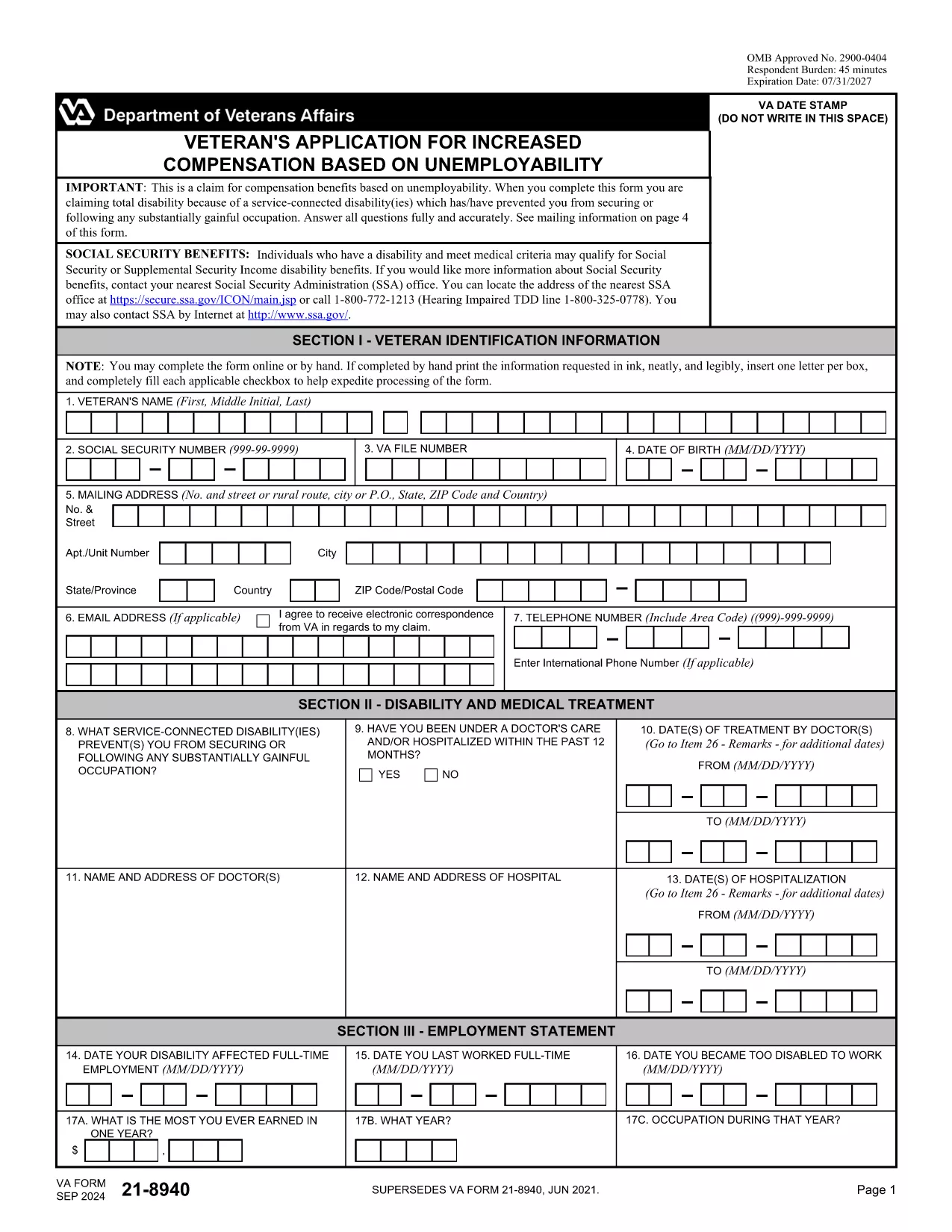
What Is VA Form 21‑8940?

VA Form 21‑8940, also known as the "Veteran's Application for Increased Compensation Based on New Evidence of a Service‑Connected Disability," is used by veterans who believe their service‑connected condition has worsened. The form allows you to request a re‑evaluation of your disability rating and, potentially, a higher compensation amount.

How to Complete the Form Online

Instead of downloading, printing, and scanning, you can fill out the form directly on our site:

  1. Click the "Fill out this form" button below.
  2. Wait a moment while the Formize PDF Filler app loads the fillable version of VA Form 21‑8940.
  3. Enter your information in each field, save your progress, and submit securely.

The online filler saves your data in real time, so you never lose a entry.

Common Mistakes to Avoid

  • Leaving required fields blank: Every field marked with an asterisk (*) must be completed.
  • Incorrect dates: Double‑check service dates and medical appointment dates; errors can delay processing.
  • Missing supporting documents: Attach medical records, doctor statements, and any new evidence before submitting.
  • Using the wrong version: Ensure you are using the latest PDF (expiration 07/31/2027).

Where to Submit the Completed Form

After you finish, you can either:

  • Upload the completed PDF through the VA’s eBenefits portal, or
  • Print, sign, and mail it to the regional VA office listed on the form.

Submitting electronically speeds up review and reduces the chance of lost paperwork.

DUK
  • Do I need a PDF editor to fill out VA Form 21‑8940?

    No. Our online Formize PDF Filler lets you complete the form directly in the browser without any additional software.

  • Can I save the form and return later?

    Yes. The filler automatically saves your progress. You can return anytime using the same link to continue where you left off.

  • What supporting documents should I attach?

    Attach recent medical records, a doctor’s statement describing the worsening condition, and any new service‑connected evidence.

  • Is the online version the most current form?

    Absolutely. The PDF linked on this page is the latest version with an expiration date of 07/31/2027.

  • How long does the VA take to process a Form 21‑8940?

    Processing times vary, but most veterans receive a decision within 60‑90 days after the VA receives a complete application.

  • Can I submit the form electronically?

    Yes. After completing the form, you can upload the PDF to the VA’s eBenefits portal for faster processing.

  • What if I make a mistake after submitting?

    Contact your regional VA office promptly. You may be asked to submit a corrected form or additional documentation.

KAIP

Kaip nemokamai užpildyti VA Form 21-8940 internete, atlikdami 3 paprastus veiksmus:

  1. 1
    Open the Fillable Form
    Click the "Fill out this form" button on the page. The Formize PDF Filler will load the VA Form 21‑8940 directly in your browser.
  2. 2
    Enter Your Information
    Complete each required field, attach supporting documents, and use the Save button often to avoid data loss.
  3. 3
    Submit Securely
    When all sections are finished, click Submit. You will receive a confirmation email with a copy of your completed PDF.
Formuokite PDF užpildymo programą
APIE

VA Form 21-8940 šabloną

Naudodami tradicinį PDF dokumento peržiūros ir pildymo funkcijų rinkinį, žiniatinklio programos pranašumus ir interaktyvų išdėstymą, galite užbaigti VA Form 21-8940 per kelias minutes.

FUNKCIJOS

PDF užpildas

Lengviausias būdas užpildyti VA Form 21-8940 internete

  • Greitai užpildykite VA Form 21-8940
    Ieškote būdo greitai užpildyti VA Form 21-8940 internete? Naudodami internetinį nemokamą PDF formų užpildą sužinosite, kaip redaguoti ir užpildyti šį pdf dokumentą greičiau nei per minutę.
  • Lengva naudoti internetinį PDF redaktorių
    Atsibodo spausdinti PDF failus, kad galėtumėte juos redaguoti prieš nuskaitydami iš naujo ir siųsdami atgal? Redaguoti PDF dokumentus internete nemokamai. Norėdami sutaupyti laiko ir popieriaus, naudokite mūsų internetinį pdf redaktorių.
  • Puikūs įrankiai, visos platformos
    Svarstote, kaip užpildyti VA Form 21-8940 „Mac“ kompiuteryje, o gal kaip nemokamai naudoti PDF užpildą? Mūsų internetiniai PDF įrankiai veikia visose platformose.
  • Saugi failų saugykla
    Užbaigti „VA Form 21-8940“ failai saugomi saugioje duomenų bazėje, kurią valdo „Amazon Cloud“ priegloba. Galite bet kada ištrinti failus iš mūsų sistemos. Bet kokiu atveju šie failai automatiškai ištrinami po 24 valandų.
  • Kalbėkitės su VA Form 21-8940
    Kalbėkite su „VA Form 21-8940“ naudodami Chatize, kuri yra nemokama PDF skaitymo priemonė. Užduokite klausimų ir gaukite atsakymus iš „VA Form 21-8940“. Tiesiog spustelėkite aukščiau esantį mygtuką Kalbėtis su dokumentu.

Ištrinti užpildymo seansą

Ištrinti pasirinktą pildymo seansą? Tokiu atveju jūsų pažanga pildant formą bus prarasta.

Ištrinti redagavimo sesiją

Ištrinti pasirinktą redagavimo sesiją? Tokiu atveju jūsų pažanga kuriant ir redaguojant formą bus prarasta.