Pasirinkite kalbą

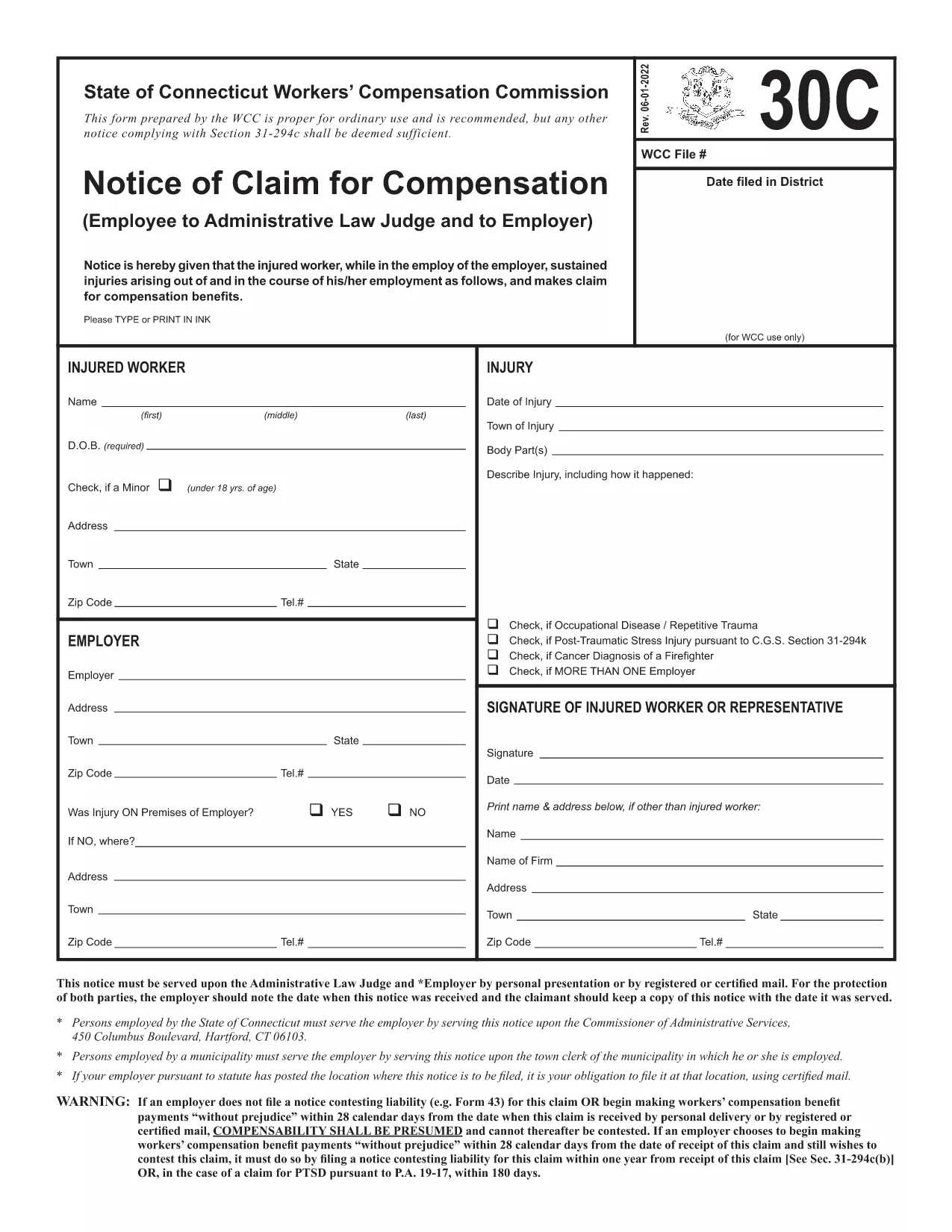
Form 30C – Notice of Claim for Workers’ Compensation

  1. Kalba Anglų
  2. Šalis JAV
  3. skyrius Workers' Compensation
  4. Veikla Workers' Compensation Claims
Form 30C – Notice of Claim for Workers’ Compensation

The Form 30C is the official "Notice of Claim for Compensation" used in Connecticut workers’ compensation cases. It must be filed promptly after a work‑related injury or occupational disease to protect your right to benefits.

What Is Form 30C and When Is It Required?

Form 30C is required whenever an employee suffers an injury or illness that is believed to be job‑related. Connecticut law sets a filing deadline of one year from the date of injury (or three years from the first manifestation of a disease). Submitting this form starts the claims process with the Workers’ Compensation Commission (WCC).

How to Complete the Fillable Form 30C Online

Instead of downloading a static PDF, simply click the "Fill out this form" button on this page. The Formize PDF Filler app will load the fillable version of Form 30C, allowing you to type directly into each field, add dates, and sign electronically.

  • Step 1: Click the blue "Fill out this form" button.
  • Step 2: Wait a few seconds while the Formize PDF Filler loads.
  • Step 3: Complete every required field – the app highlights missing information.
  • Step 4: Save your progress or submit the form directly to the WCC district office and your employer.

Common Mistakes to Avoid When Filing Form 30C

Even a small error can delay your claim. Keep these tips in mind:

  • Missing signatures: Both the employee and employer must sign.
  • Incorrect dates: Verify the injury date and the date you are filing.
  • Incomplete contact info: Provide a current phone number and mailing address.
  • Failing to attach supporting documents: Include medical reports or accident reports when required.

Using the online fillable version reduces these errors because required fields are flagged in real time.

Need a printable copy? You can still download the original PDF below, but we highly recommend the online filler for a faster, error‑free experience.

DUK
  • What is the filing deadline for Form 30C?

    You must file Form 30C within one year of the injury date, or within three years from the first symptom of an occupational disease.

  • Can I file Form 30C online?

    Yes. Using the Formize PDF Filler, you can complete the fillable version directly in your browser without downloading a static PDF.

  • Do I need a lawyer to fill out Form 30C?

    A lawyer is not required to complete the form, but you may consult one if you have complex medical or legal questions.

  • What happens if I miss the filing deadline?

    Missing the deadline may result in a denial of benefits. In some cases, you can request an extension, but it must be approved by the Workers’ Compensation Commission.

  • Do I need to attach supporting documents?

    Yes. Include any medical reports, accident reports, or employer statements that support your claim.

  • Can I print the completed form for my records?

    After completing the form online, you can download a PDF copy and print it for your personal records.

  • Where do I send the completed Form 30C?

    Send a copy to the appropriate WCC district office and provide a copy to your employer. The online filler can generate the correct mailing addresses.

KAIP

Kaip nemokamai užpildyti Form 30C internete, atlikdami 3 paprastus veiksmus:

  1. 1
    Open the Fillable Form
    Click the "Fill out this form" button on the page. The Formize PDF Filler will open the fillable Form 30C in your browser.
  2. 2
    Enter Your Information
    Type directly into each highlighted field. The filler validates dates, signatures, and required sections in real time.
  3. 3
    Save or Submit
    When all fields are complete, either save a copy for your records or submit the form electronically to the Connecticut Workers’ Compensation Commission and your employer.
Formuokite PDF užpildymo programą
APIE

Form 30C šabloną

Naudodami tradicinį PDF dokumento peržiūros ir pildymo funkcijų rinkinį, žiniatinklio programos pranašumus ir interaktyvų išdėstymą, galite užbaigti Form 30C per kelias minutes.

FUNKCIJOS

PDF užpildas

Lengviausias būdas užpildyti Form 30C internete

  • Greitai užpildykite Form 30C
    Ieškote būdo greitai užpildyti Form 30C internete? Naudodami internetinį nemokamą PDF formų užpildą sužinosite, kaip redaguoti ir užpildyti šį pdf dokumentą greičiau nei per minutę.
  • Lengva naudoti internetinį PDF redaktorių
    Atsibodo spausdinti PDF failus, kad galėtumėte juos redaguoti prieš nuskaitydami iš naujo ir siųsdami atgal? Redaguoti PDF dokumentus internete nemokamai. Norėdami sutaupyti laiko ir popieriaus, naudokite mūsų internetinį pdf redaktorių.
  • Puikūs įrankiai, visos platformos
    Svarstote, kaip užpildyti Form 30C „Mac“ kompiuteryje, o gal kaip nemokamai naudoti PDF užpildą? Mūsų internetiniai PDF įrankiai veikia visose platformose.
  • Saugi failų saugykla
    Užbaigti „Form 30C“ failai saugomi saugioje duomenų bazėje, kurią valdo „Amazon Cloud“ priegloba. Galite bet kada ištrinti failus iš mūsų sistemos. Bet kokiu atveju šie failai automatiškai ištrinami po 24 valandų.
  • Kalbėkitės su Form 30C
    Kalbėkite su „Form 30C“ naudodami Chatize, kuri yra nemokama PDF skaitymo priemonė. Užduokite klausimų ir gaukite atsakymus iš „Form 30C“. Tiesiog spustelėkite aukščiau esantį mygtuką Kalbėtis su dokumentu.

Ištrinti užpildymo seansą

Ištrinti pasirinktą pildymo seansą? Tokiu atveju jūsų pažanga pildant formą bus prarasta.

Ištrinti redagavimo sesiją

Ištrinti pasirinktą redagavimo sesiją? Tokiu atveju jūsų pažanga kuriant ir redaguojant formą bus prarasta.