Pilih Bahasa

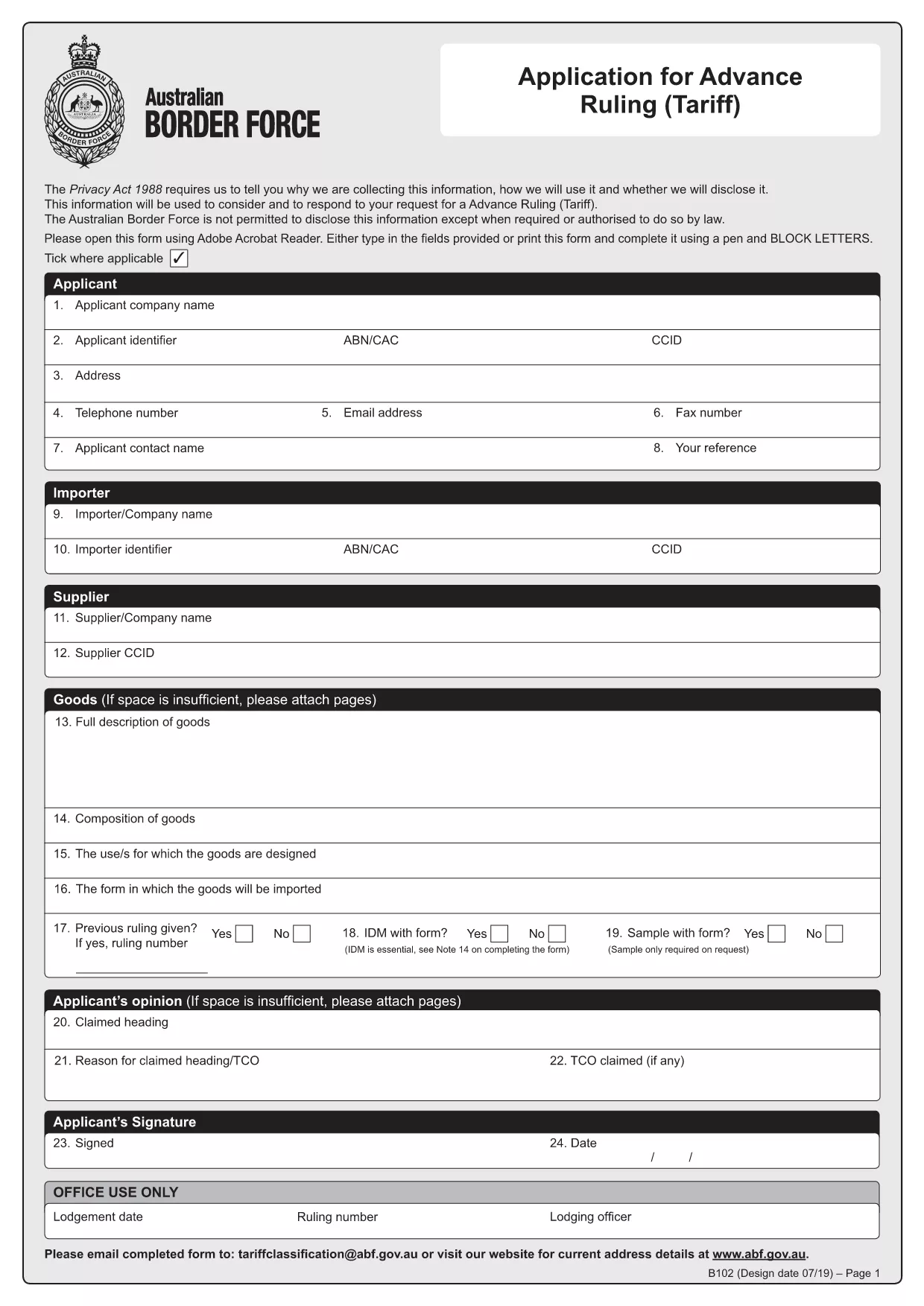
HSN Code Application Form (B102) – Fillable PDF

  1. Bahasa Inggeris
  2. Negara Australia
  3. Aktiviti Customs Classification
  4. Jabatan Australian Border Force
Isi borang ini
HSN Code Application Form (B102) – Fillable PDF

What is the HSN Code Application Form?

The HSN (Harmonized System Nomenclature) code is the international standard for classifying goods in customs. In Australia, the Form B102 – Application for Advance Ruling (Tariff) is used to request an official classification (HSN code) before importing goods. This ensures you know the correct duty rates and compliance requirements.

Why Use the Fillable B102 Form Online?

Formize turns the static PDF into a fillable, interactive form that can be completed in any browser. Benefits include:

  • Instant validation of required fields
  • Auto‑save so you never lose data
  • Direct PDF download after you finish
  • No need for Adobe Acrobat or other editors

Step‑by‑Step Guide to Complete the Form

Follow these simple steps to get your HSN code application ready for submission.

Common Mistakes to Avoid

Even experienced importers can miss details. Avoid these pitfalls:

  • Leaving the "Manufacturer Details" section blank.
  • Providing an incomplete product description.
  • Submitting the form without supporting technical specifications.

Where to Submit Your Completed Form

After you finish, download the completed PDF and email it to tariffclassification@abf.gov.au within 5 days of the request, or mail it to the National Trade Advice Centre, GPO Box 2809, Melbourne VIC 3001.

SOALAN LAZIM
  • What is an HSN code?

    An HSN (Harmonized System Nomenclature) code is a globally recognized six‑digit number used to classify goods for customs duties, taxes, and trade statistics.

  • Do I need a B102 form for every import?

    No. You only need to submit a B102 form when you want an advance ruling on the classification of a specific product before importing it.

  • Can I edit the form after I download it?

    Yes, but the easiest method is to complete the form online with Formize, then download the final PDF. Editing a static PDF later can cause formatting issues.

  • How long does the Australian Border Force take to issue a ruling?

    The standard service time is 30 days, though it can be longer during periods of high demand.

  • Is there a fee for submitting the B102 application?

    The service is free of charge when you submit directly to the Australian Border Force. Brokers may charge their own fees for assistance.

  • What supporting documents should I attach?

    Include product data sheets, technical specifications, photographs, and any prior classification decisions that relate to the goods.

  • What if I make a mistake on the form?

    You can withdraw the request and submit a new B102 application. Ensure all fields are correct before submission to avoid delays.

BAGAIMANA UNTUK

Cara mengisi HSN code application form secara percuma, dalam talian dalam 4 langkah mudah:

  1. 1
    Open the Fillable Form
    Click the **Fill out this form** button on the page. The Formize PDF Filler app loads instantly in your browser.
  2. 2
    Enter Your Information
    Complete each section—importer details, product description, and supporting documents. The app highlights any missing required fields.
  3. 3
    Validate & Save
    Use the built‑in validator to check for errors, then click **Save**. Your data is stored securely online.
  4. 4
    Download the Completed PDF
    When all fields are filled, click **Download PDF**. The file is ready for submission to the Australian Border Force.
Bentuk apl Pengisi PDF
TENTANG

templat HSN code application form.

Dengan set ciri tradisional untuk melihat dan mengisi dokumen PDF, digabungkan dengan faedah aplikasi web dan reka letak responsif, anda boleh melengkapkan HSN code application form dalam beberapa minit.

CIRI-CIRI

Pengisi PDF

Cara paling mudah untuk mengisi HSN code application form dalam talian

  • Cepat isi HSN code application form
    Mencari cara untuk mengisi HSN code application form dengan cepat dalam talian? Dengan pengisi borang PDF percuma dalam talian kami, anda akan tahu cara mengedit dan mengisi dokumen pdf ini dalam masa kurang daripada satu minit.
  • Mudah untuk menggunakan editor PDF dalam talian
    Bosan dengan mencetak fail PDF supaya anda boleh mengeditnya, sebelum mengimbas semula dan menghantarnya semula? Edit dokumen PDF secara percuma dalam talian. Gunakan editor pdf dalam talian kami untuk menjimatkan masa dan kertas.
  • Alat yang hebat, semua platform
    Tertanya-tanya cara mengisi HSN code application form pada Mac, atau mungkin cara menggunakan pengisi PDF secara percuma? Alat PDF dalam talian kami berfungsi pada semua platform.
  • Simpanan fail selamat
    Fail "HSN code application form" yang lengkap disimpan dalam pangkalan data selamat yang diuruskan oleh pengehosan Amazon Cloud. Anda boleh memadamkan fail anda daripada sistem kami pada bila-bila masa. Walau apa pun, fail ini dipadamkan secara automatik selepas 24 jam.
  • Sembang dengan HSN code application form
    Sembang dengan "HSN code application form" di Chatize yang merupakan pembantu pembaca PDF percuma. Tanya soalan dan dapatkan jawapan daripada "HSN code application form". Cuma klik pada butang Sembang Dengan Dokumen di atas.

Padamkan sesi pengisian

Padamkan sesi pengisian yang dipilih? Dalam kes ini, kemajuan anda dalam melengkapkan borang akan hilang.

Padamkan sesi penyuntingan

Padamkan sesi penyuntingan yang dipilih? Dalam kes ini, kemajuan anda dalam membuat dan mengedit borang akan hilang.