Pilih Bahasa

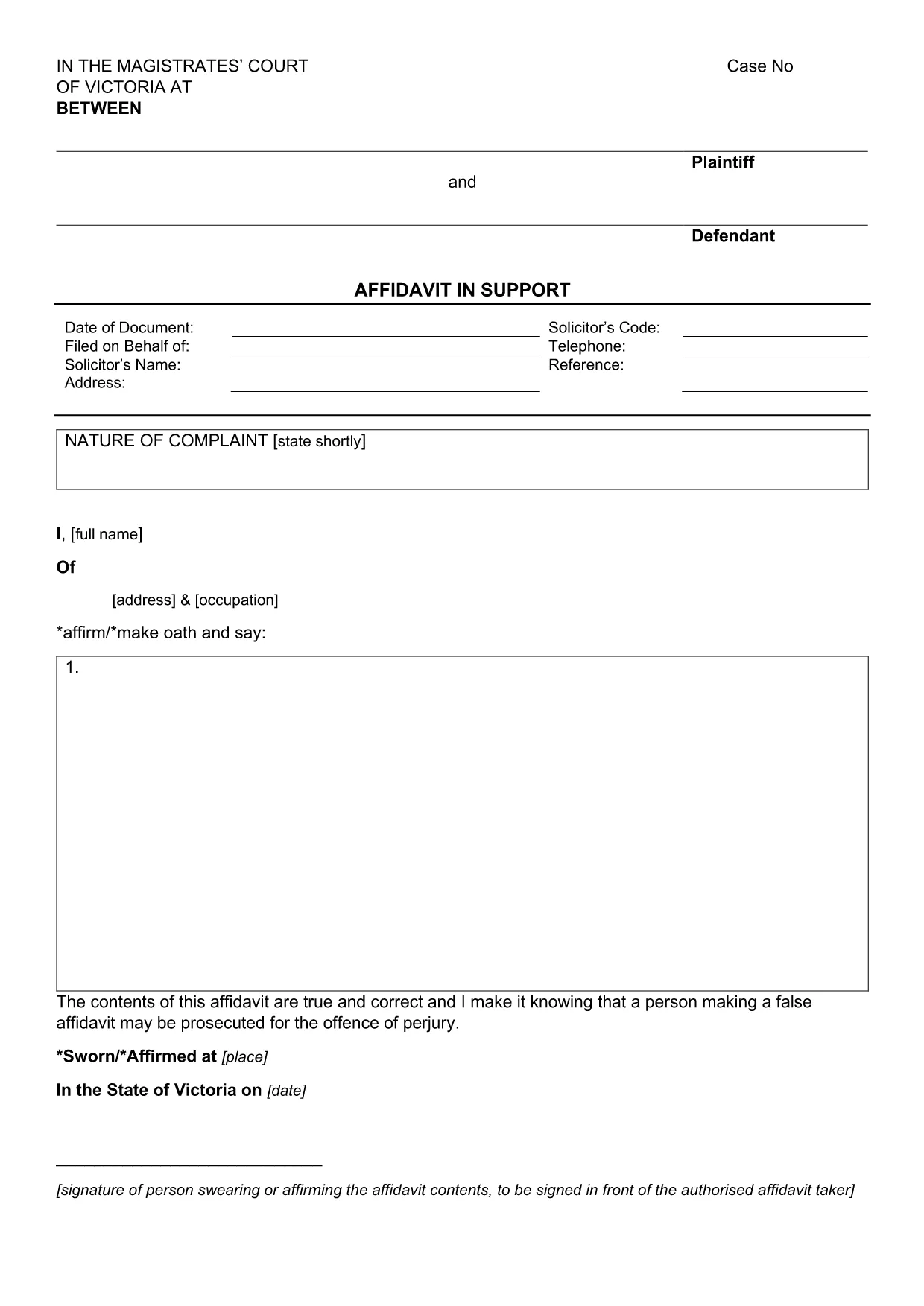
Affidavit in Support of Application – Fillable PDF Form

  1. Negara Australia
  2. Bahasa Inggeris
  3. Jabatan Courts
  4. Aktiviti Legal Documents
Isi borang ini
Affidavit in Support of Application – Fillable PDF Form

An affidavit is a written, sworn statement of facts that can be used as evidence in court or other legal proceedings. The Affidavit in Support of Application is specifically designed to accompany a court application, providing the tribunal with a clear, factual narrative.

This fillable PDF form meets the requirements of the Magistrates' Court of Victoria and can be completed entirely online using Formize’s PDF Filler app. No extra software is needed – just click the button, fill the fields, and download or print your completed affidavit.

Why choose a fillable PDF? It ensures consistent formatting, reduces the chance of missing information, and speeds up the filing process. Once completed, you can save a digital copy for your records or print a hard‑copy for submission.

Below you’ll find a step‑by‑step guide, tips for each section, and a checklist of common errors to avoid.

SOALAN LAZIM
  • What is an affidavit and why do I need one?

    An affidavit is a written statement made under oath. It is used to present facts to a court or tribunal when you cannot appear in person.

  • Can I edit the PDF on my phone or tablet?

    Yes. The Formize PDF Filler works on all modern browsers, including mobile devices, so you can complete the form on a smartphone or tablet.

  • Do I need a lawyer to fill out this affidavit?

    While legal advice is recommended for complex cases, the fillable PDF includes prompts and guidance to help you complete it yourself.

  • How many pages does the affidavit have?

    The standard Affidavit in Support of Application is a single‑page PDF with space for your personal details, case information, and a sworn statement.

  • What should I do if I make a mistake?

    Use the Formize editor’s “Undo” button or clear the field and re‑enter the correct information. Save a new copy before submitting.

  • Is the e‑signature legally binding?

    Yes. In most Australian courts, an electronic signature created through a reputable PDF filler is accepted as a valid signature.

  • Can I submit the PDF electronically to the court?

    Check your local court’s filing rules. Many courts now accept electronic filings, but some still require a printed, signed copy.

  • Is there a cost to download or use the form?

    No. The PDF is free to download, and the Formize filler is available at no charge for basic use.

BAGAIMANA UNTUK

Cara mengisi affidavit form secara percuma, dalam talian dalam 5 langkah mudah:

  1. 1
    Open the Fillable Form
    Click the “Fill out this form” button on the page. The Formize PDF Filler app will launch in your browser.
  2. 2
    Wait for the Filler to Load
    A few seconds may pass while the PDF loads. You’ll see editable fields highlighted in blue.
  3. 3
    Enter Your Information
    Type directly into each field – name, address, case details, and sworn statements. Use the Tab key to move quickly between fields.
  4. 4
    Review and Sign
    Check every entry for accuracy. When finished, use the built‑in e‑signature tool to sign the affidavit.
  5. 5
    Save or Print
    Click “Download” to save a PDF copy or “Print” to produce a hard‑copy for court filing.
Bentuk apl Pengisi PDF
TENTANG

templat affidavit form.

Dengan set ciri tradisional untuk melihat dan mengisi dokumen PDF, digabungkan dengan faedah aplikasi web dan reka letak responsif, anda boleh melengkapkan affidavit form dalam beberapa minit.

CIRI-CIRI

Pengisi PDF

Cara paling mudah untuk mengisi affidavit form dalam talian

  • Cepat isi affidavit form
    Mencari cara untuk mengisi affidavit form dengan cepat dalam talian? Dengan pengisi borang PDF percuma dalam talian kami, anda akan tahu cara mengedit dan mengisi dokumen pdf ini dalam masa kurang daripada satu minit.
  • Mudah untuk menggunakan editor PDF dalam talian
    Bosan dengan mencetak fail PDF supaya anda boleh mengeditnya, sebelum mengimbas semula dan menghantarnya semula? Edit dokumen PDF secara percuma dalam talian. Gunakan editor pdf dalam talian kami untuk menjimatkan masa dan kertas.
  • Alat yang hebat, semua platform
    Tertanya-tanya cara mengisi affidavit form pada Mac, atau mungkin cara menggunakan pengisi PDF secara percuma? Alat PDF dalam talian kami berfungsi pada semua platform.
  • Simpanan fail selamat
    Fail "affidavit form" yang lengkap disimpan dalam pangkalan data selamat yang diuruskan oleh pengehosan Amazon Cloud. Anda boleh memadamkan fail anda daripada sistem kami pada bila-bila masa. Walau apa pun, fail ini dipadamkan secara automatik selepas 24 jam.
  • Sembang dengan affidavit form
    Sembang dengan "affidavit form" di Chatize yang merupakan pembantu pembaca PDF percuma. Tanya soalan dan dapatkan jawapan daripada "affidavit form". Cuma klik pada butang Sembang Dengan Dokumen di atas.

Padamkan sesi pengisian

Padamkan sesi pengisian yang dipilih? Dalam kes ini, kemajuan anda dalam melengkapkan borang akan hilang.

Padamkan sesi penyuntingan

Padamkan sesi penyuntingan yang dipilih? Dalam kes ini, kemajuan anda dalam membuat dan mengedit borang akan hilang.