
Pilih Bahasa

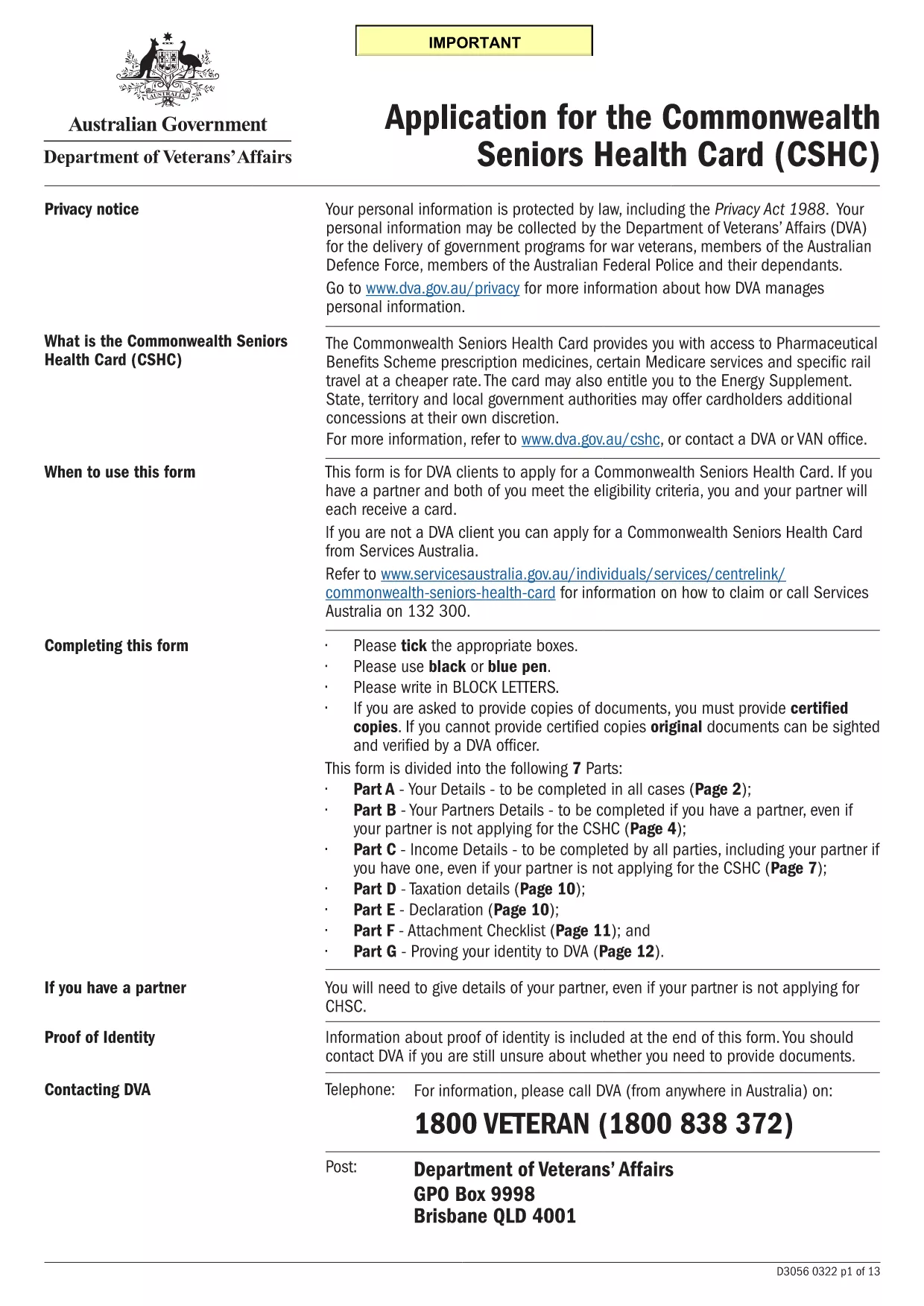
Commonwealth Seniors Health Card Application Form

  1. Bahasa Inggeris
  2. Negara Australia
  3. Jabatan Services Australia
  4. Aktiviti Health Benefits
Isi borang ini
Commonwealth Seniors Health Card Application Form

The Commonwealth Seniors Health Card (CSHC) gives eligible Australian seniors access to cheaper prescription medicines, selected Medicare services, rail travel discounts and other government concessions. This page provides everything you need to download, fill, and submit the official CSHC application form.

What is the Commonwealth Seniors Health Card?

The CSHC is a government‑issued card for people who have reached the age‑pension age (or are close to it) and meet income or asset tests. Cardholders enjoy reduced costs on the Pharmaceutical Benefits Scheme (PBS), bulk‑billing Medicare, and may receive the Energy Supplement.

Eligibility Criteria

  • Age: Must have reached age‑pension age (or be within 12 months of it).
  • Residence: Australian citizen or permanent resident living in Australia.
  • Income/Assets: Meet the income and asset thresholds set by Services Australia.
  • Partner: If you have a partner, they must also meet the criteria for a joint application.

How to Complete the Application Form

Our fillable PDF is hosted on Formize. Click the Fill out this form button below and the Formize PDF Filler will open directly in your browser – no extra software required.

Common Mistakes to Avoid

  • Leaving any mandatory field blank – the filler will flag these before you submit.
  • Providing outdated address or contact details – ensure all information is current.
  • Submitting without checking the income and asset calculations – errors can delay processing.
  • Forgetting to sign the declaration section – an unsigned form is rejected.

Submit Your Application

Once you have saved the completed PDF, you can either upload it through your MyGov account or mail the printed copy to Services Australia. Keep a copy for your records.

Ready to start? Click the button below to open the fillable form instantly.

SOALAN LAZIM
  • Who can apply for the Commonwealth Seniors Health Card?

    Anyone who has reached age‑pension age, lives in Australia, and meets the income and asset limits set by Services Australia can apply. Partners may apply jointly if they also meet the criteria.

  • Is the form available in a fillable PDF format?

    Yes. The official application is a fillable PDF that can be completed online using the Formize PDF Filler – no extra software needed.

  • Can I save my progress and finish later?

    Absolutely. The Formize filler lets you save the partially completed form to your device, so you can return and finish at any time.

  • What documents do I need to attach?

    You’ll need proof of identity (driver’s licence or passport), recent utility bills for address verification, and recent financial statements to confirm income and assets.

  • How long does processing take?

    Once Services Australia receives a complete application, processing typically takes 2‑4 weeks. You’ll be notified via mail or MyGov.

  • What if I make a mistake on the form?

    If you discover an error after submission, contact Services Australia to request a correction. It’s quicker to correct before sending.

  • Do I need a digital signature?

    A digital signature is not accepted. The form must be signed manually after printing, or you can use an electronic signature service that complies with Australian government standards.

BAGAIMANA UNTUK

Cara mengisi Commonwealth Seniors Health Card secara percuma, dalam talian dalam 5 langkah mudah:

  1. 1
    Click the Fill Out Button
    Press the "Fill out this form" button on the page. The Formize PDF Filler app will launch instantly in a new browser tab.
  2. 2
    Wait for the Form to Load
    The fillable PDF loads within seconds. All fields become editable directly in the browser.
  3. 3
    Enter Your Details
    Complete each section – personal information, income, assets, and the declaration. Required fields are highlighted.
  4. 4
    Save and Download
    When finished, click "Save" to download the completed PDF to your device. A copy is also stored in your browser for quick access.
  5. 5
    Submit to Services Australia
    Upload the saved PDF via MyGov or mail the printed form to Services Australia as instructed on the confirmation page.
Bentuk apl Pengisi PDF
TENTANG

templat Commonwealth Seniors Health Card.

Dengan set ciri tradisional untuk melihat dan mengisi dokumen PDF, digabungkan dengan faedah aplikasi web dan reka letak responsif, anda boleh melengkapkan Commonwealth Seniors Health Card dalam beberapa minit.

CIRI-CIRI

Pengisi PDF

Cara paling mudah untuk mengisi Commonwealth Seniors Health Card dalam talian

  • Cepat isi Commonwealth Seniors Health Card
    Mencari cara untuk mengisi Commonwealth Seniors Health Card dengan cepat dalam talian? Dengan pengisi borang PDF percuma dalam talian kami, anda akan tahu cara mengedit dan mengisi dokumen pdf ini dalam masa kurang daripada satu minit.
  • Mudah untuk menggunakan editor PDF dalam talian
    Bosan dengan mencetak fail PDF supaya anda boleh mengeditnya, sebelum mengimbas semula dan menghantarnya semula? Edit dokumen PDF secara percuma dalam talian. Gunakan editor pdf dalam talian kami untuk menjimatkan masa dan kertas.
  • Alat yang hebat, semua platform
    Tertanya-tanya cara mengisi Commonwealth Seniors Health Card pada Mac, atau mungkin cara menggunakan pengisi PDF secara percuma? Alat PDF dalam talian kami berfungsi pada semua platform.
  • Simpanan fail selamat
    Fail "Commonwealth Seniors Health Card" yang lengkap disimpan dalam pangkalan data selamat yang diuruskan oleh pengehosan Amazon Cloud. Anda boleh memadamkan fail anda daripada sistem kami pada bila-bila masa. Walau apa pun, fail ini dipadamkan secara automatik selepas 24 jam.
  • Sembang dengan Commonwealth Seniors Health Card
    Sembang dengan "Commonwealth Seniors Health Card" di Chatize yang merupakan pembantu pembaca PDF percuma. Tanya soalan dan dapatkan jawapan daripada "Commonwealth Seniors Health Card". Cuma klik pada butang Sembang Dengan Dokumen di atas.

Padamkan sesi pengisian

Padamkan sesi pengisian yang dipilih? Dalam kes ini, kemajuan anda dalam melengkapkan borang akan hilang.

Padamkan sesi penyuntingan

Padamkan sesi penyuntingan yang dipilih? Dalam kes ini, kemajuan anda dalam membuat dan mengedit borang akan hilang.