Pilih Bahasa

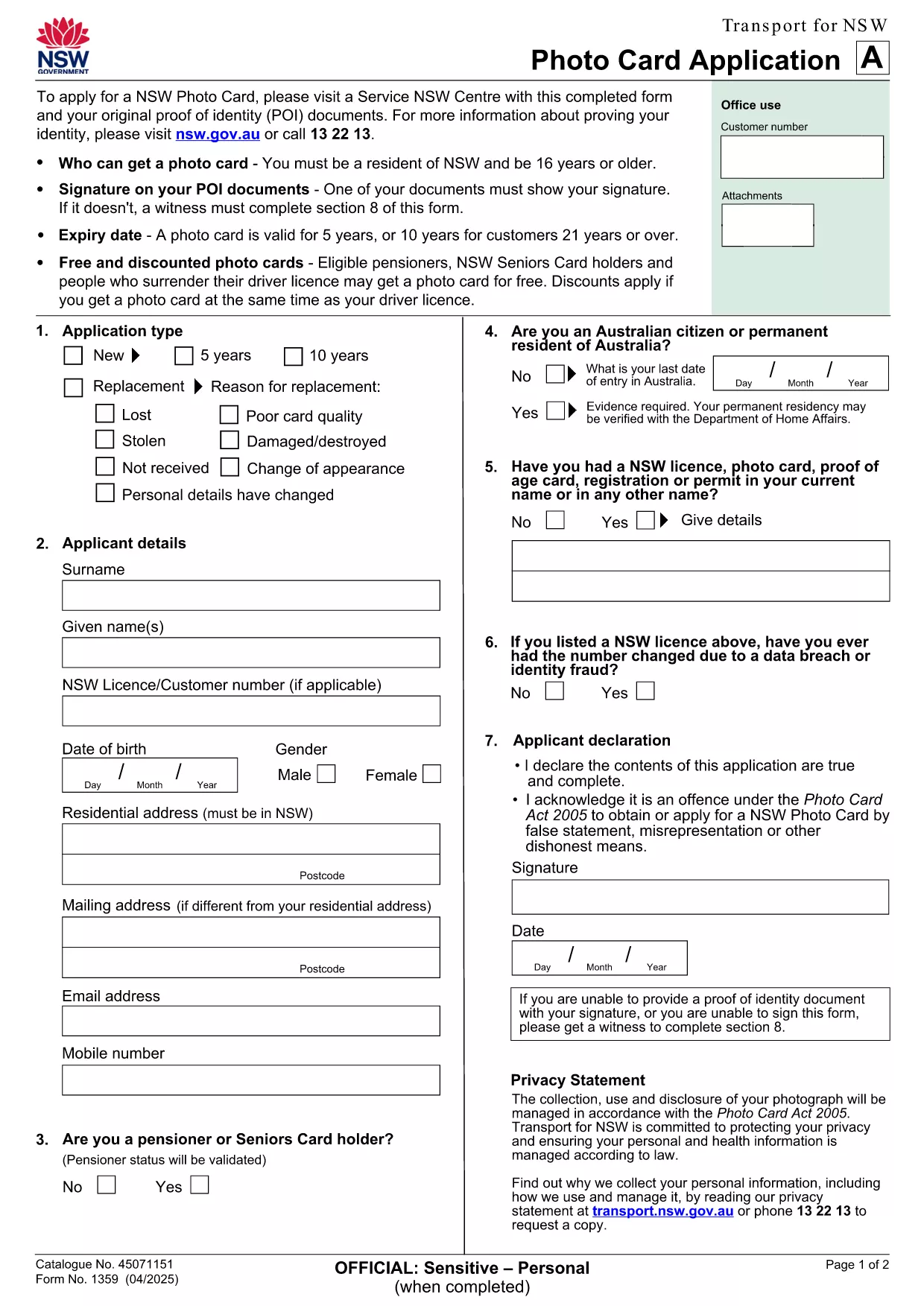
NSW Photo Card Application – Fillable PDF Form

  1. Negara Australia
  2. Bahasa Inggeris
  3. Aktiviti Identification
  4. Jabatan Transport for NSW
Isi borang ini
NSW Photo Card Application – Fillable PDF Form

Looking for a fast, secure way to apply for a NSW Photo Card? Our fillable PDF form lets you complete the official identification card application directly in your browser. No printing, scanning, or messy paperwork – just click, fill, and download.

Why You Need a NSW Photo Card

A NSW Photo Card is a government‑issued photo identification that proves your name, address, date of birth and photo. It’s perfect if you don’t have a driver licence or need a secondary ID for age‑restricted purchases, bank transactions, or online verification.

How to Complete the Fillable PDF Form

Follow these simple steps to fill out the form using the Formize PDF Filler app:

  • Click the "Fill out this form" button below.
  • Wait a few seconds while the Formize PDF Filler loads the document.
  • Enter your details in each field – the form automatically validates dates and numbers.
  • Upload a clear digital photo if the field requests one.
  • Review the completed form, then click Download to save a copy.

Common Mistakes to Avoid

  • Missing proof of identity documents: You must bring original documents (e.g., birth certificate, passport) to the Service NSW centre.
  • Incorrect photo specifications: Follow the photo guidelines – plain background, no sunglasses, and face fully visible.
  • Leaving fields blank: Even optional fields should be marked as "N/A" if not applicable.

Where to Submit Your Application

After downloading the completed PDF, print it and bring it to any Service NSW Centre with your supporting documents. You’ll have your photo taken on‑site, and the card will be issued within a few days.

Need a quick reference? Download the original PDF anytime.

SOALAN LAZIM
  • Can I submit the NSW Photo Card application online?

    No. The NSW government requires the completed form to be submitted in person at a Service NSW Centre, but you can fill it out online using our fillable PDF.

  • What documents do I need to bring?

    You must provide original proof of identity documents such as a birth certificate, passport, or existing driver licence, plus proof of address.

  • How long is the NSW Photo Card valid?

    The card is valid for 5 years. If you are 21 or over, you may be eligible for a 10‑year card.

  • Is there a fee for the Photo Card?

    Yes, fees vary depending on whether you hold a NSW driver licence and your concession status. Visit Service NSW for the latest fee schedule.

  • Can I use the Photo Card for online verification?

    In most cases, the NSW Photo Card is accepted as proof of identity, but some online services may still require a driver licence or passport. Check the service’s ID requirements.

  • What if I have a medical condition and cannot visit a centre?

    You may be eligible for a mail‑in application using a photo kit. Contact Service NSW for specific instructions.

BAGAIMANA UNTUK

Cara mengisi NSW Photo Card secara percuma, dalam talian dalam 6 langkah mudah:

  1. 1
    Click the Fill‑out Button
    Press the "Fill out this form" button on the page to launch the Formize PDF Filler.
  2. 2
    Wait for the Filler to Load
    The app loads the PDF in a few seconds – you’ll see the form fields become editable.
  3. 3
    Enter Your Details
    Type in your name, address, date of birth, and any other required information. Use the dropdowns where provided.
  4. 4
    Upload Your Photo
    If the form asks for a photo, click the upload button and select a clear, recent picture that meets the guidelines.
  5. 5
    Review and Download
    Check every field for accuracy, then click the Download button to save the completed form to your device.
  6. 6
    Print and Submit
    Print the filled PDF and take it, along with your original identity documents, to a Service NSW Centre.
Bentuk apl Pengisi PDF
TENTANG

templat NSW Photo Card.

Dengan set ciri tradisional untuk melihat dan mengisi dokumen PDF, digabungkan dengan faedah aplikasi web dan reka letak responsif, anda boleh melengkapkan NSW Photo Card dalam beberapa minit.

CIRI-CIRI

Pengisi PDF

Cara paling mudah untuk mengisi NSW Photo Card dalam talian

  • Cepat isi NSW Photo Card
    Mencari cara untuk mengisi NSW Photo Card dengan cepat dalam talian? Dengan pengisi borang PDF percuma dalam talian kami, anda akan tahu cara mengedit dan mengisi dokumen pdf ini dalam masa kurang daripada satu minit.
  • Mudah untuk menggunakan editor PDF dalam talian
    Bosan dengan mencetak fail PDF supaya anda boleh mengeditnya, sebelum mengimbas semula dan menghantarnya semula? Edit dokumen PDF secara percuma dalam talian. Gunakan editor pdf dalam talian kami untuk menjimatkan masa dan kertas.
  • Alat yang hebat, semua platform
    Tertanya-tanya cara mengisi NSW Photo Card pada Mac, atau mungkin cara menggunakan pengisi PDF secara percuma? Alat PDF dalam talian kami berfungsi pada semua platform.
  • Simpanan fail selamat
    Fail "NSW Photo Card" yang lengkap disimpan dalam pangkalan data selamat yang diuruskan oleh pengehosan Amazon Cloud. Anda boleh memadamkan fail anda daripada sistem kami pada bila-bila masa. Walau apa pun, fail ini dipadamkan secara automatik selepas 24 jam.
  • Sembang dengan NSW Photo Card
    Sembang dengan "NSW Photo Card" di Chatize yang merupakan pembantu pembaca PDF percuma. Tanya soalan dan dapatkan jawapan daripada "NSW Photo Card". Cuma klik pada butang Sembang Dengan Dokumen di atas.

Padamkan sesi pengisian

Padamkan sesi pengisian yang dipilih? Dalam kes ini, kemajuan anda dalam melengkapkan borang akan hilang.

Padamkan sesi penyuntingan

Padamkan sesi penyuntingan yang dipilih? Dalam kes ini, kemajuan anda dalam membuat dan mengedit borang akan hilang.