Pilih Bahasa

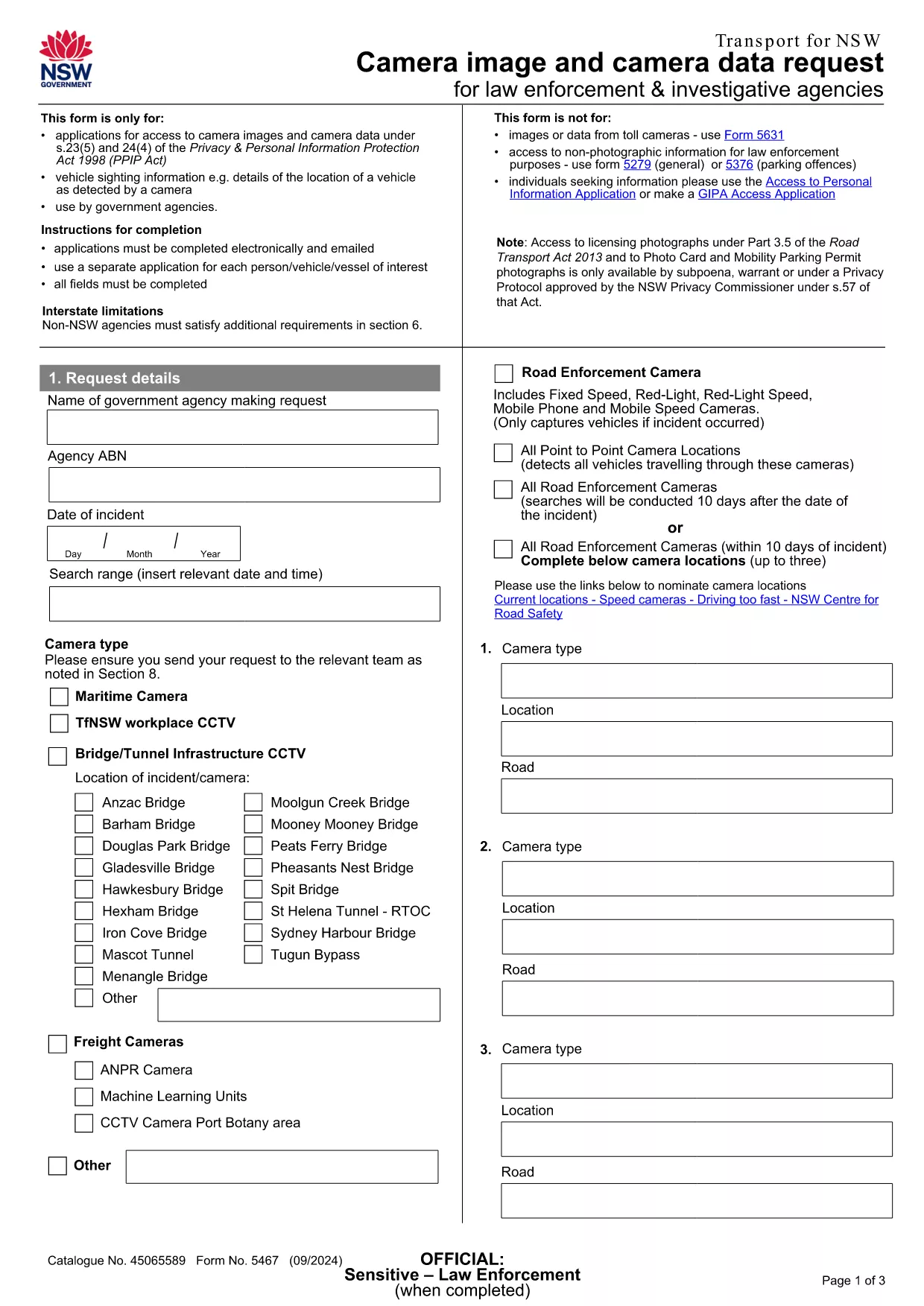
Application Form Image – Fillable PDF Online

  1. Bahasa Inggeris
  2. Negara Australia
  3. Jabatan Transport
  4. Aktiviti Camera Image Request
Isi borang ini
Application Form Image – Fillable PDF Online

Looking for a quick way to submit an Application Form Image to Transport NSW? Our fillable PDF version lets you enter all required details directly in your browser, eliminating the hassle of printing, scanning, or emailing a static document.

This form is officially used for camera‑image requests, road‑transport enforcement sightings, and related inquiries. By using Formize’s online PDF filler, you benefit from real‑time validation, auto‑save, and a secure submission process.

Below you’ll find everything you need to know about the form, step‑by‑step instructions, and tips to avoid common errors.

Why Choose This Fillable PDF Form

  • Fully editable fields – no PDF editor required.
  • Instant validation helps you avoid missing or incorrect information.
  • All data is saved securely in the cloud until you submit.
  • Compatible with any device – desktop, tablet, or mobile.

How to Complete the Application Form Image

Simply click the “Fill out this form” button on this page. The Formize PDF Filler app will load, presenting you with a clean, user‑friendly interface. Fill in each field, attach any supporting images, and click **Submit** when you’re ready.

Common Mistakes to Avoid

  • Leaving mandatory fields blank – the filler will highlight them in red.
  • Uploading images in unsupported formats (only JPG, PNG, and PDF are accepted).
  • Entering incorrect dates – use the calendar picker to ensure the right format.
  • Submitting before reviewing – use the “Preview” button to double‑check your entries.

Where to Submit Your Completed Form

After you click **Submit**, your application is automatically routed to the Transport NSW Customer Resolution Team at compliance.operations@transport.nsw.gov.au. You’ll receive a confirmation email with a reference number for future follow‑up.

Need help? Review the FAQ section below or contact the NSW Transport support email directly.

SOALAN LAZIM
  • Do I need Adobe Acrobat to fill this form?

    No. The Formize PDF Filler works entirely in your browser, so no extra software is required.

  • Can I save my progress and return later?

    Yes. The filler automatically saves your entries. When you reopen the form, you’ll be prompted to continue where you left off.

  • What file types are accepted for image attachments?

    Only JPG, PNG, and PDF files are accepted. Each file must be under 5 MB.

  • Will my personal data be kept confidential?

    All data is encrypted in transit and stored securely on Formize’s servers until it is forwarded to Transport NSW.

  • How long does it take for Transport NSW to respond?

    Typically, you’ll receive a confirmation email within minutes and a formal response within 5‑7 business days.

  • What if I make a mistake after submitting?

    Contact the Customer Resolution Team at compliance.operations@transport.nsw.gov.au with your reference number to request a correction.

BAGAIMANA UNTUK

Cara mengisi application form image secara percuma, dalam talian dalam 3 langkah mudah:

  1. 1
    Open the Fillable Form
    Click the bright “Fill out this form” button on the page. The Formize PDF Filler app will launch in a new tab.
  2. 2
    Enter Your Information
    Complete each field, attach any required images, and use the built‑in validation to correct errors as they appear.
  3. 3
    Submit Securely
    When all fields are filled, click the “Submit” button. Your data is encrypted and sent directly to Transport NSW’s processing team.
Bentuk apl Pengisi PDF
TENTANG

templat application form image.

Dengan set ciri tradisional untuk melihat dan mengisi dokumen PDF, digabungkan dengan faedah aplikasi web dan reka letak responsif, anda boleh melengkapkan application form image dalam beberapa minit.

CIRI-CIRI

Pengisi PDF

Cara paling mudah untuk mengisi application form image dalam talian

  • Cepat isi application form image
    Mencari cara untuk mengisi application form image dengan cepat dalam talian? Dengan pengisi borang PDF percuma dalam talian kami, anda akan tahu cara mengedit dan mengisi dokumen pdf ini dalam masa kurang daripada satu minit.
  • Mudah untuk menggunakan editor PDF dalam talian
    Bosan dengan mencetak fail PDF supaya anda boleh mengeditnya, sebelum mengimbas semula dan menghantarnya semula? Edit dokumen PDF secara percuma dalam talian. Gunakan editor pdf dalam talian kami untuk menjimatkan masa dan kertas.
  • Alat yang hebat, semua platform
    Tertanya-tanya cara mengisi application form image pada Mac, atau mungkin cara menggunakan pengisi PDF secara percuma? Alat PDF dalam talian kami berfungsi pada semua platform.
  • Simpanan fail selamat
    Fail "application form image" yang lengkap disimpan dalam pangkalan data selamat yang diuruskan oleh pengehosan Amazon Cloud. Anda boleh memadamkan fail anda daripada sistem kami pada bila-bila masa. Walau apa pun, fail ini dipadamkan secara automatik selepas 24 jam.
  • Sembang dengan application form image
    Sembang dengan "application form image" di Chatize yang merupakan pembantu pembaca PDF percuma. Tanya soalan dan dapatkan jawapan daripada "application form image". Cuma klik pada butang Sembang Dengan Dokumen di atas.

Padamkan sesi pengisian

Padamkan sesi pengisian yang dipilih? Dalam kes ini, kemajuan anda dalam melengkapkan borang akan hilang.

Padamkan sesi penyuntingan

Padamkan sesi penyuntingan yang dipilih? Dalam kes ini, kemajuan anda dalam membuat dan mengedit borang akan hilang.