Pilih Bahasa

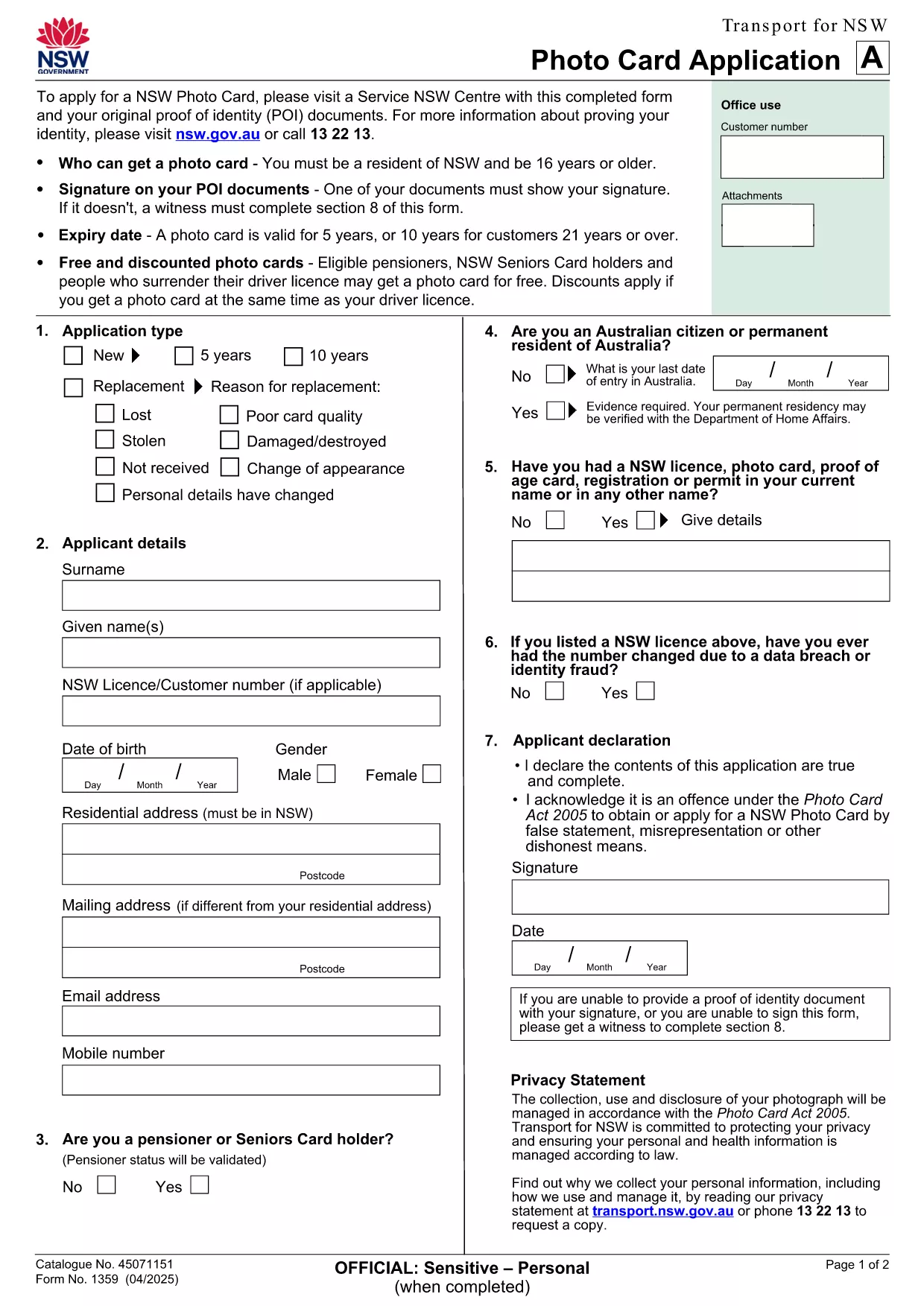
NSW Photo Card Application Form (Fillable PDF)

  1. Negara Australia
  2. Bahasa Inggeris
  3. Aktiviti Identification
  4. Jabatan Transport
Isi borang ini
NSW Photo Card Application Form (Fillable PDF)

Need a new Photo Card in New South Wales? The official NSW Photo Card application form requires a recent photograph of yourself. With Formize, you can download the PDF, attach your picture, and complete the entire form online – no printer or scanner needed.

Why a Photo Card Application Needs a Picture

The Photo Card is a government‑issued ID that verifies your identity. A clear, recent picture helps officers match the card to the holder quickly and reduces fraud.

How to Fill Out the NSW Photo Card Form Online

  1. Click the "Fill out this form" button on this page.
  2. Wait for the Formize PDF Filler app to load (usually a few seconds).
  3. Upload a high‑resolution photo (JPEG or PNG, 2 MB max).
  4. Complete the personal‑details sections – name, address, date of birth, etc.
  5. Review the entered data, then click Save or Print to submit at your nearest Service Centre.

Common Mistakes & Tips

  • Wrong photo size: Use a passport‑style headshot with a plain background.
  • Missing signature: The digital signature field must be filled; you can sign with your mouse or touch screen.
  • Incorrect address format: Follow the example shown on the form to avoid processing delays.

Download & Save Your Completed Form

After you finish, you can download a copy of the completed PDF for your records. Bring the printed form and your original photo to a Service Centre, or submit it digitally if your centre accepts e‑submissions.

Need help? The Service Centre staff can assist with identity verification and photo quality checks.

SOALAN LAZIM
  • Do I need a passport‑style photo for the NSW Photo Card?

    Yes. The photo must be a clear headshot with a plain background, taken within the last 12 months.

  • Can I submit the form without printing it?

    Most Service Centres require a printed form, but some locations accept a saved PDF on a USB drive. Check with your local centre.

  • What file formats are accepted for the picture?

    JPEG and PNG files are supported, up to 2 MB in size.

  • Is there a fee for the Photo Card?

    A standard Photo Card costs $30. Seniors and pensioners may be eligible for a free card.

  • How long does it take to receive the card after submission?

    The card is mailed to your address within 3 weeks of submitting the completed application.

  • Can I edit the form after I’ve saved it?

    Yes. Open the saved PDF in Formize again, make changes, and re‑save before you submit.

  • What should I do if my photo is rejected?

    You’ll be asked to provide a new picture that meets the requirements. Bring a compliant photo to the Service Centre for a quick replacement.

BAGAIMANA UNTUK

Cara mengisi NSW photo card application secara percuma, dalam talian dalam 5 langkah mudah:

  1. 1
    Open the Fillable Form
    Click the "Fill out this form" button on this page. The Formize PDF Filler will open in a new tab.
  2. 2
    Upload Your Photo
    Select the photo field, then choose a recent passport‑style picture (JPEG/PNG, max 2 MB). The image will appear instantly.
  3. 3
    Enter Your Details
    Type in your name, address, date of birth, and any other required information. All fields are searchable and auto‑save.
  4. 4
    Add Your Signature
    Use the signature box to draw your signature with a mouse, trackpad, or touchscreen.
  5. 5
    Review and Save
    Check every field for accuracy, then click "Save PDF" to download the completed form or "Print" to take it to a Service Centre.
Bentuk apl Pengisi PDF
TENTANG

templat NSW photo card application.

Dengan set ciri tradisional untuk melihat dan mengisi dokumen PDF, digabungkan dengan faedah aplikasi web dan reka letak responsif, anda boleh melengkapkan NSW photo card application dalam beberapa minit.

CIRI-CIRI

Pengisi PDF

Cara paling mudah untuk mengisi NSW photo card application dalam talian

  • Cepat isi NSW photo card application
    Mencari cara untuk mengisi NSW photo card application dengan cepat dalam talian? Dengan pengisi borang PDF percuma dalam talian kami, anda akan tahu cara mengedit dan mengisi dokumen pdf ini dalam masa kurang daripada satu minit.
  • Mudah untuk menggunakan editor PDF dalam talian
    Bosan dengan mencetak fail PDF supaya anda boleh mengeditnya, sebelum mengimbas semula dan menghantarnya semula? Edit dokumen PDF secara percuma dalam talian. Gunakan editor pdf dalam talian kami untuk menjimatkan masa dan kertas.
  • Alat yang hebat, semua platform
    Tertanya-tanya cara mengisi NSW photo card application pada Mac, atau mungkin cara menggunakan pengisi PDF secara percuma? Alat PDF dalam talian kami berfungsi pada semua platform.
  • Simpanan fail selamat
    Fail "NSW photo card application" yang lengkap disimpan dalam pangkalan data selamat yang diuruskan oleh pengehosan Amazon Cloud. Anda boleh memadamkan fail anda daripada sistem kami pada bila-bila masa. Walau apa pun, fail ini dipadamkan secara automatik selepas 24 jam.
  • Sembang dengan NSW photo card application
    Sembang dengan "NSW photo card application" di Chatize yang merupakan pembantu pembaca PDF percuma. Tanya soalan dan dapatkan jawapan daripada "NSW photo card application". Cuma klik pada butang Sembang Dengan Dokumen di atas.

Padamkan sesi pengisian

Padamkan sesi pengisian yang dipilih? Dalam kes ini, kemajuan anda dalam melengkapkan borang akan hilang.

Padamkan sesi penyuntingan

Padamkan sesi penyuntingan yang dipilih? Dalam kes ini, kemajuan anda dalam membuat dan mengedit borang akan hilang.