
Pilih Bahasa

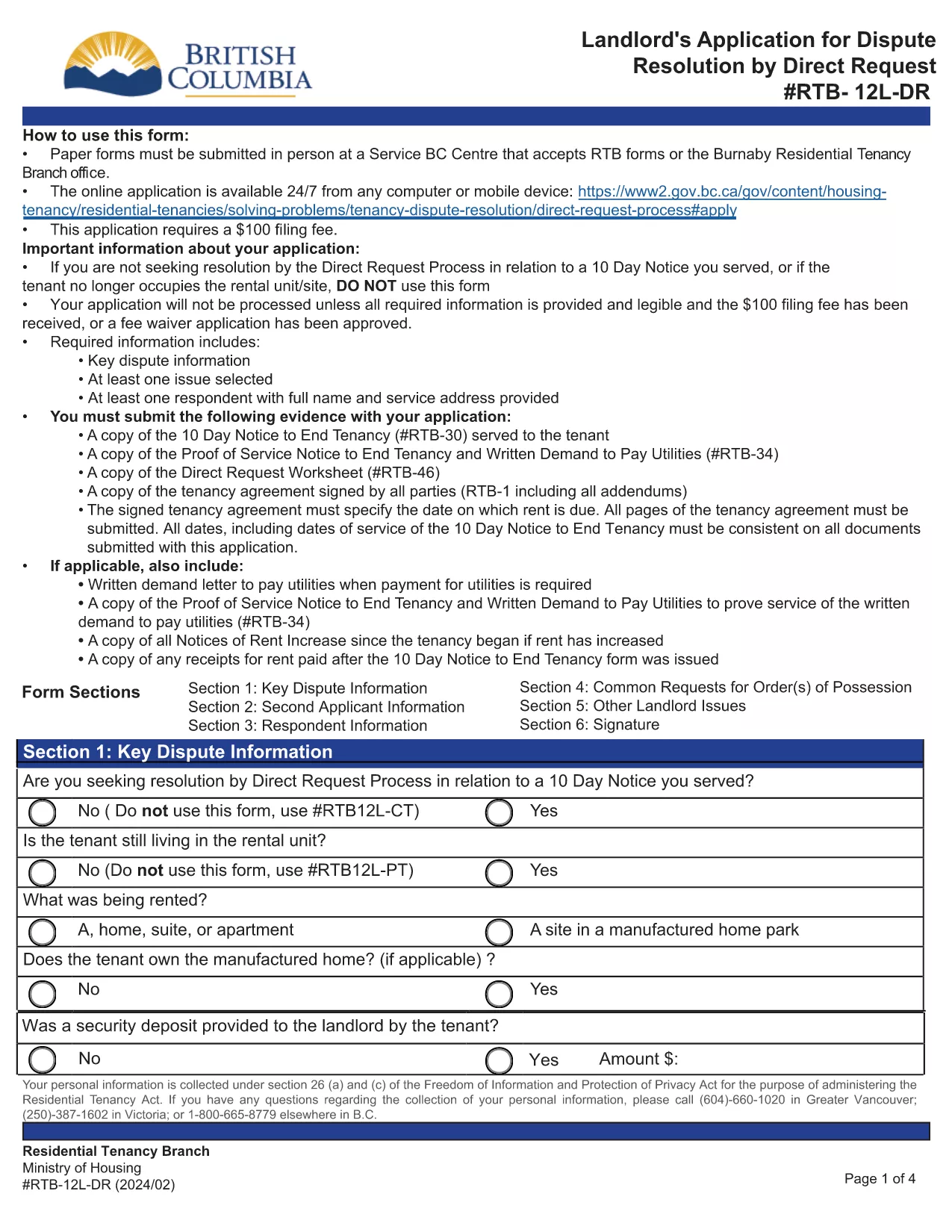
RTB‑12L‑DR Landlord Application for Dispute Resolution (Fillable PDF)

  1. Bahasa Inggeris
  2. Negara Kanada
  3. Aktiviti Penyewaan
  4. negeri British Columbia
Isi borang ini
RTB‑12L‑DR Landlord Application for Dispute Resolution (Fillable PDF)

The RTB‑12L‑DR is the official British Columbia Residential Tenancy Branch (RTB) form used by landlords to request a dispute resolution hearing by Direct Request. This form starts the process for resolving issues such as unpaid rent, damage to the rental unit, or breaches of the tenancy agreement.

What Is the RTB‑12L‑DR Form?

Designed for landlords, the RTB‑12L‑DR captures essential information about the tenancy, the nature of the dispute, and the remedy sought. It is required for all direct‑request applications and must be submitted in person or by mail to a Service BC centre that accepts RTB forms.

How to Complete the RTB‑12L‑DR Online

Instead of printing and filling out a paper copy, you can use Formize’s free fillable PDF feature. Follow these simple steps:

  • Click the “Fill out this form” button on this page.
  • Wait for the Formize PDF Filler app to load (usually a few seconds).
  • Enter your information in each field – the form automatically saves your progress.
  • Review the completed form, add your electronic signature, and click “Submit”.
  • Download the finished PDF or print it for submission.

Common Mistakes to Avoid

  • Leaving sections blank: Every field marked with an asterisk (*) is mandatory.
  • Incorrect dates: Use the exact dates from the tenancy agreement and any relevant notices.
  • Mismatched signatures: The landlord or authorized agent must sign; a missing signature will delay processing.
  • Submitting the wrong form: Ensure you are using RTB‑12L‑DR (Direct Request) and not the current‑tenancy or expedited‑hearing versions.

Where to Submit Your Application

After completing the form, you have two options:

  • In‑person: Bring the printed PDF to any Service BC centre that accepts RTB forms or to the Burnaby Residential Tenancy Branch office.
  • Mail: Send the signed PDF to the Residential Tenancy Branch at the address listed on the form.

Download the Official PDF

If you prefer a paper copy, you can download the official RTB‑12L‑DR PDF directly from the Government of British Columbia:

Download RTB‑12L‑DR (Landlord Application for Dispute Resolution – Direct Request)

Using Formize’s fillable version saves time, reduces errors, and ensures your application is ready for submission.

SOALAN LAZIM
  • What does RTB‑12L‑DR stand for?

    RTB‑12L‑DR is the “Landlord Application for Dispute Resolution – Direct Request” used by BC landlords to start a tenancy dispute hearing.

  • Can I submit the form electronically?

    The form itself must be printed, signed, and submitted in person or by mail. However, you can fill it out online with Formize and then print the completed PDF.

  • Do I need a lawyer to complete RTB‑12L‑DR?

    No. The form is designed for landlords to complete on their own. If you have complex legal questions, consider consulting a tenancy‑law specialist.

  • How long does it take to process the application?

    Processing time varies, but the Residential Tenancy Branch typically acknowledges receipt within 7‑10 business days.

  • What fees are associated with filing RTB‑12L‑DR?

    There is a filing fee for the dispute resolution hearing. Check the latest fee schedule on the BC Residential Tenancy Branch website.

  • Can I add additional issues not listed on the form?

    Yes. Use the “Additional Issues” section on the form to describe any other disputes you wish the tribunal to consider.

  • Is the fillable PDF version legally accepted?

    Yes, as long as you print, sign, and submit the completed form, the fillable version is considered identical to the paper version.

  • What if I make a mistake after submitting?

    Contact the Residential Tenancy Branch as soon as possible. Minor errors can often be corrected with a written amendment.

BAGAIMANA UNTUK

Cara mengisi RTB-12L-DR secara percuma, dalam talian dalam 5 langkah mudah:

  1. 1
    Click the Fill‑out Button
    Press the “Fill out this form” button on the page to launch the Formize PDF Filler.
  2. 2
    Wait for the Filler to Load
    The fillable PDF loads in a few seconds. No download or extra software is required.
  3. 3
    Enter Your Information
    Complete each field, following the on‑screen prompts. The form saves your entries automatically.
  4. 4
    Add Your Signature
    Use the built‑in signature field to sign electronically. This satisfies the requirement for a landlord’s signature.
  5. 5
    Download or Print
    When finished, download the completed PDF or print it to submit in person or by mail.
Bentuk apl Pengisi PDF
TENTANG

Borang untuk tuan tanah dan/atau penyewa untuk mencadangkan tindakan yang berkaitan dengan perjanjian penyewaan.

RTB-12L-DR ialah jenis perjanjian penyewaan kediaman yang digunakan oleh kebanyakan tuan tanah persendirian dan persatuan perumahan.

Terdapat beberapa perkara di mana tuan tanah atau penyewa mesti mematuhi peraturan tertentu yang ditetapkan dalam peraturan. Dalam sesetengah kes, mereka mungkin perlu melengkapkan borang, yang dipanggil 'borang yang ditetapkan', yang mencadangkan tindakan yang boleh menjejaskan pihak lain dalam perjanjian penyewaan.

Borang-borang itu dipanggil borang yang ditetapkan kerana perkataan di dalamnya telah digubal dengan teliti untuk memastikan bahawa orang yang melengkapkan borang dan orang yang menerimanya boleh memahami apa yang dicadangkan dan apa yang mereka boleh lakukan sebagai tindak balas. Kegagalan untuk menyampaikan borang yang betul boleh membatalkan tindakan yang dicadangkan.

Anda tidak boleh mengubah perkataan dalam borang ini melainkan borang menyatakan anda boleh berbuat demikian. Jika anda mengubah perkataan, borang tersebut mungkin tidak sah. Anda juga mesti mematuhi sebarang tempoh notis yang ditetapkan dalam borang.

CIRI-CIRI

Pengisi PDF

Cara paling mudah untuk mengisi RTB-12L-DR dalam talian

  • Cepat isi RTB-12L-DR
    Mencari cara untuk mengisi RTB-12L-DR dengan cepat dalam talian? Dengan pengisi borang PDF percuma dalam talian kami, anda akan tahu cara mengedit dan mengisi dokumen pdf ini dalam masa kurang daripada satu minit.
  • Mudah untuk menggunakan editor PDF dalam talian
    Bosan dengan mencetak fail PDF supaya anda boleh mengeditnya, sebelum mengimbas semula dan menghantarnya semula? Edit dokumen PDF secara percuma dalam talian. Gunakan editor pdf dalam talian kami untuk menjimatkan masa dan kertas.
  • Alat yang hebat, semua platform
    Tertanya-tanya cara mengisi RTB-12L-DR pada Mac, atau mungkin cara menggunakan pengisi PDF secara percuma? Alat PDF dalam talian kami berfungsi pada semua platform.
  • Simpanan fail selamat
    Fail "RTB-12L-DR" yang lengkap disimpan dalam pangkalan data selamat yang diuruskan oleh pengehosan Amazon Cloud. Anda boleh memadamkan fail anda daripada sistem kami pada bila-bila masa. Walau apa pun, fail ini dipadamkan secara automatik selepas 24 jam.
  • Sembang dengan RTB-12L-DR
    Sembang dengan "RTB-12L-DR" di Chatize yang merupakan pembantu pembaca PDF percuma. Tanya soalan dan dapatkan jawapan daripada "RTB-12L-DR". Cuma klik pada butang Sembang Dengan Dokumen di atas.

Padamkan sesi pengisian

Padamkan sesi pengisian yang dipilih? Dalam kes ini, kemajuan anda dalam melengkapkan borang akan hilang.

Padamkan sesi penyuntingan

Padamkan sesi penyuntingan yang dipilih? Dalam kes ini, kemajuan anda dalam membuat dan mengedit borang akan hilang.