
Pilih Bahasa

RTB‑17 Application to Waive a Filing Fee (Fillable PDF)

  1. Bahasa Inggeris
  2. Negara Kanada
  3. Aktiviti Penyewaan
  4. negeri British Columbia
Isi borang ini
RTB‑17 Application to Waive a Filing Fee (Fillable PDF)

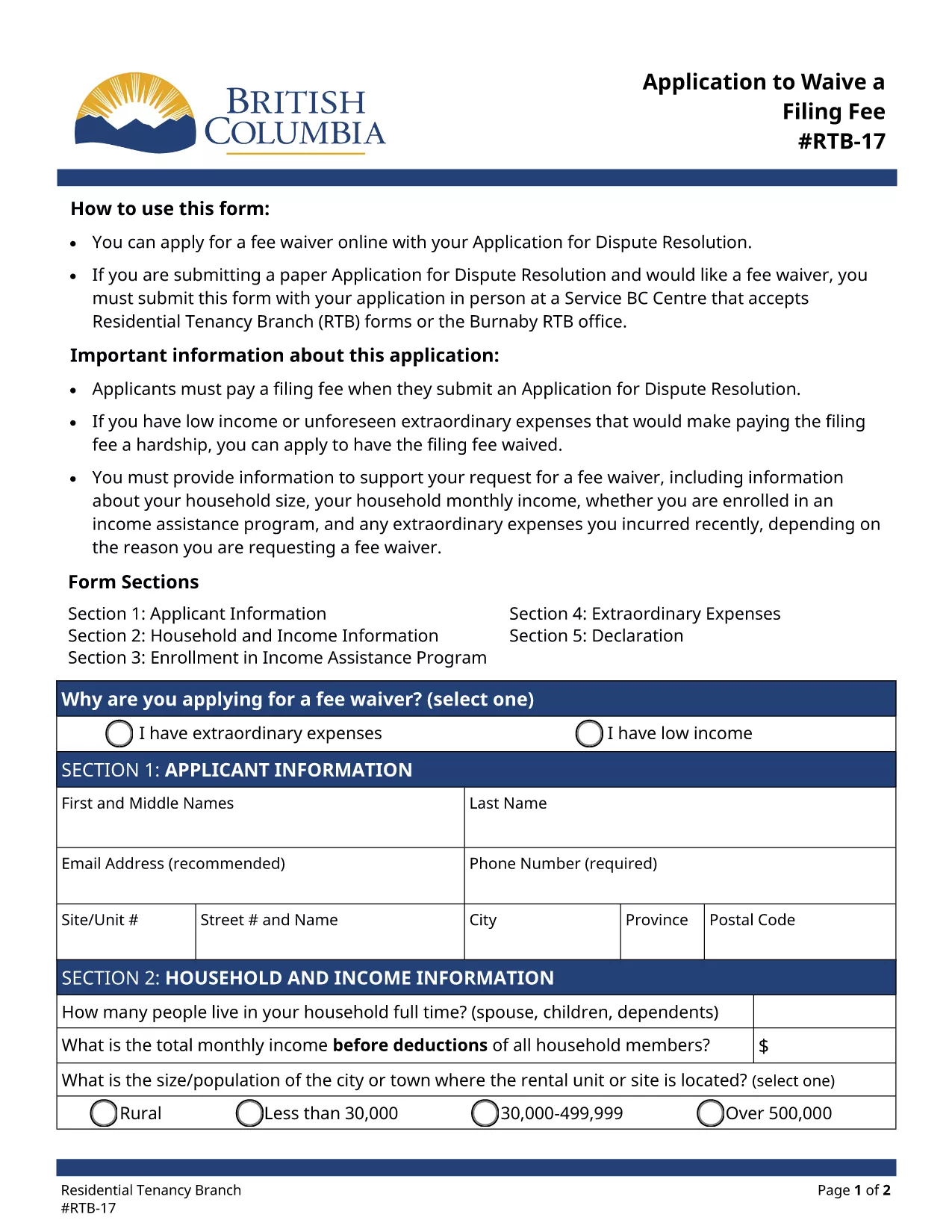
The RTB‑17 Application to Waive a Filing Fee is the official form used by the British Columbia Residential Tenancy Branch (RTB) when a tenant or landlord needs to request a waiver for the filing fee associated with a dispute resolution application. This form is required under the Residential Tenancy Act and must be completed accurately to avoid processing delays.

What is the RTB‑17 Fee Waiver Form?

RTB‑17 allows applicants to explain why they cannot afford the standard filing fee. Typical reasons include low income, loss of employment, or other financial hardships. The form collects basic personal information, details about the dispute, and supporting documentation.

How to Fill Out RTB‑17 Online with Formize

Formize provides a seamless, fillable PDF experience directly in your browser—no Adobe Reader required. Follow the simple steps below to complete the form in minutes.

Common Mistakes to Avoid When Completing RTB‑17

  • Leaving required fields blank – every field marked with an asterisk must be completed.
  • Submitting outdated contact information – ensure phone numbers and email addresses are current.
  • Failing to attach supporting documents – include proof of income or hardship when requested.

Where to Submit the Completed RTB‑17 Form

After you finish the online fillable version, you can either:

  1. Print and deliver the form in person to a Service BC Centre that accepts RTB forms.
  2. Mail the printed form to the Residential Tenancy Branch address listed on the form.
  3. Submit the PDF electronically through the RTB’s online portal (if available).

Download the Fillable RTB‑17 PDF

If you prefer to work offline, you can download the official fillable PDF directly from the government website. The file is fully compatible with Formize’s PDF Filler.

SOALAN LAZIM
  • Who is eligible to request a fee waiver using RTB‑17?

    Any tenant or landlord who can demonstrate financial hardship—such as low income, unemployment, or other documented reasons—may apply for a waiver.

  • Can I submit RTB‑17 electronically?

    Yes, after completing the fillable PDF with Formize you can upload the saved file to the RTB’s online portal, if the portal is available for fee‑waiver submissions.

  • What supporting documents should I attach?

    Typical documents include recent pay stubs, a notice of termination of employment, social assistance statements, or any proof that shows you cannot afford the filing fee.

  • How long does it take for the RTB to process a fee waiver?

    Processing times vary, but most fee‑waiver requests are reviewed within 10‑14 business days after receipt of the completed form and supporting evidence.

  • Do I need Adobe Reader to fill out RTB‑17?

    No. Formize’s online PDF filler lets you complete the form directly in your browser without installing Adobe Reader.

  • What if I make a mistake after submitting?

    You can submit a corrected RTB‑17 form with a brief note explaining the changes. Include a copy of the original submission for reference.

  • Is there a cost to use Formize’s fillable PDF service?

    Formize offers free access to fillable PDF forms like RTB‑17. No hidden fees are charged for completing or downloading the form.

BAGAIMANA UNTUK

Cara mengisi RTB-17 secara percuma, dalam talian dalam 5 langkah mudah:

  1. 1
    Click the Fill‑out Button
    On the page, click the bright "Fill out this form" button to launch the Formize PDF Filler.
  2. 2
    Wait for the Filler to Load
    The fillable PDF loads directly in your browser. No download or extra software is required.
  3. 3
    Enter Your Information
    Complete each required field, attach any supporting documents, and double‑check for accuracy.
  4. 4
    Review and Submit
    When you’re satisfied, click "Submit" to generate a completed PDF you can print or save.
  5. 5
    Save a Copy
    Download the final PDF for your records and bring the printed copy to a Service BC Centre or mail it as instructed.
Bentuk apl Pengisi PDF
TENTANG

Borang untuk tuan tanah dan/atau penyewa untuk mencadangkan tindakan yang berkaitan dengan perjanjian penyewaan.

RTB-17 ialah jenis perjanjian penyewaan kediaman yang digunakan oleh kebanyakan tuan tanah persendirian dan persatuan perumahan.

Terdapat beberapa perkara di mana tuan tanah atau penyewa mesti mematuhi peraturan tertentu yang ditetapkan dalam peraturan. Dalam sesetengah kes, mereka mungkin perlu melengkapkan borang, yang dipanggil 'borang yang ditetapkan', yang mencadangkan tindakan yang boleh menjejaskan pihak lain dalam perjanjian penyewaan.

Borang-borang itu dipanggil borang yang ditetapkan kerana perkataan di dalamnya telah digubal dengan teliti untuk memastikan bahawa orang yang melengkapkan borang dan orang yang menerimanya boleh memahami apa yang dicadangkan dan apa yang mereka boleh lakukan sebagai tindak balas. Kegagalan untuk menyampaikan borang yang betul boleh membatalkan tindakan yang dicadangkan.

Anda tidak boleh mengubah perkataan dalam borang ini melainkan borang menyatakan anda boleh berbuat demikian. Jika anda mengubah perkataan, borang tersebut mungkin tidak sah. Anda juga mesti mematuhi sebarang tempoh notis yang ditetapkan dalam borang.

CIRI-CIRI

Pengisi PDF

Cara paling mudah untuk mengisi RTB-17 dalam talian

  • Cepat isi RTB-17
    Mencari cara untuk mengisi RTB-17 dengan cepat dalam talian? Dengan pengisi borang PDF percuma dalam talian kami, anda akan tahu cara mengedit dan mengisi dokumen pdf ini dalam masa kurang daripada satu minit.
  • Mudah untuk menggunakan editor PDF dalam talian
    Bosan dengan mencetak fail PDF supaya anda boleh mengeditnya, sebelum mengimbas semula dan menghantarnya semula? Edit dokumen PDF secara percuma dalam talian. Gunakan editor pdf dalam talian kami untuk menjimatkan masa dan kertas.
  • Alat yang hebat, semua platform
    Tertanya-tanya cara mengisi RTB-17 pada Mac, atau mungkin cara menggunakan pengisi PDF secara percuma? Alat PDF dalam talian kami berfungsi pada semua platform.
  • Simpanan fail selamat
    Fail "RTB-17" yang lengkap disimpan dalam pangkalan data selamat yang diuruskan oleh pengehosan Amazon Cloud. Anda boleh memadamkan fail anda daripada sistem kami pada bila-bila masa. Walau apa pun, fail ini dipadamkan secara automatik selepas 24 jam.
  • Sembang dengan RTB-17
    Sembang dengan "RTB-17" di Chatize yang merupakan pembantu pembaca PDF percuma. Tanya soalan dan dapatkan jawapan daripada "RTB-17". Cuma klik pada butang Sembang Dengan Dokumen di atas.

Padamkan sesi pengisian

Padamkan sesi pengisian yang dipilih? Dalam kes ini, kemajuan anda dalam melengkapkan borang akan hilang.

Padamkan sesi penyuntingan

Padamkan sesi penyuntingan yang dipilih? Dalam kes ini, kemajuan anda dalam membuat dan mengedit borang akan hilang.