
Pilih Bahasa

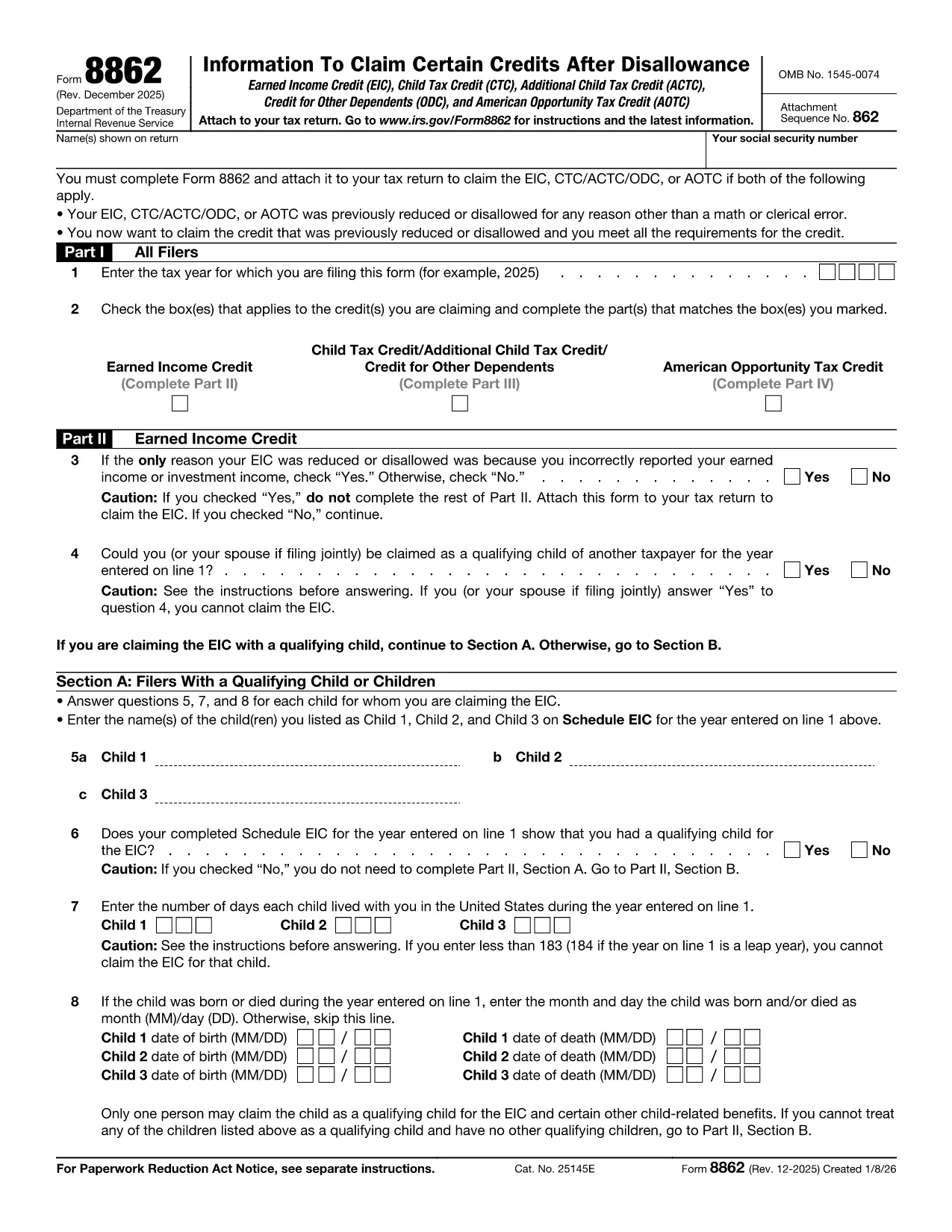
Fillable IRS Form 8862 – Claim for Earned Income Credit

  1. Negara USA
  2. Bahasa Inggeris
  3. Aktiviti Cukai
  4. Jabatan Perkhidmatan Hasil Dalam Negeri
Isi borang ini
Fillable IRS Form 8862 – Claim for Earned Income Credit

Form 8862, Claim for Earned Income Credit (EIC), is required when the IRS disallows your Earned Income Credit in a prior year and you want to claim it again. Our fillable PDF version lets you enter data directly in the browser, eliminates printing, and reduces errors.

What Is IRS Form 8862?

Form 8862 is an IRS document used to verify that you meet the eligibility criteria for the Earned Income Credit after a previous denial. It collects information about your filing status, qualifying children, and earned income. The form must be attached to your tax return (Form 1040) when you re‑claim the credit.

How to Complete Form 8862 Online

  • Click the "Fill out this form" button on this page.
  • Wait a few seconds while the Formize PDF Filler app loads securely in your browser.
  • Enter the required information in each field – the app highlights required fields and validates numbers.
  • When finished, click Save & Download to get a completed PDF ready to attach to your tax return.

Common Mistakes to Avoid

Even with a fillable form, certain errors can still cause delays:

  • Incorrect Social Security numbers for you or your qualifying children.
  • Misreporting earned income – double‑check wages, self‑employment, and farm income.
  • Leaving any required field blank. The Formize filler will flag missing data before you submit.
  • Using the wrong tax year version – always download the latest PDF (2024 edition at the link below).

Where to Find Help and Resources

If you need guidance, the official IRS instructions for Form 8862 are available on the IRS website. You can also consult a qualified tax professional for complex situations such as multiple qualifying children or prior EIC recapture.

Ready to start? Click the button and let Formize handle the rest.

Arahan

  • Instruksi Bentuk 8862 - Instruksi untuk Pembentukan 8862, Informasi untuk Klaim Penghargaan Tertentu Setelah Ketidakbenaran
SOALAN LAZIM
  • Do I need to file Form 8862 every year?

    You only need to file Form 8862 when the IRS has previously denied your Earned Income Credit and you are claiming it again.

  • Can I submit Form 8862 electronically?

    Yes. After completing the fillable PDF, you can attach the PDF to your e‑filed tax return using most tax software.

  • What happens if I make a mistake on Form 8862?

    Mistakes can delay processing of your credit. The Formize filler highlights required fields and checks numeric entries to reduce errors.

  • Is there a fee to use the Formize PDF filler?

    No. The filler is free for all IRS forms hosted on Formize, including Form 8862.

  • Where can I find the official IRS instructions for Form 8862?

    The official instructions are available on the IRS website at https://www.irs.gov/instructions/i8862.

  • Can I print the completed Form 8862 after filling it online?

    Absolutely. After saving the PDF, you can print it or keep the digital copy for electronic filing.

  • Do I need a signature on Form 8862?

    Yes. The form requires your signature. You can sign the PDF digitally after downloading it.

  • What qualifies as earned income for the EIC?

    Earned income includes wages, salaries, tips, self‑employment income, and certain disability payments. Refer to IRS guidelines for full details.

BAGAIMANA UNTUK

Cara mengisi Form 8862 secara percuma, dalam talian dalam 4 langkah mudah:

  1. 1
    Click the Fill Out Button
    Press the "Fill out this form" button on this page to launch the Formize PDF Filler.
  2. 2
    Wait for the Filler to Load
    The secure filler app loads in a few seconds – no download or installation required.
  3. 3
    Enter Your Information
    Complete each highlighted field. The app validates entries and alerts you to any missing required data.
  4. 4
    Save and Download
    When all fields are filled, click "Save & Download" to obtain a completed PDF ready for attachment to your tax return.
Bentuk apl Pengisi PDF
TENTANG

Borang cukai

Form 8862 ialah salah satu borang Cukai yang merupakan dokumen yang digunakan untuk melaporkan maklumat yang berkaitan dengan cukai kepada pihak berkuasa cukai yang berkaitan. Terdapat pelbagai jenis borang cukai, termasuk borang cukai persekutuan, negeri dan tempatan, yang boleh berbeza-beza bergantung pada keadaan dan lokasi pembayar cukai.

CIRI-CIRI

Pengisi PDF

Cara paling mudah untuk mengisi Form 8862 dalam talian

  • Cepat isi Form 8862
    Mencari cara untuk mengisi Form 8862 dengan cepat dalam talian? Dengan pengisi borang PDF percuma dalam talian kami, anda akan tahu cara mengedit dan mengisi dokumen pdf ini dalam masa kurang daripada satu minit.
  • Mudah untuk menggunakan editor PDF dalam talian
    Bosan dengan mencetak fail PDF supaya anda boleh mengeditnya, sebelum mengimbas semula dan menghantarnya semula? Edit dokumen PDF secara percuma dalam talian. Gunakan editor pdf dalam talian kami untuk menjimatkan masa dan kertas.
  • Alat yang hebat, semua platform
    Tertanya-tanya cara mengisi Form 8862 pada Mac, atau mungkin cara menggunakan pengisi PDF secara percuma? Alat PDF dalam talian kami berfungsi pada semua platform.
  • Simpanan fail selamat
    Fail "Form 8862" yang lengkap disimpan dalam pangkalan data selamat yang diuruskan oleh pengehosan Amazon Cloud. Anda boleh memadamkan fail anda daripada sistem kami pada bila-bila masa. Walau apa pun, fail ini dipadamkan secara automatik selepas 24 jam.
  • Sembang dengan Form 8862
    Sembang dengan "Form 8862" di Chatize yang merupakan pembantu pembaca PDF percuma. Tanya soalan dan dapatkan jawapan daripada "Form 8862". Cuma klik pada butang Sembang Dengan Dokumen di atas.

Padamkan sesi pengisian

Padamkan sesi pengisian yang dipilih? Dalam kes ini, kemajuan anda dalam melengkapkan borang akan hilang.

Padamkan sesi penyuntingan

Padamkan sesi penyuntingan yang dipilih? Dalam kes ini, kemajuan anda dalam membuat dan mengedit borang akan hilang.