
Pilih Bahasa

IRS Form 1045 – Fillable PDF for Tentative Refund

  1. Negara USA
  2. Bahasa Inggeris
  3. Aktiviti Cukai
  4. Jabatan Perkhidmatan Hasil Dalam Negeri
Isi borang ini
IRS Form 1045 – Fillable PDF for Tentative Refund

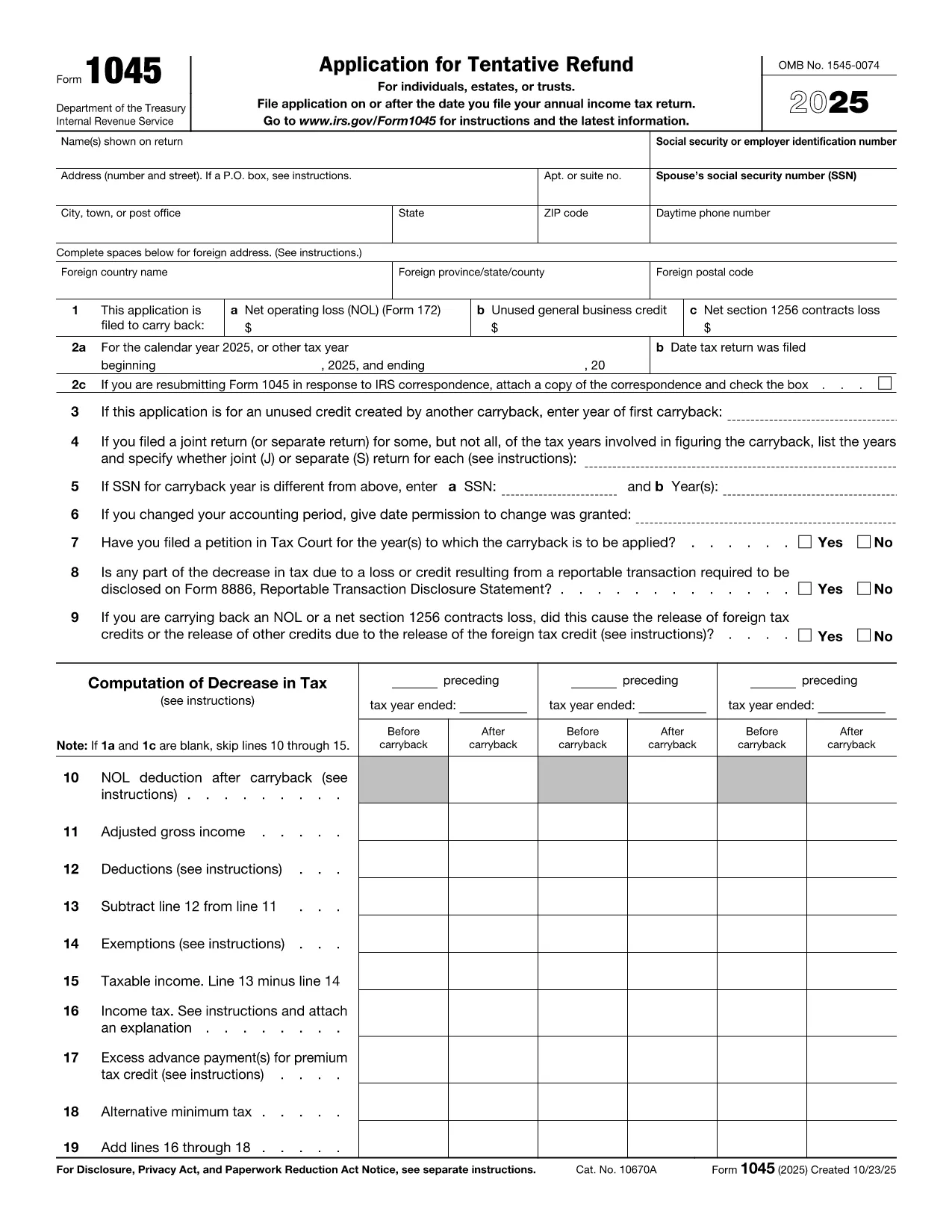
Form 1045, Application for Tentative Refund, lets individuals, estates, and trusts claim a fast refund when they have a net operating loss (NOL), an unused general business credit, or a Section 1256 contracts loss that can be carried back to a prior tax year. Instead of mailing a paper form, you can complete the official PDF instantly with Formize’s online PDF filler.

What Is Form 1045?

This two‑page IRS form is used to request a tentative refund before filing an amended return. It is ideal when you need to:

  • Carry back a net operating loss to a previous year.
  • Carry back an unused general business credit.
  • Carry back a net Section 1256 contracts loss.

How to Fill the Form Online with Formize

Formize turns the static PDF into a fully interactive, fillable document. Follow the simple steps below – no PDF editor required.

Common Mistakes to Avoid

  • Leaving required fields blank: Every line marked with an asterisk must be completed, otherwise the IRS will reject the application.
  • Mismatching tax years: Verify that the carry‑back year(s) you select match the year of the loss or credit.
  • Incorrect signatures: Both spouses must sign on joint returns; estates and trusts need the authorized representative’s signature.
  • Failing to attach supporting schedules: Attach Form 172 for NOL calculations, Form 3800 for business credits, and Form 6781 for Section 1256 losses.

Download the Fillable PDF

Click the button below to open the official IRS Form 1045 PDF in the Formize filler. The document is fully searchable, auto‑saves, and can be exported as a completed PDF ready for mailing.

Arahan

SOALAN LAZIM
  • Who can use Form 1045?

    Individuals, estates, and trusts that have a net operating loss, an unused general business credit, or a Section 1256 contracts loss that can be carried back to a prior tax year.

  • Do I need to file Form 1045 before filing an amended return?

    Yes. Form 1045 requests a tentative refund before you file an amended return (Form 1040‑X). It speeds up the refund process.

  • Can I file Form 1045 electronically?

    The IRS does not accept an electronic filing for Form 1045, but you can complete the PDF online with Formize, save it, and mail the printed copy.

  • How far back can I carry an NOL?

    Generally, you can carry an NOL back up to two years (or up to 20 years for certain farming losses) unless special relief applies.

  • What supporting documents are required?

    Attach Form 172 for NOL calculations, Form 3800 for unused general business credits, and Form 6781 plus Schedule D for Section 1256 losses.

  • Is there a filing fee for Form 1045?

    No. Form 1045 is free to file; you only pay any postage required to mail the completed form.

  • What if I make a mistake on the form?

    Correct the error, sign again, and resend the corrected form. The IRS may reject the submission if required fields are incomplete or inaccurate.

  • How long does it take to receive a tentative refund?

    The IRS typically processes a Form 1045 within 30 days, but processing times can vary based on workload.

BAGAIMANA UNTUK

Cara mengisi IRS Form 1045 secara percuma, dalam talian dalam 5 langkah mudah:

  1. 1
    Click the Fill‑out Button
    Press the “Fill out this form” button on the page. The Formize PDF Filler app will open the official Form 1045 PDF.
  2. 2
    Wait for the Filler to Load
    Give the app a few seconds to load all interactive fields. No download or extra software is required.
  3. 3
    Enter Your Information
    Complete each required field – taxpayer name, SSN, loss amounts, carry‑back years, and signatures. The filler validates entries in real time.
  4. 4
    Review and Save
    Double‑check all numbers, then click “Save” to generate a completed PDF. You can download, print, or email the file directly from Formize.
  5. 5
    Submit to the IRS
    Mail the completed Form 1045 to the address listed in the instructions, or submit it with any required supporting schedules.
Bentuk apl Pengisi PDF
TENTANG

Borang cukai

IRS Form 1045 ialah salah satu borang Cukai yang merupakan dokumen yang digunakan untuk melaporkan maklumat yang berkaitan dengan cukai kepada pihak berkuasa cukai yang berkaitan. Terdapat pelbagai jenis borang cukai, termasuk borang cukai persekutuan, negeri dan tempatan, yang boleh berbeza-beza bergantung pada keadaan dan lokasi pembayar cukai.

CIRI-CIRI

Pengisi PDF

Cara paling mudah untuk mengisi IRS Form 1045 dalam talian

  • Cepat isi IRS Form 1045
    Mencari cara untuk mengisi IRS Form 1045 dengan cepat dalam talian? Dengan pengisi borang PDF percuma dalam talian kami, anda akan tahu cara mengedit dan mengisi dokumen pdf ini dalam masa kurang daripada satu minit.
  • Mudah untuk menggunakan editor PDF dalam talian
    Bosan dengan mencetak fail PDF supaya anda boleh mengeditnya, sebelum mengimbas semula dan menghantarnya semula? Edit dokumen PDF secara percuma dalam talian. Gunakan editor pdf dalam talian kami untuk menjimatkan masa dan kertas.
  • Alat yang hebat, semua platform
    Tertanya-tanya cara mengisi IRS Form 1045 pada Mac, atau mungkin cara menggunakan pengisi PDF secara percuma? Alat PDF dalam talian kami berfungsi pada semua platform.
  • Simpanan fail selamat
    Fail "IRS Form 1045" yang lengkap disimpan dalam pangkalan data selamat yang diuruskan oleh pengehosan Amazon Cloud. Anda boleh memadamkan fail anda daripada sistem kami pada bila-bila masa. Walau apa pun, fail ini dipadamkan secara automatik selepas 24 jam.
  • Sembang dengan IRS Form 1045
    Sembang dengan "IRS Form 1045" di Chatize yang merupakan pembantu pembaca PDF percuma. Tanya soalan dan dapatkan jawapan daripada "IRS Form 1045". Cuma klik pada butang Sembang Dengan Dokumen di atas.

Padamkan sesi pengisian

Padamkan sesi pengisian yang dipilih? Dalam kes ini, kemajuan anda dalam melengkapkan borang akan hilang.

Padamkan sesi penyuntingan

Padamkan sesi penyuntingan yang dipilih? Dalam kes ini, kemajuan anda dalam membuat dan mengedit borang akan hilang.