
Pilih Bahasa

Form 14446 (zh‑t) – Fillable PDF & Instructions

  1. Negara USA
  2. Bahasa Cina (Tradisional)
  3. Aktiviti Cukai
  4. Jabatan Perkhidmatan Hasil Dalam Negeri
Isi borang ini
Form 14446 (zh‑t) – Fillable PDF & Instructions

What Is Form 14446 (zh‑t)?

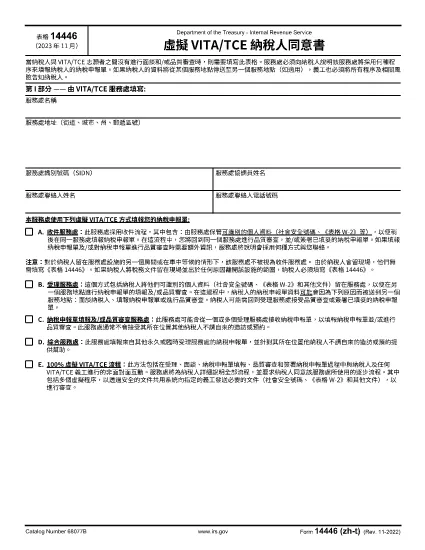
Form 14446, also known as the Taxpayer Site Retention Form, is required when a taxpayer leaves tax documents at an IRS service location and then departs the premises. The zh‑t version is the Traditional Chinese translation, making it accessible for Chinese‑speaking taxpayers.

How to Complete the Form Online

Instead of downloading the PDF and editing it with a desktop editor, use Formize’s built‑in PDF filler:

  1. Click the "Fill out this form" button on this page.
  2. Wait a few seconds while the Formize PDF Filler app loads.
  3. Enter the required information in each fillable field. The interface automatically saves your progress.
  4. When finished, click Submit to download a completed copy or print it directly.

Common Mistakes to Avoid

  • Leaving fields blank: Every required field must be completed; otherwise the form will be rejected.
  • Using the wrong language version: Ensure you are on the zh‑t (Traditional Chinese) PDF if you need it in Chinese.
  • Submitting the form before signing: The signature field is mandatory; use the digital signature option in Formize.
  • Incorrect dates: Use the exact date you left the documents at the site.

Where to Submit the Completed Form

After filling out Form 14446 (zh‑t), mail or deliver the completed form to the IRS office where the documents were left. Keep a copy for your records. If you are unsure which office to send it to, contact the IRS Service Center listed on the notice you received.

Download the PDF

For users who prefer a local copy, the official Traditional Chinese PDF is available below. The file is fully fillable and compatible with most PDF readers.

Download Form 14446 (zh‑t) PDF

SOALAN LAZIM
  • Do I need to fill out Form 14446 if I stay on the IRS premises?

    No. The form is required only when the taxpayer leaves the site after leaving documents there. Staying in the same location does not trigger the requirement.

  • Can I submit the form electronically?

    The IRS currently requires a printed and signed copy. Use Formize to fill it out, then print and mail it to the appropriate IRS office.

  • Is the zh‑t version the same as the English version?

    Yes. The content is identical; only the language differs. Use the version that matches your preferred language.

  • What happens if I forget to sign the form?

    An unsigned Form 14446 will be considered incomplete and will be returned, causing delays in processing your tax documents.

  • How long should I keep a copy of the completed form?

    Retain a copy for at least three years, the standard period for IRS record‑keeping.

  • Can I fill out Form 14446 on a mobile device?

    Yes. Formize’s PDF filler works on most modern browsers, including mobile browsers, allowing you to complete the form on a phone or tablet.

  • Where can I find the IRS office address to send the form?

    The address is listed on any notice you received from the IRS service location. If you don’t have a notice, call the IRS helpline for guidance.

BAGAIMANA UNTUK

Cara mengisi Form 14446 secara percuma, dalam talian dalam 4 langkah mudah:

  1. 1
    Open the Fillable Form
    Click the "Fill out this form" button on the page. The Formize PDF Filler will open in your browser.
  2. 2
    Enter Your Information
    Fill each required field. The filler autosaves, so you won’t lose data if you navigate away.
  3. 3
    Add Your Signature
    Use the digital signature tool inside Formize to sign the form electronically.
  4. 4
    Download or Print
    When all fields are complete, click "Download" to save a copy or "Print" to get a hard‑copy for mailing.
Bentuk apl Pengisi PDF
TENTANG

Borang cukai

Form 14446 ialah salah satu borang Cukai yang merupakan dokumen yang digunakan untuk melaporkan maklumat yang berkaitan dengan cukai kepada pihak berkuasa cukai yang berkaitan. Terdapat pelbagai jenis borang cukai, termasuk borang cukai persekutuan, negeri dan tempatan, yang boleh berbeza-beza bergantung pada keadaan dan lokasi pembayar cukai.

CIRI-CIRI

Pengisi PDF

Cara paling mudah untuk mengisi Form 14446 dalam talian

  • Cepat isi Form 14446
    Mencari cara untuk mengisi Form 14446 dengan cepat dalam talian? Dengan pengisi borang PDF percuma dalam talian kami, anda akan tahu cara mengedit dan mengisi dokumen pdf ini dalam masa kurang daripada satu minit.
  • Mudah untuk menggunakan editor PDF dalam talian
    Bosan dengan mencetak fail PDF supaya anda boleh mengeditnya, sebelum mengimbas semula dan menghantarnya semula? Edit dokumen PDF secara percuma dalam talian. Gunakan editor pdf dalam talian kami untuk menjimatkan masa dan kertas.
  • Alat yang hebat, semua platform
    Tertanya-tanya cara mengisi Form 14446 pada Mac, atau mungkin cara menggunakan pengisi PDF secara percuma? Alat PDF dalam talian kami berfungsi pada semua platform.
  • Simpanan fail selamat
    Fail "Form 14446" yang lengkap disimpan dalam pangkalan data selamat yang diuruskan oleh pengehosan Amazon Cloud. Anda boleh memadamkan fail anda daripada sistem kami pada bila-bila masa. Walau apa pun, fail ini dipadamkan secara automatik selepas 24 jam.
  • Sembang dengan Form 14446
    Sembang dengan "Form 14446" di Chatize yang merupakan pembantu pembaca PDF percuma. Tanya soalan dan dapatkan jawapan daripada "Form 14446". Cuma klik pada butang Sembang Dengan Dokumen di atas.

Padamkan sesi pengisian

Padamkan sesi pengisian yang dipilih? Dalam kes ini, kemajuan anda dalam melengkapkan borang akan hilang.

Padamkan sesi penyuntingan

Padamkan sesi penyuntingan yang dipilih? Dalam kes ini, kemajuan anda dalam membuat dan mengedit borang akan hilang.