
Pilih Bahasa

IRS Form 14453 – Penalty Computation Worksheet (Fillable Online)

  1. Negara USA
  2. Bahasa Inggeris
  3. Aktiviti Cukai
  4. Jabatan Perkhidmatan Hasil Dalam Negeri
Isi borang ini
IRS Form 14453 – Penalty Computation Worksheet (Fillable Online)

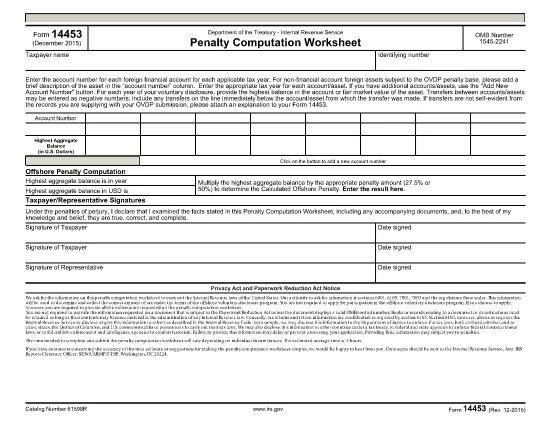
Form 14453 is the Penalty Computation Worksheet used by taxpayers who are participating in the IRS Offshore Voluntary Disclosure Program (OVDP) or similar offshore tax compliance initiatives. The worksheet helps calculate the aggregate balance of foreign accounts and the resulting penalty amount.

What Is Form 14453 and Who Needs It?

This form is required when you need to report the highest balance for each foreign financial account and let the IRS compute the offshore penalty. It is typically filed by U.S. persons with undisclosed foreign accounts, foreign trusts, or foreign corporations.

Key Sections of the Worksheet Explained

  • Account Information – List each foreign account, its highest balance, and the country of the account.
  • Aggregate Balance – The worksheet automatically adds the highest balances to give you a total aggregate balance.
  • Penalty Calculation – Based on the aggregate balance, the IRS applies the statutory penalty rate (usually 40%).
  • Signature & Date – Required to certify the accuracy of the information.

How to Complete Form 14453 with Formize

Instead of downloading the PDF and opening it in a PDF editor, simply click the "Fill out this form" button on this page. The Formize PDF Filler app will load in your browser, allowing you to complete the worksheet instantly.

Common Mistakes to Avoid

  • Entering the same balance for multiple accounts – each account must list its own highest balance.
  • Leaving negative numbers or blanks in the aggregate section – the form auto‑calculates, so leave those fields untouched.
  • Forgetting to sign the form – an unsigned worksheet will be rejected by the IRS.

Where to Find Additional IRS Guidance

Visit the IRS website for detailed instructions on the Offshore Voluntary Disclosure Program, penalty rates, and filing deadlines. You can also review related forms such as Form 14457 (OVDP Letter).

Ready to start? Click the button below and let Formize handle the rest.

SOALAN LAZIM
  • Do I need to download Form 14453 before filling it out?

    No. With Formize you can fill the form directly in your browser. Just click the "Fill out this form" button and the app loads the PDF for you.

  • Can I edit the aggregate balance field?

    The aggregate balance is calculated automatically. Do not edit it manually; the worksheet will recalculate if you change any account balances.

  • Is Form 14453 required for every offshore account?

    Only if you are reporting undisclosed foreign accounts to the IRS under the Offshore Voluntary Disclosure Program or a similar compliance program.

  • What penalty rate is applied on the worksheet?

    The worksheet uses the statutory offshore penalty rate of 40% of the aggregate balance, unless the IRS provides a reduced rate based on reasonable cause.

  • Can I submit the filled form electronically?

    Yes. After completing the form in Formize, you can download the PDF and attach it to your electronic OVDP filing or mail it as part of a paper submission.

  • What if I make a mistake after submitting?

    You can download a new copy of the form, correct the error, and resubmit. Keep both versions for your records.

  • Is there a fee to use Formize for this form?

    Formize offers free filling for IRS forms like 14453. No hidden fees or subscriptions are required.

  • Do I need a PDF reader to view the completed form?

    No. The Formize app lets you view and edit the PDF in the browser. You can also open the final PDF with any standard PDF reader if you wish.

BAGAIMANA UNTUK

Cara mengisi Form 14453 secara percuma, dalam talian dalam 5 langkah mudah:

  1. 1
    Open the Fillable Form
    Click the "Fill out this form" button on the page. The Formize PDF Filler will launch directly in your browser.
  2. 2
    Enter Your Account Details
    Add each foreign account, its highest balance, and the country. The worksheet will automatically calculate the aggregate balance.
  3. 3
    Review the Penalty Calculation
    Check the auto‑generated penalty amount. Make sure all numbers are correct before proceeding.
  4. 4
    Sign and Submit
    Enter your signature and the date, then click "Submit". You can download a completed copy for your records.
  5. 5
    Save or Print
    After submission, save the PDF to your computer or print it to attach to your OVDP filing package.
Bentuk apl Pengisi PDF
TENTANG

Borang cukai

Form 14453 ialah salah satu borang Cukai yang merupakan dokumen yang digunakan untuk melaporkan maklumat yang berkaitan dengan cukai kepada pihak berkuasa cukai yang berkaitan. Terdapat pelbagai jenis borang cukai, termasuk borang cukai persekutuan, negeri dan tempatan, yang boleh berbeza-beza bergantung pada keadaan dan lokasi pembayar cukai.

CIRI-CIRI

Pengisi PDF

Cara paling mudah untuk mengisi Form 14453 dalam talian

  • Cepat isi Form 14453
    Mencari cara untuk mengisi Form 14453 dengan cepat dalam talian? Dengan pengisi borang PDF percuma dalam talian kami, anda akan tahu cara mengedit dan mengisi dokumen pdf ini dalam masa kurang daripada satu minit.
  • Mudah untuk menggunakan editor PDF dalam talian
    Bosan dengan mencetak fail PDF supaya anda boleh mengeditnya, sebelum mengimbas semula dan menghantarnya semula? Edit dokumen PDF secara percuma dalam talian. Gunakan editor pdf dalam talian kami untuk menjimatkan masa dan kertas.
  • Alat yang hebat, semua platform
    Tertanya-tanya cara mengisi Form 14453 pada Mac, atau mungkin cara menggunakan pengisi PDF secara percuma? Alat PDF dalam talian kami berfungsi pada semua platform.
  • Simpanan fail selamat
    Fail "Form 14453" yang lengkap disimpan dalam pangkalan data selamat yang diuruskan oleh pengehosan Amazon Cloud. Anda boleh memadamkan fail anda daripada sistem kami pada bila-bila masa. Walau apa pun, fail ini dipadamkan secara automatik selepas 24 jam.
  • Sembang dengan Form 14453
    Sembang dengan "Form 14453" di Chatize yang merupakan pembantu pembaca PDF percuma. Tanya soalan dan dapatkan jawapan daripada "Form 14453". Cuma klik pada butang Sembang Dengan Dokumen di atas.

Padamkan sesi pengisian

Padamkan sesi pengisian yang dipilih? Dalam kes ini, kemajuan anda dalam melengkapkan borang akan hilang.

Padamkan sesi penyuntingan

Padamkan sesi penyuntingan yang dipilih? Dalam kes ini, kemajuan anda dalam membuat dan mengedit borang akan hilang.