
Pilih Bahasa

IRS Form 15230 – Mobility Statement (Fillable PDF)

  1. Negara USA
  2. Bahasa Inggeris
  3. Aktiviti Cukai
  4. Jabatan Perkhidmatan Hasil Dalam Negeri
Isi borang ini
IRS Form 15230 – Mobility Statement (Fillable PDF)

What Is Form 15230?

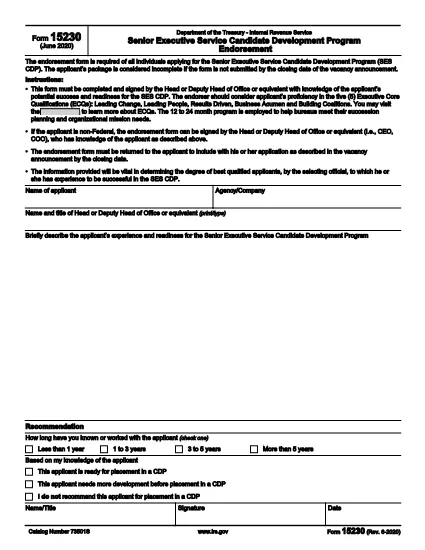
Form 15230, also known as the Mobility Statement for the Senior Executive Service Candidate Development Program (SES CDP), is an official IRS document used to capture a candidate’s willingness and ability to relocate for senior executive positions within the federal government. The form is required during the SES CDP application process and helps selecting officials assess mobility readiness.

How to Fill Out Form 15230 Online

Instead of printing, scanning, or manually editing the PDF, you can complete the form instantly with Formize’s built‑in PDF Filler. Follow these simple steps:

  1. Click the “Fill out this form” button on this page.
  2. Wait a few seconds while the Formize PDF Filler app loads the fillable version of Form 15230.
  3. Enter your personal information, current position, and mobility preferences directly in the browser.
  4. Use the signature field to e‑sign the form with a mouse, touch, or stylus.
  5. Review all entries for accuracy, then click Submit to download the completed PDF or save it to your cloud storage.

Common Mistakes to Avoid

  • Leaving required fields blank – the form will not accept submission if mandatory sections are empty.
  • Mismatching dates and locations – ensure the geographic areas you select match your actual willingness to relocate.
  • Using an outdated version – always start with the latest PDF (Rev. 6‑2020) provided by the IRS.
  • Signing with a scanned image – use the built‑in e‑signature tool for a legally binding signature.

Download the Official PDF

If you prefer to keep a copy of the original document, you can download the official IRS PDF directly from the link below. The file is the same version that Formize loads for online completion.

Download IRS Form 15230 (PDF)

FAQs About Form 15230

Below are answers to the most common questions candidates ask about this mobility statement.

SOALAN LAZIM
  • What is the purpose of Form 15230?

    Form 15230 records a candidate’s willingness and ability to relocate for senior executive roles in the SES Candidate Development Program.

  • Do I need to print the PDF to fill it out?

    No. With Formize you can fill, sign, and save the form entirely online – no printing required.

  • Can I use a scanned signature?

    A scanned image is not legally binding. Use the e‑signature field in the Formize filler for a valid signature.

  • Which version of the form should I use?

    Always use the latest revision (Rev. 6‑2020). The link on this page points to the current IRS version.

  • What happens after I submit the form?

    You will receive a completed PDF that you can download or store in the cloud. Submit the file to your agency’s HR or SES CDP office as instructed.

  • Is Form 15230 required for all federal job applications?

    It is required only for candidates applying to the Senior Executive Service Candidate Development Program.

  • Where can I get help if I have questions about the form?

    Contact your agency’s human‑resources office or review the IRS instructions included in the PDF.

BAGAIMANA UNTUK

Cara mengisi Form 15230 secara percuma, dalam talian dalam 5 langkah mudah:

  1. 1
    Click the Fill‑out Button
    Press the “Fill out this form” button on the page to launch the Formize PDF Filler.
  2. 2
    Wait for the Filler to Load
    The app loads the fillable version of Form 15230 in a few seconds – no download required.
  3. 3
    Enter Your Information
    Complete all required fields: personal details, current position, and mobility preferences.
  4. 4
    Add Your Electronic Signature
    Use the built‑in signature tool to sign with a mouse, finger, or stylus.
  5. 5
    Review and Save
    Check the form for accuracy, then click Submit to download the completed PDF or save it to your cloud storage.
Bentuk apl Pengisi PDF
TENTANG

Borang cukai

Form 15230 ialah salah satu borang Cukai yang merupakan dokumen yang digunakan untuk melaporkan maklumat yang berkaitan dengan cukai kepada pihak berkuasa cukai yang berkaitan. Terdapat pelbagai jenis borang cukai, termasuk borang cukai persekutuan, negeri dan tempatan, yang boleh berbeza-beza bergantung pada keadaan dan lokasi pembayar cukai.

CIRI-CIRI

Pengisi PDF

Cara paling mudah untuk mengisi Form 15230 dalam talian

  • Cepat isi Form 15230
    Mencari cara untuk mengisi Form 15230 dengan cepat dalam talian? Dengan pengisi borang PDF percuma dalam talian kami, anda akan tahu cara mengedit dan mengisi dokumen pdf ini dalam masa kurang daripada satu minit.
  • Mudah untuk menggunakan editor PDF dalam talian
    Bosan dengan mencetak fail PDF supaya anda boleh mengeditnya, sebelum mengimbas semula dan menghantarnya semula? Edit dokumen PDF secara percuma dalam talian. Gunakan editor pdf dalam talian kami untuk menjimatkan masa dan kertas.
  • Alat yang hebat, semua platform
    Tertanya-tanya cara mengisi Form 15230 pada Mac, atau mungkin cara menggunakan pengisi PDF secara percuma? Alat PDF dalam talian kami berfungsi pada semua platform.
  • Simpanan fail selamat
    Fail "Form 15230" yang lengkap disimpan dalam pangkalan data selamat yang diuruskan oleh pengehosan Amazon Cloud. Anda boleh memadamkan fail anda daripada sistem kami pada bila-bila masa. Walau apa pun, fail ini dipadamkan secara automatik selepas 24 jam.
  • Sembang dengan Form 15230
    Sembang dengan "Form 15230" di Chatize yang merupakan pembantu pembaca PDF percuma. Tanya soalan dan dapatkan jawapan daripada "Form 15230". Cuma klik pada butang Sembang Dengan Dokumen di atas.

Padamkan sesi pengisian

Padamkan sesi pengisian yang dipilih? Dalam kes ini, kemajuan anda dalam melengkapkan borang akan hilang.

Padamkan sesi penyuntingan

Padamkan sesi penyuntingan yang dipilih? Dalam kes ini, kemajuan anda dalam membuat dan mengedit borang akan hilang.