
Pilih Bahasa

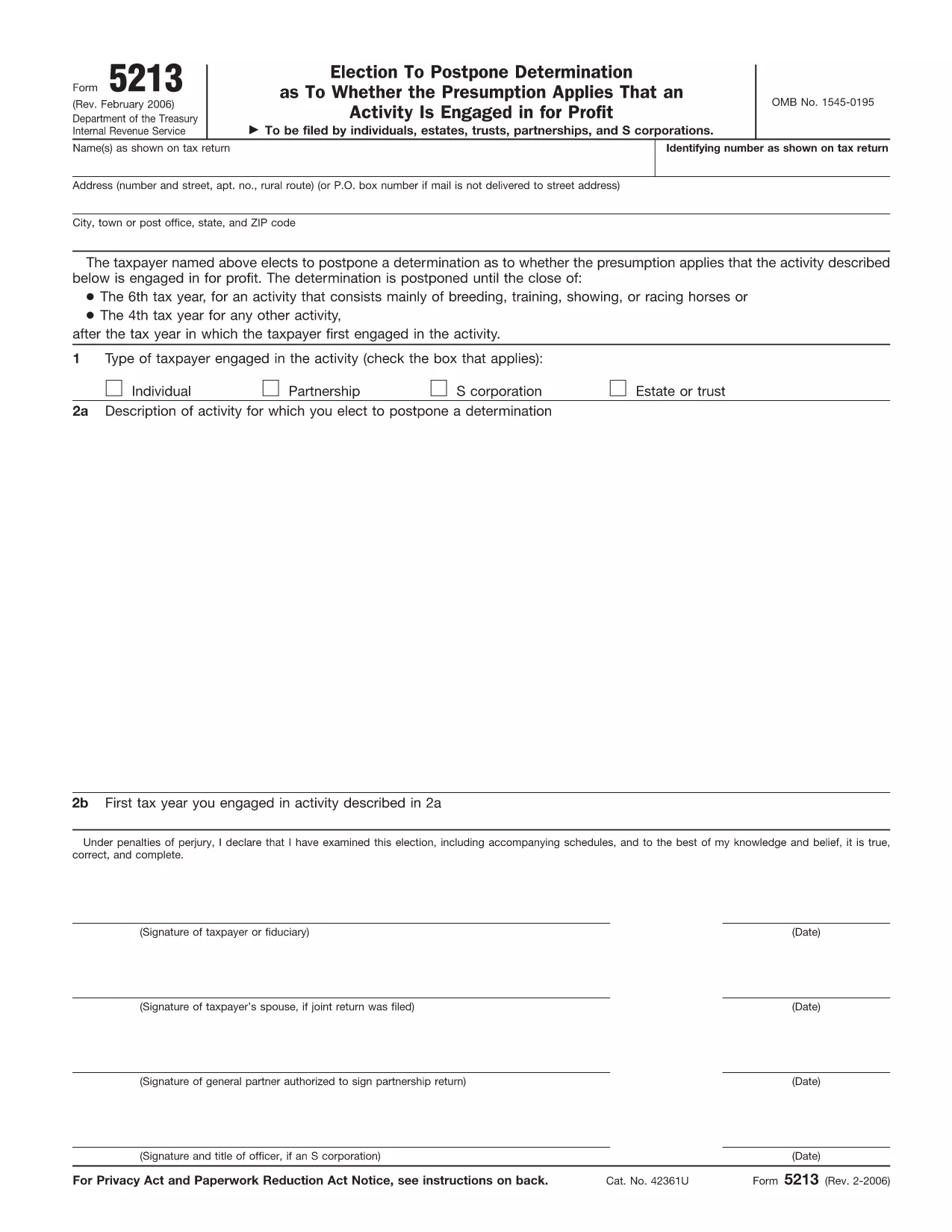
IRS Form 5213 – Election to Postpone Determination (Fillable PDF)

  1. Negara USA
  2. Bahasa Inggeris
  3. Aktiviti Cukai
  4. Jabatan Perkhidmatan Hasil Dalam Negeri
Isi borang ini
IRS Form 5213 – Election to Postpone Determination (Fillable PDF)

The IRS Form 5213, titled Election to Postpone Determination, allows taxpayers to request a delay on the IRS’s decision about whether an activity is engaged in for profit. This can be critical for individuals, estates, trusts, partnerships, and S‑corporations that need extra time to gather documentation or demonstrate profitability.

Our fillable PDF version is hosted on Formize, so you can complete the form directly in your browser—no extra software required. Simply click the “Fill out this form” button, let the Formize PDF Filler load, and start entering your information.

Below you’ll find a quick guide, tips for avoiding errors, and answers to the most common questions about Form 5213.

SOALAN LAZIM
  • When is the deadline to file Form 5213?

    You must file within three years after the due date of the return for the first tax year the activity was engaged in, or within 60 days after receiving an IRS notice of potential disallowance.

  • Can I file Form 5213 electronically?

    Yes. Using Formize’s online fillable PDF lets you complete and save the form electronically, then print or email it to the IRS.

  • Do I need a professional to complete Form 5213?

    While not required, a tax professional can help ensure the election is appropriate for your situation and that all required information is included.

  • What happens after I submit Form 5213?

    The IRS will acknowledge receipt and grant a postponement period, allowing you additional time to substantiate that the activity is for profit.

  • Is there a fee to use Formize’s fillable PDF?

    No. Formize provides the fillable version of Form 5213 for free.

  • Can I amend a previously filed Form 5213?

    If you need to change information, you must file a new Form 5213 with updated details and reference the original filing.

  • What if I miss the filing deadline?

    Missing the deadline may result in the loss of the postponement election, and the IRS could disallow related deductions.

  • Do I need to attach supporting documents?

    Attach any documentation that demonstrates your intent to make a profit, such as business plans, financial statements, or contracts.

BAGAIMANA UNTUK

Cara mengisi IRS Form 5213 secara percuma, dalam talian dalam 5 langkah mudah:

  1. 1
    Open the Fillable Form
    Click the “Fill out this form” button on the page. The Formize PDF Filler app will load in a new window.
  2. 2
    Enter Your Information
    Type directly into each field—name, identifying number, activity description, and any supporting statements.
  3. 3
    Add Your Signature
    Use the built‑in e‑signature tool to sign electronically. If filing a joint return, both spouses must sign.
  4. 4
    Review and Submit
    Check all entries for accuracy, then click “Submit” to download the completed PDF or to email it directly to the IRS.
  5. 5
    Save a Copy
    After submission, save a copy of the filled PDF to your records for future reference.
Bentuk apl Pengisi PDF
TENTANG

Borang cukai

IRS Form 5213 ialah salah satu borang Cukai yang merupakan dokumen yang digunakan untuk melaporkan maklumat yang berkaitan dengan cukai kepada pihak berkuasa cukai yang berkaitan. Terdapat pelbagai jenis borang cukai, termasuk borang cukai persekutuan, negeri dan tempatan, yang boleh berbeza-beza bergantung pada keadaan dan lokasi pembayar cukai.

CIRI-CIRI

Pengisi PDF

Cara paling mudah untuk mengisi IRS Form 5213 dalam talian

  • Cepat isi IRS Form 5213
    Mencari cara untuk mengisi IRS Form 5213 dengan cepat dalam talian? Dengan pengisi borang PDF percuma dalam talian kami, anda akan tahu cara mengedit dan mengisi dokumen pdf ini dalam masa kurang daripada satu minit.
  • Mudah untuk menggunakan editor PDF dalam talian
    Bosan dengan mencetak fail PDF supaya anda boleh mengeditnya, sebelum mengimbas semula dan menghantarnya semula? Edit dokumen PDF secara percuma dalam talian. Gunakan editor pdf dalam talian kami untuk menjimatkan masa dan kertas.
  • Alat yang hebat, semua platform
    Tertanya-tanya cara mengisi IRS Form 5213 pada Mac, atau mungkin cara menggunakan pengisi PDF secara percuma? Alat PDF dalam talian kami berfungsi pada semua platform.
  • Simpanan fail selamat
    Fail "IRS Form 5213" yang lengkap disimpan dalam pangkalan data selamat yang diuruskan oleh pengehosan Amazon Cloud. Anda boleh memadamkan fail anda daripada sistem kami pada bila-bila masa. Walau apa pun, fail ini dipadamkan secara automatik selepas 24 jam.
  • Sembang dengan IRS Form 5213
    Sembang dengan "IRS Form 5213" di Chatize yang merupakan pembantu pembaca PDF percuma. Tanya soalan dan dapatkan jawapan daripada "IRS Form 5213". Cuma klik pada butang Sembang Dengan Dokumen di atas.

Padamkan sesi pengisian

Padamkan sesi pengisian yang dipilih? Dalam kes ini, kemajuan anda dalam melengkapkan borang akan hilang.

Padamkan sesi penyuntingan

Padamkan sesi penyuntingan yang dipilih? Dalam kes ini, kemajuan anda dalam membuat dan mengedit borang akan hilang.