Pilih Bahasa

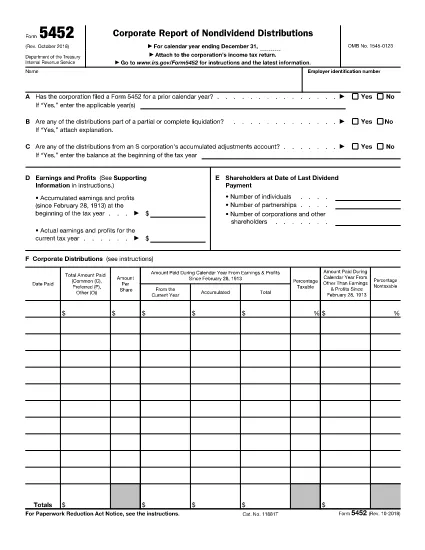
Form 5452 – Corporate Report of Nondividend Distributions (Fillable PDF)

  1. Negara USA
  2. Bahasa Inggeris
  3. Aktiviti Cukai
  4. Jabatan Perkhidmatan Hasil Dalam Negeri
Isi borang ini
Form 5452 – Corporate Report of Nondividend Distributions (Fillable PDF)

Form 5452, Corporate Report of Nondividend Distributions, is the IRS‑required document for corporations that distribute money or property to shareholders that does not qualify as a dividend. Using the fillable PDF version on Formize saves you time, eliminates manual entry errors, and keeps the form fully IRS‑compliant.

What Is Form 5452?

The form captures details about the corporation’s earnings and profits, accumulated adjustments, and the taxable versus nontaxable portions of each distribution. It is mandatory when a corporation makes nondividend distributions under IRC §301, §1368(c)(3), or §1371(e).

How to Complete the Fillable Form 5452 Online

Instead of downloading the PDF and opening a separate editor, simply click the "Fill out this form" button below. The Formize PDF Filler app loads instantly, letting you enter data directly in your browser.

  • Step 1: Click the button and wait for the secure Formize editor to appear.
  • Step 2: Fill in corporate name, EIN, and the distribution details in the highlighted fields.
  • Step 3: Use the built‑in calculator to split taxable and nontaxable amounts.
  • Step 4: Review the completed form for accuracy.
  • Step 5: Save, download, or e‑sign the PDF and attach it to your corporate tax return.

Common Mistakes to Avoid

Even experienced tax professionals slip up. Avoid these pitfalls:

  • Leaving the "Earnings and Profits" section blank – the IRS requires a precise figure.
  • Misclassifying a distribution as a dividend when it is nondividend.
  • Failing to attach supporting schedules for accumulated adjustments.
  • Submitting the form after the corporate tax return deadline, which can trigger penalties.

When and Where to File Form 5452

Form 5452 must be filed **concurrently** with the corporation’s income tax return (Form 1120, 1120‑S, etc.). Include the completed PDF with your electronic filing or attach a printed copy if you file on paper.

Key Definitions & Relevant IRS Sections

Nondividend Distribution: A payment to shareholders that does not meet the definition of a dividend under the Internal Revenue Code.

IRC §§301, 1368(c)(3), 1371(e): The statutory sections governing the treatment of nondividend distributions.

Using the fillable Form 5452 on Formize ensures every required field aligns with these sections, reducing audit risk.

SOALAN LAZIM
  • Who must file Form 5452?

    Any corporation that makes a nondividend distribution to its shareholders under IRC §301, §1368(c)(3), or §1371(e) must file Form 5452 with its tax return.

  • Can I use the fillable PDF for paper filing?

    Yes. After completing the form online, download the PDF, print it, and attach it to your paper tax return.

  • Is there a filing deadline separate from the corporate tax return?

    No. Form 5452 is due at the same time as the corporation’s income tax return. Late filing can result in penalties.

  • What if I make a mistake after filing?

    Amend the original return (Form 1120‑X, 1120‑S‑X, etc.) and include a corrected Form 5452. Attach an explanation of the changes.

  • Do I need a professional to fill out Form 5452?

    While a tax professional can help, the fillable PDF on Formize guides you through each required field, making it manageable for most corporate accountants.

  • Is the Formize filler secure?

    Yes. All data is processed over encrypted HTTPS connections and is not stored on our servers after you download the completed PDF.

  • Can I save my progress and return later?

    The Formize editor allows you to save a draft locally on your computer and reopen it later for completion.

  • What sections of the IRS code does Form 5452 reference?

    Form 5452 primarily references IRC §301 (distributions), §1368(c)(3) (S‑corporation distributions), and §1371(e) (personal holding company distributions).

BAGAIMANA UNTUK

Cara mengisi Form 5452 secara percuma, dalam talian dalam 5 langkah mudah:

  1. 1
    Click the Fill‑out Button
    On this page, hit the “Fill out this form” button. The Formize PDF Filler loads in a secure browser window.
  2. 2
    Enter Corporate Information
    Type the corporation’s name, EIN, and the date of each nondividend distribution into the highlighted fields.
  3. 3
    Calculate Taxable Portions
    Use the built‑in calculator to separate taxable and nontaxable amounts for each distribution.
  4. 4
    Review & Validate
    Check every line for completeness. The filler will flag any missing required fields.
  5. 5
    Save, Download, or e‑Sign
    When satisfied, click “Save” to download a completed PDF, or use the e‑sign feature and attach the form to your tax return.
Bentuk apl Pengisi PDF
TENTANG

Borang cukai

Form 5452 ialah salah satu borang Cukai yang merupakan dokumen yang digunakan untuk melaporkan maklumat yang berkaitan dengan cukai kepada pihak berkuasa cukai yang berkaitan. Terdapat pelbagai jenis borang cukai, termasuk borang cukai persekutuan, negeri dan tempatan, yang boleh berbeza-beza bergantung pada keadaan dan lokasi pembayar cukai.

CIRI-CIRI

Pengisi PDF

Cara paling mudah untuk mengisi Form 5452 dalam talian

  • Cepat isi Form 5452
    Mencari cara untuk mengisi Form 5452 dengan cepat dalam talian? Dengan pengisi borang PDF percuma dalam talian kami, anda akan tahu cara mengedit dan mengisi dokumen pdf ini dalam masa kurang daripada satu minit.
  • Mudah untuk menggunakan editor PDF dalam talian
    Bosan dengan mencetak fail PDF supaya anda boleh mengeditnya, sebelum mengimbas semula dan menghantarnya semula? Edit dokumen PDF secara percuma dalam talian. Gunakan editor pdf dalam talian kami untuk menjimatkan masa dan kertas.
  • Alat yang hebat, semua platform
    Tertanya-tanya cara mengisi Form 5452 pada Mac, atau mungkin cara menggunakan pengisi PDF secara percuma? Alat PDF dalam talian kami berfungsi pada semua platform.
  • Simpanan fail selamat
    Fail "Form 5452" yang lengkap disimpan dalam pangkalan data selamat yang diuruskan oleh pengehosan Amazon Cloud. Anda boleh memadamkan fail anda daripada sistem kami pada bila-bila masa. Walau apa pun, fail ini dipadamkan secara automatik selepas 24 jam.
  • Sembang dengan Form 5452
    Sembang dengan "Form 5452" di Chatize yang merupakan pembantu pembaca PDF percuma. Tanya soalan dan dapatkan jawapan daripada "Form 5452". Cuma klik pada butang Sembang Dengan Dokumen di atas.

Padamkan sesi pengisian

Padamkan sesi pengisian yang dipilih? Dalam kes ini, kemajuan anda dalam melengkapkan borang akan hilang.

Padamkan sesi penyuntingan

Padamkan sesi penyuntingan yang dipilih? Dalam kes ini, kemajuan anda dalam membuat dan mengedit borang akan hilang.