
Pilih Bahasa

Form 5498‑ESA Fillable PDF – Coverdell Education Savings Account Reporting

  1. Negara USA
  2. Bahasa Inggeris
  3. Aktiviti Cukai
  4. Jabatan Perkhidmatan Hasil Dalam Negeri
Isi borang ini
Form 5498‑ESA Fillable PDF – Coverdell Education Savings Account Reporting

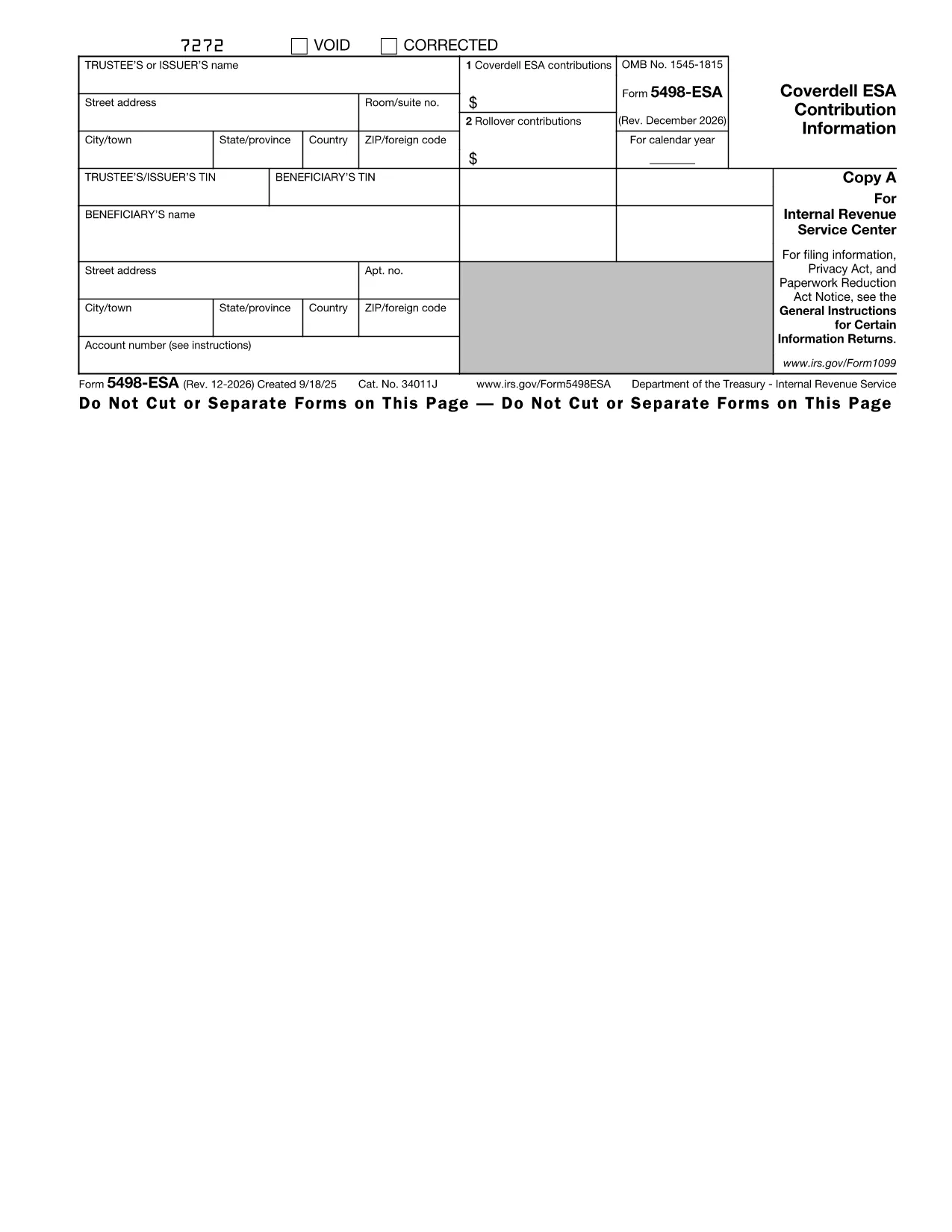
The IRS Form 5498‑ESA (Coverdell Education Savings Account Contribution Information) is the official document trustees or issuers use to report contributions, rollovers, and the year‑end fair market value of a Coverdell ESA. Accurate reporting helps the IRS track education‑savings contributions and ensures beneficiaries stay within the $2,000 annual limit.

What Is Form 5498‑ESA?

Form 5498‑ESA provides a yearly snapshot of all activity in a Coverdell ESA. It includes:

  • Trustee/issuer name, address, and TIN
  • Beneficiary name and TIN
  • Total contributions for the tax year (Box 1)
  • Rollover contributions, if any (Box 2)
  • Fair market value of the account on December 31

How to Fill Out Form 5498‑ESA Online

Instead of printing, downloading, and editing the PDF in a separate editor, simply click the "Fill out this form" button on this page. The Formize PDF Filler app will load instantly, letting you:

  1. Enter trustee and beneficiary details directly into fillable fields.
  2. Upload supporting documents if needed.
  3. Validate the data with built‑in checks that flag common mistakes.
  4. Save a completed copy or export it as a PDF for your records.

Key Deadlines and Common Errors

Deadline: Trustees must provide Copy B of Form 5498‑ESA to the beneficiary by May 31 of the year following the tax year.

Common mistakes to avoid:

  • Entering the wrong beneficiary Social Security number.
  • Reporting contributions that exceed the $2,000 limit.
  • Leaving Box 2 blank when a rollover actually occurred.
  • Failing to include the fair market value as of December 31.

Download the Fillable PDF

If you prefer to work offline, you can download the official fillable PDF directly from the IRS:

Download Form 5498‑ESA (PDF)

Why Use Formize PDF Filler?

Formize provides a secure, browser‑based environment that eliminates the need for separate PDF software. Your data never leaves the encrypted session unless you choose to save or export it. Plus, the built‑in validation helps you submit a clean, error‑free form the first time.

Ready to get started? Click the button below and let Formize guide you through every field.

Arahan

SOALAN LAZIM
  • Who must file Form 5498‑ESA?

    The trustee or issuer of the Coverdell ESA files the form. A copy (Copy B) is provided to the beneficiary by May 31 of the following year.

  • Is Form 5498‑ESA deductible on my tax return?

    No. Contributions reported on Form 5498‑ESA are not deductible, but they are important for tracking contribution limits.

  • Can I file Form 5498‑ESA electronically?

    Yes. If you have 250 or more forms, electronic filing is required. For a single form, you can submit a paper copy or use an online filler like Formize.

  • What happens if I exceed the $2,000 contribution limit?

    Excess contributions plus earnings must be withdrawn by June 1 of the following year to avoid a 6% excise tax on the excess amount.

  • Do I need to attach any supporting documents?

    Generally, no supporting documents are attached to Form 5498‑ESA, but you should keep records of contributions and rollovers for your own files.

  • How do I correct an error on a filed Form 5498‑ESA?

    Submit a corrected Form 5498‑ESA with the label "Corrected" at the top of the form. The IRS provides instructions for filing amended information returns.

BAGAIMANA UNTUK

Cara mengisi Form 5498-ESA secara percuma, dalam talian dalam 4 langkah mudah:

  1. 1
    Click the Fill‑out Button
    On this page, click the "Fill out this form" button. The Formize PDF Filler will open in a new tab.
  2. 2
    Enter Required Information
    Type the trustee’s name, address, TIN, and the beneficiary’s details into the fillable fields. The form automatically moves you to the next section.
  3. 3
    Review and Validate
    Use the built‑in validation to check for missing or incorrect entries. Fix any highlighted errors before proceeding.
  4. 4
    Save or Export
    When all fields are complete, click "Save" to store a copy in your Formize account or "Export PDF" to download a finished PDF for your records.
Bentuk apl Pengisi PDF
TENTANG

Borang cukai

Form 5498-ESA ialah salah satu borang Cukai yang merupakan dokumen yang digunakan untuk melaporkan maklumat yang berkaitan dengan cukai kepada pihak berkuasa cukai yang berkaitan. Terdapat pelbagai jenis borang cukai, termasuk borang cukai persekutuan, negeri dan tempatan, yang boleh berbeza-beza bergantung pada keadaan dan lokasi pembayar cukai.

CIRI-CIRI

Pengisi PDF

Cara paling mudah untuk mengisi Form 5498-ESA dalam talian

  • Cepat isi Form 5498-ESA
    Mencari cara untuk mengisi Form 5498-ESA dengan cepat dalam talian? Dengan pengisi borang PDF percuma dalam talian kami, anda akan tahu cara mengedit dan mengisi dokumen pdf ini dalam masa kurang daripada satu minit.
  • Mudah untuk menggunakan editor PDF dalam talian
    Bosan dengan mencetak fail PDF supaya anda boleh mengeditnya, sebelum mengimbas semula dan menghantarnya semula? Edit dokumen PDF secara percuma dalam talian. Gunakan editor pdf dalam talian kami untuk menjimatkan masa dan kertas.
  • Alat yang hebat, semua platform
    Tertanya-tanya cara mengisi Form 5498-ESA pada Mac, atau mungkin cara menggunakan pengisi PDF secara percuma? Alat PDF dalam talian kami berfungsi pada semua platform.
  • Simpanan fail selamat
    Fail "Form 5498-ESA" yang lengkap disimpan dalam pangkalan data selamat yang diuruskan oleh pengehosan Amazon Cloud. Anda boleh memadamkan fail anda daripada sistem kami pada bila-bila masa. Walau apa pun, fail ini dipadamkan secara automatik selepas 24 jam.
  • Sembang dengan Form 5498-ESA
    Sembang dengan "Form 5498-ESA" di Chatize yang merupakan pembantu pembaca PDF percuma. Tanya soalan dan dapatkan jawapan daripada "Form 5498-ESA". Cuma klik pada butang Sembang Dengan Dokumen di atas.

Padamkan sesi pengisian

Padamkan sesi pengisian yang dipilih? Dalam kes ini, kemajuan anda dalam melengkapkan borang akan hilang.

Padamkan sesi penyuntingan

Padamkan sesi penyuntingan yang dipilih? Dalam kes ini, kemajuan anda dalam membuat dan mengedit borang akan hilang.