
Pilih Bahasa

IRS Form 8038‑G Fillable PDF

  1. Negara USA
  2. Bahasa Inggeris
  3. Aktiviti Cukai
  4. Jabatan Perkhidmatan Hasil Dalam Negeri
Isi borang ini
IRS Form 8038‑G Fillable PDF

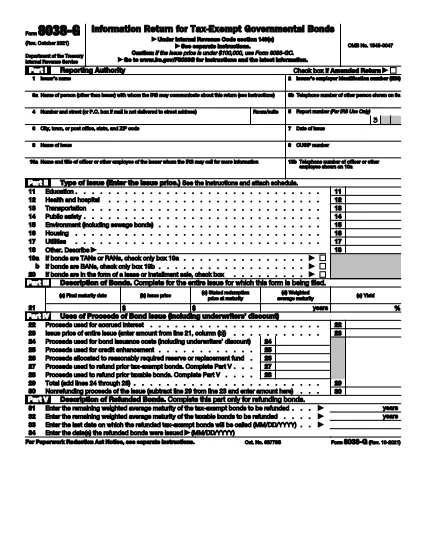
The IRS Form 8038‑G is the official document used by governmental entities to report the issuance of tax‑exempt bonds under Internal Revenue Code §149(e). Accurate reporting on this form helps maintain the bond’s tax‑exempt status and keeps the issuer compliant with federal regulations.

What Is Form 8038‑G?

Form 8038‑G collects essential details such as the issuer’s name, bond issue date, CUSIP number, amount of interest, and the purpose of the bond. The IRS uses this information to verify that the bonds meet the requirements for tax exemption.

How to Complete the Form Online

Instead of printing and scanning, you can fill out Form 8038‑G directly in your browser:

  1. Click the "Fill out this form" button on this page.
  2. Our Formize PDF Filler app loads the fillable PDF instantly.
  3. Enter the required information in each field. The form automatically validates dates and numeric entries.
  4. When all fields are complete, use the built‑in e‑signature tool to sign the form.
  5. Save a copy for your records or submit the PDF to the IRS as instructed.

Common Mistakes to Avoid

  • Incorrect CUSIP number: Double‑check the 9‑digit identifier before saving.
  • Missing officer contact info: The IRS may request clarification; incomplete contact details cause delays.
  • Wrong issue date: The form must reflect the actual issuance date, not the resolution date.
  • Failure to sign: An unsigned form is considered incomplete and will be rejected.

Download the Fillable PDF

Need a local copy? The official, fillable PDF is available from the IRS:

Download Form 8038‑G (PDF)

Whether you choose to edit offline or use Formize’s online filler, you’ll have a fully interactive version ready for submission.

Frequently Asked Questions

Below are the most common queries about Form 8038‑G.

Arahan

  • Ukiran 8038-G - Instruksi untuk Formulir 8038-G, pengembalian Informasi untuk Obligasi Pemerintah Pajak Eksempt
SOALAN LAZIM
  • Who must file Form 8038‑G?

    Any governmental entity that issues tax‑exempt bonds under IRC §149(e) is required to file Form 8038‑G with the IRS.

  • When is the filing deadline?

    The form must be filed within 90 days of the bond issuance date, unless an extension is granted.

  • Can I file Form 8038‑G electronically?

    Yes. After completing the fillable PDF, you can submit it electronically through the IRS e‑file system or mail a printed copy.

  • Is a signature required on the form?

    An authorized officer’s signature is mandatory. The Formize PDF Filler provides a secure e‑signature option.

  • What happens if I submit an incomplete form?

    The IRS will reject the submission, which can delay bond issuance and may result in penalties or loss of tax‑exempt status.

  • Do I need to attach supporting documents?

    Typically, you must attach the bond resolution, financial statements, and any other documentation that explains the bond’s purpose.

  • Is there a cost to download the fillable PDF?

    No. The IRS provides the fillable PDF for free, and Formize’s online filler is also free to use for this form.

BAGAIMANA UNTUK

Cara mengisi IRS Form 8038-G secara percuma, dalam talian dalam 4 langkah mudah:

  1. 1
    Open the Form
    Visit this landing page and click the "Fill out this form" button to launch the Formize PDF Filler.
  2. 2
    Enter Required Information
    Fill each highlighted field with accurate data—issuer details, bond issue date, CUSIP, interest amount, and officer contact info.
  3. 3
    Review and e‑Sign
    Check all entries for errors, then use the built‑in e‑signature tool to sign where required.
  4. 4
    Save or Submit
    Download the completed PDF for your records or follow IRS instructions to submit it electronically or by mail.
Bentuk apl Pengisi PDF
TENTANG

Borang cukai

IRS Form 8038-G ialah salah satu borang Cukai yang merupakan dokumen yang digunakan untuk melaporkan maklumat yang berkaitan dengan cukai kepada pihak berkuasa cukai yang berkaitan. Terdapat pelbagai jenis borang cukai, termasuk borang cukai persekutuan, negeri dan tempatan, yang boleh berbeza-beza bergantung pada keadaan dan lokasi pembayar cukai.

CIRI-CIRI

Pengisi PDF

Cara paling mudah untuk mengisi IRS Form 8038-G dalam talian

  • Cepat isi IRS Form 8038-G
    Mencari cara untuk mengisi IRS Form 8038-G dengan cepat dalam talian? Dengan pengisi borang PDF percuma dalam talian kami, anda akan tahu cara mengedit dan mengisi dokumen pdf ini dalam masa kurang daripada satu minit.
  • Mudah untuk menggunakan editor PDF dalam talian
    Bosan dengan mencetak fail PDF supaya anda boleh mengeditnya, sebelum mengimbas semula dan menghantarnya semula? Edit dokumen PDF secara percuma dalam talian. Gunakan editor pdf dalam talian kami untuk menjimatkan masa dan kertas.
  • Alat yang hebat, semua platform
    Tertanya-tanya cara mengisi IRS Form 8038-G pada Mac, atau mungkin cara menggunakan pengisi PDF secara percuma? Alat PDF dalam talian kami berfungsi pada semua platform.
  • Simpanan fail selamat
    Fail "IRS Form 8038-G" yang lengkap disimpan dalam pangkalan data selamat yang diuruskan oleh pengehosan Amazon Cloud. Anda boleh memadamkan fail anda daripada sistem kami pada bila-bila masa. Walau apa pun, fail ini dipadamkan secara automatik selepas 24 jam.
  • Sembang dengan IRS Form 8038-G
    Sembang dengan "IRS Form 8038-G" di Chatize yang merupakan pembantu pembaca PDF percuma. Tanya soalan dan dapatkan jawapan daripada "IRS Form 8038-G". Cuma klik pada butang Sembang Dengan Dokumen di atas.

Padamkan sesi pengisian

Padamkan sesi pengisian yang dipilih? Dalam kes ini, kemajuan anda dalam melengkapkan borang akan hilang.

Padamkan sesi penyuntingan

Padamkan sesi penyuntingan yang dipilih? Dalam kes ini, kemajuan anda dalam membuat dan mengedit borang akan hilang.