
Pilih Bahasa

IRS Form 8038‑TC – Fillable PDF for New Clean Renewable Energy Bonds

  1. Negara USA
  2. Bahasa Inggeris
  3. Aktiviti Cukai
  4. Jabatan Perkhidmatan Hasil Dalam Negeri
Isi borang ini
IRS Form 8038‑TC – Fillable PDF for New Clean Renewable Energy Bonds

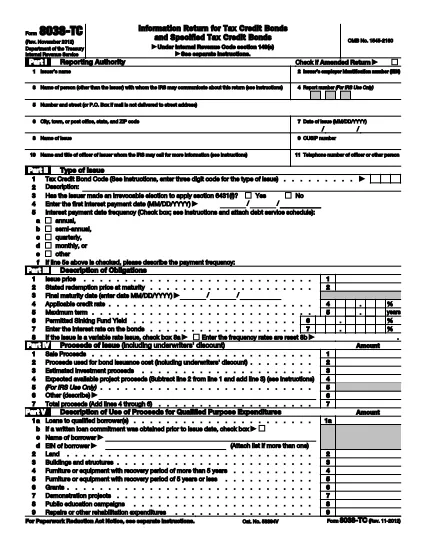
The IRS Form 8038‑TC is the official schedule used to report the issuance of New Clean Renewable Energy Bonds (New CREBs) under Internal Revenue Code sections 54A and 54C. This fillable PDF lets taxpayers and bond issuers capture required information quickly, without printing or manual data entry.

What Is Form 8038‑TC?

Form 8038‑TC provides a detailed breakdown of the qualified purpose expenditures, arbitrage provisions, and other key data points that the IRS requires for New CREBs. The form is part of the broader tax‑credit bond program that encourages investment in renewable energy projects.

How to Complete the Form Online

With Formize’s integrated PDF filler, you can fill out Form 8038‑TC directly in your browser:

  • Click the "Fill out this form" button on the page.
  • Wait a few seconds while the Formize PDF Filler loads.
  • Enter the required data into each field. The filler highlights mandatory sections and provides tooltip help.
  • When you’re finished, download the completed PDF or save it to your cloud storage.

Common Mistakes to Avoid

  • Leaving required fields blank – the filler will block saving until all mandatory boxes are completed.
  • Incorrect bond classification – ensure you select the correct bond type (New CREB vs. existing CREB).
  • Mismatched dollar amounts – totals on Schedule A must equal the sum of individual expenditures.
  • Improper signatures – use the electronic signature field; a handwritten signature on the printed copy will be rejected.

Where to Submit the Completed Form

After saving the filled PDF, attach it to your annual tax return (Form 990 or Form 1120‑PC) or submit it directly to the IRS via the e‑File system. Keep a copy for your records.

Arahan

  • Ukiran 8038-TC - Instruksi untuk Formulir 8038-TC, pengembalian Informasi untuk Obligasi Kredit Pajak dan Obligasi Kredit Pajak yang Dinyatakan
SOALAN LAZIM
  • What is the purpose of Form 8038‑TC?

    Form 8038‑TC reports the issuance of New Clean Renewable Energy Bonds, detailing qualified expenditures and ensuring compliance with IRC sections 54A and 54C.

  • Can I fill out Form 8038‑TC on a mobile device?

    Yes. The Formize PDF Filler is responsive and works on most smartphones and tablets.

  • Do I need a digital signature for this form?

    A digital signature is accepted. Use the signature field in the filler; a handwritten signature on a printed copy will be rejected.

  • Is there a fee to use the Formize fillable PDF?

    No. Formize offers free filling for IRS forms like 8038‑TC. Premium features are optional but not required for this form.

  • How do I know if I selected the correct bond type?

    Select "New CREB" from the dropdown. The form includes a brief description to help you confirm the correct classification.

  • Where should I submit the completed Form 8038‑TC?

    Attach the filled PDF to your annual tax return or submit it via the IRS e‑File system. Keep a copy for your records.

BAGAIMANA UNTUK

Cara mengisi Form 8038-TC secara percuma, dalam talian dalam 3 langkah mudah:

  1. 1
    Open the Fillable Form
    Click the "Fill out this form" button on the page. The Formize PDF Filler will load in a new window.
  2. 2
    Enter Your Information
    Complete each highlighted field. Required fields are marked with an asterisk and tooltips provide guidance.
  3. 3
    Save or Download
    When all data is entered, click "Save" to download the completed PDF or store it directly to your preferred cloud service.
Bentuk apl Pengisi PDF
TENTANG

Borang cukai

Form 8038-TC ialah salah satu borang Cukai yang merupakan dokumen yang digunakan untuk melaporkan maklumat yang berkaitan dengan cukai kepada pihak berkuasa cukai yang berkaitan. Terdapat pelbagai jenis borang cukai, termasuk borang cukai persekutuan, negeri dan tempatan, yang boleh berbeza-beza bergantung pada keadaan dan lokasi pembayar cukai.

CIRI-CIRI

Pengisi PDF

Cara paling mudah untuk mengisi Form 8038-TC dalam talian

  • Cepat isi Form 8038-TC
    Mencari cara untuk mengisi Form 8038-TC dengan cepat dalam talian? Dengan pengisi borang PDF percuma dalam talian kami, anda akan tahu cara mengedit dan mengisi dokumen pdf ini dalam masa kurang daripada satu minit.
  • Mudah untuk menggunakan editor PDF dalam talian
    Bosan dengan mencetak fail PDF supaya anda boleh mengeditnya, sebelum mengimbas semula dan menghantarnya semula? Edit dokumen PDF secara percuma dalam talian. Gunakan editor pdf dalam talian kami untuk menjimatkan masa dan kertas.
  • Alat yang hebat, semua platform
    Tertanya-tanya cara mengisi Form 8038-TC pada Mac, atau mungkin cara menggunakan pengisi PDF secara percuma? Alat PDF dalam talian kami berfungsi pada semua platform.
  • Simpanan fail selamat
    Fail "Form 8038-TC" yang lengkap disimpan dalam pangkalan data selamat yang diuruskan oleh pengehosan Amazon Cloud. Anda boleh memadamkan fail anda daripada sistem kami pada bila-bila masa. Walau apa pun, fail ini dipadamkan secara automatik selepas 24 jam.
  • Sembang dengan Form 8038-TC
    Sembang dengan "Form 8038-TC" di Chatize yang merupakan pembantu pembaca PDF percuma. Tanya soalan dan dapatkan jawapan daripada "Form 8038-TC". Cuma klik pada butang Sembang Dengan Dokumen di atas.

Padamkan sesi pengisian

Padamkan sesi pengisian yang dipilih? Dalam kes ini, kemajuan anda dalam melengkapkan borang akan hilang.

Padamkan sesi penyuntingan

Padamkan sesi penyuntingan yang dipilih? Dalam kes ini, kemajuan anda dalam membuat dan mengedit borang akan hilang.