
Pilih Bahasa

Form 8554‑EP – Enrolled Retirement Plan Agent Renewal (Fillable PDF)

  1. Negara USA
  2. Bahasa Inggeris
  3. Aktiviti Cukai
  4. Jabatan Perkhidmatan Hasil Dalam Negeri
Isi borang ini
Form 8554‑EP – Enrolled Retirement Plan Agent Renewal (Fillable PDF)

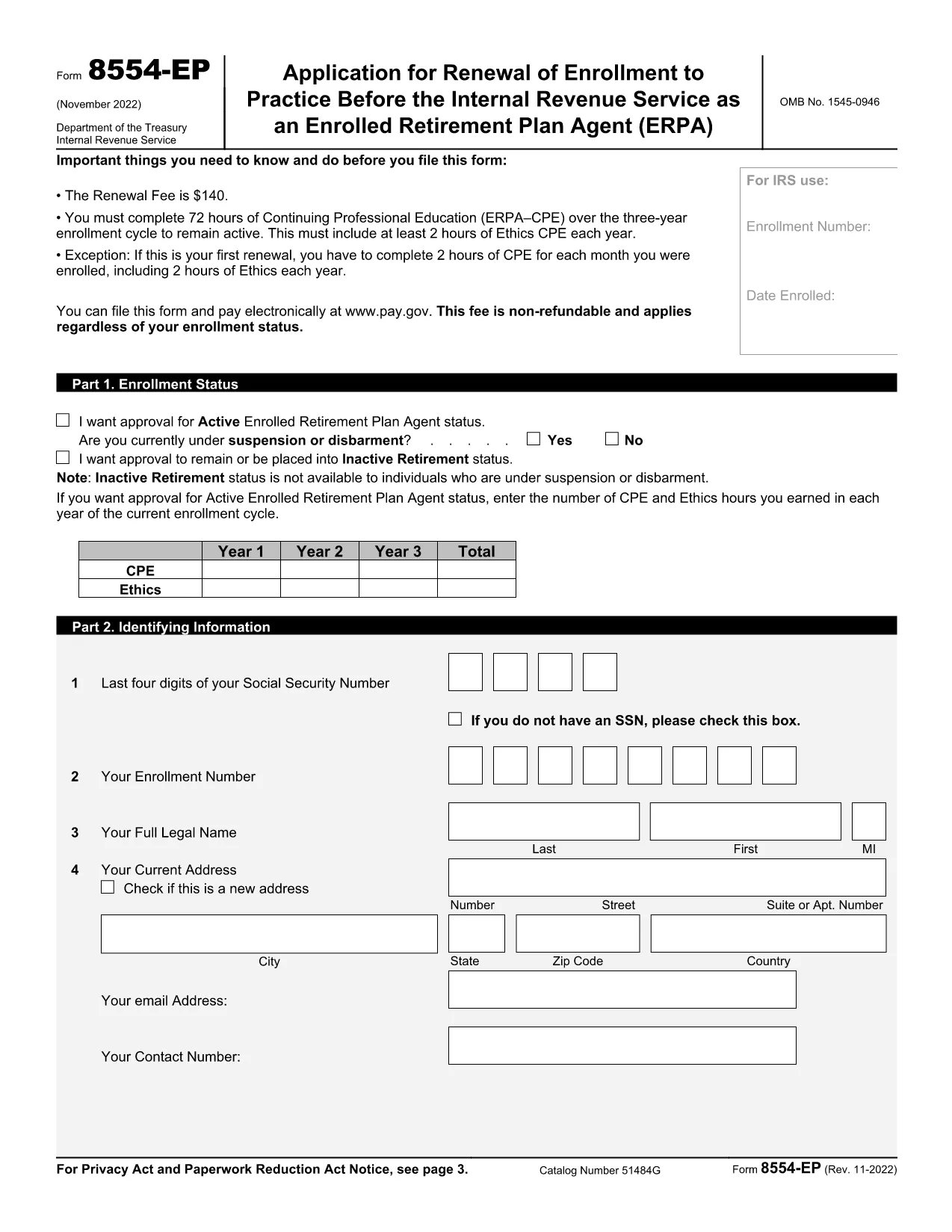
The Form 8554‑EP is the official IRS renewal application for Enrolled Retirement Plan Agents (ERPA). Every three years, ERPA‑qualified tax professionals must submit this form to maintain their ability to practice before the IRS on retirement plan matters.

What Is Form 8554‑EP?

Form 8554‑EP (Rev. 11‑2022) collects information about your credentials, continuing professional education (CPE) credits, and any changes to your practice. The form ensures you remain in good standing with the IRS.

Who Must File This Form?

  • Individuals who are currently enrolled as Retirement Plan Agents.
  • Those whose enrollment expired or will expire within the next three years.
  • Tax professionals seeking to reactivate an inactive ERPA status.

How to Complete the Fillable PDF

Our online Formize PDF Filler loads the official IRS PDF directly in your browser. No extra software is required.

Common Mistakes to Avoid

  • Leaving any required field blank – the IRS will reject incomplete submissions.
  • Failing to attach proof of CPE credits when required.
  • Signing the form with an unauthorized signature.

Submission & Deadlines

Submit the completed form to the IRS address listed on the last page of the PDF. Keep a copy for your records. The renewal deadline is the last day of the three‑year enrollment cycle.

Ready to start? Click the button below to launch the fillable version instantly.

SOALAN LAZIM
  • How often do I need to renew my ERPA enrollment?

    Renewal is required every three (3) years. The IRS will notify you when your current enrollment is approaching expiration.

  • Can I submit Form 8554‑EP electronically?

    The IRS currently accepts only paper submissions for Form 8554‑EP. Use the fillable PDF to ensure accuracy, then mail the printed form.

  • What CPE documentation must I attach?

    Attach copies of certificates or transcripts that verify you have completed the required 15 CPE hours in retirement plan practice for the enrollment cycle.

  • What happens if I miss the renewal deadline?

    Your ERPA status becomes inactive, and you cannot represent clients before the IRS on retirement‑plan matters until you re‑apply and receive approval.

  • Do I need a signature on the form?

    Yes. The form must be signed by the applicant or an authorized representative. Electronic signatures are not accepted; a handwritten signature is required.

  • Is there a fee to renew my ERPA status?

    No fee is required for the renewal of Form 8554‑EP. The IRS may assess penalties only if the form is incomplete or submitted late.

  • Where can I find the official instructions for Form 8554‑EP?

    The instructions are included in the PDF itself, beginning on page 3. Additional guidance is available on the IRS website under the Retirement Plan Community section.

BAGAIMANA UNTUK

Cara mengisi Form 8554-EP secara percuma, dalam talian dalam 5 langkah mudah:

  1. 1
    Click the Fillable Form Button
    On this page, click the bright “Fill out this form” button. The Formize PDF Filler app will open the official Form 8554‑EP in your browser.
  2. 2
    Wait for the PDF Filler to Load
    A loading screen appears while the PDF is prepared. This only takes a few seconds.
  3. 3
    Enter Your Information
    Navigate through each field, entering your personal data, CPE credits, and any changes to your practice. Required fields are highlighted.
  4. 4
    Validate and Correct Errors
    The filler automatically checks for missing or incorrectly formatted entries. Fix any highlighted issues before proceeding.
  5. 5
    Save, Download, and Submit
    When all fields are complete, click “Save & Download.” Keep the saved copy for your records and mail the printed form to the IRS address shown on page 2.
Bentuk apl Pengisi PDF
TENTANG

Borang cukai

Form 8554-EP ialah salah satu borang Cukai yang merupakan dokumen yang digunakan untuk melaporkan maklumat yang berkaitan dengan cukai kepada pihak berkuasa cukai yang berkaitan. Terdapat pelbagai jenis borang cukai, termasuk borang cukai persekutuan, negeri dan tempatan, yang boleh berbeza-beza bergantung pada keadaan dan lokasi pembayar cukai.

CIRI-CIRI

Pengisi PDF

Cara paling mudah untuk mengisi Form 8554-EP dalam talian

  • Cepat isi Form 8554-EP
    Mencari cara untuk mengisi Form 8554-EP dengan cepat dalam talian? Dengan pengisi borang PDF percuma dalam talian kami, anda akan tahu cara mengedit dan mengisi dokumen pdf ini dalam masa kurang daripada satu minit.
  • Mudah untuk menggunakan editor PDF dalam talian
    Bosan dengan mencetak fail PDF supaya anda boleh mengeditnya, sebelum mengimbas semula dan menghantarnya semula? Edit dokumen PDF secara percuma dalam talian. Gunakan editor pdf dalam talian kami untuk menjimatkan masa dan kertas.
  • Alat yang hebat, semua platform
    Tertanya-tanya cara mengisi Form 8554-EP pada Mac, atau mungkin cara menggunakan pengisi PDF secara percuma? Alat PDF dalam talian kami berfungsi pada semua platform.
  • Simpanan fail selamat
    Fail "Form 8554-EP" yang lengkap disimpan dalam pangkalan data selamat yang diuruskan oleh pengehosan Amazon Cloud. Anda boleh memadamkan fail anda daripada sistem kami pada bila-bila masa. Walau apa pun, fail ini dipadamkan secara automatik selepas 24 jam.
  • Sembang dengan Form 8554-EP
    Sembang dengan "Form 8554-EP" di Chatize yang merupakan pembantu pembaca PDF percuma. Tanya soalan dan dapatkan jawapan daripada "Form 8554-EP". Cuma klik pada butang Sembang Dengan Dokumen di atas.

Padamkan sesi pengisian

Padamkan sesi pengisian yang dipilih? Dalam kes ini, kemajuan anda dalam melengkapkan borang akan hilang.

Padamkan sesi penyuntingan

Padamkan sesi penyuntingan yang dipilih? Dalam kes ini, kemajuan anda dalam membuat dan mengedit borang akan hilang.