
Pilih Bahasa

IRS Form 8827 – Minimum Tax Credit Fillable PDF

  1. Negara USA
  2. Bahasa Inggeris
  3. Aktiviti Cukai
  4. Jabatan Perkhidmatan Hasil Dalam Negeri
Isi borang ini
IRS Form 8827 – Minimum Tax Credit Fillable PDF

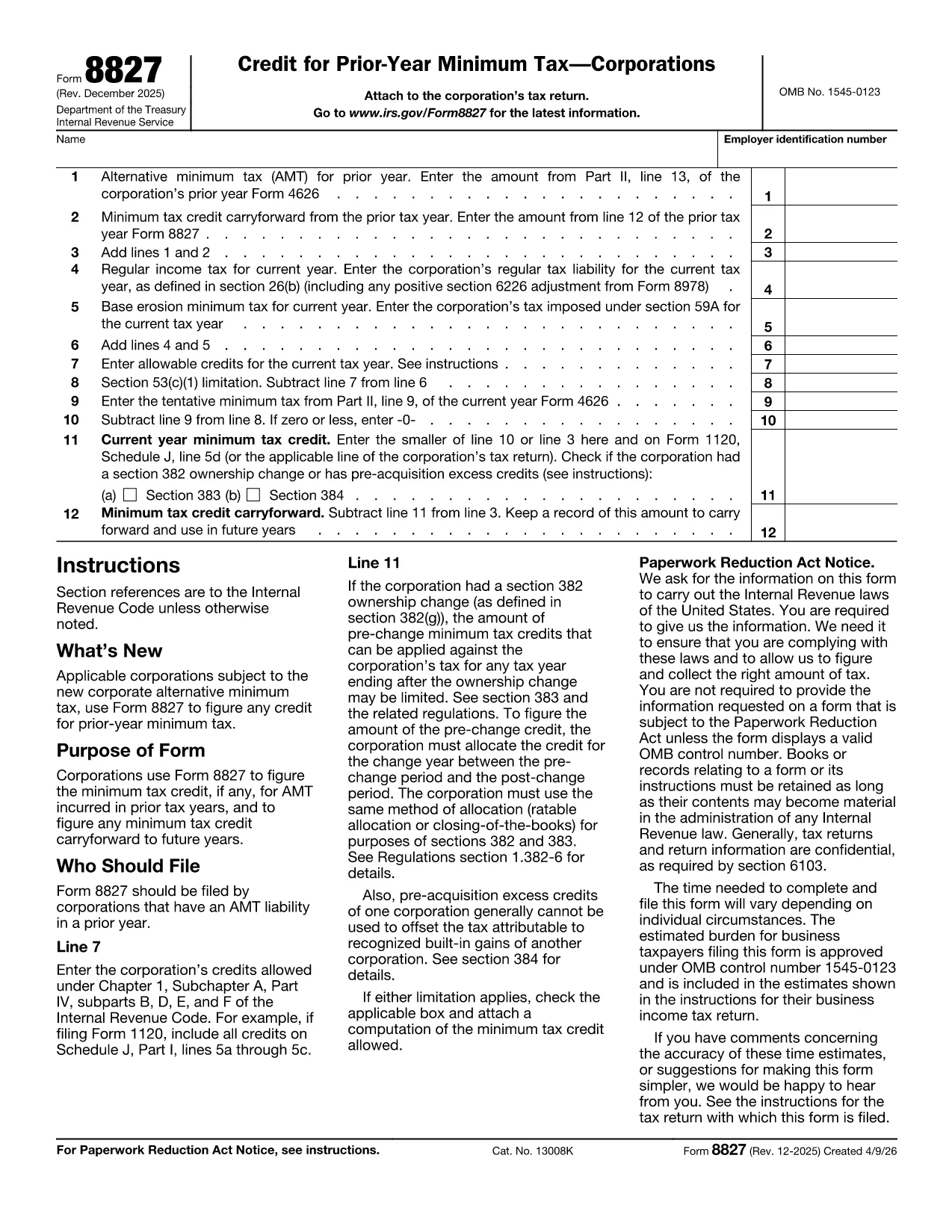
Form 8827, "Credit for Prior Year Minimum Tax (Corporations)," is the IRS form corporations use to claim a credit for alternative minimum tax (AMT) paid in earlier years and to track any credit carryforward. By completing this form correctly, businesses can reduce future regular tax liabilities.

What Is Form 8827 and Who Needs It?

This form is required for any corporation that has incurred AMT in a prior tax year and wishes to claim the resulting credit. The credit can be applied against regular tax in the current year and any unused portion can be carried forward indefinitely.

How to Fill Out Form 8827 Online with Formize

Instead of downloading the PDF and editing it manually, simply click the "Fill out this form" button on the page. The Formize PDF Filler app will load, letting you type directly into each field, save progress, and export a completed PDF.

Common Mistakes to Avoid on Form 8827

  • Entering the prior‑year AMT amount from the wrong line of Form 4626.
  • Leaving the reserved line (Line 2) blank when the form requires a zero entry.
  • Mismatching the EIN on the form with the one on the corporate tax return.
  • Forgetting to subtract the credit from the tentative minimum tax correctly, which can cause an overstated credit.

Where to Find the Official PDF and Additional Resources

The official, up‑to‑date fillable PDF is hosted by the IRS. You can download it directly or use our integrated Formize filler for a smoother experience.

For detailed line‑by‑line instructions, refer to the IRS Instructions for Form 8827, which explain each calculation and provide examples.

SOALAN LAZIM
  • Who must file Form 8827?

    Any corporation that paid alternative minimum tax (AMT) in a previous year and wants to claim a credit against current‑year regular tax must file Form 8827.

  • Can I carry forward an unused minimum tax credit?

    Yes. Unused credits can be carried forward indefinitely until they are fully utilized against regular tax.

  • Do I need to attach Form 8827 to my Form 1120?

    Yes. The completed Form 8827 should be attached to your corporate income tax return (Form 1120) when filing.

  • What line on Form 4626 provides the prior‑year AMT amount?

    Use the amount shown on line 13 of Form 4626 from the prior tax year as the prior‑year AMT input on Form 8827, line 1.

  • Is there a paper‑only version of Form 8827?

    A printable PDF is available, but using the fillable version through Formize reduces errors and speeds up filing.

  • What happens if I enter the wrong EIN?

    An incorrect EIN can delay processing of your credit. Verify the EIN matches the one on your corporate tax return before submitting.

  • Can I amend a previously filed Form 8827?

    Yes. File an amended corporate return (Form 1120‑X) and include a corrected Form 8827.

  • Is there a deadline to claim the credit?

    The credit must be claimed on the corporate return for the tax year in which you want to use it. There is no separate filing deadline.

BAGAIMANA UNTUK

Cara mengisi Form 8827 secara percuma, dalam talian dalam 5 langkah mudah:

  1. 1
    Open the Fillable Form
    Click the "Fill out this form" button on the page. The Formize PDF Filler will open in a new tab.
  2. 2
    Enter Corporate Information
    Type your corporation’s name, EIN, and prior‑year AMT amounts into the highlighted fields.
  3. 3
    Calculate the Credit
    Follow the on‑screen prompts to add lines, subtract credits, and let the calculator display the current‑year credit and any carryforward.
  4. 4
    Review and Save
    Check each entry for accuracy, then click "Save" to download the completed PDF or store it in your Formize account.
  5. 5
    Submit with Your Tax Return
    Attach the finished Form 8827 to your corporate tax return (Form 1120) when filing electronically or by mail.
Bentuk apl Pengisi PDF
TENTANG

Borang cukai

Form 8827 ialah salah satu borang Cukai yang merupakan dokumen yang digunakan untuk melaporkan maklumat yang berkaitan dengan cukai kepada pihak berkuasa cukai yang berkaitan. Terdapat pelbagai jenis borang cukai, termasuk borang cukai persekutuan, negeri dan tempatan, yang boleh berbeza-beza bergantung pada keadaan dan lokasi pembayar cukai.

CIRI-CIRI

Pengisi PDF

Cara paling mudah untuk mengisi Form 8827 dalam talian

  • Cepat isi Form 8827
    Mencari cara untuk mengisi Form 8827 dengan cepat dalam talian? Dengan pengisi borang PDF percuma dalam talian kami, anda akan tahu cara mengedit dan mengisi dokumen pdf ini dalam masa kurang daripada satu minit.
  • Mudah untuk menggunakan editor PDF dalam talian
    Bosan dengan mencetak fail PDF supaya anda boleh mengeditnya, sebelum mengimbas semula dan menghantarnya semula? Edit dokumen PDF secara percuma dalam talian. Gunakan editor pdf dalam talian kami untuk menjimatkan masa dan kertas.
  • Alat yang hebat, semua platform
    Tertanya-tanya cara mengisi Form 8827 pada Mac, atau mungkin cara menggunakan pengisi PDF secara percuma? Alat PDF dalam talian kami berfungsi pada semua platform.
  • Simpanan fail selamat
    Fail "Form 8827" yang lengkap disimpan dalam pangkalan data selamat yang diuruskan oleh pengehosan Amazon Cloud. Anda boleh memadamkan fail anda daripada sistem kami pada bila-bila masa. Walau apa pun, fail ini dipadamkan secara automatik selepas 24 jam.
  • Sembang dengan Form 8827
    Sembang dengan "Form 8827" di Chatize yang merupakan pembantu pembaca PDF percuma. Tanya soalan dan dapatkan jawapan daripada "Form 8827". Cuma klik pada butang Sembang Dengan Dokumen di atas.

Padamkan sesi pengisian

Padamkan sesi pengisian yang dipilih? Dalam kes ini, kemajuan anda dalam melengkapkan borang akan hilang.

Padamkan sesi penyuntingan

Padamkan sesi penyuntingan yang dipilih? Dalam kes ini, kemajuan anda dalam membuat dan mengedit borang akan hilang.