
Pilih Bahasa

IRS Form 8857 – Request for Innocent Spouse Relief (Fillable PDF)

  1. Negara USA
  2. Bahasa Inggeris
  3. Aktiviti Cukai
  4. Jabatan Perkhidmatan Hasil Dalam Negeri
Isi borang ini
IRS Form 8857 – Request for Innocent Spouse Relief (Fillable PDF)

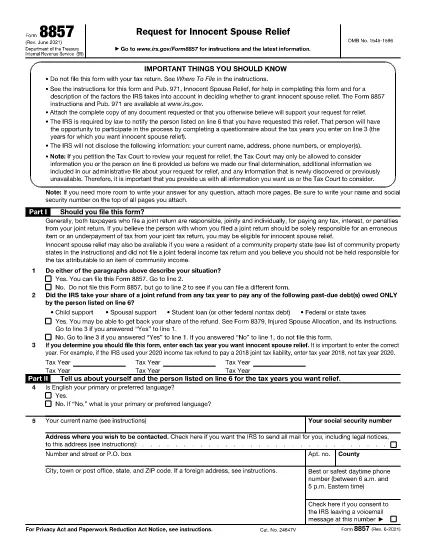
Form 8857, officially titled Request for Innocent Spouse Relief, lets taxpayers ask the Internal Revenue Service (IRS) to remove or reduce their joint tax liability when they believe the spouse or former spouse is solely responsible for an error or underpayment. This page provides a fillable PDF version, a simple step‑by‑step guide, and answers to the most common questions.

What Is Form 8857 and Who Can Use It?

Form 8857 is used when you filed a joint return and later discover that the tax liability is the result of:

  • Undisclosed income or fraudulent activity by your spouse,
  • Errors you were unaware of at the time of signing,
  • Coercion or duress that forced you to sign the return, or
  • Significant financial hardship if you were held liable.

If any of these situations apply, you may qualify for innocent spouse relief, equitable relief, or separation of liability relief.

How to Fill Out the Fillable PDF with Formize

Instead of downloading the PDF and editing it with a separate editor, use the built‑in Formize PDF Filler. Follow these easy steps:

  1. Click “Fill out this form” on this page.
  2. The Formize PDF Filler app loads directly in your browser.
  3. Enter your information in each fillable field – the form automatically saves your progress.
  4. When finished, click Save & Download to get a completed PDF.
  5. Print, sign, and mail the form to the IRS address shown in the instructions, or submit it electronically if you have an IRS e‑file account.

Common Mistakes to Avoid When Completing Form 8857

Even a small error can delay processing. Keep these tips in mind:

  • Don’t leave any required boxes blank. If a question does not apply, write “N/A”.
  • Provide supporting documentation. Attach copies of the joint return, notices, and any evidence of the spouse’s wrongdoing.
  • Use the correct tax year. The year you are requesting relief for must match the year on the joint return.
  • Sign both the taxpayer and spouse sections. If you have a paid preparer, they must also sign.
  • Check the address. Mail the form to the IRS location specified in the instructions for your state.

Following these guidelines will help the IRS process your request faster.

Arahan

  • Instruksi Bentuk 8857 - Instruksi untuk Pembentukan 8857, Permintaan Bantuan untuk Pasangan yang Tidak Bersalah
SOALAN LAZIM
  • What is IRS Form 8857 used for?

    Form 8857 is the Request for Innocent Spouse Relief. It allows a taxpayer to ask the IRS to remove or reduce liability on a joint return when the spouse is responsible for the tax debt.

  • Who qualifies for innocent spouse relief?

    You may qualify if you were unaware of the error, were coerced into signing, had no control over the financial matters, or would suffer significant hardship if held liable.

  • Can I file Form 8857 electronically?

    Yes, if you have an IRS e‑file account you can upload the completed PDF through the IRS portal. Otherwise, mail the signed form to the address in the instructions.

  • What supporting documents should I include?

    Attach a copy of the joint tax return, any IRS notices, proof of the spouse’s wrongdoing (e.g., fraud letters), and documentation of hardship (e.g., medical bills).

  • Is there a deadline to submit Form 8857?

    Generally, you must file within two years after the IRS issues a notice of liability, but it’s best to submit as soon as possible.

  • Do I need a tax professional to complete Form 8857?

    A professional can help, but the fillable PDF and step‑by‑step guide make it possible to complete the form on your own.

  • What happens after I submit the form?

    The IRS will review your request, may contact you for additional information, and will issue a determination letter with its decision.

  • Can I request relief for more than one tax year?

    Yes, you can file separate Form 8857 requests for each tax year you need relief for.

BAGAIMANA UNTUK

Cara mengisi Form 8857 secara percuma, dalam talian dalam 5 langkah mudah:

  1. 1
    Open the Fillable Form
    Click the “Fill out this form” button on the page. The Formize PDF Filler loads instantly in your browser.
  2. 2
    Enter Your Information
    Complete each field. The form auto‑saves as you type, so you won’t lose any data.
  3. 3
    Attach Supporting Documents
    Use the “Add Attachment” option to upload copies of the joint return, IRS notices, and any evidence of spouse misconduct.
  4. 4
    Save and Download
    When all sections are complete, click “Save & Download”. A completed PDF will be saved to your device.
  5. 5
    Print, Sign, and Submit
    Print the PDF, sign where required, and mail it to the IRS address listed in the form instructions, or submit electronically if eligible.
Bentuk apl Pengisi PDF
TENTANG

Borang cukai

Form 8857 ialah salah satu daripada borang Cukai yang merupakan dokumen yang digunakan untuk melaporkan maklumat tentang pendapatan, potongan dan liabiliti cukai individu atau perniagaan kepada pihak berkuasa cukai yang berkaitan. Borang ini perlu untuk mematuhi undang-undang cukai dan memenuhi kewajipan cukai. Borang cukai berbeza-beza bergantung pada negara dan keperluan cukai khusus yang ditetapkan. Berikut ialah beberapa jenis borang cukai biasa:

Borang Cukai Individu: Borang ini digunakan oleh pembayar cukai individu untuk melaporkan pendapatan peribadi dan potongan tuntutan, kredit dan pengecualian mereka. Contohnya termasuk borang 1040 di Amerika Syarikat atau borang Nyata Cukai Taksiran Sendiri di United Kingdom.

Borang Cukai Perniagaan: Borang cukai perniagaan digunakan oleh syarikat, perkongsian atau individu yang bekerja sendiri untuk melaporkan pendapatan perniagaan, perbelanjaan dan maklumat berkaitan cukai mereka yang lain. Contohnya termasuk borang Jadual C (Untung atau Rugi daripada Perniagaan) di Amerika Syarikat atau borang CT600 (Pulangan Cukai Syarikat) di United Kingdom.

Borang Cukai Gaji: Borang ini digunakan oleh majikan untuk melaporkan gaji, gaji dan cukai yang ditahan daripada gaji pekerja mereka. Contohnya termasuk borang W-2 di Amerika Syarikat atau borang P60 di United Kingdom.

Borang Cukai Jualan: Borang cukai jualan digunakan oleh perniagaan untuk melaporkan dan menghantar cukai jualan yang dikutip ke atas barangan atau perkhidmatan yang boleh dikenakan cukai. Borang cukai jualan khusus berbeza mengikut bidang kuasa.

Borang Cukai Nilai Ditambah (VAT): Borang VAT digunakan di negara yang mengenakan cukai nilai tambah untuk melaporkan dan menghantar VAT yang dikutip ke atas jualan dan menuntut kredit VAT untuk pembelian. Contohnya termasuk borang penyata VAT yang digunakan di banyak negara.

Borang Cukai Anggaran: Borang cukai anggaran digunakan untuk melaporkan dan membayar anggaran cukai ke atas pendapatan yang tidak tertakluk kepada penahanan, seperti pendapatan bekerja sendiri atau pendapatan pelaburan.

Ini hanyalah beberapa contoh daripada pelbagai bentuk cukai yang mungkin wujud. Borang khusus yang diperlukan bergantung pada undang-undang dan peraturan cukai di negara atau bidang kuasa anda. Adalah penting untuk merujuk garis panduan pihak berkuasa cukai atau mendapatkan nasihat profesional untuk menentukan borang yang boleh digunakan untuk situasi anda.

CIRI-CIRI

Pengisi PDF

Cara paling mudah untuk mengisi Form 8857 dalam talian

  • Cepat isi Form 8857
    Mencari cara untuk mengisi Form 8857 dengan cepat dalam talian? Dengan pengisi borang PDF percuma dalam talian kami, anda akan tahu cara mengedit dan mengisi dokumen pdf ini dalam masa kurang daripada satu minit.
  • Mudah untuk menggunakan editor PDF dalam talian
    Bosan dengan mencetak fail PDF supaya anda boleh mengeditnya, sebelum mengimbas semula dan menghantarnya semula? Edit dokumen PDF secara percuma dalam talian. Gunakan editor pdf dalam talian kami untuk menjimatkan masa dan kertas.
  • Alat yang hebat, semua platform
    Tertanya-tanya cara mengisi Form 8857 pada Mac, atau mungkin cara menggunakan pengisi PDF secara percuma? Alat PDF dalam talian kami berfungsi pada semua platform.
  • Simpanan fail selamat
    Fail "Form 8857" yang lengkap disimpan dalam pangkalan data selamat yang diuruskan oleh pengehosan Amazon Cloud. Anda boleh memadamkan fail anda daripada sistem kami pada bila-bila masa. Walau apa pun, fail ini dipadamkan secara automatik selepas 24 jam.
  • Sembang dengan Form 8857
    Sembang dengan "Form 8857" di Chatize yang merupakan pembantu pembaca PDF percuma. Tanya soalan dan dapatkan jawapan daripada "Form 8857". Cuma klik pada butang Sembang Dengan Dokumen di atas.

Padamkan sesi pengisian

Padamkan sesi pengisian yang dipilih? Dalam kes ini, kemajuan anda dalam melengkapkan borang akan hilang.

Padamkan sesi penyuntingan

Padamkan sesi penyuntingan yang dipilih? Dalam kes ini, kemajuan anda dalam membuat dan mengedit borang akan hilang.