
Pilih Bahasa

Fillable IRS Form 8925 – Report Employer‑Owned Life Insurance Contracts

  1. Negara USA
  2. Bahasa Inggeris
  3. Aktiviti Cukai
  4. Jabatan Perkhidmatan Hasil Dalam Negeri
Isi borang ini
Fillable IRS Form 8925 – Report Employer‑Owned Life Insurance Contracts

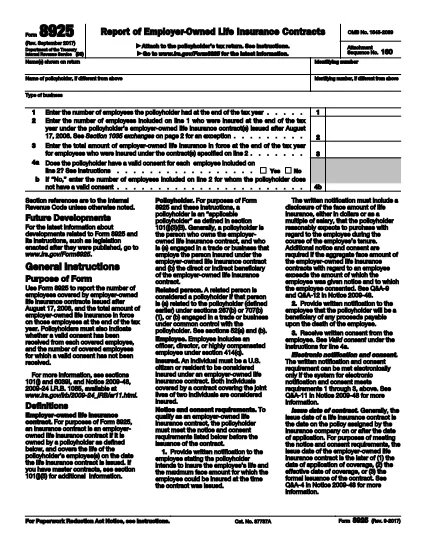
Form 8925, Report of Employer‑Owned Life Insurance Contracts, is required for any policyholder that owns one or more employer‑owned life insurance contracts issued after August 17, 2006. The form captures the number of employees covered, the total amount of insurance in force, and whether valid employee consents were obtained.

Using Formize’s cloud‑based PDF filler, you can complete the form directly in your browser – no Adobe Acrobat or other editor needed. Just click the “Fill out this form” button, wait for the Formize app to load, and start entering your data.

What Is Form 8925 and Who Needs It?

This IRS form is attached to the policyholder’s tax return. It applies to:

  • Businesses that own life‑insurance contracts on employees.
  • Contracts issued after August 17, 2006.
  • Any tax year where the contracts are still in force.

How to Complete Form 8925 Online with Formize

Follow these simple steps to fill out the form without downloading any software:

  • Click the “Fill out this form” button on this page.
  • Wait a few seconds for the Formize PDF Filler to load.
  • Enter the policyholder’s name, identifying number, and type of business.
  • Provide the total number of employees and the number covered by the insurance contracts.
  • Enter the total amount of insurance in force for the covered employees.
  • Answer the consent questions (Yes/No) and specify any employees without valid consent.
  • Review the completed form, then save, download, or submit it directly to the IRS portal.

Common Mistakes to Avoid When Filing Form 8925

  • Missing consent information: The IRS checks that each employee has a valid written consent. Incomplete answers can trigger an audit.
  • Incorrect employee counts: Double‑check the total employees versus those covered; mismatches cause delays.
  • Using an outdated PDF version: Always use the latest IRS version – the link below points to the current 2023 revision.
  • Failing to attach the form: Form 8925 must be attached to the policyholder’s income tax return (Form 1040, 1120, etc.).

Download the Official Fillable PDF

If you prefer to work offline, you can download the official IRS PDF directly. The file is fully fillable and compatible with Formize’s online editor.

Download IRS Form 8925 (PDF)

SOALAN LAZIM
  • Who must file Form 8925?

    Any policyholder that owns employer‑owned life insurance contracts issued after August 17, 2006 must attach Form 8925 to their tax return for each year the contracts are in force.

  • Is there a penalty for not filing Form 8925?

    There is no specific monetary penalty, but failure to report can lead to the IRS questioning the validity of employee consents and may result in tax adjustments or an audit.

  • Can I file Form 8925 electronically?

    Yes. Fill the form using Formize’s online PDF filler, save the completed PDF, and attach it when you e‑file your tax return.

  • What is considered a valid employee consent?

    A written, signed consent that meets IRS requirements – typically a separate consent form signed by each employee covered under the policy.

  • Do I need a separate Form 8925 for each insurance contract?

    No. One Form 8925 covers all employer‑owned life insurance contracts owned by the policyholder for the tax year.

  • Where can I find the latest version of Form 8925?

    The most recent version is available from the IRS website. Use the download link provided on this page.

BAGAIMANA UNTUK

Cara mengisi Form 8925 secara percuma, dalam talian dalam 5 langkah mudah:

  1. 1
    Open the Fillable Form
    Click the “Fill out this form” button on the page. The Formize PDF Filler will open in a new tab.
  2. 2
    Enter Policyholder Information
    Type the name, identifying number, and business type exactly as they appear on the tax return.
  3. 3
    Provide Employee & Insurance Details
    Enter total employees, number covered, and total amount of insurance in force for the covered employees.
  4. 4
    Answer Consent Questions
    Select “Yes” or “No” for each consent question and specify any employees lacking valid consent.
  5. 5
    Review, Save, and Submit
    Double‑check all entries, then save the completed PDF or download it to attach to your tax return.
Bentuk apl Pengisi PDF
TENTANG

Borang cukai

Form 8925 ialah salah satu borang Cukai yang merupakan dokumen yang digunakan untuk melaporkan maklumat yang berkaitan dengan cukai kepada pihak berkuasa cukai yang berkaitan. Terdapat pelbagai jenis borang cukai, termasuk borang cukai persekutuan, negeri dan tempatan, yang boleh berbeza-beza bergantung pada keadaan dan lokasi pembayar cukai.

CIRI-CIRI

Pengisi PDF

Cara paling mudah untuk mengisi Form 8925 dalam talian

  • Cepat isi Form 8925
    Mencari cara untuk mengisi Form 8925 dengan cepat dalam talian? Dengan pengisi borang PDF percuma dalam talian kami, anda akan tahu cara mengedit dan mengisi dokumen pdf ini dalam masa kurang daripada satu minit.
  • Mudah untuk menggunakan editor PDF dalam talian
    Bosan dengan mencetak fail PDF supaya anda boleh mengeditnya, sebelum mengimbas semula dan menghantarnya semula? Edit dokumen PDF secara percuma dalam talian. Gunakan editor pdf dalam talian kami untuk menjimatkan masa dan kertas.
  • Alat yang hebat, semua platform
    Tertanya-tanya cara mengisi Form 8925 pada Mac, atau mungkin cara menggunakan pengisi PDF secara percuma? Alat PDF dalam talian kami berfungsi pada semua platform.
  • Simpanan fail selamat
    Fail "Form 8925" yang lengkap disimpan dalam pangkalan data selamat yang diuruskan oleh pengehosan Amazon Cloud. Anda boleh memadamkan fail anda daripada sistem kami pada bila-bila masa. Walau apa pun, fail ini dipadamkan secara automatik selepas 24 jam.
  • Sembang dengan Form 8925
    Sembang dengan "Form 8925" di Chatize yang merupakan pembantu pembaca PDF percuma. Tanya soalan dan dapatkan jawapan daripada "Form 8925". Cuma klik pada butang Sembang Dengan Dokumen di atas.

Padamkan sesi pengisian

Padamkan sesi pengisian yang dipilih? Dalam kes ini, kemajuan anda dalam melengkapkan borang akan hilang.

Padamkan sesi penyuntingan

Padamkan sesi penyuntingan yang dipilih? Dalam kes ini, kemajuan anda dalam membuat dan mengedit borang akan hilang.