
Pilih Bahasa

IRS Form 945‑X – Fillable PDF for Adjusted Return of Withheld Tax

  1. Negara USA
  2. Bahasa Inggeris
  3. Aktiviti Cukai
  4. Jabatan Perkhidmatan Hasil Dalam Negeri
Isi borang ini
IRS Form 945‑X – Fillable PDF for Adjusted Return of Withheld Tax

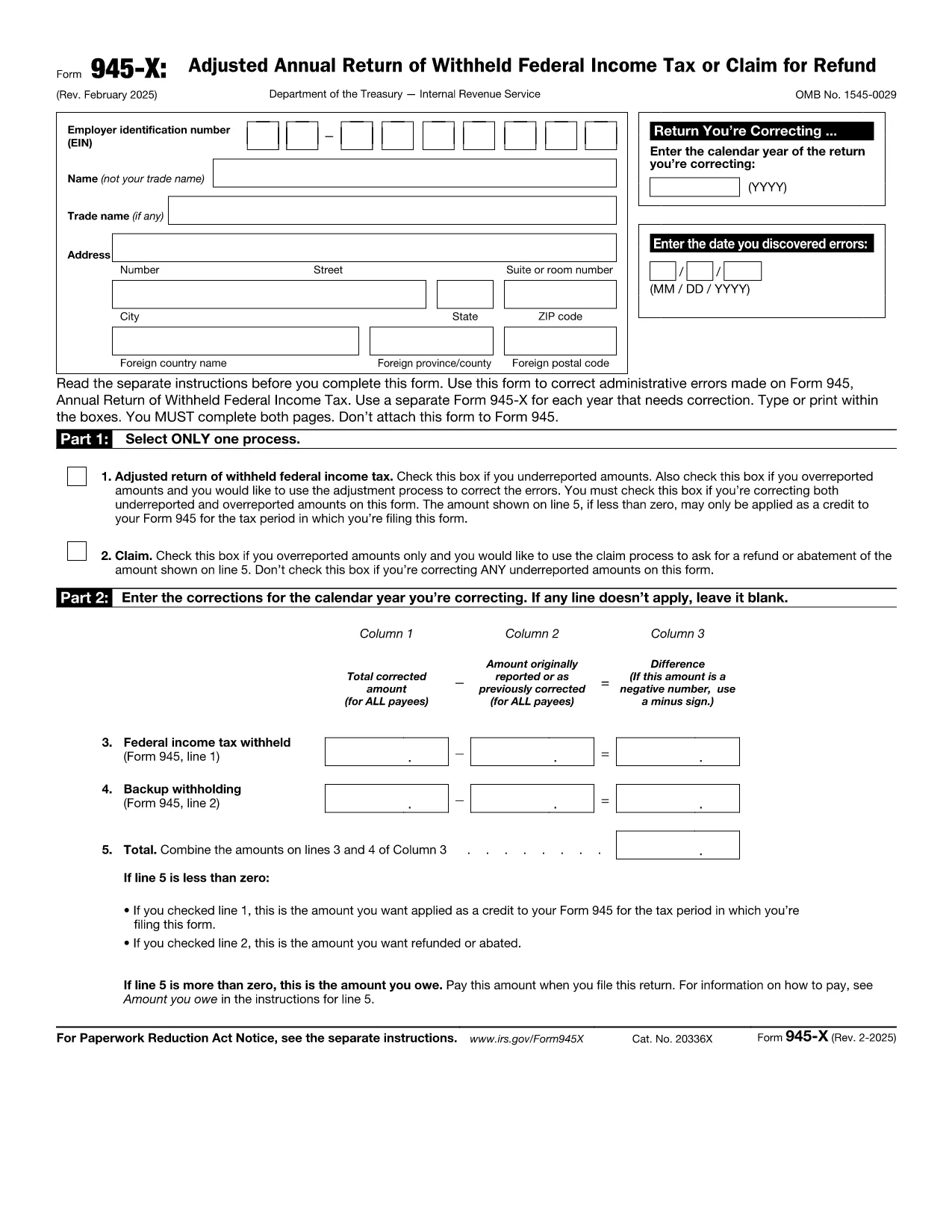
Form 945‑X is the Adjusted Return of Withheld Federal Income Tax used by businesses to correct errors on a previously filed Form 945. Whether you under‑reported, over‑reported, or need to claim a refund, the fillable PDF version lets you make adjustments quickly and accurately.

What Is Form 945‑X?

The IRS requires a separate Form 945‑X for each calendar year you need to correct. The form consists of four parts: selecting the correction process, detailing the corrections, providing a written explanation, and signing the return. It must be completed in full—both pages—and cannot be attached to the original Form 945.

How to Complete Form 945‑X Online with Formize

Instead of downloading the PDF and editing it in a separate program, simply click the "Fill out this form" button on our page. The Formize PDF Filler app will load in your browser, allowing you to type directly into each field, save your progress, and export a completed PDF ready for submission.

Common Mistakes to Avoid When Filing Form 945‑X

  • Leaving the EIN blank: The employer identification number is mandatory on both pages.
  • Incorrect tax year: Ensure the year you are correcting matches the original Form 945 filing.
  • Missing explanation: Line 7 requires a clear, concise reason for the correction.
  • Signature omission: An unsigned Form 945‑X will be rejected by the IRS.

Where to Find the Official PDF Download

You can download the official, up‑to‑date Form 945‑X PDF directly from the IRS website. Our page links to the same file so you always have the correct version.

Ready to correct your withheld tax return? Click the button below, fill out the form in minutes, and submit it with confidence.

Arahan

  • Instruksi Formulir 945-X - Instruksi untuk Formul 945-X, Disesuaikan Tahunan Kembali Tahunan dari Pajak Penghasilan Federal yang Dilunasi atau Tuntutan Pengurangan
SOALAN LAZIM
  • Do I need a separate Form 945‑X for each year I’m correcting?

    Yes. The IRS requires one Form 945‑X per calendar year with errors. Do not combine multiple years on a single form.

  • Can I file Form 945‑X electronically?

    The IRS does not accept electronic filing for Form 945‑X. After completing the fillable PDF, you must print and mail it to the address listed in the instructions.

  • What is the deadline to submit a Form 945‑X?

    You should file the correction as soon as you discover the error. There is no specific statutory deadline, but filing promptly avoids interest and penalties.

  • Will filing Form 945‑X affect my refund?

    If you over‑reported tax withheld, the negative amount on Line 5 can be applied as a credit to your current Form 945 or result in a refund, depending on IRS processing.

  • Do I need to attach supporting documents?

    Only attach additional documentation if the IRS specifically requests it. Generally, a clear written explanation on Line 7 is sufficient.

  • Is the fillable PDF compatible with Mac and Windows?

    Yes. The Formize PDF Filler works in all modern browsers on both macOS and Windows, so you can complete the form without extra software.

  • Can I save a partially completed Form 945‑X?

    The Formize app automatically saves your progress. You can close the browser and return later to finish the form.

BAGAIMANA UNTUK

Cara mengisi Form 945-X secara percuma, dalam talian dalam 4 langkah mudah:

  1. 1
    Open the Fillable Form
    Click the "Fill out this form" button on the page. The Formize PDF Filler will launch in a new tab.
  2. 2
    Enter Your Information
    Type directly into each field – EIN, tax year, correction details, and explanation. The app saves your data automatically.
  3. 3
    Review & Sign
    Double‑check all entries, add your electronic signature in the signature box, and click "Save PDF".
  4. 4
    Submit to the IRS
    Print the completed PDF or upload it through the IRS e‑file portal, following the submission instructions in the form.
Bentuk apl Pengisi PDF
TENTANG

Borang cukai

Form 945-X ialah salah satu borang Cukai yang merupakan dokumen yang digunakan untuk melaporkan maklumat yang berkaitan dengan cukai kepada pihak berkuasa cukai yang berkaitan. Terdapat pelbagai jenis borang cukai, termasuk borang cukai persekutuan, negeri dan tempatan, yang boleh berbeza-beza bergantung pada keadaan dan lokasi pembayar cukai.

CIRI-CIRI

Pengisi PDF

Cara paling mudah untuk mengisi Form 945-X dalam talian

  • Cepat isi Form 945-X
    Mencari cara untuk mengisi Form 945-X dengan cepat dalam talian? Dengan pengisi borang PDF percuma dalam talian kami, anda akan tahu cara mengedit dan mengisi dokumen pdf ini dalam masa kurang daripada satu minit.
  • Mudah untuk menggunakan editor PDF dalam talian
    Bosan dengan mencetak fail PDF supaya anda boleh mengeditnya, sebelum mengimbas semula dan menghantarnya semula? Edit dokumen PDF secara percuma dalam talian. Gunakan editor pdf dalam talian kami untuk menjimatkan masa dan kertas.
  • Alat yang hebat, semua platform
    Tertanya-tanya cara mengisi Form 945-X pada Mac, atau mungkin cara menggunakan pengisi PDF secara percuma? Alat PDF dalam talian kami berfungsi pada semua platform.
  • Simpanan fail selamat
    Fail "Form 945-X" yang lengkap disimpan dalam pangkalan data selamat yang diuruskan oleh pengehosan Amazon Cloud. Anda boleh memadamkan fail anda daripada sistem kami pada bila-bila masa. Walau apa pun, fail ini dipadamkan secara automatik selepas 24 jam.
  • Sembang dengan Form 945-X
    Sembang dengan "Form 945-X" di Chatize yang merupakan pembantu pembaca PDF percuma. Tanya soalan dan dapatkan jawapan daripada "Form 945-X". Cuma klik pada butang Sembang Dengan Dokumen di atas.

Padamkan sesi pengisian

Padamkan sesi pengisian yang dipilih? Dalam kes ini, kemajuan anda dalam melengkapkan borang akan hilang.

Padamkan sesi penyuntingan

Padamkan sesi penyuntingan yang dipilih? Dalam kes ini, kemajuan anda dalam membuat dan mengedit borang akan hilang.