
Pilih Bahasa

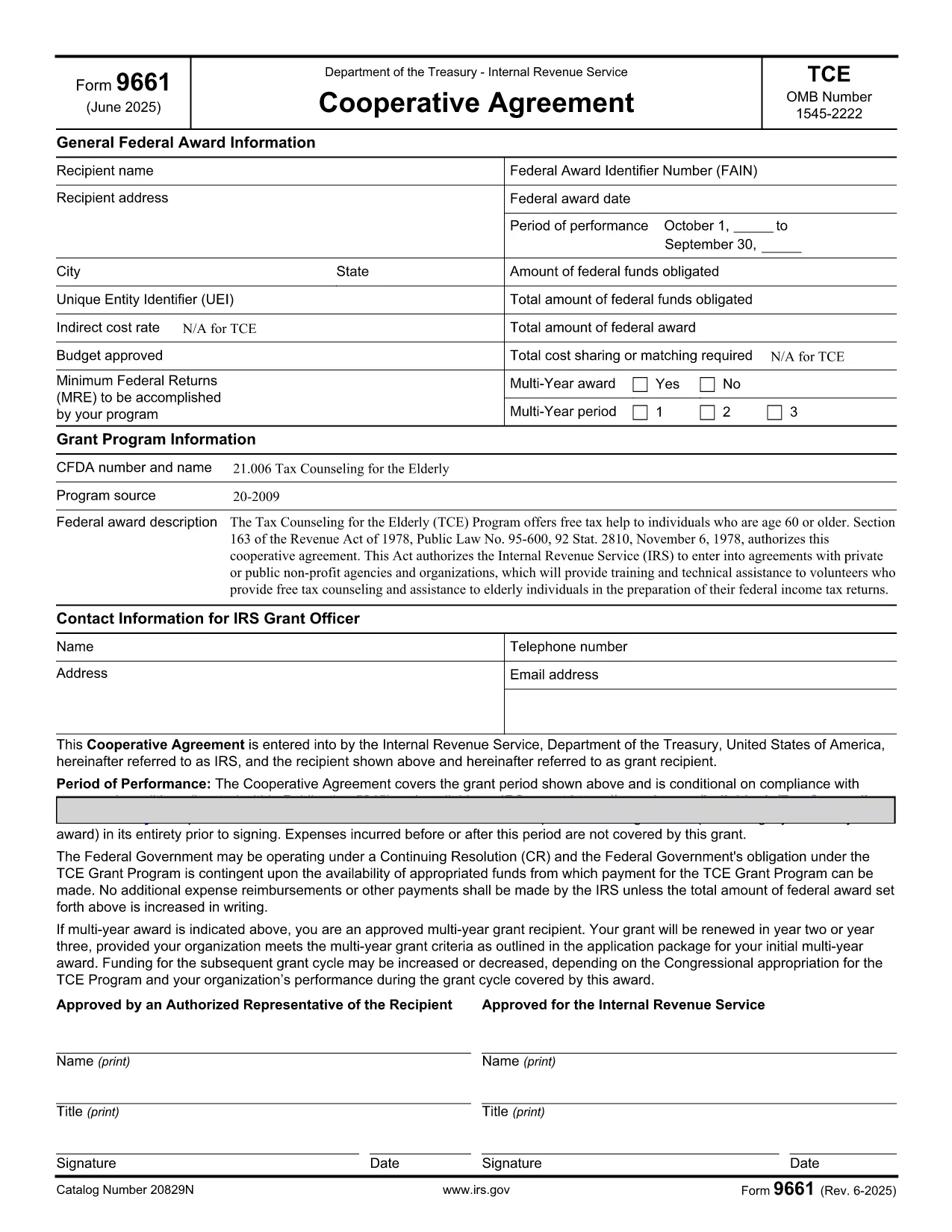
Form 9661 – Fillable PDF for Tax Counseling for the Elderly (TCE)

  1. Negara USA
  2. Bahasa Inggeris
  3. Aktiviti Cukai
  4. Jabatan Perkhidmatan Hasil Dalam Negeri
Isi borang ini
Form 9661 – Fillable PDF for Tax Counseling for the Elderly (TCE)

Form 9661, the Application for Tax Counseling for the Elderly (TCE) Program, is an IRS form that allows eligible seniors (age 60 or older) to receive free tax assistance. The form can now be completed directly in your browser using our secure, fillable PDF powered by Formize.

By using the online fillable version, you avoid printing, scanning, or installing special PDF editors. Simply click the button on this page, let the Formize PDF Filler load, and start entering your information.

Key benefits of the fillable PDF:

  • Auto‑save as you type – no data loss.
  • Built‑in validation to reduce errors.
  • Instant download of the completed form in PDF format.

Below you’ll find detailed instructions, common pitfalls, and answers to the most frequent questions about Form 9661.

SOALAN LAZIM
  • Who is eligible to use Form 9661?

    Individuals who are 60 years of age or older and wish to receive free tax counseling through the TCE program.

  • Do I need a PDF editor to fill out Form 9661?

    No. Our online fillable PDF works in any modern browser—no additional software is required.

  • Can I save my progress and return later?

    Yes. Use the "Save" button in the Formize Filler to download a partially completed PDF, then reopen it later to continue.

  • Where do I submit the completed Form 9661?

    Submit the signed form to the TCE provider that will assist you with your taxes. Many providers accept electronic PDFs.

  • What common mistakes should I avoid?

    Make sure to enter your Social Security Number exactly as it appears on your SSN card, sign the form, and double‑check dates for accuracy.

  • Is Form 9661 free to download?

    Yes. The IRS provides this form at no cost, and our fillable version is also free to use.

  • Can I use Form 9661 for non‑U.S. residents?

    Form 9661 is intended for U.S. taxpayers who meet the age requirement. Non‑U.S. residents should consult their local tax authority.

BAGAIMANA UNTUK

Cara mengisi Form 9661 secara percuma, dalam talian dalam 5 langkah mudah:

  1. 1
    Open the Fillable Form
    Click the "Fill out this form" button on this page. The Formize PDF Filler app will launch in a new window.
  2. 2
    Wait for the Loader
    Allow a few seconds for the fillable PDF to load. All fields will become editable automatically.
  3. 3
    Enter Your Information
    Complete each section of Form 9661. Required fields are marked with an asterisk and validated in real time.
  4. 4
    Review and Correct
    Use the built‑in review tool to check for missing or incorrect entries before finalizing.
  5. 5
    Download or Print
    When you’re satisfied, click "Download" to save the completed PDF or "Print" to submit a hard copy to your TCE provider.
Bentuk apl Pengisi PDF
TENTANG

Borang cukai

Form 9661 ialah salah satu borang Cukai yang merupakan dokumen yang digunakan untuk melaporkan maklumat yang berkaitan dengan cukai kepada pihak berkuasa cukai yang berkaitan. Terdapat pelbagai jenis borang cukai, termasuk borang cukai persekutuan, negeri dan tempatan, yang boleh berbeza-beza bergantung pada keadaan dan lokasi pembayar cukai.

CIRI-CIRI

Pengisi PDF

Cara paling mudah untuk mengisi Form 9661 dalam talian

  • Cepat isi Form 9661
    Mencari cara untuk mengisi Form 9661 dengan cepat dalam talian? Dengan pengisi borang PDF percuma dalam talian kami, anda akan tahu cara mengedit dan mengisi dokumen pdf ini dalam masa kurang daripada satu minit.
  • Mudah untuk menggunakan editor PDF dalam talian
    Bosan dengan mencetak fail PDF supaya anda boleh mengeditnya, sebelum mengimbas semula dan menghantarnya semula? Edit dokumen PDF secara percuma dalam talian. Gunakan editor pdf dalam talian kami untuk menjimatkan masa dan kertas.
  • Alat yang hebat, semua platform
    Tertanya-tanya cara mengisi Form 9661 pada Mac, atau mungkin cara menggunakan pengisi PDF secara percuma? Alat PDF dalam talian kami berfungsi pada semua platform.
  • Simpanan fail selamat
    Fail "Form 9661" yang lengkap disimpan dalam pangkalan data selamat yang diuruskan oleh pengehosan Amazon Cloud. Anda boleh memadamkan fail anda daripada sistem kami pada bila-bila masa. Walau apa pun, fail ini dipadamkan secara automatik selepas 24 jam.
  • Sembang dengan Form 9661
    Sembang dengan "Form 9661" di Chatize yang merupakan pembantu pembaca PDF percuma. Tanya soalan dan dapatkan jawapan daripada "Form 9661". Cuma klik pada butang Sembang Dengan Dokumen di atas.

Padamkan sesi pengisian

Padamkan sesi pengisian yang dipilih? Dalam kes ini, kemajuan anda dalam melengkapkan borang akan hilang.

Padamkan sesi penyuntingan

Padamkan sesi penyuntingan yang dipilih? Dalam kes ini, kemajuan anda dalam membuat dan mengedit borang akan hilang.