Pilih Bahasa

2025 CSE Application Form – Fillable Online

  1. Bahasa Inggeris
  2. Negara Philippines
  3. Jabatan Department of Budget and Management
  4. Aktiviti Procurement
Isi borang ini
2025 CSE Application Form – Fillable Online

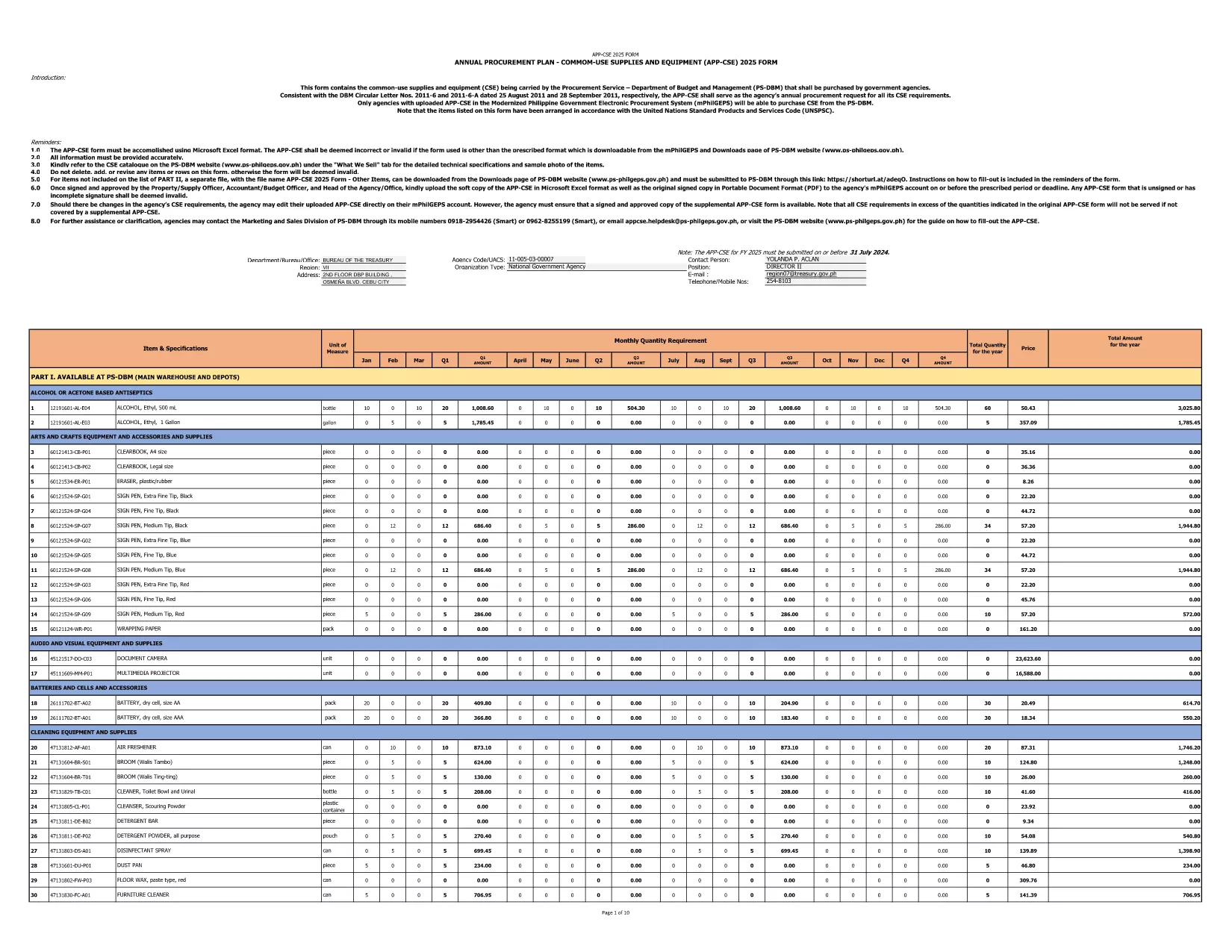
The 2025 CSE (Common‑Use Supplies and Equipment) Application Form is the official document used by Philippine government agencies to request procurement of shared supplies and equipment. This fillable PDF is hosted by the Department of Budget and Management and follows the latest DBM Circular Letters.

What Is the CSE Application Form?

The CSE form consolidates all common‑use items that agencies plan to purchase for the fiscal year. It ensures transparency, avoids duplication, and streamlines the procurement process across the public sector.

How to Complete the Form Online

Instead of downloading the PDF and opening a separate editor, simply click the "Fill out this form" button on this page. The Formize PDF Filler app will load in your browser, letting you enter data directly into the fields.

Common Mistakes to Avoid

  • Leaving required fields blank – the form will flag them before submission.
  • Using the wrong fiscal year – this version is for FY 2025 only.
  • Entering non‑numeric values in budget columns.
  • Forgetting to attach supporting documents where indicated.

Download the Official PDF

If you prefer to keep a local copy, you can download the original PDF from the government site. The file is the same one used by Formize.

Why Use Formize PDF Filler?

Formize provides a secure, browser‑based environment that:

  • Preserves the original formatting of the government form.
  • Auto‑saves your progress, preventing data loss.
  • Allows you to submit the completed form directly to your agency’s procurement portal.

Start filling the 2025 CSE Application Form now and accelerate your agency’s procurement workflow.

SOALAN LAZIM
  • Is this form only for FY 2025?

    Yes. The downloaded PDF is specifically labeled APP‑CSE FY 2025 and follows the 2025 procurement guidelines.

  • Do I need a PDF editor to fill the form?

    No. The Formize PDF Filler works in any modern browser—no extra software is required.

  • Can I save my progress and return later?

    Absolutely. The filler auto‑saves your entries, and you can download a draft PDF at any time.

  • What if I make a mistake after submitting?

    You can download the completed PDF, correct it using Formize, and re‑submit. Always keep a backup copy.

  • Is the form secure?

    Formize uses SSL encryption, and the PDF remains on your device unless you choose to upload it to a secure agency portal.

  • Where can I find guidance on each field?

    Each field includes a tooltip with brief instructions. For detailed guidance, refer to DBM Circular Letter Nos. 2011‑6 and 2011‑6‑A.

  • Can I print the completed form?

    Yes. After filling out the form, click "Print" to generate a printer‑ready version.

BAGAIMANA UNTUK

Cara mengisi CSE application form secara percuma, dalam talian dalam 4 langkah mudah:

  1. 1
    Open the Fillable Form
    Click the "Fill out this form" button on the page. The Formize PDF Filler loads instantly in your browser.
  2. 2
    Enter Required Information
    Complete each highlighted field—agency name, item description, quantity, budget, and supporting details.
  3. 3
    Validate and Save
    Use the built‑in validation to check for missing or incorrect entries, then click "Save" to store a copy on your device.
  4. 4
    Submit or Export
    When finished, either submit the form directly to your procurement portal or export it as a completed PDF for offline filing.
Bentuk apl Pengisi PDF
TENTANG

templat CSE application form.

Dengan set ciri tradisional untuk melihat dan mengisi dokumen PDF, digabungkan dengan faedah aplikasi web dan reka letak responsif, anda boleh melengkapkan CSE application form dalam beberapa minit.

CIRI-CIRI

Pengisi PDF

Cara paling mudah untuk mengisi CSE application form dalam talian

  • Cepat isi CSE application form
    Mencari cara untuk mengisi CSE application form dengan cepat dalam talian? Dengan pengisi borang PDF percuma dalam talian kami, anda akan tahu cara mengedit dan mengisi dokumen pdf ini dalam masa kurang daripada satu minit.
  • Mudah untuk menggunakan editor PDF dalam talian
    Bosan dengan mencetak fail PDF supaya anda boleh mengeditnya, sebelum mengimbas semula dan menghantarnya semula? Edit dokumen PDF secara percuma dalam talian. Gunakan editor pdf dalam talian kami untuk menjimatkan masa dan kertas.
  • Alat yang hebat, semua platform
    Tertanya-tanya cara mengisi CSE application form pada Mac, atau mungkin cara menggunakan pengisi PDF secara percuma? Alat PDF dalam talian kami berfungsi pada semua platform.
  • Simpanan fail selamat
    Fail "CSE application form" yang lengkap disimpan dalam pangkalan data selamat yang diuruskan oleh pengehosan Amazon Cloud. Anda boleh memadamkan fail anda daripada sistem kami pada bila-bila masa. Walau apa pun, fail ini dipadamkan secara automatik selepas 24 jam.
  • Sembang dengan CSE application form
    Sembang dengan "CSE application form" di Chatize yang merupakan pembantu pembaca PDF percuma. Tanya soalan dan dapatkan jawapan daripada "CSE application form". Cuma klik pada butang Sembang Dengan Dokumen di atas.

Padamkan sesi pengisian

Padamkan sesi pengisian yang dipilih? Dalam kes ini, kemajuan anda dalam melengkapkan borang akan hilang.

Padamkan sesi penyuntingan

Padamkan sesi penyuntingan yang dipilih? Dalam kes ini, kemajuan anda dalam membuat dan mengedit borang akan hilang.