Pilih Bahasa

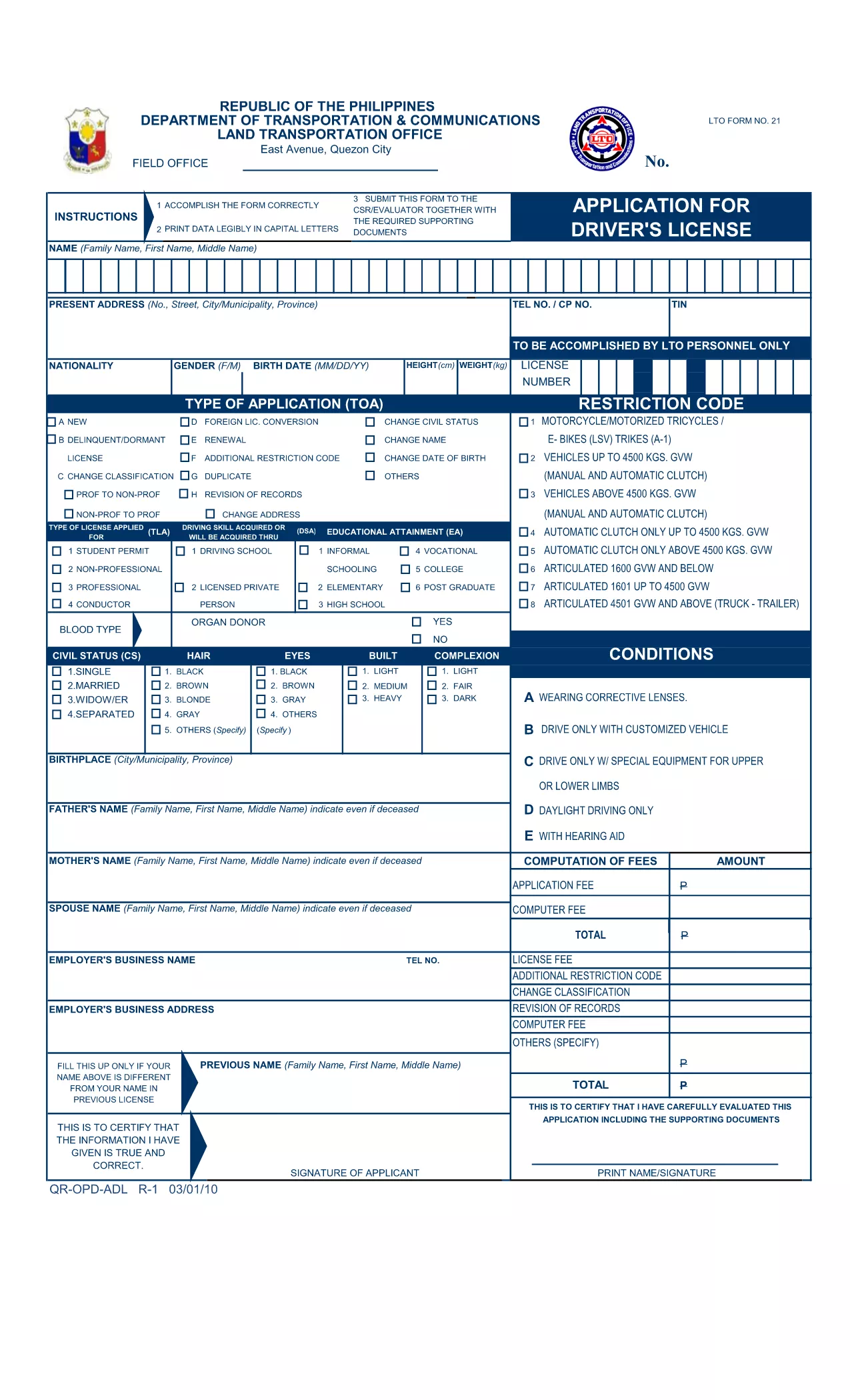
LTO Driver’s License Application Form – Fillable PDF

  1. Negara Philippines
  2. Bahasa Inggeris
  3. Aktiviti Vehicle Licensing
  4. Jabatan Land Transportation Office
Isi borang ini
LTO Driver’s License Application Form – Fillable PDF

The LTO driver’s license application form (also known as the ADL Form) is the official document you need to fill out before visiting any Land Transportation Office (LTO) branch in the Philippines. Our page provides a direct link to a fillable PDF that you can complete instantly with the Formize PDF Filler – no extra software required.

Using a fillable PDF saves time, reduces errors, and lets you review your answers before printing. Whether you are applying for a first non‑professional license, renewing an existing one, or updating personal details, this form covers all the essential information the LTO requires.

What Is the LTO Application Form?

The LTO application form is a government‑issued document that collects personal data, licensing history, and medical declarations. It is mandatory for all applicants, including minors (with parental consent) and senior citizens.

How to Fill the LTO Form Online with Formize

Simply click the "Fill out this form" button below. The Formize PDF Filler app will load in your browser, allowing you to type directly into each field, add signatures, and save your progress.

Key Sections of the Form

  • Applicant Information: Name, birthdate, address, and contact details.
  • License Details: Desired license type, previous license numbers, and validity dates.
  • Medical & Certification: Health declarations and examiner’s certification.
  • Parental Consent (if applicable): Required for applicants under 18.

Common Mistakes to Avoid

  • Leaving mandatory fields blank – the filler will highlight missing entries.
  • Using an illegible handwritten signature – the digital signature tool ensures clarity.
  • Submitting outdated IDs – double‑check that your ID numbers match official records.

Where to Submit Your Completed Form

After you finish and print the form, bring it along with the required supporting documents to any LTO branch. Remember to bring a valid ID, original medical certificate (if needed), and the appropriate processing fee.

Ready to start? Click the button below to open the fillable PDF now.

SOALAN LAZIM
  • Is the LTO application form free to download?

    Yes, the official PDF is provided free of charge on our page. You only pay the processing fee when you submit the form at the LTO.

  • Can I fill the form on a mobile device?

    The Formize PDF Filler works on most modern browsers, including mobile Chrome and Safari, but a desktop or laptop offers the best experience.

  • Do I need to print the form after filling it online?

    Yes. The LTO requires a hard‑copy, signed version of the form together with your supporting documents.

  • What should I do if I make a mistake after printing?

    Cross out the error with a single line, write the correct information, and initial the change. For major errors, refill the form online and print a new copy.

  • Is a digital signature accepted by the LTO?

    The LTO still requires a handwritten signature on the printed form. Use the digital signature only for previewing; add your handwritten signature before submission.

  • How long does it take to process my application?

    Processing times vary by branch, but most non‑professional licenses are issued within 1‑2 business days after submission.

BAGAIMANA UNTUK

Cara mengisi application form lto secara percuma, dalam talian dalam 5 langkah mudah:

  1. 1
    Open the Fillable Form
    Click the "Fill out this form" button on the page. The Formize PDF Filler will launch directly in your browser.
  2. 2
    Enter Your Information
    Type your details into each highlighted field. Use the tab key to move quickly between sections.
  3. 3
    Add Your Digital Signature
    Select the signature field, draw or upload your signature, and place it where required.
  4. 4
    Review & Save
    Check every section for completeness. Click "Save" to download a copy for your records.
  5. 5
    Print and Submit
    Print the completed PDF on standard A4 paper, attach the required supporting documents, and visit your nearest LTO branch.
Bentuk apl Pengisi PDF
TENTANG

templat application form lto.

Dengan set ciri tradisional untuk melihat dan mengisi dokumen PDF, digabungkan dengan faedah aplikasi web dan reka letak responsif, anda boleh melengkapkan application form lto dalam beberapa minit.

CIRI-CIRI

Pengisi PDF

Cara paling mudah untuk mengisi application form lto dalam talian

  • Cepat isi application form lto
    Mencari cara untuk mengisi application form lto dengan cepat dalam talian? Dengan pengisi borang PDF percuma dalam talian kami, anda akan tahu cara mengedit dan mengisi dokumen pdf ini dalam masa kurang daripada satu minit.
  • Mudah untuk menggunakan editor PDF dalam talian
    Bosan dengan mencetak fail PDF supaya anda boleh mengeditnya, sebelum mengimbas semula dan menghantarnya semula? Edit dokumen PDF secara percuma dalam talian. Gunakan editor pdf dalam talian kami untuk menjimatkan masa dan kertas.
  • Alat yang hebat, semua platform
    Tertanya-tanya cara mengisi application form lto pada Mac, atau mungkin cara menggunakan pengisi PDF secara percuma? Alat PDF dalam talian kami berfungsi pada semua platform.
  • Simpanan fail selamat
    Fail "application form lto" yang lengkap disimpan dalam pangkalan data selamat yang diuruskan oleh pengehosan Amazon Cloud. Anda boleh memadamkan fail anda daripada sistem kami pada bila-bila masa. Walau apa pun, fail ini dipadamkan secara automatik selepas 24 jam.
  • Sembang dengan application form lto
    Sembang dengan "application form lto" di Chatize yang merupakan pembantu pembaca PDF percuma. Tanya soalan dan dapatkan jawapan daripada "application form lto". Cuma klik pada butang Sembang Dengan Dokumen di atas.

Padamkan sesi pengisian

Padamkan sesi pengisian yang dipilih? Dalam kes ini, kemajuan anda dalam melengkapkan borang akan hilang.

Padamkan sesi penyuntingan

Padamkan sesi penyuntingan yang dipilih? Dalam kes ini, kemajuan anda dalam membuat dan mengedit borang akan hilang.