Pilih Bahasa

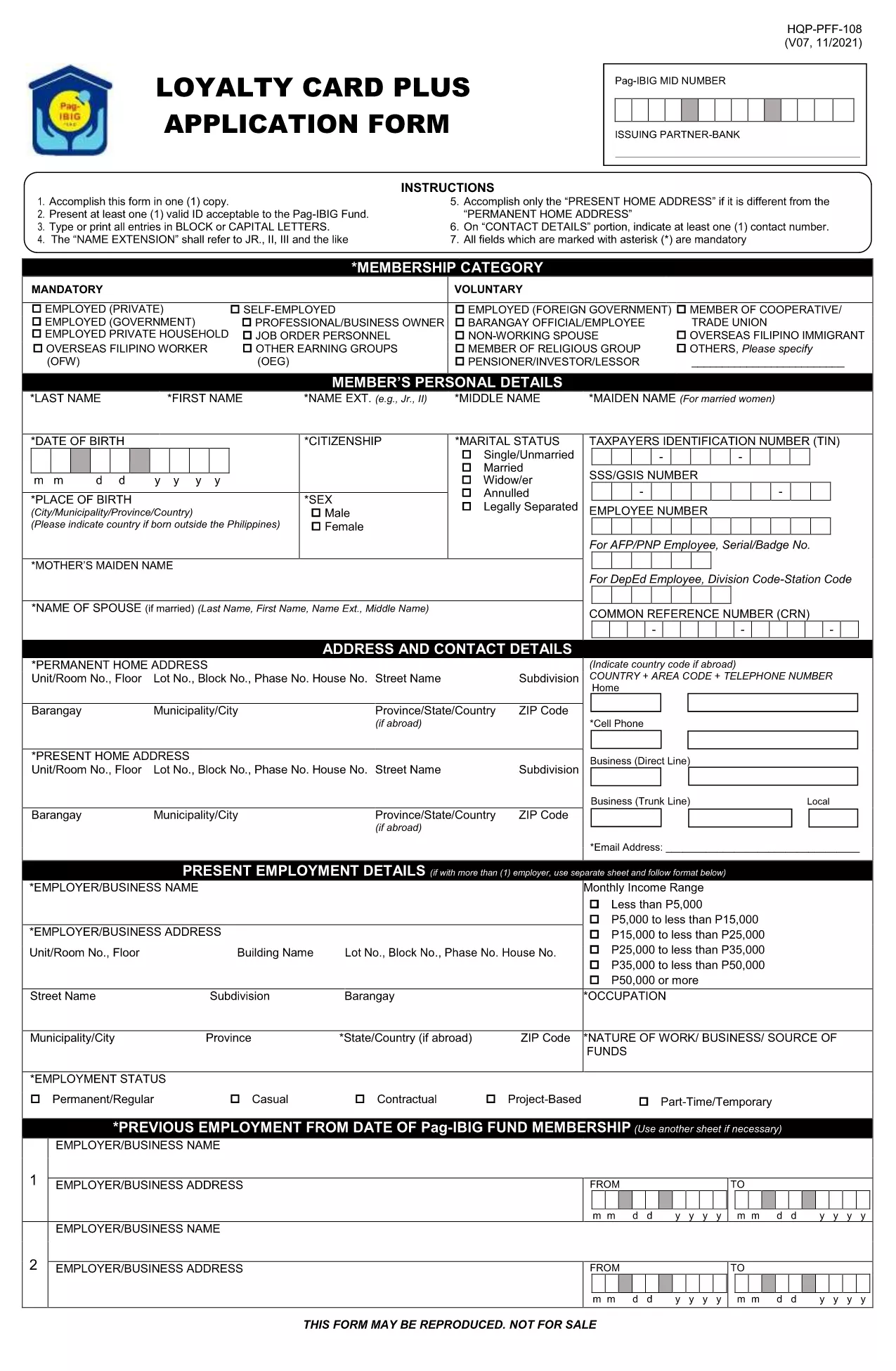
Pag‑IBIG Loyalty Card Application Form (Fillable PDF)

  1. Bahasa Inggeris
  2. Negara Philippines
  3. Aktiviti Housing and Savings
  4. Jabatan Pag‑IBIG Fund
Isi borang ini
Pag‑IBIG Loyalty Card Application Form (Fillable PDF)

The Pag‑IBIG Loyalty Card rewards members for their consistent contributions and participation in the fund’s programs. To obtain your card, you need to complete the official Pag‑IBIG Loyalty Card Application Form, which is now available as a fillable PDF.

What is the Pag‑IBIG Loyalty Card?

The Loyalty Card is a voluntary benefit that offers exclusive discounts, priority service, and additional loan privileges to eligible Pag‑IBIG members. Once approved, the card can be used at partner merchants and for special Pag‑IBIG events.

How to Fill the Loyalty Card Application Online

Instead of downloading the PDF and opening it in a separate editor, simply click the "Fill out this form" button on this page. The Formize PDF Filler app will load the form directly in your browser, allowing you to type, select, and sign without any extra software.

Key Sections of the Form

  • Personal Information – Name, birthdate, and Pag‑IBIG Membership ID.
  • Contact Details – Current address, phone number, and email.
  • Employment & Income – Employer name, position, and monthly salary.
  • Authorization – Consent for Pag‑IBIG to verify your credit standing and eligibility.

Common Mistakes to Avoid

  • Leaving mandatory fields blank – they are marked with an asterisk (*).
  • Using an outdated Membership ID – verify your ID on the Pag‑IBIG portal first.
  • Submitting illegible signatures – the online filler lets you type a digital signature or draw one with your mouse.
  • Incorrect email format – a valid email is required for confirmation.

Download & Submit the Form

After completing all sections, click Submit. The filled PDF will be generated automatically. Save a copy for your records and follow the instructions on the confirmation page to submit the hard‑copy to your nearest Pag‑IBIG office if required.

Need the original PDF? Download it here for offline use.

SOALAN LAZIM
  • Do I need a PDF editor to fill the Loyalty Card form?

    No. The Formize PDF Filler works directly in your browser, so no additional software is required.

  • Is the Loyalty Card Application free of charge?

    Yes. There is no fee to apply for the Pag‑IBIG Loyalty Card. Any charges would only apply if you request a hard‑copy card at a Pag‑IBIG office.

  • What documents are required with the application?

    Generally, a valid government ID and your Pag‑IBIG Membership ID are needed. Check the confirmation page for any additional requirements.

  • Can I edit the form after I have submitted it?

    Once you click "Submit," the form is locked. If you notice an error, you must fill out a new application.

  • How long does it take to get the Loyalty Card after approval?

    Processing typically takes 7‑10 business days after you submit the completed form and required documents.

  • Is the online filler secure?

    Yes. Formize uses SSL encryption, and your data is stored only temporarily for the duration of the session.

  • Can I print the filled form before submitting?

    Absolutely. After completing the form, click "Download" to save a printable copy.

  • What if I don’t have internet access to use the online filler?

    You can download the PDF from the link provided, fill it out manually, and submit it at any Pag‑IBIG office.

BAGAIMANA UNTUK

Cara mengisi Pag‑IBIG loyalty card secara percuma, dalam talian dalam 5 langkah mudah:

  1. 1
    Click the Fill‑out Button
    On this page, press the "Fill out this form" button. The Formize PDF Filler will open the Loyalty Card Application directly in your browser.
  2. 2
    Wait for the Filler to Load
    A few seconds may pass while the filler loads. This is normal; the app prepares the fillable fields for you.
  3. 3
    Complete Each Section
    Enter your personal, contact, and employment details. Use the dropdowns and checkboxes where provided.
  4. 4
    Review and Sign
    Double‑check all entries, add your digital signature using the signature field, and click "Save".
  5. 5
    Download or Submit
    After saving, download the completed PDF for your records or follow on‑screen instructions to submit it to your Pag‑IBIG office.
Bentuk apl Pengisi PDF
TENTANG

templat Pag‑IBIG loyalty card.

Dengan set ciri tradisional untuk melihat dan mengisi dokumen PDF, digabungkan dengan faedah aplikasi web dan reka letak responsif, anda boleh melengkapkan Pag‑IBIG loyalty card dalam beberapa minit.

CIRI-CIRI

Pengisi PDF

Cara paling mudah untuk mengisi Pag‑IBIG loyalty card dalam talian

  • Cepat isi Pag‑IBIG loyalty card
    Mencari cara untuk mengisi Pag‑IBIG loyalty card dengan cepat dalam talian? Dengan pengisi borang PDF percuma dalam talian kami, anda akan tahu cara mengedit dan mengisi dokumen pdf ini dalam masa kurang daripada satu minit.
  • Mudah untuk menggunakan editor PDF dalam talian
    Bosan dengan mencetak fail PDF supaya anda boleh mengeditnya, sebelum mengimbas semula dan menghantarnya semula? Edit dokumen PDF secara percuma dalam talian. Gunakan editor pdf dalam talian kami untuk menjimatkan masa dan kertas.
  • Alat yang hebat, semua platform
    Tertanya-tanya cara mengisi Pag‑IBIG loyalty card pada Mac, atau mungkin cara menggunakan pengisi PDF secara percuma? Alat PDF dalam talian kami berfungsi pada semua platform.
  • Simpanan fail selamat
    Fail "Pag‑IBIG loyalty card" yang lengkap disimpan dalam pangkalan data selamat yang diuruskan oleh pengehosan Amazon Cloud. Anda boleh memadamkan fail anda daripada sistem kami pada bila-bila masa. Walau apa pun, fail ini dipadamkan secara automatik selepas 24 jam.
  • Sembang dengan Pag‑IBIG loyalty card
    Sembang dengan "Pag‑IBIG loyalty card" di Chatize yang merupakan pembantu pembaca PDF percuma. Tanya soalan dan dapatkan jawapan daripada "Pag‑IBIG loyalty card". Cuma klik pada butang Sembang Dengan Dokumen di atas.

Padamkan sesi pengisian

Padamkan sesi pengisian yang dipilih? Dalam kes ini, kemajuan anda dalam melengkapkan borang akan hilang.

Padamkan sesi penyuntingan

Padamkan sesi penyuntingan yang dipilih? Dalam kes ini, kemajuan anda dalam membuat dan mengedit borang akan hilang.