Pilih Bahasa

Fillable PRC Size Teacher Oath Form (PDF)

  1. Bahasa Inggeris
  2. Negara Philippines
  3. Aktiviti Licensure
  4. Jabatan Professional Regulation Commission
Isi borang ini
Fillable PRC Size Teacher Oath Form (PDF)

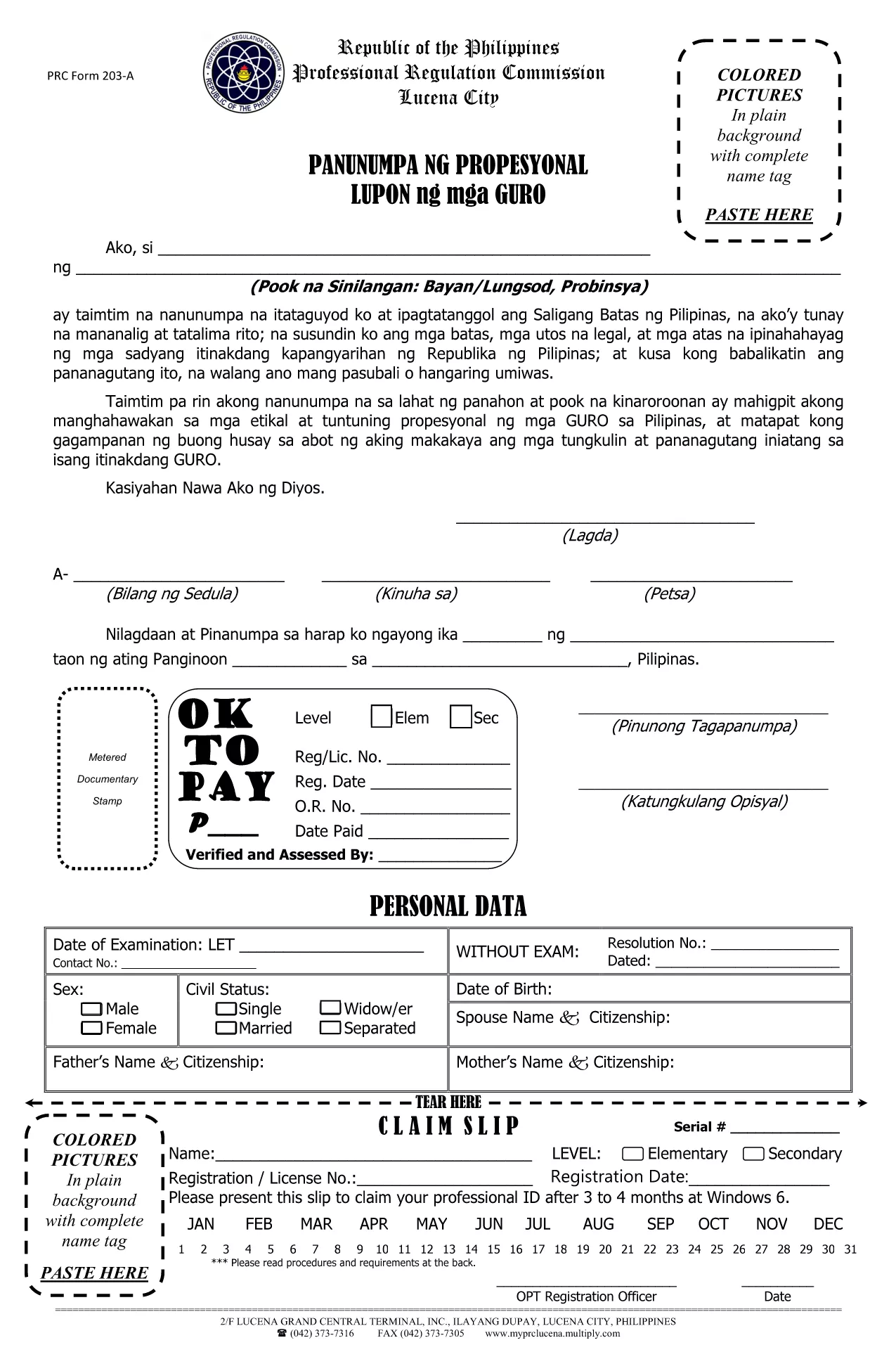
The Professional Regulation Commission (PRC) requires teachers to submit an Oath Form that matches the official PRC paper size (8½" × 13"). Our fillable PDF lets you complete the form on‑screen, save a digital copy, and print it on the correct paper without any hassle.

What Is the PRC Size Teacher Oath Form?

This is the official oath taken by teachers before they can be granted a Professional Identification Card. The form is designed for the custom PRC paper size (8½ × 13 inches) and includes fields for personal details, certification numbers, and the oath statement.

How to Fill the Form Online with Formize

Instead of downloading the PDF and opening a separate editor, simply click the “Fill out this form” button on the page. The Formize PDF Filler app loads in your browser, allowing you to type directly into each field, add signatures, and navigate with the tab key.

Common Mistakes to Avoid

  • Using the wrong paper size: Print on standard Letter (8.5 × 11) paper and the form will be misaligned.
  • Leaving required fields blank: The PRC will reject an incomplete oath.
  • Incorrect spelling of names or IDs: Double‑check against your official documents.
  • Not saving a copy: Keep a digital copy for future reference.

Download, Save, and Print Options

After completing the form in Formize, you can:

  1. Download the completed PDF to your computer or mobile device.
  2. Save it to cloud storage (Google Drive, Dropbox, etc.) for easy access.
  3. Print on PRC‑size paper (8½ × 13 in) at any local print shop or home printer that supports custom sizes.

Follow these steps and your Teacher Oath Form will be ready for submission to the PRC in no time.

SOALAN LAZIM
  • What is the correct paper size for PRC forms?

    PRC official forms use a custom size of 8½ × 13 inches. Print the PDF using this setting to avoid misalignment.

  • Can I fill the Teacher Oath Form on a mobile device?

    Yes. The Formize PDF Filler works on most smartphones and tablets with a modern browser.

  • Do I need Adobe Acrobat to complete the form?

    No. The form is completely fillable online via Formize, so no additional software is required.

  • Is the PDF secure for personal data?

    Formize uses HTTPS encryption while you fill the form. Once downloaded, the file is stored locally on your device.

  • What should I do if I make a mistake after saving?

    Open the saved PDF again in Formize, correct the error, and re‑save. Keep only the latest version for submission.

  • Do I need to attach any supporting documents?

    The oath form itself does not require attachments, but the PRC may ask for a copy of your Professional ID or diploma during processing.

  • How long does the online filling process take?

    Most users complete the form in 5‑10 minutes, depending on how quickly you gather your information.

  • Can I print the form in black and white?

    Yes, the form is designed to be legible in black and white. However, a clear signature is recommended.

  • Is there a fee to download the PDF?

    No, the PDF is provided free of charge for teachers needing the PRC oath form.

  • Where do I submit the completed oath form?

    Submit the printed form to the nearest PRC office or attach it to your online application if the PRC accepts digital uploads.

BAGAIMANA UNTUK

Cara mengisi PRC size form secara percuma, dalam talian dalam 5 langkah mudah:

  1. 1
    Click the Fill‑out Button
    Press the “Fill out this form” button on the page. The Formize PDF Filler app will open in a new tab.
  2. 2
    Enter Your Information
    Type directly into each highlighted field. Use the Tab key to move quickly between sections.
  3. 3
    Add Your Signature
    Click the signature box, draw or upload your signature, and confirm.
  4. 4
    Save the Completed Form
    When all fields are filled, click “Save” to download the completed PDF to your device.
  5. 5
    Print on PRC‑Size Paper
    Open the saved PDF and print using the custom 8½ × 13 in paper setting. Your form will be perfectly aligned for PRC submission.
Bentuk apl Pengisi PDF
TENTANG

templat PRC size form.

Dengan set ciri tradisional untuk melihat dan mengisi dokumen PDF, digabungkan dengan faedah aplikasi web dan reka letak responsif, anda boleh melengkapkan PRC size form dalam beberapa minit.

CIRI-CIRI

Pengisi PDF

Cara paling mudah untuk mengisi PRC size form dalam talian

  • Cepat isi PRC size form
    Mencari cara untuk mengisi PRC size form dengan cepat dalam talian? Dengan pengisi borang PDF percuma dalam talian kami, anda akan tahu cara mengedit dan mengisi dokumen pdf ini dalam masa kurang daripada satu minit.
  • Mudah untuk menggunakan editor PDF dalam talian
    Bosan dengan mencetak fail PDF supaya anda boleh mengeditnya, sebelum mengimbas semula dan menghantarnya semula? Edit dokumen PDF secara percuma dalam talian. Gunakan editor pdf dalam talian kami untuk menjimatkan masa dan kertas.
  • Alat yang hebat, semua platform
    Tertanya-tanya cara mengisi PRC size form pada Mac, atau mungkin cara menggunakan pengisi PDF secara percuma? Alat PDF dalam talian kami berfungsi pada semua platform.
  • Simpanan fail selamat
    Fail "PRC size form" yang lengkap disimpan dalam pangkalan data selamat yang diuruskan oleh pengehosan Amazon Cloud. Anda boleh memadamkan fail anda daripada sistem kami pada bila-bila masa. Walau apa pun, fail ini dipadamkan secara automatik selepas 24 jam.
  • Sembang dengan PRC size form
    Sembang dengan "PRC size form" di Chatize yang merupakan pembantu pembaca PDF percuma. Tanya soalan dan dapatkan jawapan daripada "PRC size form". Cuma klik pada butang Sembang Dengan Dokumen di atas.

Padamkan sesi pengisian

Padamkan sesi pengisian yang dipilih? Dalam kes ini, kemajuan anda dalam melengkapkan borang akan hilang.

Padamkan sesi penyuntingan

Padamkan sesi penyuntingan yang dipilih? Dalam kes ini, kemajuan anda dalam membuat dan mengedit borang akan hilang.