Pilih Bahasa

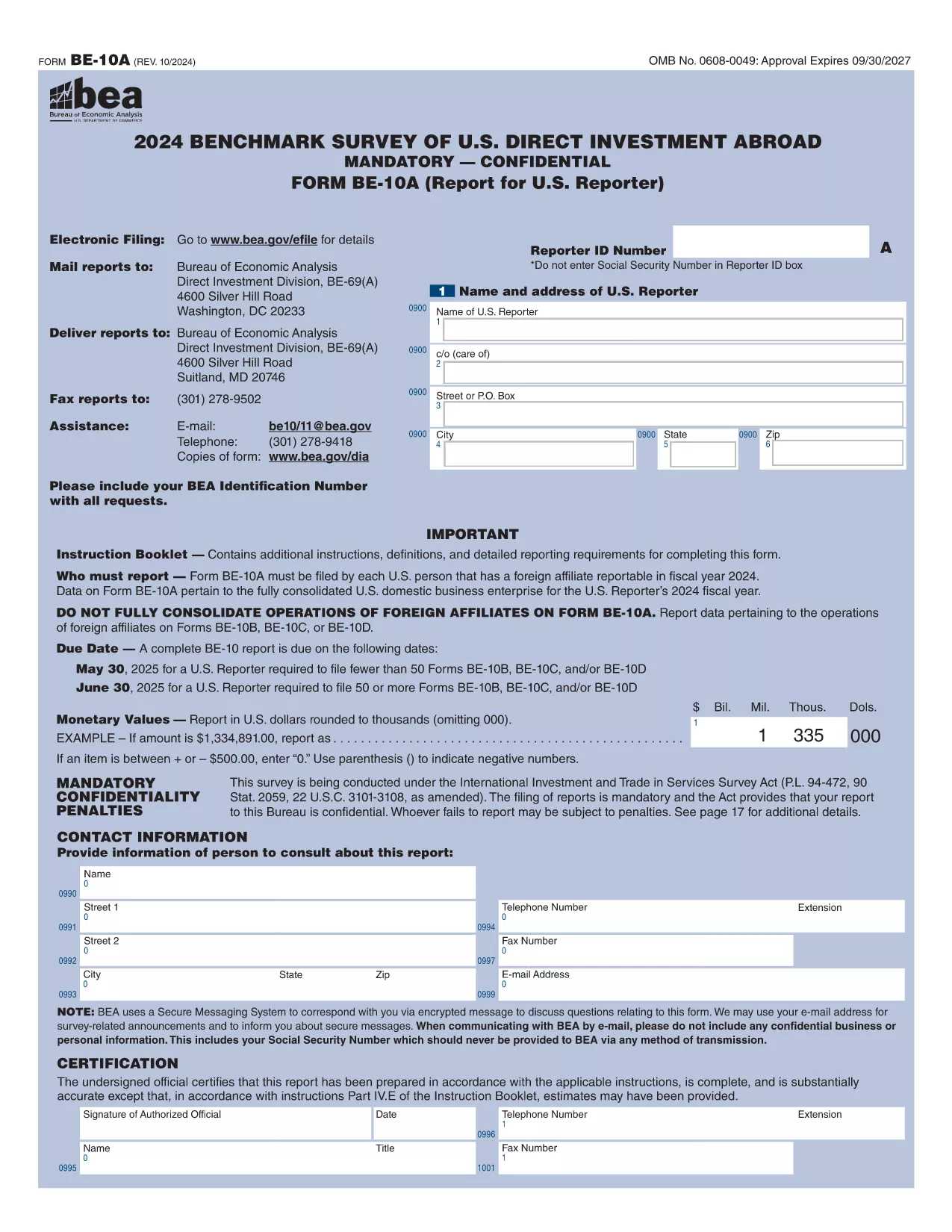
Form 10BBE – Fillable BE‑10 Survey PDF

  1. Negara USA
  2. Bahasa Inggeris
  3. Jabatan Bureau of Economic Analysis
  4. Aktiviti International Investment Surveys
Isi borang ini
Form 10BBE – Fillable BE‑10 Survey PDF

The Form 10BBE is part of the BE‑10 benchmark survey administered by the U.S. Bureau of Economic Analysis (BEA). It collects detailed financial and operating data for majority‑owned foreign affiliates that meet specific asset, sales, or net‑income thresholds.

Using Formize’s online PDF filler, you can complete the form directly in your browser—no Adobe Acrobat Pro or other PDF editor required. Simply click the “Fill out this form” button, wait for the Formize PDF Filler to load, and start entering your information.

Below you’ll find everything you need to know about the form, step‑by‑step instructions, and answers to the most common questions.

What is Form 10BBE?

Form 10BBE (often referenced as BE‑10B) gathers data on foreign affiliates whose assets, sales, or net income exceed $80 million. The information helps the BEA compile the U.S. Direct Investment Abroad statistics used by policymakers, researchers, and businesses.

How to Complete the Fillable Form 10BBE

Follow the simple process below to fill out the form quickly and accurately using Formize.

Common Mistakes to Avoid

  • Leaving required fields blank – the filler will highlight missing entries.
  • Entering figures in the wrong units (e.g., thousands vs. millions).
  • Using outdated fiscal year dates – verify the reporting year before you start.

Download & Fill the Form Instantly

Click the button below to open the fillable PDF in Formize’s secure online editor. All changes are saved automatically, and you can export the completed form as a PDF ready for e‑filing.

FAQ About Form 10BBE

Find quick answers to the most frequently asked questions further down the page.

SOALAN LAZIM
  • Who must file Form 10BBE?

    All U.S. multinational enterprises with majority‑owned foreign affiliates whose assets, sales, or net income exceed $80 million must file Form 10BBE as part of the BE‑10 benchmark survey.

  • Can I file Form 10BBE electronically?

    Yes. After completing the fillable PDF with Formize, you can upload the saved file to the BEA e‑file system for electronic submission.

  • What fiscal year does Form 10BBE cover?

    The form reports data for the most recent fiscal year ending in the calendar year specified in the survey notice (typically the year before the filing deadline).

  • Is the information I provide confidential?

    Federal law protects the confidentiality of all data submitted to the BEA. Your information is used only for statistical purposes and is not disclosed publicly.

  • What if I make a mistake after submitting?

    You can file an amendment using the BEA’s “Form 10BBE Amendment” process. Contact the BEA survey office for the correct procedure.

  • Do I need Adobe Acrobat Pro to edit the form?

    No. Formize’s online PDF filler works in any modern browser, and you only need the free Adobe Acrobat Reader to view the final PDF.

  • What is the deadline for filing Form 10BBE?

    For reporters filing 50 or more BE‑10 forms, the deadline is June 30 2025. For fewer than 50, the deadline is May 30 2025.

  • Where can I find the instructions for Form 10BBE?

    The detailed instruction booklet is available on the BEA website alongside the fillable PDF. It explains each line item and provides examples.

BAGAIMANA UNTUK

Cara mengisi Form 10BBE secara percuma, dalam talian dalam 5 langkah mudah:

  1. 1
    Click the Fill‑out Button
    Press the “Fill out this form” button on the page. The Formize PDF Filler will open in a new tab.
  2. 2
    Wait for the Formizer to Load
    A short loading screen appears while the fillable PDF is prepared. This ensures all fields are interactive.
  3. 3
    Enter Your Data
    Complete each required field. The filler validates entries in real time and highlights any missing information.
  4. 4
    Review and Save
    Use the built‑in preview to double‑check your answers, then click “Save” to store the completed form on your device.
  5. 5
    Submit or Download
    When you’re satisfied, download the final PDF for e‑filing or submit it directly through the BEA e‑file portal.
Bentuk apl Pengisi PDF
TENTANG

templat Form 10BBE.

Dengan set ciri tradisional untuk melihat dan mengisi dokumen PDF, digabungkan dengan faedah aplikasi web dan reka letak responsif, anda boleh melengkapkan Form 10BBE dalam beberapa minit.

CIRI-CIRI

Pengisi PDF

Cara paling mudah untuk mengisi Form 10BBE dalam talian

  • Cepat isi Form 10BBE
    Mencari cara untuk mengisi Form 10BBE dengan cepat dalam talian? Dengan pengisi borang PDF percuma dalam talian kami, anda akan tahu cara mengedit dan mengisi dokumen pdf ini dalam masa kurang daripada satu minit.
  • Mudah untuk menggunakan editor PDF dalam talian
    Bosan dengan mencetak fail PDF supaya anda boleh mengeditnya, sebelum mengimbas semula dan menghantarnya semula? Edit dokumen PDF secara percuma dalam talian. Gunakan editor pdf dalam talian kami untuk menjimatkan masa dan kertas.
  • Alat yang hebat, semua platform
    Tertanya-tanya cara mengisi Form 10BBE pada Mac, atau mungkin cara menggunakan pengisi PDF secara percuma? Alat PDF dalam talian kami berfungsi pada semua platform.
  • Simpanan fail selamat
    Fail "Form 10BBE" yang lengkap disimpan dalam pangkalan data selamat yang diuruskan oleh pengehosan Amazon Cloud. Anda boleh memadamkan fail anda daripada sistem kami pada bila-bila masa. Walau apa pun, fail ini dipadamkan secara automatik selepas 24 jam.
  • Sembang dengan Form 10BBE
    Sembang dengan "Form 10BBE" di Chatize yang merupakan pembantu pembaca PDF percuma. Tanya soalan dan dapatkan jawapan daripada "Form 10BBE". Cuma klik pada butang Sembang Dengan Dokumen di atas.

Padamkan sesi pengisian

Padamkan sesi pengisian yang dipilih? Dalam kes ini, kemajuan anda dalam melengkapkan borang akan hilang.

Padamkan sesi penyuntingan

Padamkan sesi penyuntingan yang dipilih? Dalam kes ini, kemajuan anda dalam membuat dan mengedit borang akan hilang.