
Pilih Bahasa

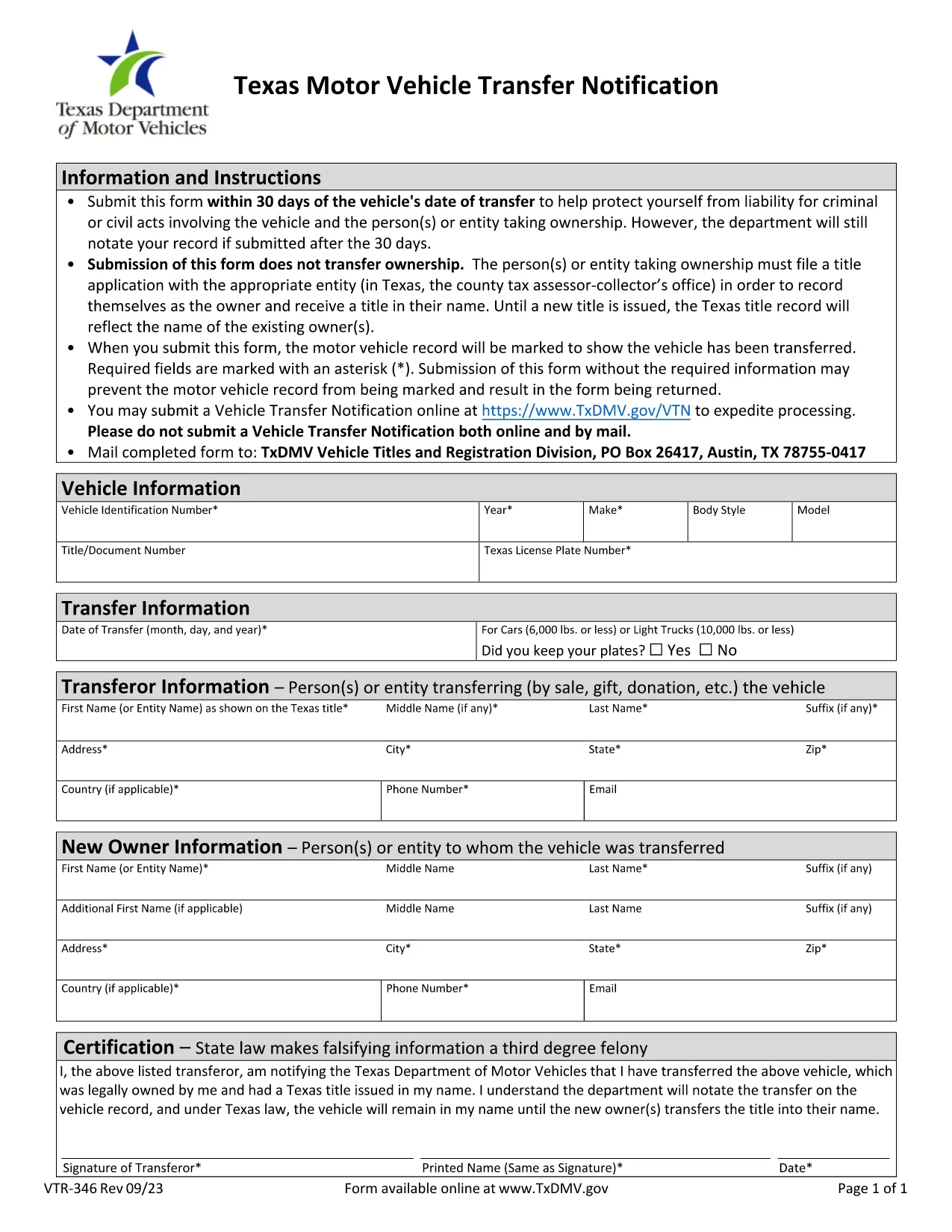
Application Form with Undertaking for Change of Ownership

  1. Bahasa Inggeris
  2. Negara USA
  3. Aktiviti Pendaftaran Kenderaan
  4. Jabatan Department of Motor Vehicles
Isi borang ini
Application Form with Undertaking for Change of Ownership

The Application Form with Undertaking for Change of Ownership is the official document required when you transfer the title of a vehicle, boat, or other registered asset to a new owner. This form not only captures the buyer and seller information but also includes an undertaking that protects the seller from future liabilities such as parking tickets or toll violations.

What Is This Form and When Is It Needed?

State motor vehicle departments (DMVs) require this form whenever a title is transferred. It is used for private sales, dealer-to-private sales, and any situation where ownership changes hands. The undertaking clause is essential because it formally releases the seller from responsibility after the transfer is recorded.

How to Complete the Form Online with Formize

Instead of printing, scanning, and mailing a paper copy, you can fill the form directly in your browser using the Formize PDF Filler. The process is fast, secure, and fully compliant with DMV requirements.

Common Mistakes to Avoid

  • Leaving the sale price or odometer reading blank.
  • Not signing the undertaking section.
  • Forgetting to include the VIN (Vehicle Identification Number) in the correct format.
  • Submitting the form without the required proof of identity for both parties.

Where to Submit the Completed Form

After you have filled, reviewed, and signed the form, you can:

  • Upload it through your state’s online DMV portal (if available).
  • Print and hand‑deliver it to your local tax office or DMV.
  • Mail the PDF to the address listed on the form’s instructions.

Using the fillable PDF ensures the data is captured accurately, reducing processing time and avoiding delays in title issuance.

SOALAN LAZIM
  • Do I need to print the form after filling it online?

    No. The Formize PDF Filler lets you complete, sign, and save the form entirely online. Printing is only required if your local DMV asks for a hard copy.

  • What is the undertaking section for?

    The undertaking releases the seller from future liabilities (e.g., tickets, tolls) after the title transfer is recorded.

  • Can I use this form for a vehicle sold out of state?

    Yes, but you must also comply with the receiving state’s registration requirements. The form’s VIN and sale details remain valid nationwide.

  • How long does it take for the DMV to process the transfer?

    Processing times vary by state, but a correctly completed, electronically signed form typically speeds up the process to 5‑10 business days.

  • What documents should I keep after submitting the form?

    Keep a copy of the signed PDF, a receipt of submission (if online), and any proof of identity for both parties. These may be needed for future reference.

  • Is there a fee for filing this form?

    Yes, most states charge a title transfer fee. Check your local DMV’s fee schedule for the exact amount.

BAGAIMANA UNTUK

Cara mengisi change of ownership form secara percuma, dalam talian dalam 5 langkah mudah:

  1. 1
    Click the Fill‑out Button
    On this page, click the "Fill out this form" button to launch the Formize PDF Filler.
  2. 2
    Wait for the Formize PDF Filler to Load
    The fillable PDF will open in a secure browser window. No download or installation is required.
  3. 3
    Enter All Required Information
    Complete buyer and seller details, vehicle information, sale price, odometer reading, and the undertaking clause.
  4. 4
    Review and Electronically Sign
    Double‑check every field, then use the built‑in e‑signature tool to sign the form.
  5. 5
    Save or Submit
    Download the finished PDF for your records or submit it directly to the DMV if the portal supports online upload.
Bentuk apl Pengisi PDF
TENTANG

Borang Pendaftaran Kenderaan

change of ownership form ialah salah satu borang pendaftaran Kenderaan yang merupakan dokumen yang digunakan untuk mendaftarkan kenderaan bermotor dengan pihak berkuasa kerajaan yang berkaitan, biasanya Jabatan Kenderaan Bermotor (DMV) atau agensi yang setara. Borang ini diperlukan apabila seseorang membeli kenderaan baharu atau terpakai, memindahkan pemilikan kenderaan, atau berpindah ke bidang kuasa baharu dengan kenderaan.

Borang pendaftaran kenderaan tertentu boleh berbeza mengikut bidang kuasa, tetapi biasanya borang tersebut memerlukan maklumat berikut:

Maklumat Kenderaan: Ini termasuk butiran tentang kenderaan, seperti jenama, model, tahun, nombor pengenalan kenderaan (VIN) dan bacaan odometer.

Maklumat Pemilik: Borang akan memerlukan maklumat tentang pemilik kenderaan, termasuk nama, alamat, maklumat hubungan dan nombor lesen memandu mereka.

Bukti Pemilikan: Bergantung pada keadaan, bukti pemilikan mungkin diperlukan, seperti sijil hak milik, bil jualan atau sijil asal pengeluar (untuk kenderaan baharu).

Maklumat Insurans: Bukti perlindungan insurans kenderaan yang sah biasanya diperlukan. Ini mungkin termasuk memberikan nombor polisi insurans, tarikh perlindungan dan butiran syarikat insurans.

Pembayaran Yuran: Pendaftaran kenderaan melibatkan pembayaran pelbagai yuran, seperti yuran pendaftaran, cukai dan mungkin caj lain yang khusus untuk bidang kuasa.

Sebagai tambahan kepada keperluan asas ini, sesetengah bidang kuasa mungkin mempunyai borang tambahan atau keperluan dokumentasi. Contohnya, keputusan ujian pelepasan, pemeriksaan keselamatan atau bukti pemastautin mungkin diperlukan di kawasan tertentu.

Setelah borang pendaftaran kenderaan dilengkapkan dan diserahkan, pihak berkuasa kerajaan akan mengeluarkan sijil pendaftaran, plat lesen dan pelekat pendaftaran. Dokumen ini menunjukkan bahawa kenderaan itu didaftarkan secara sah dan dibenarkan untuk dikendalikan di jalan awam.

Adalah penting untuk ambil perhatian bahawa keperluan pendaftaran kenderaan boleh berbeza-beza mengikut bidang kuasa. Oleh itu, adalah disyorkan untuk berunding dengan DMV tempatan atau agensi yang setara untuk mendapatkan borang dan prosedur khusus yang berkenaan dengan lokasi anda.

CIRI-CIRI

Pengisi PDF

Cara paling mudah untuk mengisi change of ownership form dalam talian

  • Cepat isi change of ownership form
    Mencari cara untuk mengisi change of ownership form dengan cepat dalam talian? Dengan pengisi borang PDF percuma dalam talian kami, anda akan tahu cara mengedit dan mengisi dokumen pdf ini dalam masa kurang daripada satu minit.
  • Mudah untuk menggunakan editor PDF dalam talian
    Bosan dengan mencetak fail PDF supaya anda boleh mengeditnya, sebelum mengimbas semula dan menghantarnya semula? Edit dokumen PDF secara percuma dalam talian. Gunakan editor pdf dalam talian kami untuk menjimatkan masa dan kertas.
  • Alat yang hebat, semua platform
    Tertanya-tanya cara mengisi change of ownership form pada Mac, atau mungkin cara menggunakan pengisi PDF secara percuma? Alat PDF dalam talian kami berfungsi pada semua platform.
  • Simpanan fail selamat
    Fail "change of ownership form" yang lengkap disimpan dalam pangkalan data selamat yang diuruskan oleh pengehosan Amazon Cloud. Anda boleh memadamkan fail anda daripada sistem kami pada bila-bila masa. Walau apa pun, fail ini dipadamkan secara automatik selepas 24 jam.
  • Sembang dengan change of ownership form
    Sembang dengan "change of ownership form" di Chatize yang merupakan pembantu pembaca PDF percuma. Tanya soalan dan dapatkan jawapan daripada "change of ownership form". Cuma klik pada butang Sembang Dengan Dokumen di atas.

Padamkan sesi pengisian

Padamkan sesi pengisian yang dipilih? Dalam kes ini, kemajuan anda dalam melengkapkan borang akan hilang.

Padamkan sesi penyuntingan

Padamkan sesi penyuntingan yang dipilih? Dalam kes ini, kemajuan anda dalam membuat dan mengedit borang akan hilang.