
Pilih Bahasa

NY DMV Form MV-215 – Refund of Vehicle Registration Fee

  1. Bahasa Inggeris
  2. Negara USA
  3. Aktiviti Pendaftaran Kenderaan
  4. Jabatan Department of Motor Vehicles
Isi borang ini
NY DMV Form MV-215 – Refund of Vehicle Registration Fee

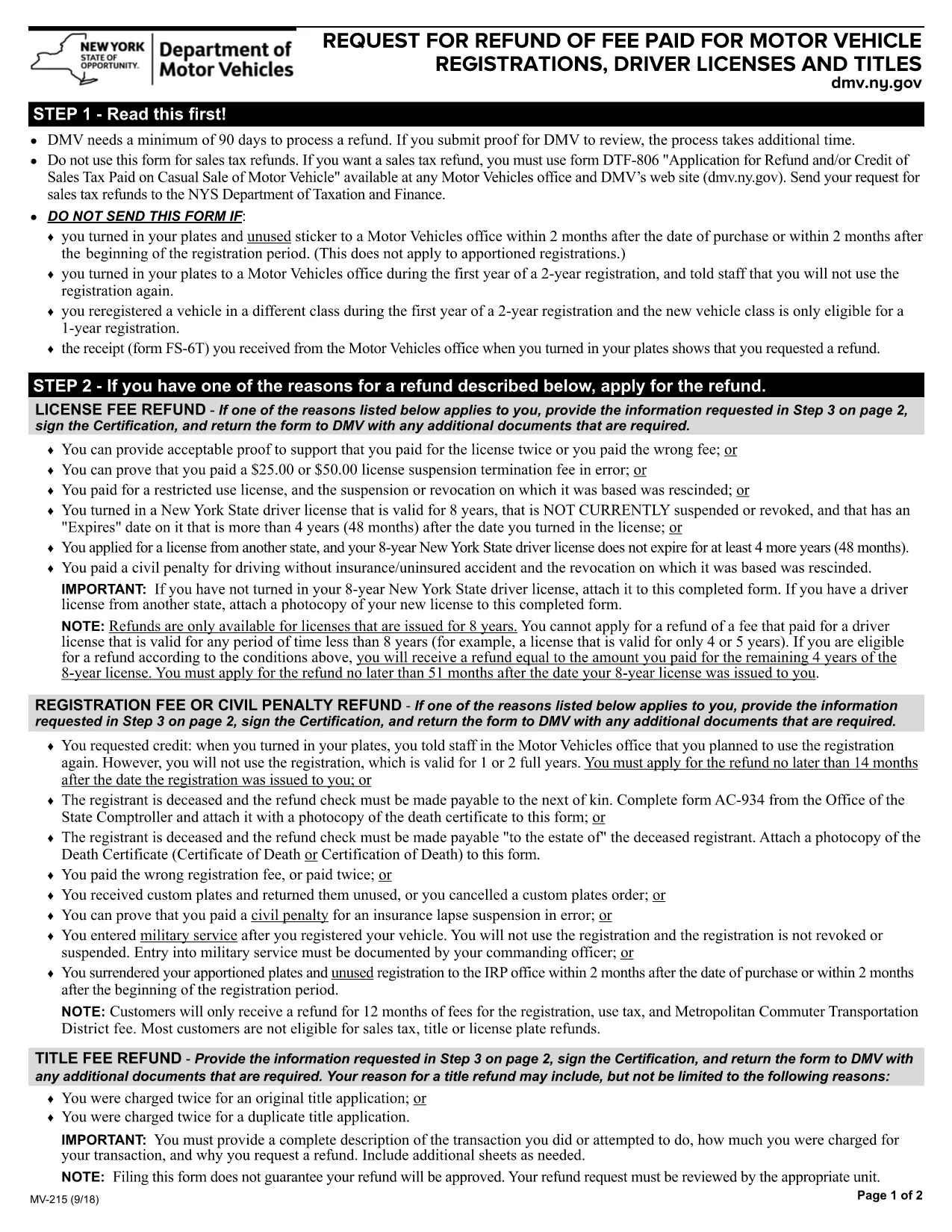
The NY DMV Form MV-215 is the official application used to request a refund of fees paid for motor vehicle registrations in New York State. Whether you switched vehicle classes, received a duplicate registration, or cancelled a registration early, this form helps you get your money back quickly.

What Is Form MV-215?

Form MV-215, titled “Request for Refund of Fee Paid for Motor Vehicle Registrations,” is issued by the New York Department of Motor Vehicles (DMV). It is not used for sales‑tax refunds—those require a separate form (DTF‑806). The MV‑215 focuses solely on registration‑related fees.

Who Should Use This Form?

  • Vehicle owners who changed the vehicle class during the first year of a 2‑year registration.
  • Anyone who received a receipt (Form FS‑6T) showing a refund request.
  • Drivers who cancelled a registration before the term expired.

How to Complete Form MV-215 Online

Instead of downloading the PDF and opening a separate editor, simply click the "Fill out this form" button on this page. The Formize PDF Filler app will load the fillable version of MV‑215 directly in your browser.

  1. Click the "Fill out this form" button.
  2. Wait a few seconds for the Formize PDF Filler to initialize.
  3. Enter your personal and vehicle information in the highlighted fields.
  4. Use the built‑in validation to check for missing or incorrect entries.
  5. When you’re satisfied, download the completed PDF or email it straight to the NY DMV.

Common Mistakes & Tips for a Successful Refund

  • Incorrect vehicle class: Verify the class listed on your registration receipt matches the one on the form.
  • Missing receipt number: The receipt (Form FS‑6T) is required; without it the DMV will reject the request.
  • Signature errors: Sign the form exactly as it appears on your driver’s license.
  • Mailing address: Use the address on your current registration to avoid processing delays.

Following these steps and tips will reduce processing time and increase the likelihood of a swift refund.

SOALAN LAZIM
  • Can I use MV‑215 for sales‑tax refunds?

    No. MV‑215 is only for registration‑fee refunds. For sales‑tax refunds you must file Form DTF‑806.

  • Do I need a receipt to submit MV‑215?

    Yes. Include the receipt (Form FS‑6T) that shows the fee you are requesting to be refunded.

  • How long does the refund process take?

    After the DMV receives a complete MV‑215, refunds typically process within 4‑6 weeks.

  • Can I submit the form electronically?

    You can fill the form online with Formize, then download the PDF and mail it to the DMV. Electronic submission directly to the DMV is not currently supported.

  • What if I make a mistake after submitting?

    Contact the NY DMV office that processed your request. They may ask you to submit a corrected MV‑215.

  • Is there a filing fee for MV‑215?

    No. The form itself is free; you are only requesting a refund of fees you have already paid.

  • Do I need to provide proof of ownership?

    A copy of your registration receipt and vehicle title (if applicable) is recommended to avoid delays.

  • Can I use MV‑215 for a vehicle that was sold?

    If the vehicle was sold and you received a duplicate registration, you may request a refund, but you must also submit the sales‑tax refund form DTF‑806.

  • Where do I mail the completed MV‑215?

    Send the completed form to the address listed on the form instructions, typically the NY DMV Refund Processing Center.

  • Is the Formize filler compatible with mobile devices?

    Yes, the Formize PDF Filler works on most modern smartphones and tablets.

BAGAIMANA UNTUK

Cara mengisi MV-215 secara percuma, dalam talian dalam 5 langkah mudah:

  1. 1
    Click the Fill‑out Button
    Press the "Fill out this form" button on the page to launch the Formize PDF Filler.
  2. 2
    Wait for the Filler to Load
    The fillable MV‑215 will appear in your browser within a few seconds.
  3. 3
    Enter Your Information
    Complete each highlighted field with your personal, vehicle, and receipt details.
  4. 4
    Validate the Form
    Use the built‑in checker to ensure no required fields are missing or incorrectly formatted.
  5. 5
    Download or Email the Completed Form
    Save the finished PDF to your device or send it directly to the NY DMV using the provided email option.
Bentuk apl Pengisi PDF
TENTANG

Borang Pendaftaran Kenderaan

Jika anda memiliki atau memajak kenderaan bermotor, treler atau bot, anda mesti memenuhi kewajipan tertentu untuk memastikan kenderaan anda didaftarkan secara sah dan selamat.

MV-215 ialah salah satu borang pendaftaran Kenderaan yang merupakan dokumen yang digunakan untuk mendaftarkan kenderaan bermotor dengan pihak berkuasa negeri atau wilayah yang berkaitan. Borang ini biasanya diperlukan apabila seseorang membeli kenderaan baharu atau terpakai atau apabila mereka berpindah ke negeri atau wilayah baharu dengan kenderaan.

Keperluan dan borang tepat yang diperlukan untuk pendaftaran kenderaan boleh berbeza mengikut lokasi, tetapi secara amnya, proses itu melibatkan penyediaan maklumat tentang kenderaan, pemilik dan sebarang lien pada kenderaan.

Setelah borang pendaftaran dan bayaran diserahkan, pihak berkuasa negeri atau wilayah akan mengeluarkan sijil pendaftaran atau plat lesen kepada pemilik kenderaan. Pendaftaran ini membolehkan kenderaan itu dikendalikan secara sah di jalan raya dan lebuh raya awam.

CIRI-CIRI

Pengisi PDF

Cara paling mudah untuk mengisi MV-215 dalam talian

  • Cepat isi MV-215
    Mencari cara untuk mengisi MV-215 dengan cepat dalam talian? Dengan pengisi borang PDF percuma dalam talian kami, anda akan tahu cara mengedit dan mengisi dokumen pdf ini dalam masa kurang daripada satu minit.
  • Mudah untuk menggunakan editor PDF dalam talian
    Bosan dengan mencetak fail PDF supaya anda boleh mengeditnya, sebelum mengimbas semula dan menghantarnya semula? Edit dokumen PDF secara percuma dalam talian. Gunakan editor pdf dalam talian kami untuk menjimatkan masa dan kertas.
  • Alat yang hebat, semua platform
    Tertanya-tanya cara mengisi MV-215 pada Mac, atau mungkin cara menggunakan pengisi PDF secara percuma? Alat PDF dalam talian kami berfungsi pada semua platform.
  • Simpanan fail selamat
    Fail "MV-215" yang lengkap disimpan dalam pangkalan data selamat yang diuruskan oleh pengehosan Amazon Cloud. Anda boleh memadamkan fail anda daripada sistem kami pada bila-bila masa. Walau apa pun, fail ini dipadamkan secara automatik selepas 24 jam.
  • Sembang dengan MV-215
    Sembang dengan "MV-215" di Chatize yang merupakan pembantu pembaca PDF percuma. Tanya soalan dan dapatkan jawapan daripada "MV-215". Cuma klik pada butang Sembang Dengan Dokumen di atas.

Padamkan sesi pengisian

Padamkan sesi pengisian yang dipilih? Dalam kes ini, kemajuan anda dalam melengkapkan borang akan hilang.

Padamkan sesi penyuntingan

Padamkan sesi penyuntingan yang dipilih? Dalam kes ini, kemajuan anda dalam membuat dan mengedit borang akan hilang.