
Pilih Bahasa

Form D4 – District of Columbia Employee Withholding Allowance Certificate

  1. Negara USA
  2. Bahasa Inggeris
  3. Aktiviti Cukai
  4. Jabatan District of Columbia Office of Tax and Revenue
Isi borang ini
Form D4 – District of Columbia Employee Withholding Allowance Certificate

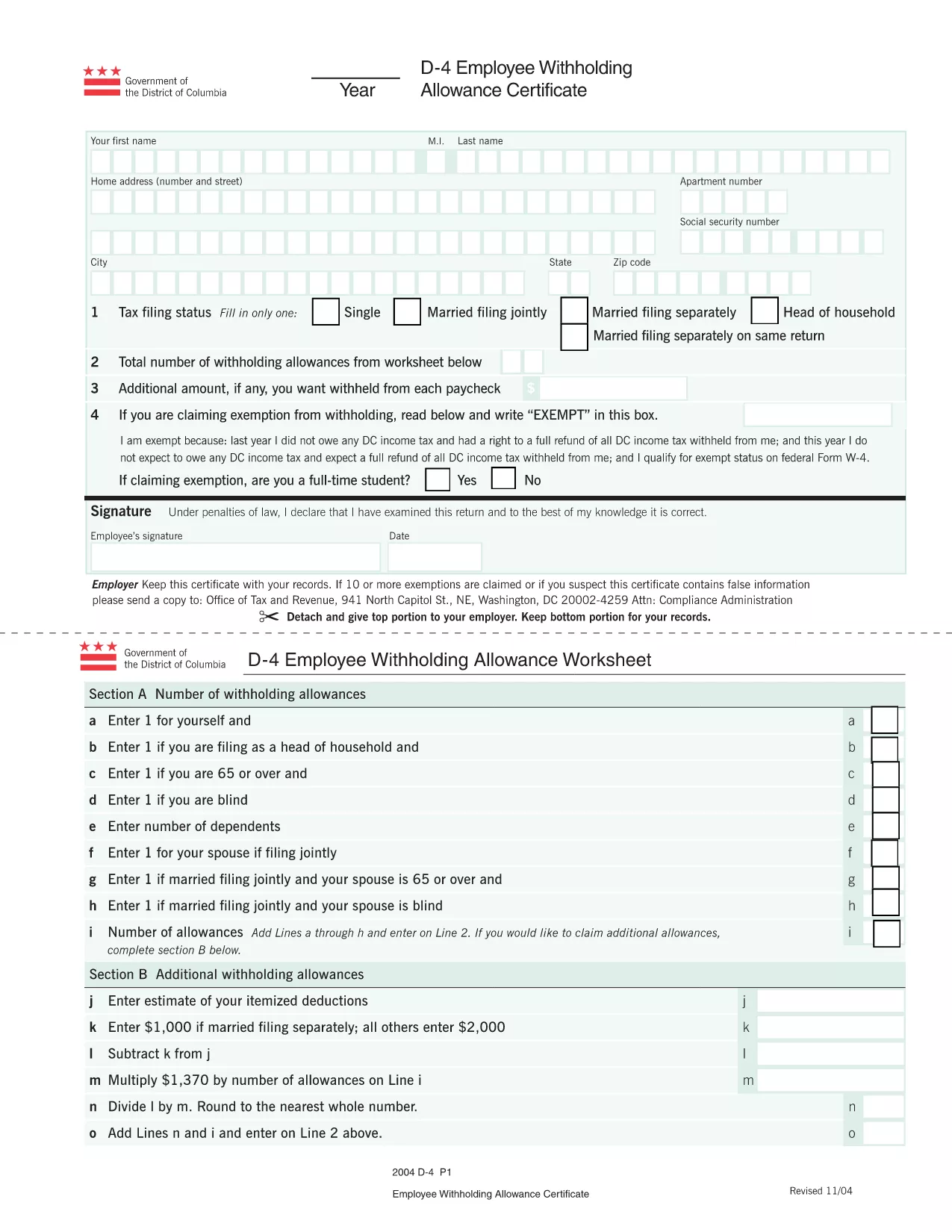
The Form D4 is the official District of Columbia Employee Withholding Allowance Certificate. Employers use it to determine the correct amount of DC income tax to withhold from an employee’s paycheck. By offering a fillable PDF version, Formize lets you complete the form quickly, securely, and without installing any software.

What is Form D4?

Form D4 records the number of withholding allowances you claim for DC tax purposes. It is required when you start a new job in the District of Columbia or when your personal tax situation changes. The form is recognized by the DC Office of Tax and Revenue and must be signed and returned to your employer.

How to Fill the D4 Form Online with Formize

Instead of downloading the PDF, opening a desktop editor, and printing it, simply click the “Fill out this form” button on this page. The Formize PDF Filler will load in your browser, allowing you to type directly into each field, save your progress, and download a completed copy.

Common Mistakes to Avoid

  • Leaving fields blank: Every required box must be completed; otherwise your employer may withhold tax at the maximum rate.
  • Incorrect Social Security Number: Double‑check the nine‑digit number to avoid processing delays.
  • Using the wrong filing year: The top of the form indicates the tax year—make sure it matches the current year.
  • Signing with a printed name only: Use a digital signature or type your name in the signature field; a handwritten signature is not needed when using Formize.

Where to Submit Your Completed D4

After you save the completed PDF, send it to your employer’s payroll department via email or upload it to the company’s secure portal. Keep a copy for your records in case the employer requests it later.

FAQs About the D4 Form

Below are the most common questions people ask about Form D4.

SOALAN LAZIM
  • Do I need to print Form D4 after filling it online?

    No. The fillable PDF can be saved and sent electronically. Most employers accept a digital copy.

  • How often should I update my D4 form?

    Update the form whenever your personal tax situation changes—e.g., marriage, divorce, or a change in dependents.

  • Can I use the same D4 form for multiple employers?

    Yes, as long as the information remains accurate for the current tax year.

  • What if I make a mistake after submitting?

    Submit a new, corrected D4 form to your employer. The updated form supersedes the previous one.

  • Is Form D4 required for part‑time or seasonal workers?

    Yes. Any employee who earns taxable wages in DC must submit a completed Form D4.

BAGAIMANA UNTUK

Cara mengisi Form D4 secara percuma, dalam talian dalam 4 langkah mudah:

  1. 1
    Click the Fill Button
    Press the “Fill out this form” button on this page. The Formize PDF Filler app will open in a new tab.
  2. 2
    Enter Your Information
    Type directly into each field—personal details, Social Security Number, and number of withholding allowances.
  3. 3
    Save and Review
    Use the “Save” icon to download a copy of the completed form. Review all entries for accuracy before submitting.
  4. 4
    Submit to Your Employer
    Email or upload the saved PDF to your employer’s payroll department as instructed.
Bentuk apl Pengisi PDF
TENTANG

Borang cukai

Form D4 ialah salah satu borang Cukai yang merupakan dokumen yang digunakan untuk melaporkan maklumat yang berkaitan dengan cukai kepada pihak berkuasa cukai yang berkaitan. Terdapat pelbagai jenis borang cukai, termasuk borang cukai persekutuan, negeri dan tempatan, yang boleh berbeza-beza bergantung pada keadaan dan lokasi pembayar cukai.

CIRI-CIRI

Pengisi PDF

Cara paling mudah untuk mengisi Form D4 dalam talian

  • Cepat isi Form D4
    Mencari cara untuk mengisi Form D4 dengan cepat dalam talian? Dengan pengisi borang PDF percuma dalam talian kami, anda akan tahu cara mengedit dan mengisi dokumen pdf ini dalam masa kurang daripada satu minit.
  • Mudah untuk menggunakan editor PDF dalam talian
    Bosan dengan mencetak fail PDF supaya anda boleh mengeditnya, sebelum mengimbas semula dan menghantarnya semula? Edit dokumen PDF secara percuma dalam talian. Gunakan editor pdf dalam talian kami untuk menjimatkan masa dan kertas.
  • Alat yang hebat, semua platform
    Tertanya-tanya cara mengisi Form D4 pada Mac, atau mungkin cara menggunakan pengisi PDF secara percuma? Alat PDF dalam talian kami berfungsi pada semua platform.
  • Simpanan fail selamat
    Fail "Form D4" yang lengkap disimpan dalam pangkalan data selamat yang diuruskan oleh pengehosan Amazon Cloud. Anda boleh memadamkan fail anda daripada sistem kami pada bila-bila masa. Walau apa pun, fail ini dipadamkan secara automatik selepas 24 jam.
  • Sembang dengan Form D4
    Sembang dengan "Form D4" di Chatize yang merupakan pembantu pembaca PDF percuma. Tanya soalan dan dapatkan jawapan daripada "Form D4". Cuma klik pada butang Sembang Dengan Dokumen di atas.

Padamkan sesi pengisian

Padamkan sesi pengisian yang dipilih? Dalam kes ini, kemajuan anda dalam melengkapkan borang akan hilang.

Padamkan sesi penyuntingan

Padamkan sesi penyuntingan yang dipilih? Dalam kes ini, kemajuan anda dalam membuat dan mengedit borang akan hilang.