
Pilih Bahasa

Form 5285 – Skills Test Failure (Behind‑the‑Wheel) Fillable PDF

  1. Bahasa Inggeris
  2. Negara USA
  3. Aktiviti Lesen memandu
  4. negeri Missouri
Isi borang ini
Form 5285 – Skills Test Failure (Behind‑the‑Wheel) Fillable PDF

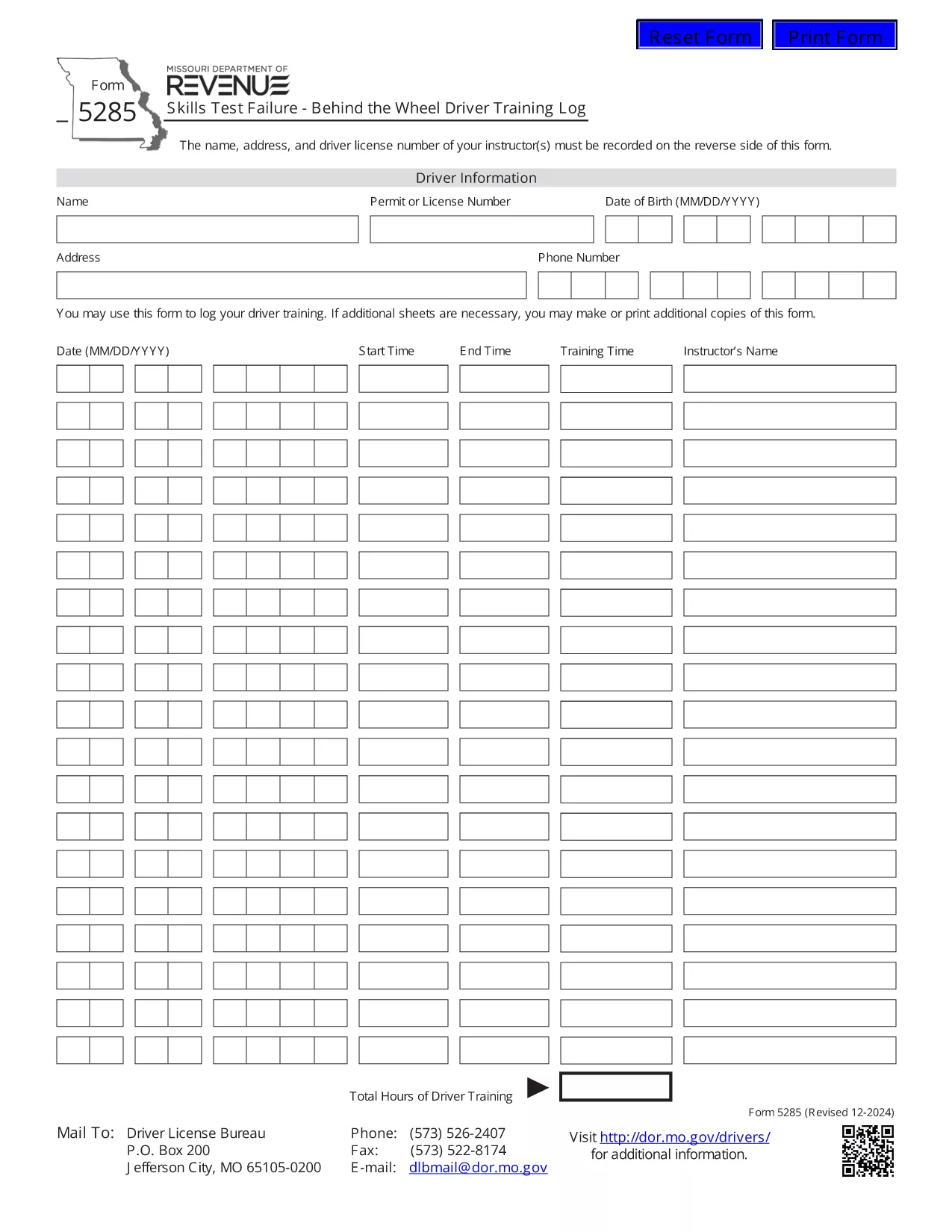
Form 5285 is the official Missouri Skills Test Failure – Behind the Wheel Driver Training Log. Instructors use this form to record a driver’s failure during a behind‑the‑wheel skills test, including instructor details, driver information, and the specific skills that were not met.

What Is Form 5285?

This form is required by the Missouri Department of Revenue – Driver Licensing Division. It captures:

  • Instructor name, address, and license number
  • Driver’s personal details
  • Date and location of the test
  • Specific skills that were failed
  • Signature of the instructor

How to Fill Out Form 5285 Online

Instead of printing, printing, and scanning, you can complete the form directly in your browser using Formize’s fillable PDF technology:

  1. Click the "Fill out this form" button on this page.
  2. Wait a few seconds while the Formize PDF Filler app loads the PDF.
  3. Enter the required information in each field. The form is fully interactive – just type or select from drop‑down menus.
  4. When you’re done, click Save to store a copy in your browser or download a completed PDF.
  5. Print the completed document if a hard copy is needed for submission.

Common Mistakes to Avoid

  • Leaving required fields blank: The PDF will highlight missing information before you can save.
  • Incorrect instructor license number: Double‑check the number on the instructor’s license.
  • Using the wrong date format: Missouri requires MM/DD/YYYY.
  • Submitting an unsigned form: The instructor’s signature is mandatory.

Where to Submit the Completed Form

After you have saved the filled form, submit it to the nearest Missouri Department of Revenue driver licensing office or mail it to the address listed on the form’s instructions. Some offices also accept electronic submissions via email – call your local office to confirm.

Download the Official PDF

If you prefer the original PDF for offline use, you can download it directly from the Missouri Department of Revenue:

Download Form 5285 (PDF)

SOALAN LAZIM
  • What is the purpose of Form 5285?

    Form 5285 records a driver’s failure on a behind‑the‑wheel skills test. It provides the Missouri Department of Revenue with details needed to issue a retest or take corrective action.

  • Can I fill out Form 5285 on a mobile device?

    Yes. The Formize fillable PDF works on smartphones and tablets. Just tap the "Fill out this form" button and complete the fields using your device’s keyboard.

  • Do I need to print the form after filling it online?

    Only if your local licensing office requires a hard copy. Many offices now accept a saved PDF sent by email or uploaded through their portal.

  • Is there a fee to use the Formize PDF Filler?

    No. Formize provides free, secure filling of Missouri state forms, including Form 5285.

  • What should I do if I make a mistake after saving?

    Open the saved PDF again with the Formize filler, edit the incorrect fields, and re‑save. The filler preserves all previously entered data.

  • Where can I find the official instructions for Form 5285?

    The official instructions are included on the last page of the PDF you download from the Missouri Department of Revenue website.

BAGAIMANA UNTUK

Cara mengisi Form 5285 secara percuma, dalam talian dalam 4 langkah mudah:

  1. 1
    Open the Fillable Form
    Click the "Fill out this form" button on the page. The Formize PDF Filler loads the Form 5285 directly in your browser.
  2. 2
    Enter the Required Information
    Type the instructor’s name, address, license number, driver details, test date, and failed skill items into the highlighted fields.
  3. 3
    Review and Save
    Use the built‑in validation to ensure all required fields are completed, then click "Save" to store a copy or download the completed PDF.
  4. 4
    Print or Submit Electronically
    Print the saved PDF for a hard‑copy submission, or follow your local office’s instructions for electronic delivery.
Bentuk apl Pengisi PDF
TENTANG

Borang Permohonan Lesen Memandu

Di kebanyakan negara, adalah wajib untuk memiliki lesen memandu sebelum anda boleh pergi ke jalan raya. Mendapatkan lesen memandu adalah peristiwa penting bagi sesiapa yang ingin memandu kereta.

Form 5285 ialah salah satu borang Permohonan Lesen Memandu yang merupakan dokumen yang digunakan untuk mengumpulkan maklumat daripada orang yang ingin memohon lesen memandu. Ia biasanya mengandungi medan untuk nama pemohon, tarikh lahir, nombor ID, maklumat hubungan, serta sejarah dan pengalaman lesen memandu mereka.

CIRI-CIRI

Pengisi PDF

Cara paling mudah untuk mengisi Form 5285 dalam talian

  • Cepat isi Form 5285
    Mencari cara untuk mengisi Form 5285 dengan cepat dalam talian? Dengan pengisi borang PDF percuma dalam talian kami, anda akan tahu cara mengedit dan mengisi dokumen pdf ini dalam masa kurang daripada satu minit.
  • Mudah untuk menggunakan editor PDF dalam talian
    Bosan dengan mencetak fail PDF supaya anda boleh mengeditnya, sebelum mengimbas semula dan menghantarnya semula? Edit dokumen PDF secara percuma dalam talian. Gunakan editor pdf dalam talian kami untuk menjimatkan masa dan kertas.
  • Alat yang hebat, semua platform
    Tertanya-tanya cara mengisi Form 5285 pada Mac, atau mungkin cara menggunakan pengisi PDF secara percuma? Alat PDF dalam talian kami berfungsi pada semua platform.
  • Simpanan fail selamat
    Fail "Form 5285" yang lengkap disimpan dalam pangkalan data selamat yang diuruskan oleh pengehosan Amazon Cloud. Anda boleh memadamkan fail anda daripada sistem kami pada bila-bila masa. Walau apa pun, fail ini dipadamkan secara automatik selepas 24 jam.
  • Sembang dengan Form 5285
    Sembang dengan "Form 5285" di Chatize yang merupakan pembantu pembaca PDF percuma. Tanya soalan dan dapatkan jawapan daripada "Form 5285". Cuma klik pada butang Sembang Dengan Dokumen di atas.

Padamkan sesi pengisian

Padamkan sesi pengisian yang dipilih? Dalam kes ini, kemajuan anda dalam melengkapkan borang akan hilang.

Padamkan sesi penyuntingan

Padamkan sesi penyuntingan yang dipilih? Dalam kes ini, kemajuan anda dalam membuat dan mengedit borang akan hilang.