
Pilih Bahasa

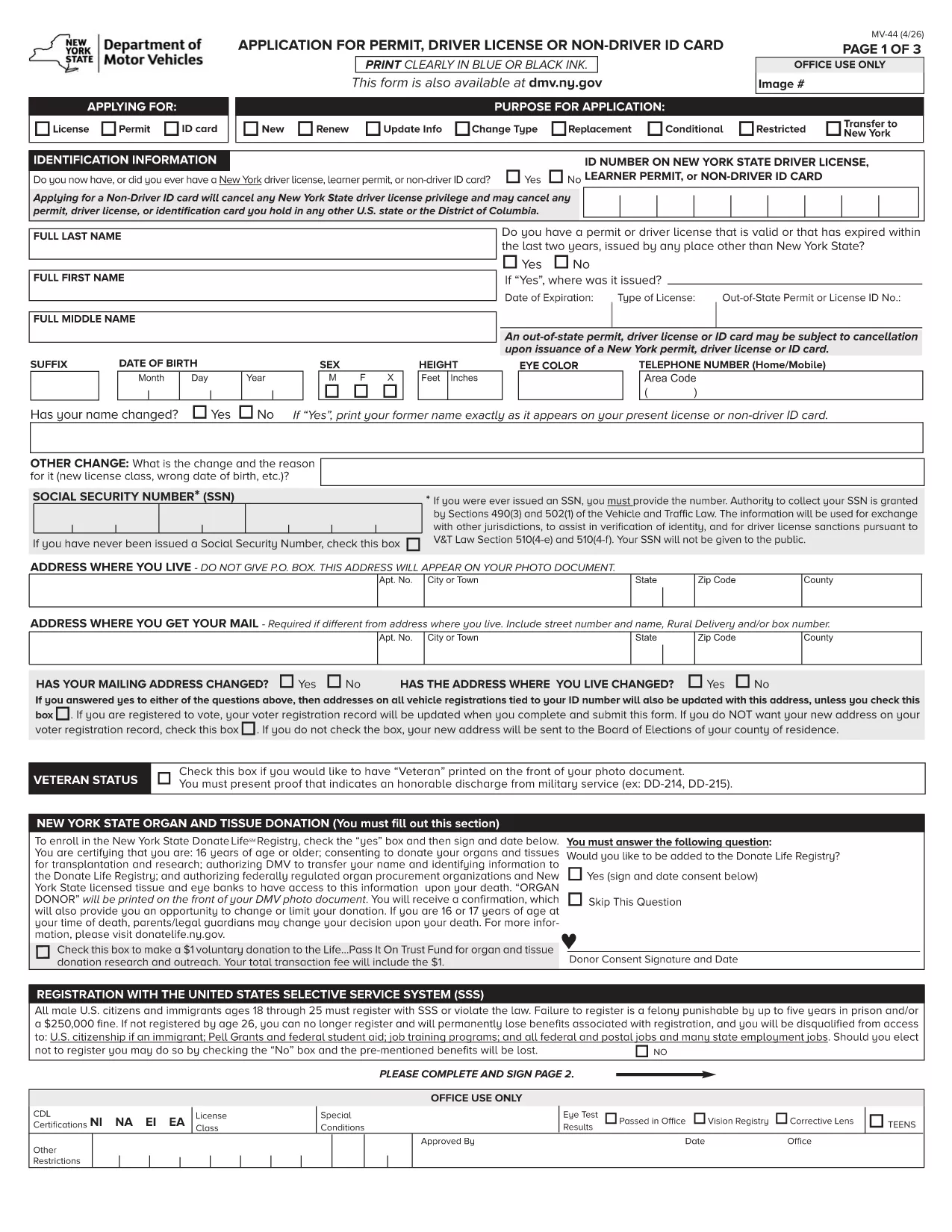
MV-44 Application Form – Permit, Driver License & Non‑Driver ID

  1. Bahasa Inggeris
  2. Negara USA
  3. Aktiviti Lesen memandu
  4. negeri New York
Isi borang ini
MV-44 Application Form – Permit, Driver License & Non‑Driver ID

The MV-44 is the official New York State application used to request a learner’s permit, a driver’s license, or a non‑driver identification card. This form is required for first‑time applicants, renewals, and certain name‑change situations.

Formize.com offers a fully fillable PDF version of the MV‑44, so you can complete the entire application directly in your web browser—no Adobe Acrobat needed.

Below you’ll find everything you need to know about the MV‑44, step‑by‑step instructions for filling it out online, and tips to avoid common errors that can delay processing.

Key benefits of using the Formize fillable PDF:

  • Instant loading in the Formize PDF Filler app
  • Auto‑save as you type, preventing data loss
  • Built‑in validation to catch missing or incorrect information
  • Easy electronic signature and direct download of the completed form

Ready to start? Simply click the "Fill out this form" button and let the Formize PDF Filler do the rest.

SOALAN LAZIM
  • Can I save my progress and finish the MV‑44 later?

    Yes. The Formize PDF Filler auto‑saves your entries locally. Simply close the tab and reopen the form to continue where you left off.

  • Do I need a PDF reader to use this form?

    No. The fillable version runs entirely in your browser via the Formize PDF Filler, eliminating the need for Adobe Acrobat or other PDF software.

  • What identification documents do I need to attach?

    You’ll need a valid photo ID (passport, existing NY driver’s license, or non‑driver ID) and proof of residency such as a utility bill or lease agreement. Upload scans after completing the form.

  • How long does the DMV take to process the MV‑44?

    Processing times vary, but most applications are reviewed within 7‑10 business days after the completed form and required documents are submitted.

  • Is the MV‑44 form free to download?

    Yes. The MV‑44 is a free, government‑provided form. Formize only hosts the fillable version at no cost.

  • Can I submit the completed MV‑44 electronically?

    The NY DMV currently requires a printed and signed copy. After downloading, print the form, sign it, and mail or deliver it to your local DMV office.

  • What should I do if I make a mistake on the form?

    If you notice an error before printing, simply go back in the Formize filler, correct the field, and re‑download the PDF. Once printed and signed, you’ll need to start a new form.

  • Do I need a separate form for a duplicate license?

    For a duplicate or replacement, you must complete Form MV‑44 and check the “Duplicate” box. Additional documentation may be required.

BAGAIMANA UNTUK

Cara mengisi MV-44 secara percuma, dalam talian dalam 4 langkah mudah:

  1. 1
    Click the Fill‑out Button
    On this page, locate the bright "Fill out this form" button and click it. The Formize PDF Filler will open in a new tab.
  2. 2
    Wait for the PDF Filler to Load
    The fillable MV‑44 PDF loads automatically. A loading spinner indicates the app is preparing the document.
  3. 3
    Enter Your Information
    Complete each field using the on‑screen prompts. Required fields are marked with an asterisk. The filler validates dates, numbers, and signatures in real time.
  4. 4
    Review, Sign & Download
    After filling all sections, review the data, add your electronic signature, and click "Download Completed Form". You can then print or submit the PDF as instructed by the DMV.
Bentuk apl Pengisi PDF
TENTANG

Borang Permohonan Lesen Memandu

Di kebanyakan negara, adalah wajib untuk memiliki lesen memandu sebelum anda boleh pergi ke jalan raya. Mendapatkan lesen memandu adalah peristiwa penting bagi sesiapa yang ingin memandu kereta.

MV-44 ialah salah satu borang Permohonan Lesen Memandu yang merupakan dokumen yang digunakan untuk mengumpulkan maklumat daripada orang yang ingin memohon lesen memandu. Ia biasanya mengandungi medan untuk nama pemohon, tarikh lahir, nombor ID, maklumat hubungan, serta sejarah dan pengalaman lesen memandu mereka.

CIRI-CIRI

Pengisi PDF

Cara paling mudah untuk mengisi MV-44 dalam talian

  • Cepat isi MV-44
    Mencari cara untuk mengisi MV-44 dengan cepat dalam talian? Dengan pengisi borang PDF percuma dalam talian kami, anda akan tahu cara mengedit dan mengisi dokumen pdf ini dalam masa kurang daripada satu minit.
  • Mudah untuk menggunakan editor PDF dalam talian
    Bosan dengan mencetak fail PDF supaya anda boleh mengeditnya, sebelum mengimbas semula dan menghantarnya semula? Edit dokumen PDF secara percuma dalam talian. Gunakan editor pdf dalam talian kami untuk menjimatkan masa dan kertas.
  • Alat yang hebat, semua platform
    Tertanya-tanya cara mengisi MV-44 pada Mac, atau mungkin cara menggunakan pengisi PDF secara percuma? Alat PDF dalam talian kami berfungsi pada semua platform.
  • Simpanan fail selamat
    Fail "MV-44" yang lengkap disimpan dalam pangkalan data selamat yang diuruskan oleh pengehosan Amazon Cloud. Anda boleh memadamkan fail anda daripada sistem kami pada bila-bila masa. Walau apa pun, fail ini dipadamkan secara automatik selepas 24 jam.
  • Sembang dengan MV-44
    Sembang dengan "MV-44" di Chatize yang merupakan pembantu pembaca PDF percuma. Tanya soalan dan dapatkan jawapan daripada "MV-44". Cuma klik pada butang Sembang Dengan Dokumen di atas.

Padamkan sesi pengisian

Padamkan sesi pengisian yang dipilih? Dalam kes ini, kemajuan anda dalam melengkapkan borang akan hilang.

Padamkan sesi penyuntingan

Padamkan sesi penyuntingan yang dipilih? Dalam kes ini, kemajuan anda dalam membuat dan mengedit borang akan hilang.