
Pilih Bahasa

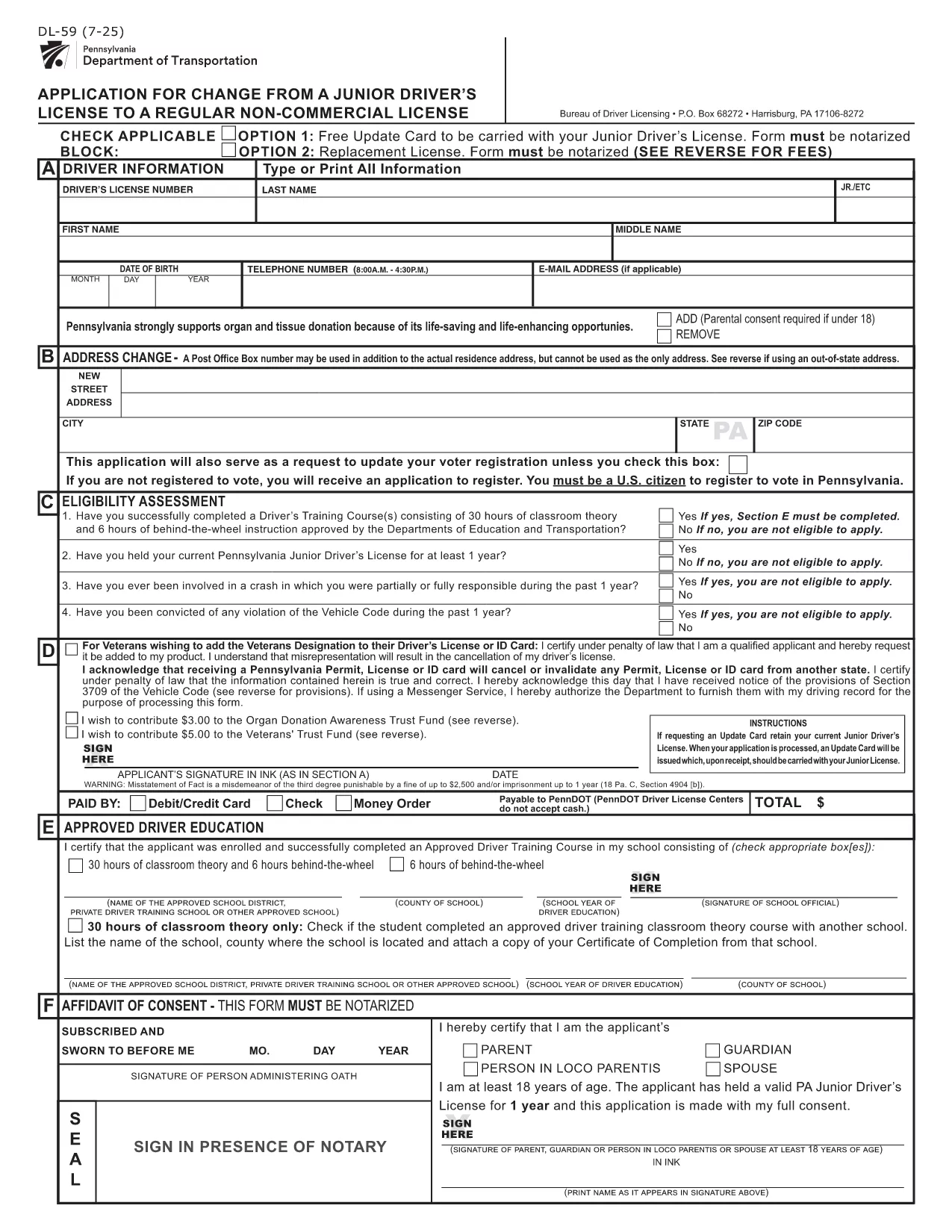
PennDOT DL-59 – Junior Driver License Upgrade Form

  1. Bahasa Inggeris
  2. Negara USA
  3. Aktiviti Lesen memandu
  4. negeri Pennsylvania
Isi borang ini
PennDOT DL-59 – Junior Driver License Upgrade Form

The DL-59 is the Pennsylvania Department of Transportation (PennDOT) application used to change a junior driver’s license to a regular non‑commercial license. Whether you’re turning 18, adding a new class, or simply need an updated ID, the DL-59 streamlines the process.

What Is the DL-59 Form?

This official PennDOT PDF collects personal details, eye color, height, and the new license class you’re requesting. It must be signed and, in some cases, notarized before submission.

How to Complete the DL-59 Online

Instead of downloading, printing, and scanning, use Formize’s built‑in PDF filler:

  1. Click the "Fill out this form" button on this page.
  2. Wait a few seconds while the Formize PDF Filler app loads.
  3. Enter the required information directly into the fillable fields.
  4. Review the completed form for accuracy.
  5. Save or print the finished PDF and submit it to PennDOT.

Common Mistakes to Avoid

  • Leaving the eye color or height fields blank – PennDOT uses these as fraud‑prevention identifiers.
  • Forgetting to sign the form in the designated area.
  • Submitting an outdated address; always double‑check your mailing address.
  • Not notarizing when a notary seal is required (e.g., certain name changes).

Where to Submit Your Completed Form

Mail the finished DL-59 to the address listed on the form or deliver it in person to any PennDOT Driver License Center. Include the appropriate fee (usually $12‑$17) unless you qualify for a free update.

Download the Official Fillable PDF

If you prefer the traditional route, you can still download the official form below. It is fully fillable and compatible with most PDF editors.

SOALAN LAZIM
  • Who needs to fill out the DL-59 form?

    Anyone who holds a Pennsylvania junior driver’s license and wants to upgrade to a regular non‑commercial license, typically after turning 18 or adding a new class.

  • Is the DL-59 form free?

    The form itself is free to download, but PennDOT charges a processing fee (usually $12‑$17) unless you qualify for a fee‑waiver update.

  • Do I need a notary for the DL-59?

    A notary is required only if the form includes a name change or other circumstances that PennDOT specifies. Check the form’s instructions.

  • Can I submit the DL-59 electronically?

    PennDOT currently accepts only printed and mailed or in‑person submissions. Use the fillable PDF to avoid errors before printing.

  • How long does it take to process the upgrade?

    Processing typically takes 7‑10 business days after PennDOT receives the completed form and payment.

  • What documents should I attach?

    Include proof of residency, a copy of your current junior license, and any required fee payment receipt.

  • What if I make a mistake after submitting?

    Contact your local PennDOT Driver License Center to request a correction; you may need to submit a new DL-59.

BAGAIMANA UNTUK

Cara mengisi DL-59 secara percuma, dalam talian dalam 5 langkah mudah:

  1. 1
    Open the Fillable Form
    Click the "Fill out this form" button on the page. The Formize PDF Filler will open in a new window.
  2. 2
    Enter Your Information
    Type directly into each highlighted field—personal details, eye color, height, and the new license class.
  3. 3
    Review and Sign
    Double‑check every entry, then use the built‑in signature tool to add your signature.
  4. 4
    Save or Print
    Save the completed PDF to your device or print it for submission to PennDOT.
  5. 5
    Submit to PennDOT
    Mail or deliver the form along with any required fees to the address shown on the PDF.
Bentuk apl Pengisi PDF
TENTANG

Borang Permohonan Lesen Memandu

Di kebanyakan negara, adalah wajib untuk memiliki lesen memandu sebelum anda boleh pergi ke jalan raya. Mendapatkan lesen memandu adalah peristiwa penting bagi sesiapa yang ingin memandu kereta.

DL-59 ialah salah satu borang Permohonan Lesen Memandu yang merupakan dokumen yang digunakan untuk mengumpulkan maklumat daripada orang yang ingin memohon lesen memandu. Ia biasanya mengandungi medan untuk nama pemohon, tarikh lahir, nombor ID, maklumat hubungan, serta sejarah dan pengalaman lesen memandu mereka.

CIRI-CIRI

Pengisi PDF

Cara paling mudah untuk mengisi DL-59 dalam talian

  • Cepat isi DL-59
    Mencari cara untuk mengisi DL-59 dengan cepat dalam talian? Dengan pengisi borang PDF percuma dalam talian kami, anda akan tahu cara mengedit dan mengisi dokumen pdf ini dalam masa kurang daripada satu minit.
  • Mudah untuk menggunakan editor PDF dalam talian
    Bosan dengan mencetak fail PDF supaya anda boleh mengeditnya, sebelum mengimbas semula dan menghantarnya semula? Edit dokumen PDF secara percuma dalam talian. Gunakan editor pdf dalam talian kami untuk menjimatkan masa dan kertas.
  • Alat yang hebat, semua platform
    Tertanya-tanya cara mengisi DL-59 pada Mac, atau mungkin cara menggunakan pengisi PDF secara percuma? Alat PDF dalam talian kami berfungsi pada semua platform.
  • Simpanan fail selamat
    Fail "DL-59" yang lengkap disimpan dalam pangkalan data selamat yang diuruskan oleh pengehosan Amazon Cloud. Anda boleh memadamkan fail anda daripada sistem kami pada bila-bila masa. Walau apa pun, fail ini dipadamkan secara automatik selepas 24 jam.
  • Sembang dengan DL-59
    Sembang dengan "DL-59" di Chatize yang merupakan pembantu pembaca PDF percuma. Tanya soalan dan dapatkan jawapan daripada "DL-59". Cuma klik pada butang Sembang Dengan Dokumen di atas.

Padamkan sesi pengisian

Padamkan sesi pengisian yang dipilih? Dalam kes ini, kemajuan anda dalam melengkapkan borang akan hilang.

Padamkan sesi penyuntingan

Padamkan sesi penyuntingan yang dipilih? Dalam kes ini, kemajuan anda dalam membuat dan mengedit borang akan hilang.