
Pilih Bahasa

DL-14C – Texas Election Identification Certificate (Fillable PDF)

  1. Bahasa Inggeris
  2. Negara USA
  3. Aktiviti Lesen memandu
  4. negeri Texas
Isi borang ini
DL-14C – Texas Election Identification Certificate (Fillable PDF)

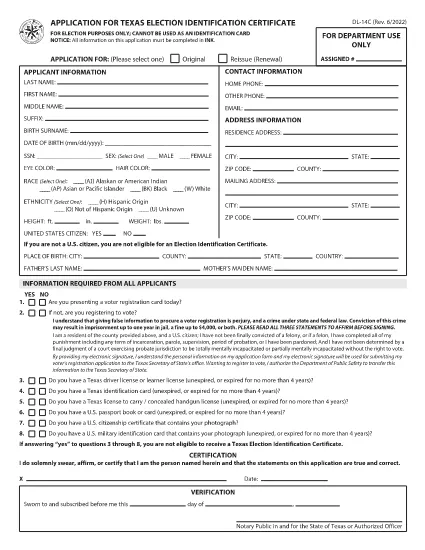
The DL-14C is the official Application for a Texas Election Identification Certificate (EIC). This card allows eligible voters to prove their identity at the polls without a driver’s license or state ID. Our fillable PDF version lets you complete the form quickly, securely, and without printing.

What Is the DL-14C Form?

The DL-14C is issued by the Texas Department of Public Safety (DPS) in partnership with the Texas Secretary of State. It is available to any Texas resident who does not have a driver’s license or state ID but needs a valid photo ID for voting.

How to Fill Out the DL-14C Online

Instead of downloading the PDF and opening a separate editor, simply click the "Fill out this form" button on this page. The Formize PDF Filler app will load the document directly in your browser, allowing you to enter data, add signatures, and save a completed copy.

  • Step 1 – Open the Form: Click the blue "Fill out this form" button.
  • Step 2 – Enter Your Information: Fill in personal details, address, and citizenship status. All fields are searchable and auto‑validated.
  • Step 3 – Upload Supporting Documents: Attach a copy of your birth certificate, passport, or other accepted ID.
  • Step 4 – Sign Electronically: Use your mouse or touchscreen to add a digital signature.
  • Step 5 – Save & Submit: Download the completed PDF or email it directly to the Texas DPS office.

Common Mistakes to Avoid

  • Leaving the SSN field blank when it is optional – you can write “N/A” to avoid processing delays.
  • Providing an outdated address – the DPS requires a current residential address.
  • Uploading non‑PDF supporting documents – convert images to PDF before attaching.
  • Forgetting to sign – an unsigned form is rejected.

Where to Submit Your Completed Form

After you have saved the filled PDF, mail it to the address listed on the last page of the form or submit it in person at any Texas Department of Public Safety office. You can also upload the file through the DPS online portal if you have an account.

Frequently Asked Questions

Below are quick answers to the most common queries about the DL-14C.

SOALAN LAZIM
  • Do I have to provide my Social Security Number on the DL-14C?

    No. The SSN field is optional for Election Identification Certificate applicants. You can write “N/A” if you prefer not to disclose it.

  • Can I use a driver’s license number on this form?

    Only if you already have a Texas driver’s license. The DL-14C is intended for residents who do NOT have a driver’s license or state ID.

  • How long does it take to receive the Election ID after submitting the form?

    Processing typically takes 7‑10 business days after the DPS receives a complete application and supporting documents.

  • What documents are accepted as proof of identity?

    A certified birth certificate, valid U.S. passport, or an out‑of‑state driver’s license with a translation are accepted.

  • Is there a fee to obtain the Election Identification Certificate?

    No. The DL-14C application for an Election ID is free of charge.

  • Can I fill out the DL-14C on a mobile device?

    Yes. The Formize PDF Filler works on smartphones and tablets, allowing you to complete the form on the go.

BAGAIMANA UNTUK

Cara mengisi DL-14C secara percuma, dalam talian dalam 4 langkah mudah:

  1. 1
    Open the Fillable Form
    Click the "Fill out this form" button on the page. The Formize PDF Filler will load the DL-14C directly in your browser.
  2. 2
    Complete All Required Fields
    Enter your personal information, address, and citizenship details. Use the built‑in validation to avoid errors.
  3. 3
    Add Supporting Documents and Sign
    Upload PDFs of your birth certificate or passport, then add an electronic signature. Save the completed form to your device.
  4. 4
    Submit the Application
    Print and mail, deliver in person to a DPS office, or upload the PDF through the DPS online portal.
Bentuk apl Pengisi PDF
TENTANG

Borang Permohonan Lesen Memandu

DL-14C ialah salah satu borang lesen memandu yang merupakan dokumen yang digunakan untuk memohon lesen memandu atau meminta pelbagai perkhidmatan yang berkaitan dengan lesen memandu. Borang ini biasanya disediakan oleh jabatan atau agensi yang bertanggungjawab untuk mengeluarkan lesen memandu dalam bidang kuasa tertentu, seperti Jabatan Kenderaan Bermotor (DMV) di Amerika Syarikat.

Borang lesen memandu biasa termasuk:

Permohonan Lesen Memandu: Borang ini digunakan untuk memohon lesen memandu baharu atau memperbaharui lesen sedia ada. Ia biasanya memerlukan maklumat peribadi seperti nama, alamat, tarikh lahir dan nombor Keselamatan Sosial.

Dokumen Pengenalan: Sesetengah bidang kuasa memerlukan dokumen pengenalan khusus untuk mengesahkan identiti dan pemastautin pemohon. Ini mungkin termasuk borang seperti sijil kelahiran, pasport atau kad keselamatan sosial.

Pemeriksaan Penglihatan: Banyak permohonan lesen memandu memerlukan borang pemeriksaan penglihatan, di mana seorang profesional perubatan atau pakar penjagaan mata yang sah memperakui bahawa pemohon memenuhi keperluan penglihatan minimum untuk memandu.

Borang Pendidikan Pemandu: Dalam sesetengah kes, individu mungkin perlu memberikan bukti melengkapkan kursus pendidikan pemandu, seperti sijil tamat pendidikan pemandu atau borang yang ditandatangani oleh pengajar.

Penilaian Perubatan: Keadaan perubatan tertentu mungkin memerlukan borang tambahan untuk diisi oleh profesional penjagaan kesihatan. Borang ini mengesahkan kecergasan fizikal dan mental pemohon untuk memandu.

Borang Perubahan Alamat: Jika pemegang lesen memandu berpindah ke alamat baharu, mereka mungkin perlu mengisi borang pertukaran alamat untuk mengemas kini maklumat lesen memandu mereka.

Borang lesen memandu boleh didapati dari pejabat DMV tempatan atau dimuat turun dari laman web mereka. Adalah penting untuk melengkapkan dengan teliti dan menyerahkan borang yang diperlukan bersama dengan sebarang dokumen sokongan untuk memastikan proses permohonan atau perkhidmatan berjalan lancar.

CIRI-CIRI

Pengisi PDF

Cara paling mudah untuk mengisi DL-14C dalam talian

  • Cepat isi DL-14C
    Mencari cara untuk mengisi DL-14C dengan cepat dalam talian? Dengan pengisi borang PDF percuma dalam talian kami, anda akan tahu cara mengedit dan mengisi dokumen pdf ini dalam masa kurang daripada satu minit.
  • Mudah untuk menggunakan editor PDF dalam talian
    Bosan dengan mencetak fail PDF supaya anda boleh mengeditnya, sebelum mengimbas semula dan menghantarnya semula? Edit dokumen PDF secara percuma dalam talian. Gunakan editor pdf dalam talian kami untuk menjimatkan masa dan kertas.
  • Alat yang hebat, semua platform
    Tertanya-tanya cara mengisi DL-14C pada Mac, atau mungkin cara menggunakan pengisi PDF secara percuma? Alat PDF dalam talian kami berfungsi pada semua platform.
  • Simpanan fail selamat
    Fail "DL-14C" yang lengkap disimpan dalam pangkalan data selamat yang diuruskan oleh pengehosan Amazon Cloud. Anda boleh memadamkan fail anda daripada sistem kami pada bila-bila masa. Walau apa pun, fail ini dipadamkan secara automatik selepas 24 jam.
  • Sembang dengan DL-14C
    Sembang dengan "DL-14C" di Chatize yang merupakan pembantu pembaca PDF percuma. Tanya soalan dan dapatkan jawapan daripada "DL-14C". Cuma klik pada butang Sembang Dengan Dokumen di atas.

Padamkan sesi pengisian

Padamkan sesi pengisian yang dipilih? Dalam kes ini, kemajuan anda dalam melengkapkan borang akan hilang.

Padamkan sesi penyuntingan

Padamkan sesi penyuntingan yang dipilih? Dalam kes ini, kemajuan anda dalam membuat dan mengedit borang akan hilang.