
Pilih Bahasa

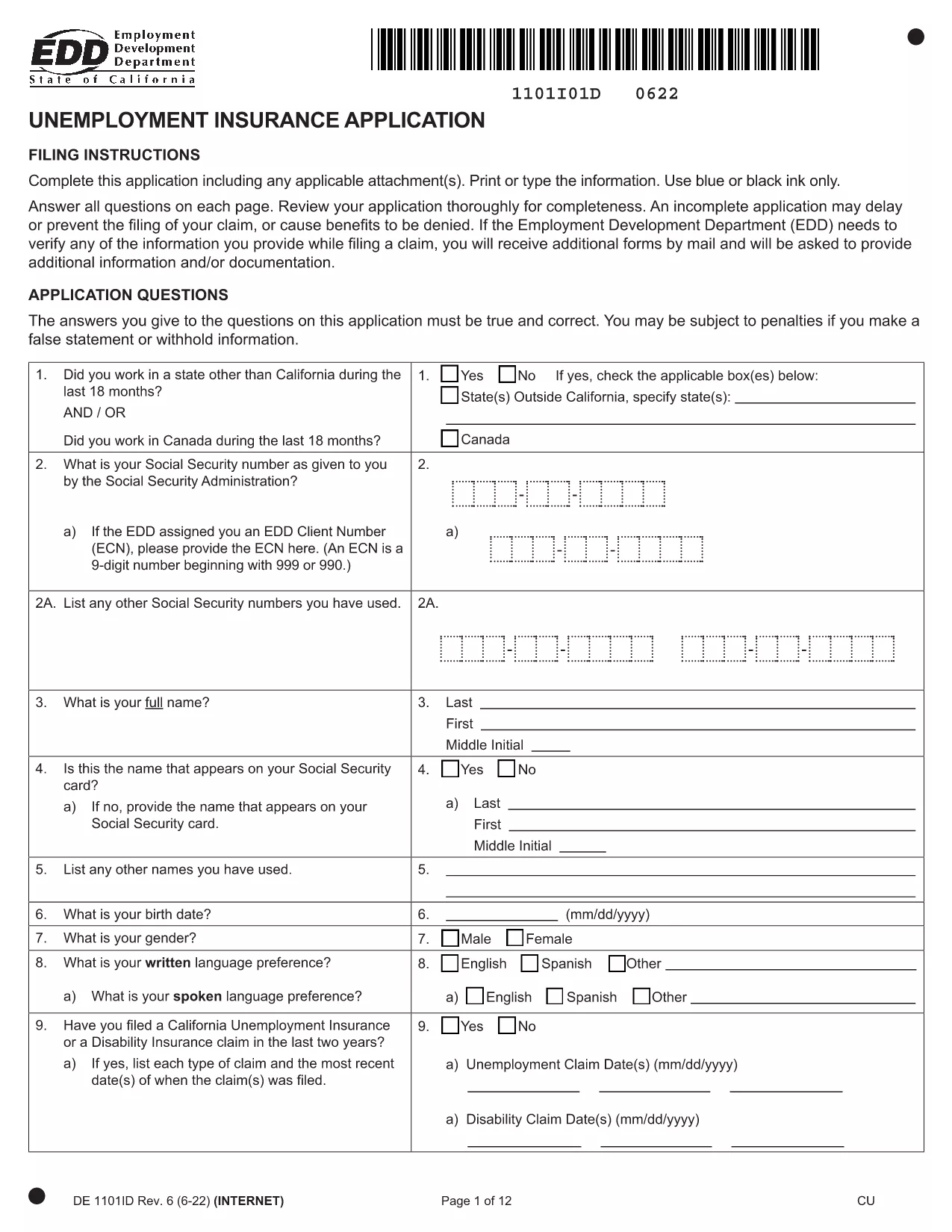
California Unemployment Insurance Application (Form DE 1101ID) – Fillable PDF

  1. Bahasa Inggeris
  2. Negara USA
  3. Aktiviti Unemployment Insurance
  4. Jabatan Employment Development Department
Isi borang ini
California Unemployment Insurance Application (Form DE 1101ID) – Fillable PDF

Looking for a fast, error‑free way to apply for California Unemployment Insurance (UI)? The DE 1101ID form is now available as a fillable PDF that you can complete directly in your browser. No printing, scanning, or faxing required.

Our Formize PDF Filler loads the official EDD form, preserves the exact layout, and validates required fields in real time. This saves you time, reduces mistakes, and speeds up the processing of your claim.

Why Use a Fillable PDF for Your UI Application

  • Instant validation: The filler alerts you if a required field is missing or formatted incorrectly.
  • Secure storage: Your data stays in the browser until you choose to download or submit.
  • Print‑ready: After completing the form, download a clean PDF ready for electronic submission.

Step‑by‑Step Guide to Completing the DE 1101ID Form

Follow the simple steps below to finish your application:

  1. Click the Fill out this form button on this page.
  2. Wait a few seconds while the Formize PDF Filler loads the DE 1101ID document.
  3. Enter your personal, employment, and banking information in the highlighted fields.
  4. Review each section – the filler will highlight any missing or inconsistent entries.
  5. When you’re satisfied, click Download Completed PDF and save the file.
  6. Upload the saved PDF to the California Employment Development Department (EDD) portal or mail it as instructed.

Common Mistakes to Avoid When Filing UI Benefits

  • Leaving the "Reason for Unemployment" blank – EDD uses this to determine eligibility.
  • Entering an incorrect Social Security Number – double‑check the digits.
  • Missing the signature field – the form is not accepted without a signature.
  • Providing outdated contact information – ensure your phone and email are current.

Where to Submit Your Completed Application

After downloading the completed PDF, you can:

  • Upload it directly through the EDD Online UI portal.
  • Mail it to the address listed on the last page of the form.

Using the fillable PDF reduces processing delays, helping you receive benefits faster.

SOALAN LAZIM
  • Do I need Adobe Acrobat to fill out the DE 1101ID form?

    No. The Formize PDF Filler works in any modern browser, so you don’t need additional software.

  • Can I save my progress and return later?

    Yes. Use the browser’s save feature to download a partially completed PDF and reopen it later in the filler.

  • Is the fillable PDF accepted by the EDD?

    Absolutely. The form retains the exact layout and signatures required by the California Employment Development Department.

  • What should I do if I make a mistake after downloading?

    Open the saved PDF again with the Formize filler, correct the error, and re‑download the updated version.

  • How long does it take to complete the UI application?

    Most users finish in 10‑15 minutes when using the fillable PDF, thanks to real‑time validation.

  • Do I need to print the form to submit it?

    No. You can upload the completed PDF directly through the EDD online portal.

  • Is my personal data safe while using Formize?

    Yes. All data stays in your browser until you choose to download; nothing is stored on our servers.

  • Can I use this form if I live outside California?

    The DE 1101ID form is specific to California UI claims. Residents of other states should locate their state’s UI application.

  • What if I don’t have a digital signature?

    You can type your name in the signature field; the EDD accepts typed signatures on the electronic PDF.

  • Is there a fee to use the Formize PDF Filler?

    No. The filler is provided free of charge for all users.

BAGAIMANA UNTUK

Cara mengisi unemployment insurance application secara percuma, dalam talian dalam 3 langkah mudah:

  1. 1
    Open the Fillable Form
    Click the **Fill out this form** button on this page. The Formize PDF Filler will open the DE 1101ID document in a new window.
  2. 2
    Enter Your Information
    Type directly into each highlighted field. The filler checks for required entries and alerts you to any errors.
  3. 3
    Review and Download
    After completing all sections, click **Download Completed PDF**. Save the file to your computer for submission to the EDD.
Bentuk apl Pengisi PDF
TENTANG

templat unemployment insurance application.

Dengan set ciri tradisional untuk melihat dan mengisi dokumen PDF, digabungkan dengan faedah aplikasi web dan reka letak responsif, anda boleh melengkapkan unemployment insurance application dalam beberapa minit.

CIRI-CIRI

Pengisi PDF

Cara paling mudah untuk mengisi unemployment insurance application dalam talian

  • Cepat isi unemployment insurance application
    Mencari cara untuk mengisi unemployment insurance application dengan cepat dalam talian? Dengan pengisi borang PDF percuma dalam talian kami, anda akan tahu cara mengedit dan mengisi dokumen pdf ini dalam masa kurang daripada satu minit.
  • Mudah untuk menggunakan editor PDF dalam talian
    Bosan dengan mencetak fail PDF supaya anda boleh mengeditnya, sebelum mengimbas semula dan menghantarnya semula? Edit dokumen PDF secara percuma dalam talian. Gunakan editor pdf dalam talian kami untuk menjimatkan masa dan kertas.
  • Alat yang hebat, semua platform
    Tertanya-tanya cara mengisi unemployment insurance application pada Mac, atau mungkin cara menggunakan pengisi PDF secara percuma? Alat PDF dalam talian kami berfungsi pada semua platform.
  • Simpanan fail selamat
    Fail "unemployment insurance application" yang lengkap disimpan dalam pangkalan data selamat yang diuruskan oleh pengehosan Amazon Cloud. Anda boleh memadamkan fail anda daripada sistem kami pada bila-bila masa. Walau apa pun, fail ini dipadamkan secara automatik selepas 24 jam.
  • Sembang dengan unemployment insurance application
    Sembang dengan "unemployment insurance application" di Chatize yang merupakan pembantu pembaca PDF percuma. Tanya soalan dan dapatkan jawapan daripada "unemployment insurance application". Cuma klik pada butang Sembang Dengan Dokumen di atas.

Padamkan sesi pengisian

Padamkan sesi pengisian yang dipilih? Dalam kes ini, kemajuan anda dalam melengkapkan borang akan hilang.

Padamkan sesi penyuntingan

Padamkan sesi penyuntingan yang dipilih? Dalam kes ini, kemajuan anda dalam membuat dan mengedit borang akan hilang.