Pilih Bahasa

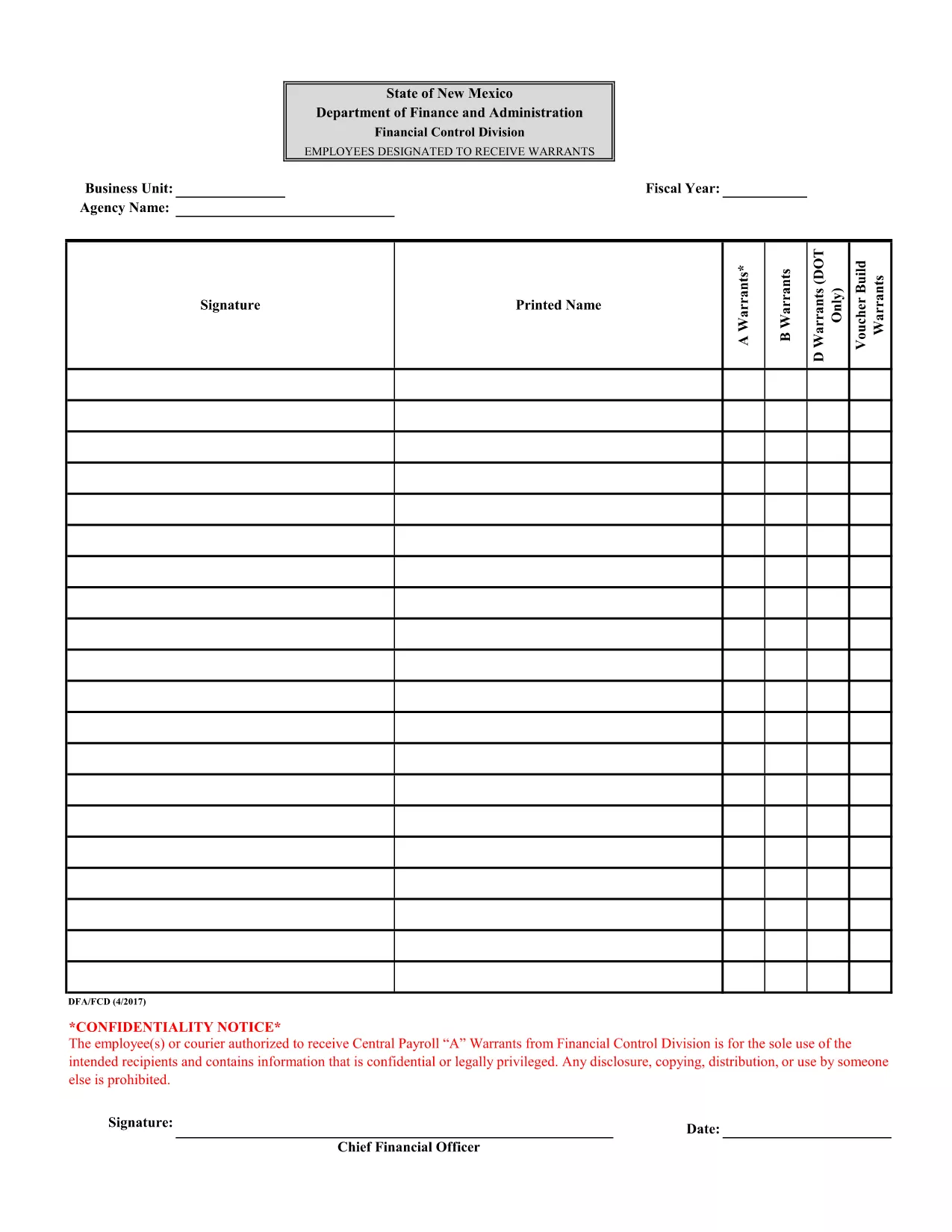
Attachment F – Employees Designated to Receive Warrants (Fillable PDF)

  1. Bahasa Inggeris
  2. Negara USA
  3. Jabatan Financial Control Division
  4. Aktiviti Payroll Warrants
Isi borang ini
Attachment F – Employees Designated to Receive Warrants (Fillable PDF)

The Attachment F – Employees Designated to Receive Warrants is a confidential form used by the Financial Control Division to authorize specific employees or couriers to receive Central Payroll "A" warrants. This document contains sensitive payroll information and must be handled securely.

Formize.com provides a seamless, browser‑based PDF filler so you can complete the form without installing any software. Simply click the “Fill out this form” button, enter the required data, and download the completed PDF.

Using a fillable PDF ensures that all fields are completed correctly, reduces errors, and speeds up the approval process. The form is compliant with state confidentiality requirements and is suitable for both desktop and mobile browsers.

Below you’ll find step‑by‑step instructions, tips to avoid common mistakes, and answers to the most frequently asked questions.

SOALAN LAZIM
  • Is this form truly fillable online?

    Yes. Formize’s PDF Filler turns the original PDF into an interactive, web‑based form that you can complete without any extra software.

  • Do I need a Formize account to use the filler?

    No. You can fill out the form as a guest. Creating an account only adds the ability to save drafts for later.

  • Can I print the completed form directly from the browser?

    Absolutely. After you finish, click the “Download” button and open the saved PDF, then print it like any other document.

  • What security measures protect the data I enter?

    Formize uses SSL encryption for all data transmission and does not store your completed form unless you choose to save it to your account.

  • Is the original PDF still available for download?

    Yes. The “Download Original PDF” link is provided on the page for reference or archival purposes.

  • Who should I contact if I encounter an error while filling the form?

    For technical issues, use the “Report a problem” link within the Formize interface. For content‑related questions, contact your organization’s Financial Control Division.

BAGAIMANA UNTUK

Cara mengisi fillable PDF form secara percuma, dalam talian dalam 4 langkah mudah:

  1. 1
    Open the Form
    Click the “Fill out this form” button on this page. The Formize PDF Filler will load directly in your browser.
  2. 2
    Complete the Fields
    Enter the required information in each fillable field. Use the dropdowns, checkboxes, and text boxes as indicated.
  3. 3
    Review Your Entries
    Double‑check all data for accuracy. The form will highlight any missing mandatory fields.
  4. 4
    Save or Download
    When you are satisfied, click “Save” to store the completed form in your account or “Download” to get a finalized PDF copy.
Bentuk apl Pengisi PDF
TENTANG

templat fillable PDF form.

Dengan set ciri tradisional untuk melihat dan mengisi dokumen PDF, digabungkan dengan faedah aplikasi web dan reka letak responsif, anda boleh melengkapkan fillable PDF form dalam beberapa minit.

CIRI-CIRI

Pengisi PDF

Cara paling mudah untuk mengisi fillable PDF form dalam talian

  • Cepat isi fillable PDF form
    Mencari cara untuk mengisi fillable PDF form dengan cepat dalam talian? Dengan pengisi borang PDF percuma dalam talian kami, anda akan tahu cara mengedit dan mengisi dokumen pdf ini dalam masa kurang daripada satu minit.
  • Mudah untuk menggunakan editor PDF dalam talian
    Bosan dengan mencetak fail PDF supaya anda boleh mengeditnya, sebelum mengimbas semula dan menghantarnya semula? Edit dokumen PDF secara percuma dalam talian. Gunakan editor pdf dalam talian kami untuk menjimatkan masa dan kertas.
  • Alat yang hebat, semua platform
    Tertanya-tanya cara mengisi fillable PDF form pada Mac, atau mungkin cara menggunakan pengisi PDF secara percuma? Alat PDF dalam talian kami berfungsi pada semua platform.
  • Simpanan fail selamat
    Fail "fillable PDF form" yang lengkap disimpan dalam pangkalan data selamat yang diuruskan oleh pengehosan Amazon Cloud. Anda boleh memadamkan fail anda daripada sistem kami pada bila-bila masa. Walau apa pun, fail ini dipadamkan secara automatik selepas 24 jam.
  • Sembang dengan fillable PDF form
    Sembang dengan "fillable PDF form" di Chatize yang merupakan pembantu pembaca PDF percuma. Tanya soalan dan dapatkan jawapan daripada "fillable PDF form". Cuma klik pada butang Sembang Dengan Dokumen di atas.

Padamkan sesi pengisian

Padamkan sesi pengisian yang dipilih? Dalam kes ini, kemajuan anda dalam melengkapkan borang akan hilang.

Padamkan sesi penyuntingan

Padamkan sesi penyuntingan yang dipilih? Dalam kes ini, kemajuan anda dalam membuat dan mengedit borang akan hilang.