
Pilih Bahasa

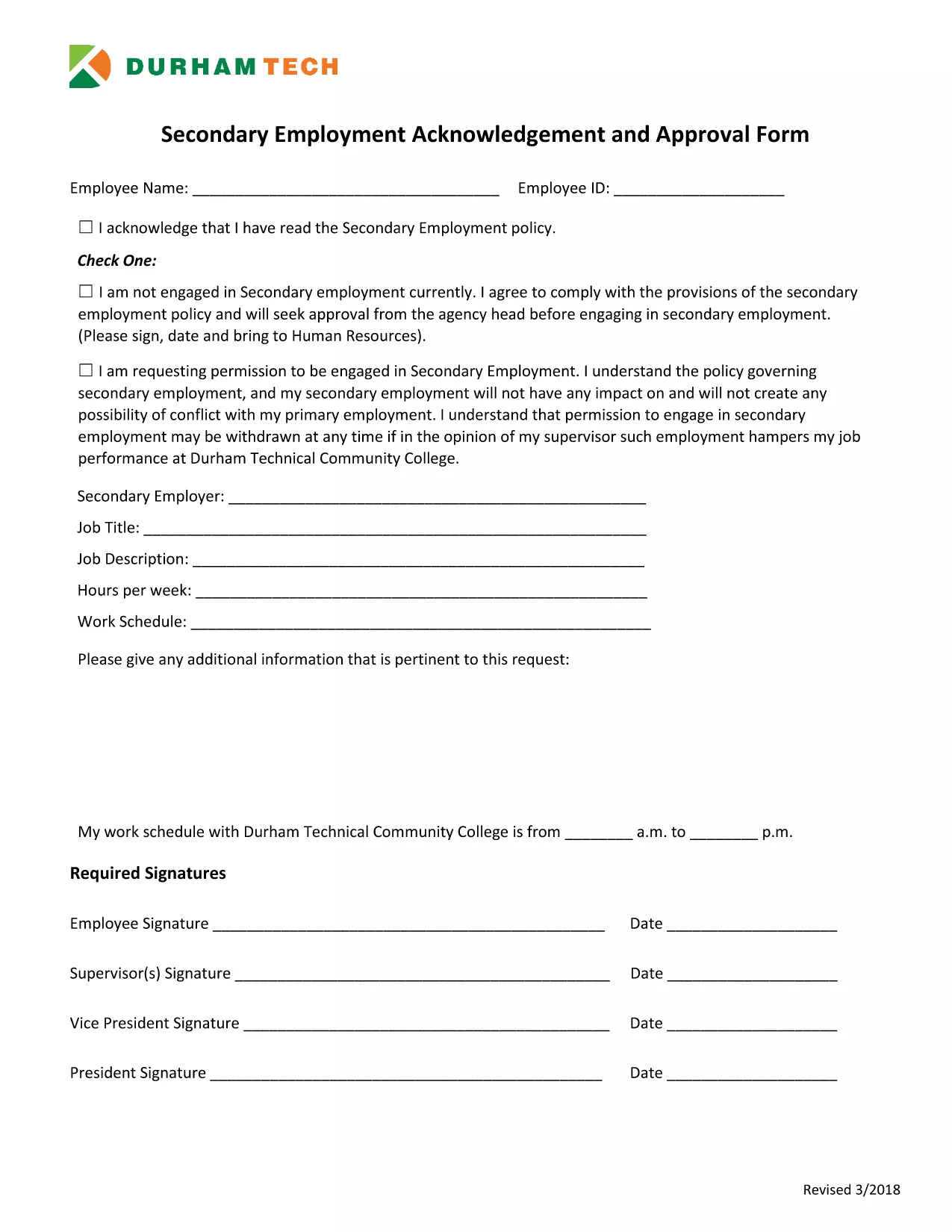
Secondary Employment Declaration – Resident Fillable PDF

  1. Bahasa Inggeris
  2. Negara USA
  3. Aktiviti Employment Compliance
  4. Jabatan Human Resources
Isi borang ini
Secondary Employment Declaration – Resident Fillable PDF

Employers often require a Secondary Employment Declaration to ensure that any outside work does not create a conflict of interest or violate company policy. This fillable PDF is designed for residents who hold a primary position and want to disclose any additional employment.

Why You Need a Secondary Employment Declaration

  • Maintains transparency with your employer.
  • Protects you from potential policy violations.
  • Helps HR track outside income for tax and compliance purposes.

How to Complete the Form Online

Using Formize’s built‑in PDF filler, you can complete the declaration without downloading a separate editor. Just click the button below, fill each field, and save.

Common Mistakes to Avoid

  • Leaving required fields blank – the form will not submit.
  • Providing vague job descriptions – be specific about duties and hours.
  • Submitting an outdated version – always use the latest PDF (linked below).

Submission Guidelines & What Happens Next

After saving the completed PDF, email it to your HR department or upload it through your internal portal. Keep a copy for your records. HR will review the declaration and confirm whether the secondary job is permissible.

Download the Secondary Employment Request Form (PDF)

SOALAN LAZIM
  • Do I need to sign the secondary employment declaration electronically?

    Yes. The Formize filler includes a digital signature field. Just type your name in the signature box and it will be accepted as an electronic signature.

  • Can I edit the form after I download it?

    You can reopen the saved PDF in the Formize filler to make changes, but it’s best to complete all fields before the first download.

  • What if my secondary job changes after I submit the form?

    Submit an updated declaration using the same fillable PDF. Notify HR as soon as any details (hours, compensation, duties) change.

  • Is the secondary employment declaration required for part‑time work?

    Yes. Any paid activity outside your primary employment, including part‑time or freelance work, must be disclosed.

  • Will my personal information be shared with anyone outside my company?

    No. The form is stored securely on Formize’s encrypted servers and only shared with your HR department when you submit it.

  • What happens if I don’t submit the declaration?

    Failure to disclose secondary employment can result in disciplinary action, including possible termination, because it may violate company policy.

BAGAIMANA UNTUK

Cara mengisi secondary employment declaration secara percuma, dalam talian dalam 5 langkah mudah:

  1. 1
    Open the Fillable Form
    Click the "Fill out this form" button on the page. The Formize PDF Filler app will load instantly in your browser.
  2. 2
    Review Each Section
    Read the instructions at the top of each page and make sure you understand what information is required.
  3. 3
    Enter Your Information
    Type directly into the PDF fields – name, employee ID, details of the secondary job, hours, and compensation.
  4. 4
    Save and Download
    When all fields are completed, click "Save". The filled PDF will be downloaded to your computer.
  5. 5
    Submit to HR
    Email the saved PDF to your HR contact or upload it to the company portal as instructed.
Bentuk apl Pengisi PDF
TENTANG

templat secondary employment declaration.

Dengan set ciri tradisional untuk melihat dan mengisi dokumen PDF, digabungkan dengan faedah aplikasi web dan reka letak responsif, anda boleh melengkapkan secondary employment declaration dalam beberapa minit.

CIRI-CIRI

Pengisi PDF

Cara paling mudah untuk mengisi secondary employment declaration dalam talian

  • Cepat isi secondary employment declaration
    Mencari cara untuk mengisi secondary employment declaration dengan cepat dalam talian? Dengan pengisi borang PDF percuma dalam talian kami, anda akan tahu cara mengedit dan mengisi dokumen pdf ini dalam masa kurang daripada satu minit.
  • Mudah untuk menggunakan editor PDF dalam talian
    Bosan dengan mencetak fail PDF supaya anda boleh mengeditnya, sebelum mengimbas semula dan menghantarnya semula? Edit dokumen PDF secara percuma dalam talian. Gunakan editor pdf dalam talian kami untuk menjimatkan masa dan kertas.
  • Alat yang hebat, semua platform
    Tertanya-tanya cara mengisi secondary employment declaration pada Mac, atau mungkin cara menggunakan pengisi PDF secara percuma? Alat PDF dalam talian kami berfungsi pada semua platform.
  • Simpanan fail selamat
    Fail "secondary employment declaration" yang lengkap disimpan dalam pangkalan data selamat yang diuruskan oleh pengehosan Amazon Cloud. Anda boleh memadamkan fail anda daripada sistem kami pada bila-bila masa. Walau apa pun, fail ini dipadamkan secara automatik selepas 24 jam.
  • Sembang dengan secondary employment declaration
    Sembang dengan "secondary employment declaration" di Chatize yang merupakan pembantu pembaca PDF percuma. Tanya soalan dan dapatkan jawapan daripada "secondary employment declaration". Cuma klik pada butang Sembang Dengan Dokumen di atas.

Padamkan sesi pengisian

Padamkan sesi pengisian yang dipilih? Dalam kes ini, kemajuan anda dalam melengkapkan borang akan hilang.

Padamkan sesi penyuntingan

Padamkan sesi penyuntingan yang dipilih? Dalam kes ini, kemajuan anda dalam membuat dan mengedit borang akan hilang.